Preglife - Pregnancy Tracker
- 180.00
- 4.5
- Installs
- 1.00M
- Price
- Free

Screenshots


Analysis by Reviewed
Pregnancy can turn ordinary questions into things you want answered right away: what is changing this week, what should I remember to ask at an appointment, and how do I keep all the information from becoming overwhelming? Preglife - Pregnancy Tracker is designed to make that stretch feel more organized, with pregnancy-stage guidance alongside practical tracking and a community. I see its strongest role as a calm companion for general information and preparation, not a medical authority or a replacement for care.
What the free starting point means
Preglife is a free parenting app from Preglife, and it has a 4.7 average from around 37,000 ratings. It has been downloaded over a million times, carries an Everyone age rating, and its current version is 9.1.30. I like that there is no purchase price to get started; in-app purchases range from $0.99 to $27.99 per item, so it is worth checking what is included before paying for anything. The free entry point makes it easy to try the weekly guidance and decide whether its style suits you, rather than committing upfront.
That distinction is useful when judging value: access begins without a purchase, while optional paid items are a separate decision. I would first spend time with the parts that already fit my needs, then look at a paid option only if its purpose and price are clear to me. I would not assume that paying is necessary to get basic value from the app, nor treat an optional purchase as a substitute for clinical support.
The main value for me is having pregnancy information arranged around the stage I am in, instead of searching broadly and sorting through unrelated advice. That can make a quick check feel calmer and more focused. Still, I would treat an app as a companion for general reading, not as a substitute for a midwife or doctor. If a symptom feels urgent or worrying, getting professional advice is a better next step than relying on a tracker or community replies.
Your Weekly Pregnancy Guide
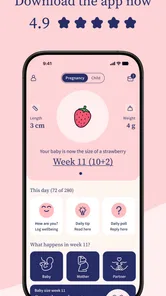
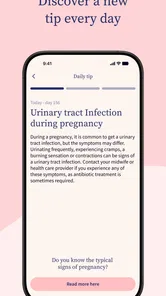
One of the coolest features of Preglife - Pregnancy Tracker is its weekly pregnancy updates. Every week, the app gives you a sneak peek into what’s happening with your little one - from the size of a blueberry to a full-grown watermelon! It’s like getting a backstage pass to your own body’s incredible transformation. Plus, the app offers useful tips and advice tailored to your pregnancy stage, which is super handy for first-time moms like me who often find themselves asking, "Is this normal?"
Making weekly guidance useful without overdoing it
The stage-based approach works best when I treat it as a prompt, not a checklist of things I must feel or experience. A week’s material gives me a topic to explore, but pregnancy does not follow an identical script for everyone. If a detail does not match my experience, I would not take that mismatch as evidence that something is wrong; I would bring a specific concern to my care team instead.
A realistic routine might be to read the new update during a quiet moment, then close the app rather than browsing until every uncertainty has turned into another question. If something genuinely needs follow-up, I can capture it for an appointment. This small boundary helps the weekly content stay informative instead of becoming a reason to repeatedly compare my body with a general description.
More From Our News Desk

 Remini - AI Photo Enhancer
Remini Is Our App of the Week for Bringing Old Photos Back to Life
A quick AI restoration tool earns its place by making faded portraits and soft, older photos feel vivid again—provided you know where its polish ends.

 PayPal - Pay, Send, Save
PayPal Reviewed: Who Benefits from Its Reach, and Who Should Skip It
PayPal is most useful when its reach and familiar checkout solve a real payment problem. These reader-by-reader recommendations show where it earns a place—and where friction wins.

 Millionaire 2026 Quiz & Trivia
 Makes Every Answer Count
A familiar quiz-show format succeeds or falters on tiny design decisions: how clearly the game guides a first answer, handles hesitation, and invites one more round.

 Decor Life - Home Design Game
Decor Life Turns Short Breaks Into Bite-Sized Decorating Jobs
A room-by-room decorating game built for quick sessions gains from modern phone habits, but its gentle pace still depends on patience, repetition, and a steady stream of design jobs.

 Sniper 3D:Gun Shooting Games
Sniper 3D’s Quick-Shot Appeal Faces the Upgrade Treadmill
The appeal is immediate: line up a target, steady your aim, and fire. The harder question is whether Sniper 3D can keep players returning after the first rush.

 Blockudoku®: Block Puzzle Game
Blockudoku vs. the Puzzle Pack: A Quick Puzzle With a Repetitive Edge
Blockudoku turns a clean grid into a quiet test of foresight. Against match-three polish and head-to-head simplicity, its lasting appeal is also its biggest limitation.
Latest News



Keeping Track of It All
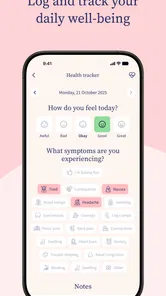
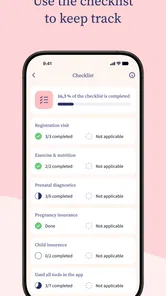
Now, I’m not the most organized person, but this app has helped me keep track of all those important details. Whether it’s checking off those doctor’s appointments or remembering to take your prenatal vitamins, Preglife has got you covered. The app even lets you jot down notes or questions to bring up at your next appointment. It’s like having a personal assistant who’s just as excited about the baby as you are!
A practical way to get more from those notes is to write down a question as soon as it occurs, then review the list before an appointment. I find this more useful than trying to remember concerns while sitting with a clinician. You can also keep personal details separate from community conversations: appointment notes are for your own follow-up, while peer discussions offer shared experiences that may not match your circumstances. That distinction matters when advice from another pregnancy sounds reassuring but is not a fit for yours.
A low-friction way to prepare for appointments
For a more focused appointment, I would keep each note short and concrete: what I noticed, roughly when it began, and what I want to ask. That turns a vague worry into something easier to discuss, without asking the app to interpret it. I would also scan the list shortly before leaving, since questions that seemed important at home can be easy to forget once the conversation starts.
This kind of organization is most valuable when appointments are busy or when several small questions have accumulated between visits. It is less compelling if I already have a reliable system, such as a paper notebook or a calendar I use every day. The practical test is whether keeping notes here makes preparation simpler; if maintaining another record becomes a chore, a familiar tool may work better.
Community and Connection
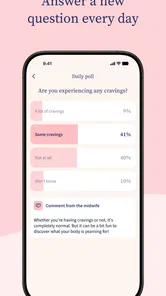
Preglife also offers a vibrant community feature, which I found incredibly reassuring. You can connect with other moms-to-be, share your stories, and get advice from those who are a few steps ahead on the journey. It’s amazing how comforting it is to know that you’re not alone in this, and the app’s community really fosters that sense of connection and support.
The community is most helpful when I use it for perspective rather than diagnosis: hearing how someone handled an ordinary uncertainty can make a long wait for an appointment feel less isolating. The trade-off is that personal stories vary, and a confident-sounding reply is not automatically appropriate for another person. If you prefer private, clinician-led guidance or do not want pregnancy discussions in a social space, you may be better served by your care team and a straightforward reference source.
How I would use peer conversations
I would go into community discussions with a narrow purpose, such as finding reassurance that other people also have questions about a particular stage, rather than asking strangers to decide what a symptom means. It can also help to pause before replying or reading more when a thread leaves me tense. Peer support should make it easier to feel connected; if it starts to intensify worry, stepping away is a sensible choice, not a failure to use the app properly.
There is a privacy trade-off in any social feature: sharing details can invite support, but I would keep identifying or sensitive information to myself unless I had a clear reason to share it. Someone who wants information without discussion may prefer the weekly guide and personal notes while ignoring the social side. The app’s value does not depend on being an active community participant.
Visualizing Your Baby’s Growth
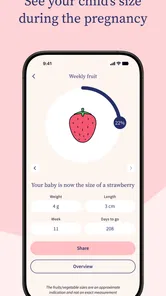
One of the standout features for me is the visualization tool. Seeing how my baby is growing week by week was both mind-blowing and heartwarming. The app provides beautiful illustrations and descriptions that make the changes feel less abstract and more real. It’s like having a mini ultrasound right on your phone!
That visual rhythm can be especially nice on a quiet evening: open the current week, read the description together, and use it as a gentle prompt to talk about what is changing. I would not treat the illustrations as a medical measurement, though; they make development easier to imagine, not a way to assess an individual baby. Compared with a calendar or a folder of articles, the week-by-week presentation is more personal and easier to revisit, while a general pregnancy book may be preferable if you want a single, linear reference without app notifications or a community element.
Where it fits in a pregnancy routine
For a realistic routine, I would check the weekly update once, save questions as they arise, and bring that short list to the next appointment. That keeps the app useful without turning every new sensation into another search session. A partner can also read the same stage-based material to get a shared starting point for conversations, while leaving medical decisions to the pregnant person and their clinician.
Sharing a weekly update with a partner can be a simple way to involve them without expecting them to follow every detail in a separate source. I would use it as a conversation starter: what feels exciting, what is unclear, and what practical help would be useful this week? The app can support that exchange, but it cannot know what kind of support someone wants, so a direct conversation still matters more than assuming the same information will land the same way for both people.
There are sensible reasons to skip it. If you already have a trusted pregnancy resource and prefer not to add another stream of content, the weekly format may feel repetitive. If you want a tool focused only on appointments, a simple calendar may be quicker; if you want individualized medical answers, a healthcare professional is the better choice. Preglife’s appeal is the mix of stage-based reading, personal organization, visuals, and peer connection, rather than a replacement for any one of those alternatives.
How it compares with familiar alternatives
Against a general web search, Preglife’s main advantage is that its pregnancy material is organized by stage, which can reduce the effort of sorting through pages that were written for different circumstances. A search engine is still more flexible when I need a very specific topic, but it can also expose me to conflicting claims and alarming anecdotes. I would use the app for an overview and take medical questions to a clinician, rather than treating either a search result or a general tracker as a personal assessment.
A book may suit someone who wants a longer, continuous read and fewer digital prompts. A calendar may be the better choice for someone whose only need is remembering dates. Preglife sits between those options: it offers more context than a bare schedule, while keeping information easier to dip into than a full reference book. That mix is useful, but it also means a person who wants only one narrow function may find a simpler alternative less distracting.
Who is likely to get the most value?
I would recommend trying Preglife if you are new to pregnancy information, enjoy following changes week by week, or want one place to collect questions and feel less alone. It may be less useful if you find frequent pregnancy content increases anxiety, or if the community side is not something you want. Because the app is free to start and has optional in-app purchases, I would explore the parts that matter to you first and only consider a purchase if it clearly adds value to your own routine.
It is also a better fit for someone who likes gentle, repeatable check-ins than for someone who wants an exhaustive medical library or personalized clinical guidance. A first-time parent may appreciate having stage-specific reading and a place to gather questions; someone with an established care routine and trusted resources may see less benefit. For a partner or support person, the weekly material can offer a shared point of reference, but the pregnant person should remain in control of what information and discussions feel helpful.
My buy-or-skip verdict
My recommendation is to start with the free access and judge the app by whether it makes your own routine calmer or more manageable. There is no need to buy something simply because it is available; the optional in-app purchases make sense only if a particular item clearly addresses a need you have. I would skip it if pregnancy content makes me more anxious, if I do not want a community space, or if a simple calendar and direct care-team conversations already cover what I need.
In conclusion, Preglife - Pregnancy Tracker has been an invaluable resource during my pregnancy. It’s not just an app; it’s a companion that helps you celebrate each milestone and eases those little worries that pop up along the way. Whether you’re a first-time mom or a seasoned pro, this app is definitely worth a try. Happy tracking!
Preglife - Pregnancy Tracker Frequently Asked Questions
Is Preglife - Pregnancy Tracker free to download, and what should I know about optional purchases?
Preglife is free to download, with access to a wide range of features. It also offers optional in-app purchases, priced from $0.99 to $27.99 per item, for users who want to explore paid content or options. You can start with the free experience and decide whether any purchases suit your needs; check the app before buying so you understand what each option includes.
What age group is Preglife intended for?
Preglife is a parenting app with an Everyone content rating, so its listed age classification is suitable for a general audience. Its pregnancy guides, tracking tools, and parenting information are most directly relevant to people who are expecting a baby and those supporting them. As with any health-related app, use its content as guidance and discuss personal concerns with a healthcare professional.
Who develops Preglife, and is it a widely used pregnancy app?
Preglife is a parenting app developed by Preglife, created to support people through pregnancy and early parenthood. It has been downloaded by more than 9 million parents, so it is a familiar option for users looking for pregnancy information and tracking tools. Its broad reach may be reassuring when comparing apps, though the features and style of guidance should still suit your own needs.
Is Preglife - Pregnancy Tracker available for my phone?
Preglife is available for Android devices running version 6.0 or later, making it compatible with many phones that meet that requirement. Before downloading, check your device’s operating system and make sure you have enough space for the app. The app is also available on iOS, so expectant parents can use it on a compatible iPhone as well.
What features does Preglife - Pregnancy Tracker offer to expectant parents?
Preglife - Pregnancy Tracker is a comprehensive app designed to guide expectant parents through pregnancy. It offers a week-by-week pregnancy guide, daily tips, and access to articles written by healthcare professionals. Additionally, it includes a kick counter, contraction timer, and a diary to document your pregnancy journey. The app also provides insights into fetal development, nutritional advice, and postnatal guidance to help new parents transition smoothly.
Pros
- Comprehensive pregnancy tracking features.
- User-friendly interface with easy navigation.
- Includes expert advice and articles.
- Daily tips for expecting mothers.
- Customizable settings for personal needs.
Cons
- Limited features in free version.
- Some articles require premium access.
- Occasional bugs in the app interface.
- Notifications can be overwhelming.
- Requires internet for full functionality.