Poweramp: Music Player (Trial)
- 73.43K
- 4.2
- Installs
- 50.00M
- Price
- Free

Screenshots

Analysis by Reviewed
I’d start by asking what you want from a music player: a simple way to press play, or hands-on control over how your own music sounds and is arranged. I’m in the second camp, and that’s where Poweramp: Music Player makes sense. It is an Android music app from Poweramp Software Design (Max MP), built around local listening and audio adjustments rather than the discovery-first experience of a streaming service. If your library lives on your device and you like shaping the sound yourself, it has a clear purpose.
Who benefits most from its controls
The equalizer and bass boost are more than extra buttons for their own sake: they give me a way to adjust playback when headphones, speakers, or a particular recording sound too bright, thin, or heavy. I’d make one restrained change at a time and compare it with the original, rather than stacking adjustments until every track sounds exaggerated. That approach is especially useful when a playlist mixes older recordings with newer, more polished tracks.
Poweramp’s crossfade can also suit a workout or a party playlist, where a sharp pause between songs can interrupt the mood. I’d use it selectively: for an album meant to be heard in its intended order, a transition between tracks may not be welcome. This is a good example of the app’s appeal and its trade-off in one place: it offers control, but you get the most from it when you decide what kind of listening experience you want.
How it compares with other listening habits
Compared with a basic preinstalled player, this app is a better fit if you want more say over equalization, presentation, and playback. Compared with a streaming app, it serves a different need. It is for listening to music you already have available, not for browsing a streaming catalog or relying on recommendation feeds. I wouldn’t replace a streaming service with it if discovering unfamiliar artists is the main reason I listen to music.
That distinction also answers a practical question: can I use it without a connection? Yes, it works offline, which makes it useful on a commute or during a workout when I want to avoid depending on mobile data. The catch is that offline playback is only useful when the music I want is already accessible to the player. I’d check that my library is organized and available before heading out, rather than assume the app will supply tracks from an online catalog.
First Impressions and Interface
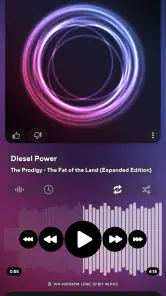
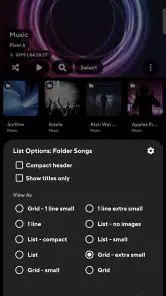
Right off the bat, Poweramp: Music Player looks sleek and modern. The interface is user-friendly, which is a big plus for anyone who doesn’t want to spend ages figuring out where everything is. I was able to navigate through my albums and playlists with ease. The app is decked out with various themes, so you can personalize it to match your vibe, and trust me, it makes a difference when you’re staring at your screen for hours.
Sound Quality and Playback Features
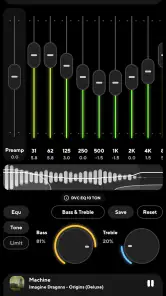
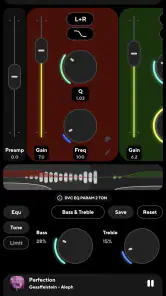
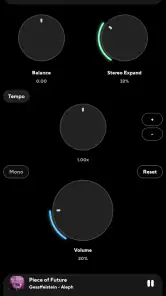
Okay, let’s talk about what really matters: the sound. The audio quality here is off the charts. With a powerful equalizer that offers a ton of presets, you can tailor your listening experience to perfection. From bass that’ll make your heart thump to treble that’s crisp and clear, this app does it all. And, if you’re like me and love tweaking settings, you’ll appreciate the advanced adjustments available.
More From Our News Desk

Weather by Xiaomi Review: Clear at a Glance, Less Clear Up Close

X Under Pressure: Can It Recover When Posting Goes Wrong?

Clash of Clans Is Won Between the Battles

Android Auto Makes the Case for Quieter Car Software

MobiOffice: Transforming Mobile Productivity with Seamless Integration

EA SPORTS FC™ Mobile Soccer: Redefining Mobile Sports Gaming
There’s also a crossfade feature, which is super cool because it makes your playlists feel like one continuous party. Plus, the app supports various audio formats, so you’re not limited to just MP3s. It’s like having a mini DJ booth in your pocket.
Making adjustments that hold up beyond one song
I find it helpful to judge an equalizer setting with several familiar tracks rather than a single song. A bass-heavy adjustment might make one recording enjoyable but muddy another, especially when the playlist jumps between styles. I’d keep a neutral reference in mind, then listen to a vocal-led track, something with strong low end, and a quieter recording before deciding a preset is right for regular use.
There is also a practical reason to avoid chasing maximum bass or treble: a setting that sounds exciting for a minute can become tiring over a longer walk or work session. I’d use the controls to correct a mismatch between a recording and my headphones, not assume that more processing automatically means better sound. If the original mix already sounds balanced, leaving it alone is a perfectly good choice.
Usability and Extras
One thing I love about Poweramp is its responsiveness. It’s fast, smooth, and doesn’t crash – which is more than I can say for some other apps I’ve tried. It also works offline, so you can enjoy your music without worrying about your data plan.
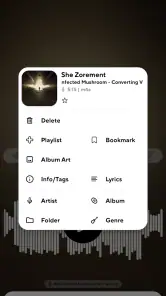
Another neat feature is the lyrics support, which lets you sing along without having to search for the words. If you enjoy knowing every lyric to your favourite tracks, this is a game-changer. And, for those who are into aesthetics, you can download album art for all your tracks, keeping your library looking fresh.
A useful routine for albums, playlists, and artwork
For album listening, I’d browse by album and leave crossfade off so the sequence can breathe as intended. For a mixed playlist, I’d switch to the queue that fits the occasion and consider a smoother transition. Treating those as separate habits avoids the common annoyance of using one setting everywhere and then wondering why an album feels oddly joined together.
Album art and lyrics add a different kind of value from sound adjustments: they make a collection easier to enjoy and recognize, but they depend on the library being in reasonable shape. If artwork looks inconsistent, I’d tidy the files or the relevant library details before spending time changing themes. A polished screen cannot fix a disorganized collection, and a few minutes sorting the music can make browsing much more pleasant.
Making the trial a useful test
Poweramp: Music Player is free to try, with in-app purchases ranging from $0.49 to $8.99 per item. I’d use the trial to test more than the first impressive bass adjustment: play a few familiar tracks, try the equalizer with your usual headphones, and see whether the library view feels comfortable during everyday use. The app has a 4.2 average from around 1.4 million ratings, and more than 50 million installs, so it is a well-established choice, but those figures can’t tell you whether its controls suit your own habits.
For a realistic test, imagine getting ready for work, then switching to a walk after dinner. You could use albums for focused listening at home, a playlist with crossfade for the walk, and offline playback when you don’t want to rely on data. If you sing along, lyrics support may be handy; if you mainly want a queue assembled for you, that workflow may feel like extra effort rather than a benefit. The useful question is not how many settings the player offers, but whether you’ll actually use them.
When a different kind of player makes more sense
I’d choose a streaming service instead if the central pleasure is searching for artists I don’t know, following recommendations, or moving between music I haven’t already collected. Its online catalog and discovery tools answer a different question from a local player. Keeping both kinds of app can make sense, too: one for finding new music and another for a personal collection that I want to play offline and adjust more directly.
A simple built-in player may be the sensible alternative if I only need to tap an album and listen, or if I don’t want to spend time managing settings. Those players can be easier to keep out of the way. Poweramp’s extra control is most valuable when I notice the difference and enjoy making decisions; if equalization, crossfade, and browsing options sound like chores, a lighter option is likely a better match.
It is also not a solution for someone who expects the app to provide music simply because it is installed. I’d first make sure the tracks I care about are actually available in my library. That small check matters before a flight, commute, or gym session: local playback is dependable only when the files are there and visible to the player.
What to consider before switching
Moving to a different player can mean adjusting to a new way of browsing your collection and setting up your preferred sound again. Before committing, I’d try the formats I actually listen to, check that my playlists and albums appear as expected, and keep equalizer changes modest until I know how they translate across my listening gear. A preset that suits one pair of headphones may not be the right choice elsewhere, so I wouldn’t treat one setting as a universal fix.
The current version is build-1015-bundle-play and it runs on Android 5.0 or later. It is rated for Everyone and was released on November 1, 2010. Those basics make it relevant to a broad range of Android users, though the more important decision is whether a dedicated player fits your routine. If your music is mostly streamed, or you rarely adjust playback, the simpler player you already use may be the better option.
Keep the changeover low-risk
I wouldn’t reorganize an entire library just to try a new player. I’d start with a handful of albums and playlists I know well, confirm that they appear as expected, and use those as a test set. That makes it easier to tell whether a problem comes from the way I browse, from missing files, or simply from unfamiliar controls. Once the routine feels natural, expanding to the rest of the collection is less frustrating.
I’d also avoid setting up a complicated equalizer profile before I know how the app behaves with my everyday headphones. Start neutral, make one adjustment, and check it at ordinary listening levels. This is a more useful test than making a dramatic change that sounds impressive at first but obscures whether the player itself suits me. If I switch between headphones and a speaker, I’d revisit the setting rather than expect one profile to serve every situation equally well.
Usability and Extras
One thing I love about Poweramp is its responsiveness. It’s fast, smooth, and doesn’t crash – which is more than I can say for some other apps I’ve tried. It also works offline, so you can enjoy your music without worrying about your data plan.
Another neat feature is the lyrics support, which lets you sing along without having to search for the words. If you enjoy knowing every lyric to your favourite tracks, this is a game-changer. And, for those who are into aesthetics, you can download album art for all your tracks, keeping your library looking fresh.
Who should skip it, and who should keep it
I’d recommend trying it if your phone is already where you keep your music, you listen to albums or personal playlists, and you like the idea of adjusting the presentation instead of accepting one fixed sound. It suits someone who wants an offline library close at hand and is happy to spend a little time making that library feel their own. The equalizer, crossfade, and visual options matter most when they solve a real preference, not just because they are available.
I’d skip it if I mostly listen through streaming catalogs, rarely keep music locally, or prefer a player that makes every choice for me. It may also be more than I need if the default sound from my current app and headphones already works well. There is no prize for using more controls; the right player is the one that makes listening easier or more enjoyable for the way I actually listen.
Final Thoughts
So, would I recommend Poweramp: Music Player? Absolutely. It’s packed with features that cater to both casual listeners and audiophiles. Sure, it’s a trial version, but it gives you enough time to fall in love with it. Whether you’re commuting, working out, or just chilling at home, this app makes sure your music experience is top-notch.
With its customizable interface, high-quality sound, and a bunch of handy features, it’s definitely worth checking out if you’re serious about your music. Just remember, once you try it, you might not want to go back to your old player!
My clearest recommendation is to treat the trial as a decision about habits, not a contest to find the biggest number of settings. Try it with a commute playlist, an album you know well, and the headphones you use most. If you naturally return to its controls and enjoy having your own collection organized this way, the purchase options may be worth considering; if you keep reaching for streaming discovery or never change a setting, there is little reason to force a switch.
Poweramp: Music Player (Trial) Frequently Asked Questions
Can I use Poweramp: Music Player (Trial) to listen to music stored on my phone?
Poweramp is a music player intended for listening to audio, so it is a practical option if you want to play music files on an Android device. Its appeal is centered on playback and sound controls rather than being described as a music streaming service. Before downloading, consider whether you want a player for your own music library and whether the app’s playback and customization options fit how you listen.
Is Poweramp: Music Player (Trial) an Android app or can I install it on iPhone?
Poweramp: Music Player (Trial) is an Android music player, rather than an app for iPhone. Its minimum requirement is Android 5.0, so check your device’s operating system before installing. If you use an iPhone, this Android release is not the version to download. The app is in the Music & Audio category and has an Everyone content rating.
Does Poweramp: Music Player (Trial) work on my Android device?
Poweramp: Music Player (Trial) is an Android music player, and it requires Android 5.0 or later. If your device meets that requirement, you can install the app and try it before deciding whether its listening features suit you. It is categorized as Music & Audio and has an Everyone content rating.
What features does Poweramp: Music Player (Trial) offer?
Poweramp: Music Player (Trial) offers a robust set of features including high-quality audio playback, a customizable equalizer with multiple presets, support for various audio formats, and gapless music playback. Users also benefit from a sleek user interface and the ability to adjust audio effects like bass and treble, making it a comprehensive tool for music enthusiasts.
Is Poweramp: Music Player (Trial) free to use?
Poweramp: Music Player (Trial) is available for free download and use, but it comes with a limited trial period. During this trial, users can experience all the premium features. Once the trial expires, a one-time purchase is required to continue using the full version without limitations. This purchase unlocks the complete set of features permanently.
Pros
- High-quality audio output
- Customizable equalizer settings
- Supports various file formats
- User-friendly interface
- Offline music playback
Cons
- Trial version is time-limited
- Interface can feel cluttered
- No lyrics support
- Heavy battery usage
- Limited free features
- Category
- Music & Audio
- Version
- build-1015-bundle-play












