Poweramp Full Version Unlocker
- 20.32K
- 4.2
- Installs
- 5.00M
- Price
- $19.99

Screenshots


Analysis by Reviewed
If you're anything like me, music is not just a background noise; it's a full-blown experience. That’s why finding the right music player app can be a game-changer. Enter Poweramp Full Version Unlocker, a name that’s been making waves in the audio player scene for quite some time. Whether you’re an audiophile or just someone who loves a good tune, this app promises to elevate your listening experience to new heights. Let’s dive into what makes Poweramp Full Version Unlocker a worthy addition to your app collection.
What the unlocker means for daily listening
One practical point is that this app is the paid key for Poweramp rather than a separate music library or streaming service. I’d think of it as a purchase for someone who already uses Poweramp and wants its full version, not as a standalone place to discover new artists. That distinction matters: if your listening revolves around playlists supplied by a streaming platform, this unlocker is not a replacement for that service.
Poweramp is an Android music player from Poweramp Software Design (Max MP), in the Music & Audio category. It has been available since November 7, 2010, and its established audience is reflected in an average rating of 4.2 from around 290,000 ratings, with more than 5 million installs. The unlocker costs $19.99 and is rated Everyone. I’d weigh that price against how often you use the player and whether its controls make a noticeable difference to your own listening, rather than assuming a paid unlock automatically improves every track or pair of headphones.
The best fit, in my view, is someone with a personal collection who likes adjusting playback and wants a dedicated player instead of a general-purpose audio app. If you mostly listen casually, rarely change settings, or want one app to combine a subscription catalogue with recommendations, a streaming service or the phone’s built-in player may be a simpler choice. The unlocker makes more sense when you already know you enjoy Poweramp’s approach.
The User Interface: A Visual Treat
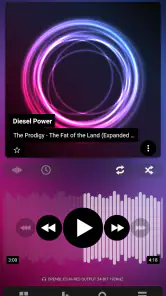
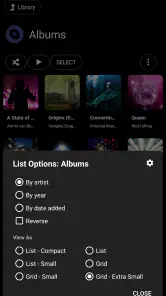
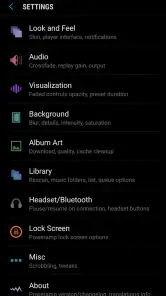
First impressions matter, and Poweramp doesn’t disappoint. The app greets you with a sleek and modern interface that’s both aesthetically pleasing and intuitive to navigate. As someone who values simplicity without compromising on features, I found the layout to be user-friendly. The customization options are abundant, allowing you to tweak the interface to match your personal style. Whether it’s changing themes or adjusting the layout, Poweramp gives you the freedom to make it your own. Personalization is key here, and Poweramp nails it.
Sound Quality: Audiophile Approved
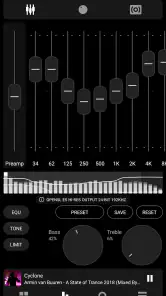
Now, let’s talk about the heart of the app – its sound quality. If you’ve ever used a basic music player and felt something was missing, Poweramp fills that void. The app supports a wide range of audio formats and comes with a powerful equalizer that lets you fine-tune your music to perfection. For those who love bass, you’re in for a treat. The bass boost feature is nothing short of phenomenal, allowing you to feel every beat. It’s like having a concert in your pocket. The clarity and depth of sound provided by Poweramp make it a top choice for any music lover.
My advice is to change the equalizer gradually and compare the same passage at the same volume, rather than making several dramatic adjustments at once. That makes it easier to tell whether a change genuinely suits your headphones or simply sounds louder. Bass boost can be enjoyable for electronic music or a commute, but on bass-heavy headphones it may become tiring; a flatter setting can preserve detail for acoustic tracks and spoken audio. The useful advantage is control, while the trade-off is that getting the sound you want can take some experimentation.
More From Our News Desk

Weather by Xiaomi Review: Clear at a Glance, Less Clear Up Close

X Under Pressure: Can It Recover When Posting Goes Wrong?

Clash of Clans Is Won Between the Battles

Android Auto Makes the Case for Quieter Car Software

MobiOffice: Transforming Mobile Productivity with Seamless Integration

EA SPORTS FC™ Mobile Soccer: Redefining Mobile Sports Gaming
Features Galore: More Than Just a Music Player
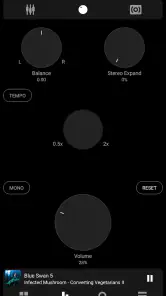
Beyond its impressive sound capabilities, Poweramp is packed with features that enhance the overall user experience. From dynamic queueing to gapless playback and crossfade, the app ensures your music flows seamlessly. The lyrics support is a nice touch, especially for those who love to sing along. And let’s not forget about the visualizations – they’re not just eye candy; they’re pure entertainment. With regular updates and a dedicated developer team, Poweramp continues to innovate and add new features, keeping users engaged and satisfied.
These playback tools are most useful when they solve a specific annoyance. Gapless playback suits albums recorded as continuous sequences, while crossfade can make a mixed playlist feel less abrupt; I wouldn’t necessarily enable both for every kind of listening. Dynamic queueing is handy when I want to add a few tracks without losing the album or playlist I started with. A small habit that helps: build the queue before pressing play, then treat it as a temporary listening plan rather than repeatedly replacing the current selection.
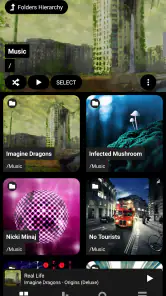
In addition to these, the app’s ability to handle large music libraries without a hitch is commendable. As someone with a vast collection, I appreciated the efficiency and speed with which Poweramp managed my playlists. It’s clear that a lot of thought has gone into making this app both powerful and practical.
That library-first approach also changes what I’d check before committing: make sure your music is organized in a way you can browse comfortably, and spend a little time learning how the player presents your collection. For a long drive, I might choose an album or queue a few familiar records before leaving, rather than trying to organize everything while moving. On a crowded commute, a prepared playlist and a comfortable control layout are more useful than having every setting within reach. Those small choices make a feature-rich player feel less fiddly in everyday use.
Network Moments, Mobile Use, and Recovery
Connectivity is not the main reason to choose a local-library player, and the unlocker itself should not be confused with a streaming subscription. I’d make the key listening decision before leaving home: choose the music I want and check that it is available in the player, rather than relying on a network connection to solve a last-minute change. That workflow is useful on a train or during a walk, where reception can vary and stopping to browse is inconvenient.
For a realistic morning routine, I might select an album while getting ready, then use the queue to add a few songs for the trip. If playback is interrupted by a weak connection or another mobile distraction, I would first check whether the issue is with the player, the audio output, or the content source instead of immediately changing equalizer settings. Returning to the current track and rebuilding a short queue is a calmer recovery than starting over with a whole library search.
For data-conscious listening, the important distinction is where the audio comes from. A dedicated player is appealing when I already have music available on the device, while a streaming app may be better when I want a broad catalogue and can manage its network use through that service. I would avoid assuming that every lyrics or visual element works the same way in every situation; the dependable core of this purchase is the unlocked Poweramp player experience, not a promise of constant online extras.
That difference also affects what I’d do when a song won’t start. I’d check whether the selected track is accessible and whether the audio route is behaving normally before blaming the unlocker or changing several settings at once. If I was switching between headphones and a car system, I’d test a familiar track first and keep volume and equalizer adjustments modest until the output sounded right. This simple troubleshooting order avoids turning a small connection or device hiccup into a full library reorganization.
On the move, I also prefer to keep interaction brief. Searching through a large collection or tweaking sound controls is better done while parked or at home, not while walking across a busy street or driving. A short queue prepared in advance is more reliable than expecting a mobile session to be the right moment for detailed setup. That’s one area where a streaming app with ready-made mixes can feel more convenient, even if I prefer Poweramp’s control when I have a specific album in mind.
Where It Fits Among Music Apps
Compared with a phone’s basic player, Poweramp is for listeners who want more playback control, sound shaping, and customization. Compared with streaming apps, it is a different kind of tool: it centers on playing a personal collection rather than browsing a large hosted catalogue. Neither approach wins for everyone. I’d choose a streaming service when discovery and an extensive ready-made library matter most; I’d choose this unlocker when I already use Poweramp and care more about shaping how my own music plays.
The added control has a learning cost. Someone who wants to tap one button and never think about playback settings may find the built-in player easier, and a paid unlock is hard to justify if Poweramp is only used occasionally. For regular listeners, though, a little setup can pay off: adjust the interface once, settle on a sensible default equalizer profile, and keep specialized changes for headphones or genres that truly need them. That way, customization serves the music instead of becoming a project of its own.
There’s also a useful middle ground for people who use both kinds of listening apps. I wouldn’t expect the unlocker to replace a streaming subscription; instead, I’d use a dedicated player for a carefully kept personal collection and reach for a streaming service when I want to explore unfamiliar music. That split makes sense if you have albums you return to often but still enjoy recommendations. If you don’t maintain music files or don’t want to think about where a track is stored, the extra player may feel like another step rather than an improvement.
Before paying, I’d ask myself a practical question: am I already reaching for Poweramp often enough to notice what the full version adds to my routine? If the answer is yes, the purchase has a clear purpose. If I’m only curious because the feature list sounds impressive, I’d spend time with the player’s general approach first and see whether its library navigation and controls suit me. A paid unlock is most satisfying when it removes a real limitation in an app I already like, not when I’m hoping it will create a listening habit from scratch.
Final Thoughts: Is It Worth It?
So, is the Poweramp Full Version Unlocker worth the investment? If you’re serious about your music and want an app that delivers on both performance and features, then absolutely. While there are many music player apps out there, Poweramp stands out with its top-notch sound quality, extensive customization options, and robust feature set. It’s an app that grows with you, adapting to your needs and enhancing your music experience. In a world where music is a staple of daily life, having the right app can make all the difference. Give Poweramp a try – your ears will thank you.
My recommendation is narrower than “for every music fan”: it is for the person who already prefers Poweramp’s style and will actually use its unlocked capabilities. If you are still deciding, ask yourself whether you want to manage a personal collection and tune playback, or simply search for music and press play. That answer is more useful than a feature checklist. For the first kind of listener, this can be a satisfying long-term player; for the second, a simpler built-in option or a streaming app is likely the more natural fit.
Poweramp Full Version Unlocker Frequently Asked Questions
Do I need to install Poweramp Music Player before buying the unlocker?
Yes, the unlocker is intended to work with Poweramp Music Player, rather than play music on its own. If you are new to Poweramp, install the player first and make sure it suits your listening habits before purchasing the separate unlocker. The unlocker activates the full version of that player; it is not a standalone music app.
Does the unlocker include music, or do I need my own collection?
Poweramp Full Version Unlocker is an activation app for Poweramp Music Player, not a source of songs or a music subscription. You use it with the player to unlock its full version, while your music comes from your own collection. If you are looking for an app that supplies tracks or provides a streaming catalog, this unlocker is not intended for that purpose.
Can I use Poweramp Full Version Unlocker on an iPhone or iPad?
No. Poweramp Full Version Unlocker is for unlocking Poweramp Music Player on Android, so it is not an iOS music-player unlocker. If you use an iPhone or iPad, this purchase will not unlock a Poweramp app there. Android users should make sure they are installing the official unlocker and the Poweramp player it is intended for.
What is Poweramp Full Version Unlocker?
Poweramp Full Version Unlocker is a paid app that unlocks the full potential of Poweramp Music Player on Android. It removes all limitations of the free version, enabling users to enjoy all the premium features including an advanced equalizer, customizable themes, and support for various audio formats. It is designed to work with the Poweramp player rather than act as a standalone music player. The developer is Poweramp Software Design (Max MP).
How much does Poweramp Full Version Unlocker cost?
Poweramp Full Version Unlocker costs $19.99. It is a paid purchase for unlocking the full version of Poweramp Music Player, rather than a separate music library or streaming subscription. Check the purchase screen in Google Play before buying so you can confirm the charge shown for your account and region.
Pros
- Unlocks full features of Poweramp.
- No ads for uninterrupted music.
- High-quality audio experience.
- Supports various audio formats.
- User-friendly interface.
Cons
- Paid app without free trial.
- Limited to Poweramp features.
- No cloud sync option.
- Occasional app crashes.
- UI might feel outdated to some.
- Category
- Music & Audio
- Version
- Varies with device












