Pollog Family Assistant
- 236.00
- 4.2
- Installs
- 1.00M
- Price
- Free

Screenshots
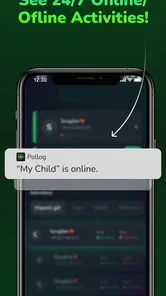
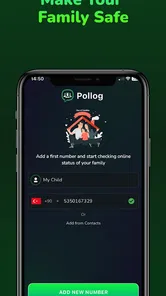
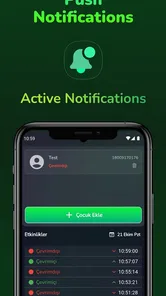
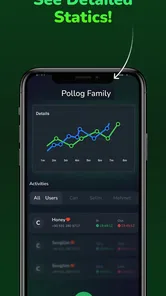
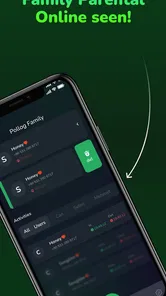
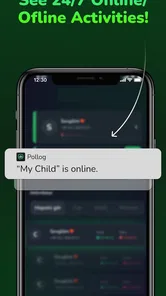
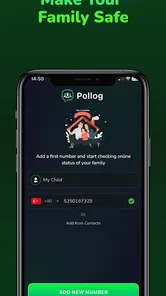
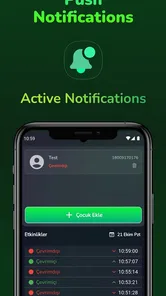
Analysis by Reviewed
Choosing a family organizer is less about collecting features and more about finding a routine that everyone in the household will actually use. Pollog Family Assistant is aimed at that everyday coordination: keeping plans, chores, shopping, and family conversations together rather than scattered across separate tools. I like the idea, though the best fit depends on whether your household wants one shared place to check or already has a system that works.
What the free starting point means
The app is free to download, with in-app purchases listed from $3.99 to $15.99 per item. That makes it possible to try the basic experience without an upfront purchase, but I would not assume every feature or long-term use is free. Before relying on a paid option, check what it unlocks in the app and whether it solves a problem your family actually has; a price range alone cannot tell you which purchase is worthwhile.
Where the value comes from
For a parent coordinating school, errands, and household jobs, the useful part is the shared workflow: a task can have an owner and a deadline, while calendar items and shopping needs can be visible to the family. The real benefit is not simply storing information; it is reducing the number of times one person has to remember and repeat it. Pollux Teknoloji’s app is in the parenting category, and its focus makes sense for families who want everyday coordination rather than a general-purpose project manager.
A practical way to test it is to start with one recurring pinch point instead of moving the whole household at once. For example, use a shared shopping list for the next grocery trip and assign a couple of routine chores. If family members check those items without being chased, the app may earn a place in your routine. If everyone keeps reverting to texts or paper notes, adding more lists may only create another place to monitor.
Trade-offs to weigh before switching
Shared calendars, task lists, and chat can make coordination easier, but they work only when people agree to keep them current. Notifications can help with deadlines, yet too many alerts can become noise; I would keep reminders focused on tasks that are genuinely easy to forget. Location-based reminders may suit errands, but they are not a substitute for checking a list before leaving home, especially when plans change.
Compared with using a phone’s built-in calendar, notes, and family group chat, a dedicated organizer can put household information in a more coherent routine. The trade-off is asking everyone to adopt another app and maintain it. If your family already shares a calendar reliably, Pollog may add little. If chores, shopping, and messages are currently split across different places, bringing them together could be more valuable than adding another standalone reminder tool.
Who is likely to get the most from it
I would consider it for a household where one parent currently carries most of the planning and wants to make responsibilities more visible to everyone. It may also suit families with older children who can check assigned tasks and reminders themselves. It is less compelling for someone who wants a private to-do list, dislikes notifications, or needs a specialized service for a particular school, custody, or calendar workflow. A simple shared calendar may be the better choice when scheduling is the only real problem.
More From Our News Desk

 Remini - AI Photo Enhancer
Remini Is Our App of the Week for Bringing Old Photos Back to Life
A quick AI restoration tool earns its place by making faded portraits and soft, older photos feel vivid again—provided you know where its polish ends.

 PayPal - Pay, Send, Save
PayPal Reviewed: Who Benefits from Its Reach, and Who Should Skip It
PayPal is most useful when its reach and familiar checkout solve a real payment problem. These reader-by-reader recommendations show where it earns a place—and where friction wins.

 Millionaire 2026 Quiz & Trivia
 Makes Every Answer Count
A familiar quiz-show format succeeds or falters on tiny design decisions: how clearly the game guides a first answer, handles hesitation, and invites one more round.

 Decor Life - Home Design Game
Decor Life Turns Short Breaks Into Bite-Sized Decorating Jobs
A room-by-room decorating game built for quick sessions gains from modern phone habits, but its gentle pace still depends on patience, repetition, and a steady stream of design jobs.

 Sniper 3D:Gun Shooting Games
Sniper 3D’s Quick-Shot Appeal Faces the Upgrade Treadmill
The appeal is immediate: line up a target, steady your aim, and fire. The harder question is whether Sniper 3D can keep players returning after the first rush.

 Blockudoku®: Block Puzzle Game
Blockudoku vs. the Puzzle Pack: A Quick Puzzle With a Repetitive Edge
Blockudoku turns a clean grid into a quiet test of foresight. Against match-three polish and head-to-head simplicity, its lasting appeal is also its biggest limitation.
Latest News



For a realistic test, imagine a weekday when a grocery stop, a household chore, and an appointment all compete for attention. A shared list can show what needs buying, a task assignment can make clear who handles a chore, and a calendar entry can help the family keep the appointment in view. The key is to agree on who adds each item and when it is considered complete. That small rule prevents the organizer from becoming a parent-only inbox.
My verdict on the overall value
Pollog Family Assistant has an average rating of 4.1 from around 67,000 ratings, and it has over one million installs. It is free to start, rated for Everyone, and its current version is 1.0.11; the app was released on October 21, 2024, and lists Android 7.0 as its minimum OS. Those details make it accessible to a broad range of households, but they do not guarantee that its shared approach will suit yours. I would try it if household coordination is a recurring source of friction, then judge it by whether other family members participate—not by how many lists you can create.
Getting Started with Pollog Family Assistant
Setting up Pollog Family Assistant was a breeze. The app is available for both Android and iOS, so you can download it from your respective app store without a hitch. Once installed, I was greeted with a clean and intuitive user interface. No steep learning curve here, just straightforward navigation that even my kids can handle!
Features that Stand Out
What sets Pollog apart is its suite of features designed to streamline family management. From shared calendars to task lists, it's got everything you need to keep your household running smoothly. I particularly loved the task assignment feature. You can assign chores to family members, set deadlines, and even send gentle reminders. It's like having a personal butler, minus the tuxedo.
Another cool feature is the shopping list integration. You can create and share shopping lists with your family members in real-time. No more forgotten grocery items or duplicate purchases. Plus, the app offers location-based reminders, so you'll never forget to pick up milk when you're near the store.
Why You Should Consider It
If you're a parent, you'll appreciate how Pollog makes managing family life less chaotic. It's like having a family organizer in your pocket. For someone like me who thrives on order, this app was a godsend. The ability to sync calendars and tasks across devices ensures everyone is on the same page, literally.
Moreover, the app's notification system is spot-on. I never miss an event or deadline, thanks to timely alerts. The family chat feature also keeps communication open and organized, which is a huge plus for busy families.
Final Thoughts
In a world where we're constantly on the go, Pollog Family Assistant is a must-have for modern families looking to stay organized. It takes the stress out of family management, giving you more time to focus on what truly matters. Whether you're managing chores, keeping track of appointments, or simply trying to get everyone out the door on time, this app can handle it all.
So, if you're tired of the chaos and looking for a reliable assistant to keep your family life in check, give Pollog Family Assistant a try. It's like having a digital family manager at your fingertips. Trust me, once you start using it, you'll wonder how you ever managed without it!
A low-pressure way to test the routine
I would resist the temptation to populate every section on day one. Instead, agree on one shared habit, such as adding grocery needs as soon as someone notices they are running low. That gives the household a clear reason to open the app and makes it easier to see whether shared access is genuinely useful. Once that habit sticks, add a chore or appointment workflow only if there is still a real coordination gap.
It also helps to decide who owns the upkeep. If one parent enters every event, checks every task, and nudges everyone else, the app has simply made the family’s existing workload more visible without distributing it. Assigning responsibility for adding or closing items is a small but important step: the organizer works best as a shared reference, not as another private dashboard for the person already doing the planning.
Making reminders useful rather than noisy
For location-based prompts, I would treat them as a backup for specific errands, not as a general system for managing the day. A reminder to pick up an item near a shop can be handy when the trip is already planned; it is less useful if the list is long, the outing changes, or several family members expect someone else to handle it. Keep the shared list current and agree who is shopping, so a prompt supports a plan instead of creating uncertainty.
The same restraint applies to task alerts. A deadline is useful when it reflects a genuine time constraint, but routine jobs do not all need to compete for attention. Choosing a few reminders that prevent real last-minute stress can make the notifications easier to trust. If people start ignoring them, that is a sign to simplify the routine rather than add more alerts.
Where it differs from familiar family tools
A group chat is flexible and already familiar, but important details can disappear between casual messages. A shared calendar is clearer for appointments, though it is not necessarily a natural place for shopping needs or household responsibilities. Pollog’s appeal is the possibility of keeping those kinds of family coordination together. That convenience comes with a commitment: everyone needs to check the same place and understand how the household uses it.
For families already using a reliable calendar and a simple list, switching everything over may be more work than benefit. I would compare the tools by the specific information that gets missed, not by the number of features each one offers. If the recurring problem is “who is doing this?” or “did anyone add it?”, shared tasks and lists may address it more directly than another calendar. If the only frustration is finding a date, a calendar alone is likely the lighter solution.
Questions worth settling as a family
Before depending on the app, I would agree on whether it is the household’s main place for plans or just a backup. That avoids maintaining two competing calendars or lists and then discovering that different people trust different versions. It is also worth deciding how completed chores are marked and whether a task belongs to one person or can be picked up by anyone. Clear conventions matter more than a large collection of entries.
Families may also want to decide who should see which reminders and how much communication belongs in a shared organizer rather than a direct conversation. The app’s family chat can give coordination a common place, but a quick message is not automatically a replacement for discussing a sensitive or complicated issue. I see the strongest use here as practical household communication—making an errand, task, or plan easy to find—rather than trying to turn every family conversation into an item to manage.
For a household with younger children, an adult may still need to enter and explain tasks; older children are more likely to benefit from checking their own assignments. That difference affects the value of the shared setup. If the adults are willing to keep expectations simple and show children how to check what is assigned, the app can support independence. If no one wants to maintain a shared routine, a paper note in a visible place may be more dependable.
Who should choose a different approach
I would skip it if you need a dedicated solution for a school’s communications, a formal custody schedule, or another specialized workflow. A general family organizer should not be assumed to meet requirements that call for a service built around those needs. Likewise, anyone who prefers a private list and does not want household tasks visible to other family members may find the shared emphasis unnecessary.
Privacy and access are also sensible things to consider before putting family information into any shared app. Decide what details are appropriate to enter and who in the household needs access; do not use a family organizer as a place for information that should remain private. This is not a reason to avoid a shared tool, but it is part of choosing what belongs in it and setting sensible boundaries.
How I would judge the paid options
Since the app is free to download and offers in-app purchases, I would begin by seeing whether the free experience supports the household’s basic routine. If a paid choice appears, first connect its benefit to a problem you have already encountered. A purchase is easier to evaluate when you can name the friction it would remove, rather than paying in the hope that extra options will make the family more organized.
The listed purchase range runs from $3.99 to $15.99 per item, but that range alone does not show which option is useful for a particular family. I would check the in-app description and terms at the point of purchase, then decide whether the added value is worth it to the people who will actually use it. For families who only need a shared list and basic coordination, there is no reason to assume they need to spend more.
Overall, I see Pollog as most promising for households that want to make everyday responsibilities visible and are willing to establish a shared habit around checking them. Start with one practical use, keep reminders selective, and let participation—not a crowded setup—decide whether it earns a permanent place. If your household’s existing tools already work, keeping them is a perfectly sensible choice; if information keeps slipping between chat, notes, and calendars, this is a reasonable free starting point to try.
Pollog Family Assistant Frequently Asked Questions
Who develops Pollog Family Assistant, and what is the app intended to do?
Pollog Family Assistant is a parenting app developed by Pollux Teknoloji. Its focus is helping families stay organized and connected through shared calendars, task lists, and messaging. If you are looking for a place to coordinate household plans and everyday responsibilities, these tools provide a practical starting point. The app’s store summary describes its purpose as helping keep your family safe.
What operating system does Pollog Family Assistant need, and what age rating does it have?
Pollog Family Assistant is rated Everyone and requires Android 7.0 or later. Before downloading, check that your device meets this operating-system requirement so you can install and run the app. The age rating makes it suitable for a broad audience, while its parenting focus may make it particularly relevant to families coordinating schedules and shared responsibilities.
Is Pollog Family Assistant free to download, and are there paid options?
Pollog Family Assistant is free to download, with in-app purchases available for users who want to explore paid options. Prices range from $3.99 to $15.99 per item. The app offers free and premium options, with shared calendars and task management among the basic features and additional tools in the premium offering. Check the purchase details in the app before choosing one.
What age group is Pollog Family Assistant intended for, and which devices can run it?
Pollog Family Assistant is a parenting app with an Everyone content rating, making it suitable for a broad audience. It requires Android 7.0 or later, so check your device’s operating system before downloading. The app is developed by Pollux Teknoloji. These details can help you decide whether it fits your family’s devices and who may use it.
What is Pollog Family Assistant and how can it help my family?
Pollog Family Assistant is a comprehensive mobile application designed to help families manage their daily activities, schedules, and communications more efficiently. It offers features such as shared calendars, task lists, and messaging systems that allow family members to stay organized and connected. This app is particularly useful for busy families who need to coordinate various appointments, chores, and events seamlessly.
Pros
- Efficient family scheduling
- User-friendly interface
- Multiple user support
- Real-time notifications
- Customizable to-do lists
Cons
- Limited free version
- Occasional sync issues
- No offline mode
- Ads in free version
- Limited third-party integrations