PiyoLog: Newborn Baby Tracker
- 118.00
- 4.9
- Installs
- 1.00M
- Price
- Free

Screenshots
Analysis by Reviewed
With a newborn, small details can disappear from memory surprisingly fast. After a broken night, I may know that the baby fed recently without remembering exactly when, and a handoff between caregivers can turn into a string of questions. PiyoLog: Newborn Baby Tracker is designed to keep those everyday records together. It is free to try, with optional in-app purchases ranging from $3.49 to $34.99 per item; I would begin with the free access and look at the details of any paid extra before spending.
What the free starting point tells you
The useful distinction here is that downloading the app does not require an upfront payment, while some optional items cost extra. That makes it possible to see whether keeping a baby log suits your household before deciding whether to buy anything. I would not treat the purchase range as a reason to upgrade by itself: the sensible question is whether a particular paid option addresses a need you actually have.
For families comparing trackers, that is a practical way to approach the cost. A paper notebook or a notes app may be enough if you only want a basic record, and both avoid the question of optional in-app purchases. PiyoLog has more appeal if you want a dedicated place for multiple kinds of baby information. Since the value of an extra depends on what it provides and how often you will use it, check the item description rather than assuming every household needs to pay.
Use the record to reduce mental juggling
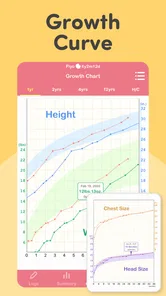
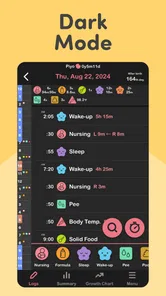
As a parenting app from PiyoLog Inc., PiyoLog brings feeding, sleep, diaper, and growth records into the same general routine. That breadth is useful when the person taking over care needs more than a reminder about the last feed. It can also make a short appointment conversation easier to prepare for, because you can look back at your observations instead of relying entirely on a tired memory.
I would think of it as a shared reference point, not a parenting rulebook. A record can help you notice what happened and explain it to someone else, but it cannot decide what a pattern means for your baby. If a concern is medical, the log is supporting context for a qualified professional, not a substitute for one.
Make logging fit the day you actually have
When I use a tracker, I find it helps to choose a small set of entries that matter most at that moment. For example, a household trying to make caregiver handoffs smoother might prioritize feeds and diapers, then add sleep when it becomes useful to understand the rhythm of a particular day. That choice can prevent tracking from becoming a second job.
A less obvious benefit of selective logging is that the record can stay readable. If every possible detail gets entered even when nobody will refer to it, important changes may be harder to spot among routine entries. Notes can be reserved for exceptions—a feed interrupted by discomfort, for instance, or an unusually short nap—so a timestamp has context when you look back.
More From Our News Desk

 Remini - AI Photo Enhancer
Remini Is Our App of the Week for Bringing Old Photos Back to Life
A quick AI restoration tool earns its place by making faded portraits and soft, older photos feel vivid again—provided you know where its polish ends.

 PayPal - Pay, Send, Save
PayPal Reviewed: Who Benefits from Its Reach, and Who Should Skip It
PayPal is most useful when its reach and familiar checkout solve a real payment problem. These reader-by-reader recommendations show where it earns a place—and where friction wins.

 Millionaire 2026 Quiz & Trivia
 Makes Every Answer Count
A familiar quiz-show format succeeds or falters on tiny design decisions: how clearly the game guides a first answer, handles hesitation, and invites one more round.

 Decor Life - Home Design Game
Decor Life Turns Short Breaks Into Bite-Sized Decorating Jobs
A room-by-room decorating game built for quick sessions gains from modern phone habits, but its gentle pace still depends on patience, repetition, and a steady stream of design jobs.

 Sniper 3D:Gun Shooting Games
Sniper 3D’s Quick-Shot Appeal Faces the Upgrade Treadmill
The appeal is immediate: line up a target, steady your aim, and fire. The harder question is whether Sniper 3D can keep players returning after the first rush.

 Blockudoku®: Block Puzzle Game
Blockudoku vs. the Puzzle Pack: A Quick Puzzle With a Repetitive Edge
Blockudoku turns a clean grid into a quiet test of foresight. Against match-three polish and head-to-head simplicity, its lasting appeal is also its biggest limitation.
Latest News



A realistic handoff and appointment workflow
Imagine one caregiver settling in after a night shift while the other finally gets some rest. Instead of asking the person who is asleep to recall the last feed, the incoming caregiver can check the recent record and take over with a clearer picture. Later, if something seems different, a focused note about when it began can make the next conversation with a clinician more concrete.
For an appointment, I would review the relevant entries beforehand and decide what question I want answered. A log is most helpful when it supports a clear account—what changed, when you noticed it, and what else was happening—rather than being presented as a diagnosis. This is a useful distinction for any baby tracker, and especially important when tired parents are tempted to read too much into a chart or a run of entries.
Why PiyoLog Stood Out to Me
One of the first things that caught my attention was the app's intuitive design. Setting it up was a breeze, and within minutes, I was tracking my baby's activities with ease. The simplicity in navigation is a breath of fresh air. You don't want to wrestle with a complicated interface when you have a fussy newborn in your arms, right?
Features That Make Parenting Easier
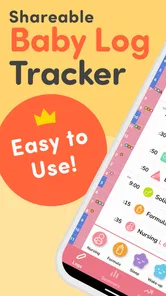
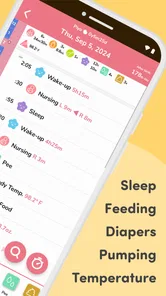
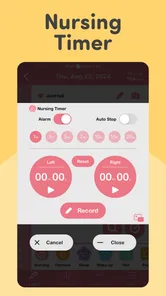
The app is packed with features that cater to every parent's needs. You can record feedings, whether breastfeeding or bottle, with precise timestamps. This was particularly helpful for me during those late-night feedings when my brain was too foggy to remember anything. Also, tracking diaper changes helped me monitor my baby's health better. It's amazing how much you can learn from a diaper!
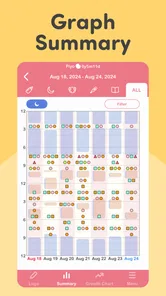
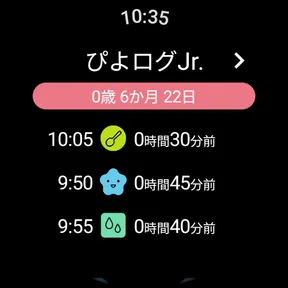
Sleep tracking is another gem. With sleep deprivation being a constant companion in my life, knowing when and how long my baby naps gave me a chance to sneak in some rest too. Plus, the app's ability to sync data with other caregivers meant my partner and I were always on the same page, avoiding those "I thought you fed the baby" moments.
Logging without adding to the workload
One useful habit is to decide what matters to your household before starting: perhaps feeds and diapers during a busy stretch, then sleep records when you want a clearer picture of the day. Keeping the log selective can make it easier to maintain than trying to capture every detail. Notes are especially useful when a number alone does not explain what happened, such as an interrupted feed or a nap that ended sooner than expected.
Compared with a paper notebook or a general notes app, a dedicated baby tracker gives these recurring events a more organized home. A notebook may be quicker for someone who prefers handwriting, while a shared calendar can suit families who only need a few reminders. PiyoLog makes more sense when caregivers want baby-related records together; it is less compelling if you dislike logging or already have a system everyone reliably uses.
Personal Touches That Make a Difference
What truly impressed me was the customization options. You can personalize the log entries with little notes and even photos. It’s like creating a digital scrapbook of your baby’s early days, which is a nice touch for sentimental parents like me. Plus, the ability to export data is perfect for sharing with your pediatrician during check-ups.
For a useful appointment summary, I would keep notes focused on what a clinician may need to understand: a change you noticed, when it began, and any context that seems relevant. An exported record can support that conversation, but I would still explain the concern in my own words rather than expecting a log to tell the whole story. The notes and photos also make the app more personal than a bare list of timestamps, though families who want only quick logging may not care about that extra layer.
Reminders, limits, and the cost question
And let's not forget about the reminders! With everything going on, it's easy to lose track of time. The app sends gentle nudges for upcoming feedings or medication schedules, ensuring you don't miss a beat.
Reminders can be helpful when the day is hectic, but I would treat them as prompts to check in, not as instructions to feed or medicate on a fixed timetable. Babies’ needs vary, and medication plans should follow a clinician’s guidance. If frequent notifications become distracting, it may be better to keep only the reminders that genuinely help your routine.
The app has a 4.8 average from around 26,000 ratings and more than a million installs, which suggests many families have found it useful. It is rated for everyone and first appeared in 2017. Those figures do not tell me whether the optional purchases are right for my own needs, so I would start with the free access and consider paying only if a specific extra solves a real problem. The listed purchase range is broad enough that checking the item details matters.
Who is likely to get the most from it?
I would recommend trying PiyoLog if two caregivers share newborn duties, if you often forget the order of feeds and naps, or if you want an organized record to refer to during a check-up. Its combination of feeding, sleep, diaper, and growth tracking makes it more useful for families who want several kinds of baby information in one place than for someone who only needs a single reminder.
On the other hand, it may not be the right fit if logging feels like another chore, if you prefer a paper record, or if your household already has a simple routine that everyone follows. A tracking app should reduce mental load, not create pressure to document every moment. I would also avoid treating a tidy chart as proof that everything is fine; questions about health belong with a qualified professional.
Final Thoughts
In the whirlwind of newborn parenting, PiyoLog: Newborn Baby Tracker is a reliable companion. It’s like having an extra set of hands, helping you keep track of your baby’s needs and your sanity. While it might not do the dishes or laundry, it certainly takes a load off your mind, and that’s priceless. If you're looking for a way to streamline your parenting journey, this app is definitely worth a try.
Where it fits among baby-tracking options
The choice is not simply between one app and another. Some parents do best with a paper notebook because it is immediate and does not ask them to unlock a phone while holding a baby. Others use a general notes app or calendar for a few reminders, accepting that feeding, sleep, and diaper details may not sit in a purpose-built structure. PiyoLog is the stronger fit when you want those recurring baby records collected in one place and shared with another caregiver.
That convenience has a trade-off: a digital tracker only helps if people remember to enter the information and can agree on a simple way to use it. Before relying on a shared log, I would decide who records an event when both caregivers are present, and whether notes should be brief or detailed. A small household agreement avoids duplicate entries and makes the record easier to trust.
Small habits that make the log more useful
One practical tip is to enter an event as close to the moment as is comfortable, rather than trying to reconstruct an entire busy stretch later. If that is not possible, I would mark only what I can remember confidently and leave uncertain details out instead of making the history look more precise than it is. The purpose is to help future-you, not to create a perfect archive.
Another useful approach is to review the record for a specific reason, rather than checking it repeatedly without a question in mind. Before a handoff, look for the latest relevant activity; before an appointment, focus on the period connected to the concern. This keeps the app in a supporting role and makes it less likely that ordinary variation will become a source of unnecessary worry.
Choosing whether to keep using it
If you are unsure whether a tracker will help, I would try the free access during a stretch when handoffs or remembering recent events are genuinely difficult. After a few days, ask whether it has saved time, clarified communication, or made a useful record. If the answer is no, switching back to a notebook or a simpler routine is perfectly reasonable; using an app is not a measure of how attentive a parent is.
The same test applies to optional purchases. I would first identify the exact inconvenience I want to solve, then check whether a paid item addresses it and whether I expect to use it often enough to justify the cost. With individual items priced from $3.49 to $34.99, the range alone cannot say what represents good value for a particular family. The app is free to start, and that is enough to judge whether its basic tracking approach fits your day.
A good fit depends on your household
PiyoLog is most convincing for caregivers who want a shared, organized history across several everyday areas and are comfortable entering information as they go. It is also worth considering if you like having notes or photos alongside routine records, or if you want to prepare observations before a check-up. Its all-in-one approach can save mental effort when the alternative is scattered messages, paper scraps, and a calendar.
I would skip it if a log makes you more anxious, if you want a medical decision tool, or if the act of recording takes attention away from caring for the baby. It is also not necessary for a household whose existing method is clear and dependable. The right choice is the one that helps caregivers communicate without turning normal newborn unpredictability into a scorecard.
Overall, I see the free starting point as a low-commitment way to find out whether PiyoLog’s style of tracking suits you. Its value comes from the routine it can support, not from collecting the most entries or buying every extra. If you share care and regularly wish you could recall what happened earlier in the day, I would give it a try; if a simpler method already works, there is no need to change it.
PiyoLog: Newborn Baby Tracker Frequently Asked Questions
Is PiyoLog suitable for parents who want a simple place to record baby-care routines?
PiyoLog: Newborn Baby Tracker is a parenting app for keeping everyday baby-care notes in one place. Its focus includes feeding, sleep, growth, and diaper changes, which can be useful when several routines are happening throughout the day. Parents looking for a dedicated tracker may find it a convenient way to review what they have recorded.
Can PiyoLog help me keep track of feeding, sleep, and diaper changes?
Yes. PiyoLog is described as a baby tracker for breastfeeding, sleep, baby eating, growth, and diapers. Recording these routines can help parents keep daily observations together and refer back to them later. It is best viewed as an organizational tool for family use, not as a diagnosis or a replacement for guidance from a healthcare professional.
What can I check about PiyoLog before installing it?
PiyoLog: Newborn Baby Tracker is a parenting app from PiyoLog Inc. It is rated for Everyone, and its stated minimum operating system requirement is version 8.0. The app has an average rating of 4.8 from around 26,000 ratings, so parents can consider those details alongside whether its baby-tracking tools fit their routine.
Does PiyoLog cover everyday baby-care routines?
PiyoLog is intended for tracking several parts of a baby’s daily routine, including breastfeeding and other feeding, sleep, eating, growth, and diaper changes. Keeping these notes together can make it easier to look back at patterns and remember what happened during a busy day. It is a practical log for organizing observations, rather than a substitute for professional medical advice.
What is PiyoLog: Newborn Baby Tracker and how does it work?
PiyoLog: Newborn Baby Tracker is a comprehensive app designed to help parents monitor and manage their newborn's daily activities and health metrics. The app allows parents to record essential data such as feeding times, diaper changes, sleep patterns, and baby’s growth. With an intuitive interface, it offers a seamless experience for new parents to track their baby’s progress and share information with caregivers or healthcare professionals.
Pros
- Easy to use interface for new parents
- Tracks multiple babies simultaneously
- Customizable notifications for feeding
- Allows data export to CSV format
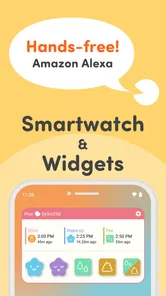
- Integrates with smart devices
Cons
- Limited features in free version
- Occasional syncing issues
- No dark mode available
- Lacks advanced analytics
- May require frequent updates