Pinardin: Parental Control
- 40.00
- 4.6
- Installs
- 100.00K
- Price
- Free

Screenshots

Analysis by Reviewed
Pinardin is best approached as a practical family-safety tool, not an all-seeing solution to parenting online. Its appeal is the combination of parental controls and location tracking in one app, which can help a parent check in without juggling several services. I’d consider it for families who want a central place to manage digital boundaries and everyday reassurance, while remembering that any monitoring tool works best when children understand why it is being used.
Where it fits into family life
Pinardin is a free parenting app from Pinardin OÜ, with optional in-app purchases. It is rated for Everyone, and its focus is on helping parents oversee online safety and a child’s location. The app has a 4.6 average from around 11,000 ratings, and has been installed over 100,000 times. It was released in June 2023; version 2.5.0 lists Android 7.0 as its minimum operating-system requirement.
Those figures suggest that it has attracted a real user base, but they don’t answer the important household question: does its approach suit your family? Parental-control apps can feel reassuring to adults and intrusive to children. I would introduce Pinardin as a shared safety arrangement, explaining what parents intend to check and when, rather than quietly installing it and treating it as a substitute for conversation.
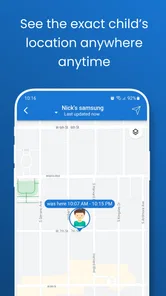
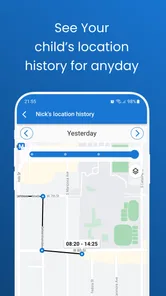
The useful idea here is the pairing of online-safety oversight with GPS tracking. These needs often arise in different moments: a parent may want to support healthier digital habits at home, then check that a child has arrived safely after school. Keeping both concerns within one parenting app may be simpler than switching between a collection of separate tools.
Why the combined approach can help
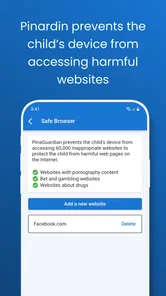
Location checking is most valuable when it answers a specific, ordinary concern: a child is walking home, travelling to an activity, or taking a route that has changed. The online-safety side addresses a different worry, namely how a child navigates their digital life. Putting these responsibilities under one roof makes the app’s purpose easy to understand, even if it does not remove the need to set clear family rules.
A practical approach is to agree on a few situations in which location checks are appropriate before relying on them. For instance, parents might explain that they will check during an unfamiliar journey, rather than repeatedly watching a child’s whereabouts throughout the day. This keeps GPS tracking focused on reassurance and helps prevent a safety feature from becoming a source of unnecessary tension.
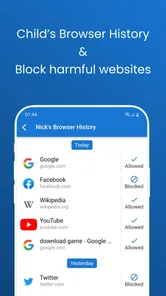
There is a similar advantage to treating online oversight as a conversation starter. If a parent notices a concern, the next step should be to talk with the child and understand the context, not jump straight to punishment. The app can support a family’s approach to safety; it cannot supply the judgment, trust, or digital-literacy guidance that makes that approach effective.
More From Our News Desk

Weather by Xiaomi Review: Clear at a Glance, Less Clear Up Close

X Under Pressure: Can It Recover When Posting Goes Wrong?

Clash of Clans Is Won Between the Battles

Android Auto Makes the Case for Quieter Car Software

MobiOffice: Transforming Mobile Productivity with Seamless Integration

EA SPORTS FC™ Mobile Soccer: Redefining Mobile Sports Gaming
What I would weigh before relying on it
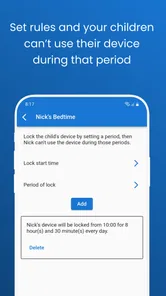
The central limitation is that “parental control” covers a broad set of expectations. One family may mainly want a way to check a child’s location; another may expect detailed control over device use and online activity. Pinardin’s overall purpose is clear, but parents should confirm that the particular controls they need are present and work on their devices before making it the foundation of a household plan.
That matters because a category label can create assumptions. I would not choose an app on the expectation that it will solve every screen-time dispute or make a child safe in every online situation. No parental-control tool can replace age-appropriate conversations, and no location feature can guarantee that a child is safe simply because a phone appears to be where expected.
There can also be friction in family adoption. Children may resist monitoring, especially if the rules are unclear or seem to change from day to day. A parent who wants invisible supervision may find that this approach undermines trust, while a family that agrees on transparent boundaries is more likely to use the app constructively. The strongest setup is not necessarily the one with the most oversight; it is the one everyone understands.
Cost is another point to consider. Pinardin is free to download, but it includes in-app purchases priced from $9.99 to $169.99 per item. That is a wide range, so I would inspect the purchase options carefully and decide what, if anything, is worth paying for before committing. A free starting point is useful, but it should not be mistaken for a guarantee that every desired capability comes at no cost.
A sensible way to try it
Before depending on Pinardin during a busy day, I would set aside time to configure it with the child and test the parts the family intends to use. Agree on the purpose of location checks, who will access the app, and what the family considers a reasonable response to an alert or concern. A calm setup is better than introducing monitoring in the middle of a stressful situation.
One realistic example is a child starting to travel home from an after-school activity independently. A parent could explain that the app is there to provide reassurance during that new routine, then use it as a backup rather than sending repeated messages. If the child’s plans change, a direct conversation remains more useful than assuming a map view tells the whole story.
A second useful workflow is to review family expectations when a child gains more independence or gets a new device. Instead of keeping the same level of oversight indefinitely, parents can discuss what still feels necessary and what can be relaxed. That turns a control app into a temporary support for changing responsibilities, rather than a permanent extension of parental attention.
I would also avoid using any location-based check as proof of what a child is doing. A device’s position is not the same thing as a full account of a person’s circumstances. If something looks unexpected, ask first. This is a small but important distinction: tracking can help answer “where might they be?” but it cannot explain why plans changed or whether everything is all right.
Who is likely to benefit most
Pinardin seems most suitable for parents who want a straightforward way to bring online-safety oversight and GPS tracking into their family routine. It may be especially appealing when the immediate need is practical reassurance around a child’s journeys, alongside a broader interest in safer digital habits. Its free entry point gives families room to explore the app before deciding whether any paid options make sense.
It is less suitable for a parent looking for a guaranteed fix for difficult conversations about devices, or for someone who expects a monitoring app to eliminate online risks. Families who prefer minimal tracking may also be happier with occasional check-ins and built-in device settings, rather than adding another dedicated parenting service. The right choice depends on whether the app’s combined focus matches a real need, not on how many controls a parent hopes to find.
Compared with relying only on the controls already available on a child’s phone, Pinardin’s distinctive appeal is its parenting-oriented combination of digital oversight and location checking. Compared with using separate apps for those tasks, a single place may be easier to manage. On the other hand, built-in device tools may be sufficient for families who only need basic limits, and a separate location-sharing option may suit those who want location reassurance without a broader parental-control app.
Making the setup work for different ages
The family’s approach should change as a child becomes more independent. For a younger child, a parent may be the one who sets the routine and explains why location sharing matters. With an older child, I would make the discussion more collaborative: agree on when checking is reasonable, what counts as an exception, and when the arrangement should be reviewed. The useful point is not to apply the same rules to every child, but to make the purpose understandable at each stage.
It also helps to agree on what happens when a check raises a question. A late arrival, for example, might have a simple explanation: a changed plan, a stop with a friend, or a phone that has been put away. If parents decide in advance to ask calmly rather than assume the worst, location information is less likely to turn into an accusation. That small household rule can make a bigger difference than adding more monitoring.
For families with more than one child, I would avoid assuming that one set of expectations will feel fair to everyone. A teenager and a younger sibling may need different levels of support, and explaining those differences is better than presenting the app as an automatic rule applied identically. Pinardin can be part of that conversation, but the parent still has to make the family agreement specific and consistent.
Questions worth settling before installation
Before making it part of a routine, decide which problem you are trying to solve. Is the immediate concern a child’s independent journey, online safety, or both? If location reassurance is the only need, a simple location-sharing arrangement may be less involved. If the goal is broader parental oversight, Pinardin’s combined focus may be more relevant, but I would still check the available controls against the family’s actual expectations rather than relying on the category name.
Another practical question is whether every relevant family member is ready to use it. A parent may be comfortable checking the app, while a child feels watched or worries that an ordinary delay will trigger a confrontation. Talk through those concerns before setup and agree on a trial routine that can be revisited. If the app creates more arguments than reassurance, that is useful evidence that the arrangement needs changing or that a less intrusive alternative would fit better.
Families should also think about the phone itself. An app-based plan only helps when the child has the device with them and can use it as expected. A parent should not treat the app as a substitute for teaching practical habits such as telling someone when plans change, knowing whom to contact, or following an agreed route. Those habits remain useful whether or not a monitoring app is installed.
Finally, I would separate the decision to install the app from the decision to pay for anything. The free download lets a family begin exploring, while the purchase range makes it sensible to inspect what each option actually adds before spending. Set a clear ceiling and avoid paying simply because a household feels anxious in the moment. A purchase is worthwhile only if it addresses a concrete need that the family has identified.
My recommendation
I’d recommend Pinardin to parents who want a combined safety and location tool and are prepared to use it openly, with clear family rules. Its strongest point is the way it brings two common parental concerns together, making it a plausible option for everyday routines such as a child’s journey home or a new step toward independence.
I would approach it as one part of a wider plan, not as a substitute for trust, direct check-ins, or sensible conversations about online life. Before paying for anything, I’d compare the available purchase options with the specific controls the family actually needs. If those needs are modest, a phone’s existing settings may be enough; if the combination fits, Pinardin is worth exploring with the child involved from the start.
My overall view is that the app makes the most sense when a family can name a practical reason for using both its safety oversight and location features. It is not automatically better than built-in settings or a lighter location-sharing tool; its value depends on whether keeping those concerns together makes day-to-day parenting simpler. I would start with one clearly defined routine, discuss it openly, and reassess once the family has a feel for whether the arrangement brings genuine reassurance.
Pinardin: Parental Control Frequently Asked Questions
What is Pinardin: Parental Control, and what can it help parents manage?
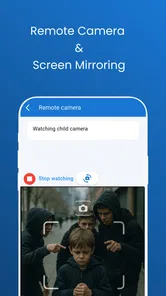
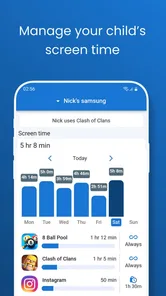
Pinardin: Parental Control is designed to help parents oversee how children use their devices. Depending on the features available in the current version and the devices being managed, parental-control tools may include screen-time limits, app restrictions, activity reports, or schedules. Check the app’s listing and setup instructions to confirm which controls it supports before relying on it for a particular need.
Which devices and operating systems are compatible with Pinardin?
Compatibility can depend on the parent’s device, the child’s device, and the operating-system versions installed on each. Before downloading, review Pinardin’s current store listing for supported platforms, minimum software requirements, and any limitations on managing devices across Android and iOS. Also check whether both devices need the app, whether a parent account is required, and whether particular controls are unavailable on some platforms.
Does Pinardin require permissions or installation on a child’s device?
Parental-control apps commonly need permissions on the managed device to apply restrictions or report activity, and some features may require installing a companion app or completing extra setup. The exact requirements for Pinardin depend on the feature and device. Read each permission prompt carefully, follow the official setup guidance, and make sure you understand what information is collected and how the app uses it.
Is Pinardin free, or does it require a subscription or in-app purchases?
Pricing and included features may change over time, so check the app’s current Google Play or App Store page before installing. Look for whether core controls are free, whether a trial automatically becomes a paid subscription, and whether plans limit the number of children or devices. Review renewal terms and cancellation instructions through the relevant store to avoid unexpected charges.
Can Pinardin guarantee that children cannot access unsuitable content or bypass restrictions?
No parental-control app should be treated as a complete guarantee. Restrictions can vary by operating system, browser, app, and device configuration, and children may encounter content through services the controls do not cover. Pinardin can be one part of a broader approach, but parents should test its settings, keep devices updated, discuss online safety with children, and periodically review the controls in use.
Pros
- Helps parents set consistent screen-time limits for children.
- Can make it easier to supervise device use from a parent account.
- Useful for families who want clear boundaries around phone use.
- May reduce the need to check a child’s device manually.
- Provides a focused alternative to broader family-safety tools.
Cons
- Setup and permissions may take time on each child’s device.
- Children may find monitoring intrusive
- so clear communication matters.
- Some controls can vary by device and operating-system version.
- Parents and children may need reliable internet for remote management.
- Check the app’s privacy policy before sharing family or device data.











