Photoroom AI Photo Editor
- 16.76K
- 4.7
- Installs
- 100.00M
- Price
- Free

Screenshots
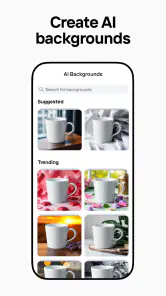
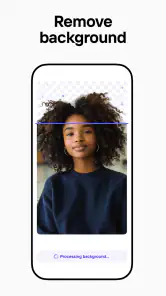
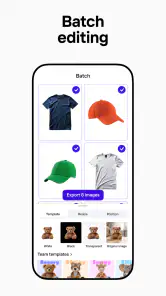


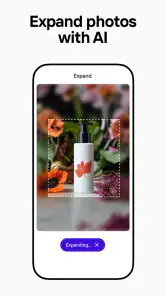
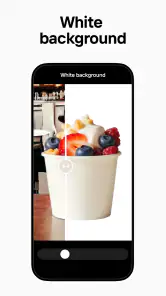
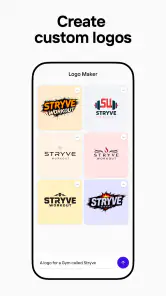
Analysis by Reviewed
I see Photoroom as a practical shortcut for a particular kind of photo work: isolating a subject, giving it a cleaner setting, and turning an ordinary image into something ready to share or present. It is less about mastering every control in a traditional photo editor and more about getting a useful result without a long editing session. That focus makes it appealing, though it also means it will not replace a full desktop workflow for every job.
Where the quick workflow earns its keep
The strongest use case is a photo where the subject matters more than the original background. I can picture taking a quick picture of a second-hand lamp, removing the clutter behind it, and making a more inviting listing image before posting it. For a small seller, that saves the awkward process of arranging a perfect room just to photograph one object. It is also handy for profile images, simple promotional graphics, and social posts where a consistent look matters more than intricate retouching.
A useful habit is to start with a clear, well-lit source photo rather than expecting the cutout to fix everything. Hair, transparent objects, and items with edges that blend into the background can be harder to separate cleanly. I would zoom in and inspect the outline before adding text or decorations; a small edge flaw becomes much more noticeable once the image is placed against a flat, contrasting color. If the cutout is only going to appear as a small thumbnail, that flaw may not matter, but a large product image deserves a closer check.
Choosing it over a conventional editor
Compared with the usual photo-editing alternatives, Photoroom’s appeal is speed and a workflow centered on the subject and its background. A general editor can offer finer control over color, layers, and detailed retouching, but it often takes more effort to reach the same clean product-style composition. I would choose this app for repeatable, everyday image preparation and reach for a more manual editor when I need precise color correction, complex compositing, or careful work on a difficult edge.
That distinction helps set expectations: AI assistance can make the first pass feel easy, but it does not guarantee that every result is ready for professional use. I still treat the output as a draft to inspect, especially when the photo represents something a customer is buying. A convincing background should support the subject rather than distract from its shape, color, or scale. Keeping the scene simple is often a better choice than piling on visual effects.
Who will get the most from it
I think it suits people who make images regularly but do not want editing to become a separate hobby: casual sellers, social media users, and anyone preparing simple visuals on a phone. The app is free to download, and its Everyone content rating makes it suitable for a broad audience. Photoroom AI Photo Editor is made by Photoroom AI Photo Editor; it has a 4.7 average from around 3.7 million ratings and over 100 million installs, which suggests it has found a large audience for this kind of quick editing.
There is a reasonable caveat around cost. Some in-app purchases range from $5.99 to $249.99 per item, so I would check which tools and limits matter to me before building a regular workflow around paid options. If I only need a background removed now and then, the free starting point may be enough; if I rely on it for ongoing business work, I would first make sure the features I actually need fit the available purchase choices. The app’s current version is 2025.49.03, and it requires Android 10 or later.
A realistic day-to-day test
Imagine I have several objects to photograph for a weekend clear-out. I would take each picture near a window, keep the camera angle consistent, and edit one image before moving on to the rest. That first result gives me a chance to settle on a background and framing style; I can then reuse a saved template where it fits, while checking each cutout individually. This is more reliable than applying one look blindly, because a dark object and a pale object may need different contrast to remain easy to see.
For a quick social post, I would also keep the original photo untouched until I am happy with the edited version. That gives me a fallback if the background removal misses a detail or if a design choice feels too busy after I see it outside the editor. It is a small step, but it makes experimentation less risky and avoids treating the first AI result as final simply because it appeared quickly.
Where the app fits in a repeatable workflow
One practical question is whether this works for a single image or a steady stream of them. I would use it for either, but I would organize the work differently. For one photo, the quickest route is to remove the background, choose a restrained setting, check the edges, and export only after looking at the image at its intended size. For a batch of product pictures, I would first decide on framing, background tone, and text placement, then use a template as a starting point rather than a rule. Templates help make a shop or social feed feel consistent, but they cannot correct differences in lighting or camera angle by themselves.
That last point matters more than it sounds. A set of cutouts can look tidy in the editing screen yet feel uneven when viewed together: one item may appear larger, another may sit too low, and a third may have a shadow that makes it seem to float. I would compare the finished images side by side before posting them. The app can make the edits faster, but a final visual check is still what makes a collection look deliberate.
Small choices that improve the result
For product images, I would leave a little breathing room around the object instead of cropping tightly at the start. That gives me flexibility to reposition it against a new background and reduces the chance that a handle, corner, or decorative edge gets clipped. I would also choose a background with enough contrast to separate the object without changing how its color is perceived. A white object on a very pale setting may disappear, while a strong colored backdrop can make a neutral item look different from reality.
For portraits and profile pictures, I would be even more conservative. Hair and fine details can expose the limits of automatic selection, so a simple, softly contrasting background is usually safer than a dramatic scene. If the image is for a casual post, a tiny imperfection may be unimportant; if it represents a business or will be displayed large, I would inspect it closely and consider a manual editor when the outline needs careful correction. The useful lesson is to match the amount of polish to where the image will appear.
What to expect from AI editing
AI makes the tedious first step feel approachable, but it does not know what the subject is meant to communicate. A generated or substituted setting can look attractive while giving the wrong impression about an item’s size, material, or use. I would avoid backgrounds that imply a product comes with accessories or features that are not actually part of it. For selling, clarity and accurate presentation matter more than making every image look like an advertisement.
There is also a difference between making a photo cleaner and making it more truthful. Removing a distracting room can help people focus on a used object, but extensive retouching may hide wear that a buyer should see. I would keep the original available and show any condition details honestly. This is one reason I see the app as a presentation tool rather than a substitute for good source photography or careful disclosure.
Who may prefer another approach
If you enjoy adjusting every layer and want detailed control over color, masks, and retouching, a traditional editor is likely a better fit. Photoroom is most convincing when the job has a clear subject and a straightforward goal; it is less suited to a complicated composite where lighting, perspective, and multiple objects must be matched precisely. Someone who edits only once in a while may also find that a phone’s built-in editing tools are enough for cropping, brightness, and basic cleanup, without needing a dedicated design workflow.
I would also pause before making it the foundation of a business process until I had tried the exact steps I use most. The free entry point makes experimentation easy, but paid options may matter if the work becomes frequent. Rather than deciding based on a long list of possible tools, I would test a representative image: a difficult edge, a typical product, and the kind of final layout I actually publish. That reveals whether the app saves time where I need it, not just whether it can produce an impressive one-off result.
Have you ever found yourself scrolling through social media, only to stop dead in your tracks at a stunning picture that makes you wonder, "How did they do that?" Well, I might just have the answer for you. Let me introduce you to the Photoroom AI Photo Editor. It's like having a professional photographer and editor in your pocket. Now, before you start thinking this is just another app, let me dive into why Photoroom AI Photo Editor has quickly become one of my go-to apps.
Transforming Photos with Ease
First off, the ease of use is something to write home about. Remember those complicated photo editors that felt like you needed a degree just to understand the basics? Yeah, Photoroom is nothing like that. The first time I opened the app, I was greeted by a clean and intuitive interface. Everything seems to be just where you would expect it to be. The app uses AI to help you effortlessly remove backgrounds, which is a game-changer for anyone looking to create professional-looking photos.
Features Galore
Let's talk features. Photoroom isn’t just a one-trick pony. Besides the amazing background removal tool, it offers a whole suite of editing features. You can adjust lighting, add text, and even create collages. And the best part? It’s all incredibly straightforward. I’ve always been a fan of apps that don’t overcomplicate things, and Photoroom nails this by keeping their features robust but user-friendly. Whether you’re a beginner or an editing pro, you’ll find something to love here.
And here’s the kicker: the app also lets you create your own templates. So if you’re like me and love a good personalized touch, you’ll appreciate being able to save your favorite styles and apply them with just a tap. It's like having a shortcut to your own unique brand of photo edits!
Performance and Accessibility
Performance-wise, Photoroom is smooth sailing. No annoying lags or crashes, just seamless editing from start to finish. Whether you’re on a high-end smartphone or a more budget-friendly device, the app runs like a dream. Plus, it's available on both Android and iOS, making it accessible to a wide range of users. And for all you savvy downloaders out there, you can find it on the Google Play Store and the Apple App Store with ease.
One of the things that really stood out to me is how well the app caters to both casual users and professionals. If you’re just looking to spruce up your Instagram feed or if you're a business owner needing polished images, Photoroom has got your back.
Final Thoughts
In a world where visual content is king, having a tool like Photoroom AI Photo Editor can make all the difference. It’s versatile, easy to use, and packed with features that cater to all types of users. Whether you’re a social media maven or someone who just loves tinkering with photos, this app is definitely worth a download. So go ahead, give it a try and watch as your photos transform into works of art. Who knows? You might just become the next go-to photographer in your friend group!
Photoroom AI Photo Editor Frequently Asked Questions
What kinds of photos can I edit with Photoroom AI Photo Editor?
Photoroom AI Photo Editor is a photography app for editing images, removing backgrounds, retouching photos, and creating logos. That makes it relevant for everyday pictures as well as images you want to prepare for a design or promotional use. Before downloading, consider what you want to create: its appeal is strongest when you need AI-assisted edits or a cleaner background, rather than a full-purpose design workflow.
Can I use Photoroom AI Photo Editor to remove a photo background?
Yes. Removing backgrounds is one of the app’s central tools, and it can help make a subject stand out or prepare an image for a different design. The store summary also highlights photo editing, retouching, and logo creation, so background removal is part of a broader set of creative options. The result you get will depend on the image and the kind of edit you want.
Is Photoroom AI Photo Editor suitable for product photos and small-business designs?
It can be useful for preparing product images and simple promotional visuals because its core tools include removing backgrounds, editing photos, retouching images, and creating logos. These options make it easier to give pictures a cleaner, more consistent look without starting a design from scratch. Whether it fits your workflow depends on the edits you need and how much control you want over the final result.
How much does Photoroom AI Photo Editor cost, and can I use it for free?
Photoroom AI Photo Editor is free to download, so you can try the app without paying upfront. It also offers in-app purchases, with listed prices ranging from $5.99 to $249.99 per item. The free option may be enough for occasional edits, while people who want additional tools should review the purchase choices in the app before deciding what suits their needs.
What features does Photoroom AI Photo Editor offer?
Photoroom AI Photo Editor is packed with advanced features that allow users to remove backgrounds from images, enhance photo quality with AI-driven tools, and apply various artistic effects and filters. It also offers batch editing, which is great for users who need to edit multiple photos simultaneously. With its intuitive interface, even beginners can create professional-looking images in no time.
Pros
- User-friendly interface for quick edits
- High-quality background removal
- Wide range of creative templates
- Fast processing with AI technology
- Supports various image formats
Cons
- Limited free features available
- In-app purchases can be pricey
- Occasional glitches in processing
- Requires internet for full functionality
- Ads in the free version

- Category
- Photography
- Version
- 2025.49.03











