Phone Number Location Tracker
- 235.00
- 4.1
- Installs
- 5.00M
- Price
- Free

Screenshots
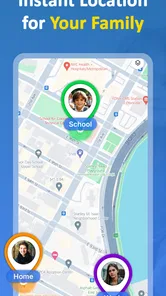
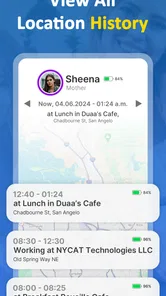
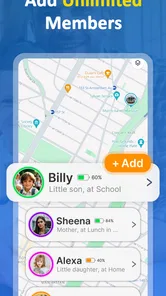
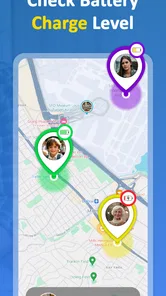
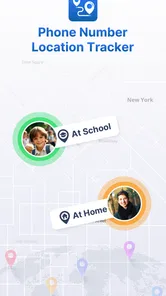
Analysis by Reviewed
I would treat a phone-number-based location app as a practical aid for agreed family check-ins, not as a way to secretly follow someone. That distinction matters: location tools work best when everyone understands what is being shared and why. Phone Number Location Tracker is a free parenting app from Midgard Production, and its focus is easy to understand: helping families feel more connected when people are apart.
What to expect from the current version
The app is currently at version 9.0.0, and it has been available since June 2, 2024. Those details tell me where the product stands today, but they do not, by themselves, show what changed between versions. I would avoid assuming a particular feature was newly added or improved without a clear change history. For someone considering it now, the useful question is whether its location-sharing approach suits the family’s routine.
It is rated 4.3 on average, with around 119,000 ratings, and has more than a million installs. That level of adoption may reassure a new user that it is not an obscure download, but it is not a substitute for checking how the app behaves on your own devices. The age rating is Everyone, while optional in-app purchases range from $4.99 to $22.99 per item. I’d start with the free experience and decide whether any paid option is genuinely useful before spending money.
How it can fit into a family routine
For a parent, the most helpful use is often a simple check before worrying: a teenager is walking home, a family member is travelling, or someone has arrived in an unfamiliar area. Rather than repeatedly calling, you can use a location tool as one part of a check-in routine. I’d still agree on when location sharing is appropriate, and keep a direct message or call as the backup when a location looks old or unclear.
A useful habit is to establish expectations before anyone needs the app. Talk through who can see whose location, when it is reasonable to check, and what to do if a person does not appear where expected. This avoids turning a safety tool into a source of arguments or constant monitoring. For younger children, an adult should guide setup and use; with older children, a shared agreement is more respectful and usually more sustainable.
A realistic check-in, not a substitute for conversation
Imagine a teenager walking home after an activity while a parent is preparing dinner. Before the walk, they agree that the parent will check the app once near the expected arrival time, and the teenager will send a message if plans change. That workflow can reduce unnecessary calls without making the map responsible for every decision. If the location appears stale, the useful next step is a calm call or text, not an assumption that something is wrong.
I’d also use a location check to answer a practical question rather than to watch someone continuously. For example, a parent coordinating a pickup can check whether the other family member is approaching before leaving the house. That is a narrower, more respectful purpose than repeatedly refreshing a screen. It gives the app a defined role in the routine and makes it easier for everyone to agree on when checking is appropriate.
More From Our News Desk

 Remini - AI Photo Enhancer
Remini Is Our App of the Week for Bringing Old Photos Back to Life
A quick AI restoration tool earns its place by making faded portraits and soft, older photos feel vivid again—provided you know where its polish ends.

 PayPal - Pay, Send, Save
PayPal Reviewed: Who Benefits from Its Reach, and Who Should Skip It
PayPal is most useful when its reach and familiar checkout solve a real payment problem. These reader-by-reader recommendations show where it earns a place—and where friction wins.

 Millionaire 2026 Quiz & Trivia
 Makes Every Answer Count
A familiar quiz-show format succeeds or falters on tiny design decisions: how clearly the game guides a first answer, handles hesitation, and invites one more round.

 Decor Life - Home Design Game
Decor Life Turns Short Breaks Into Bite-Sized Decorating Jobs
A room-by-room decorating game built for quick sessions gains from modern phone habits, but its gentle pace still depends on patience, repetition, and a steady stream of design jobs.

 Sniper 3D:Gun Shooting Games
Sniper 3D’s Quick-Shot Appeal Faces the Upgrade Treadmill
The appeal is immediate: line up a target, steady your aim, and fire. The harder question is whether Sniper 3D can keep players returning after the first rush.

 Blockudoku®: Block Puzzle Game
Blockudoku vs. the Puzzle Pack: A Quick Puzzle With a Repetitive Edge
Blockudoku turns a clean grid into a quiet test of foresight. Against match-three polish and head-to-head simplicity, its lasting appeal is also its biggest limitation.
Latest News



Where it differs from familiar alternatives
Many families already rely on built-in location sharing on their phones or messaging apps. Those options may be simpler if everyone uses the same platform and only needs occasional sharing. A dedicated tracker can be worth considering when you want a separate family-focused tool, but I would compare the setup and day-to-day experience with what your household already has before asking everyone to install another app.
The trade-off is not just convenience. A separate app means another place for family members to set up, learn, and remember. If your household’s existing phone tools are already understood and reliable, switching may add friction without solving a real problem. On the other hand, if the family prefers to keep location coordination separate from everyday messaging, a dedicated app may feel easier to explain and use consistently. I’d make that decision together rather than installing it on someone else’s device without discussion.
Phone-number lookup should not be confused with a guarantee of pinpoint, live accuracy. A displayed position can be affected by the device, its connection, and the way a service determines location. If your need is dependable navigation, emergency response, or confirming someone’s exact position at a specific moment, use a method designed for that purpose and contact the person directly when possible. A map marker is context, not proof that someone is safe.
Getting Started with Tracking
When you first download the Phone Number Location Tracker, you’ll notice how clean and straightforward the interface is. No clutter, just the essentials. You pop in a phone number, and voila, it gives you a location. Now, don’t expect it to pinpoint someone standing in line at Starbucks, but it’ll give you a pretty good idea of their whereabouts. The app is designed to show you the location based on the phone number’s network data, which is quite nifty.
Why Use It?
You might be wondering, why would anyone need this? Well, think about those times when your friends are running late and you’re stuck waiting, not knowing if you should order another drink or just head home. Or maybe you’re trying to coordinate a meetup and need to know who’s closest to the venue. This app can give you that little nudge of information to make better decisions.
Parents might find this particularly useful too. Knowing your kids are safe and where they’re supposed to be can bring peace of mind. Plus, if you’re in a new city or traveling, it’s a great way to keep tabs on your group without constant check-ins.
Making the first use less confusing
One practical way to evaluate the app is to try it with a consenting family member while both of you are together. Compare what the app shows with your actual situation, then repeat the check later when you are apart and can confirm the result by message. This gives you a feel for how useful its location information is in your routine, without depending on it during a stressful moment or treating an uncertain marker as a precise answer.
It is also worth deciding in advance what “checking in” means for your family. A location tool can help with coordination, but it cannot explain why someone stopped, changed plans, or has not moved on the map. Agreeing that an unexpected result leads to a direct message keeps the app from becoming the only source of information. That small workflow is especially helpful when children are learning to travel independently.
Functionality and Features
One of the standout features is how the app doesn’t drain your phone’s battery. We all know the pain of apps that suck the life out of our devices, but thankfully, this isn’t one of them. It runs smoothly in the background, allowing you to use your phone as you usually would.
The app also respects privacy by not sharing the location data with third parties. It’s just between you and whoever you’re tracking (as long as they’ve consented, of course). This aspect is huge, especially in today’s world where privacy is paramount.
Privacy and family agreements
For a parent setting up a family routine, the conversation around access matters as much as the app itself. Explain why location sharing is useful, who will look at it, and when. Let older children ask questions and set reasonable boundaries, such as using location for a walk home or a pickup rather than checking without a clear purpose. In my view, that agreement makes a tracker more useful because it builds trust instead of quietly undermining it.
I would not assume that a location app can settle every disagreement or replace a family’s normal safety plan. A person may have a legitimate reason to change route, turn off a device, or be temporarily unreachable. If that possibility would make the household more anxious rather than more comfortable, a simple call-and-message check-in may be the better fit. The right tool is the one people can use openly and calmly.
Choosing it with care
I would skip this app if the goal is to identify an unknown person, monitor someone without their knowledge, or replace a proper emergency plan. A location tool is most useful when the people involved have chosen to share and know how to reach one another. It also may not be worth adding if your phone’s existing family-sharing tools already do everything you need.
Before relying on it for a school pickup or a walk home, try the routine in a low-pressure situation. Have the family member share their location while you are both available to confirm what you see, then agree on what a delayed or unexpected update means. This small test helps reveal whether the workflow is clear enough for your household, without treating a map as an automatic alarm system.
Who is likely to find it worthwhile
I see the strongest case for families who coordinate regular journeys and want a shared reference point between check-ins. It may also suit a family travelling together in an unfamiliar place, where people sometimes split up briefly and need an agreed way to reconnect. The key is that all users understand the purpose and are comfortable sharing. If only one person wants the visibility, while everyone else feels pressured, the app is unlikely to improve the relationship or the routine.
It is less compelling for someone who only needs turn-by-turn directions, a one-time meetup location, or a way to contact an unknown number. A navigation app is a better choice for routes, and an ordinary call or message is often clearer for a one-off question. If your household already has a location-sharing option that everyone knows how to use, I would not add another tool just because it exists. Choose based on a specific need, not on the idea that more tracking automatically means more safety.
What I’d keep in mind
For existing users, version 9.0.0 is the current reference point; I would check the app’s own update notes when a newer version appears rather than assuming that an update changes accuracy, privacy, or battery use. The Android minimum is OS 9, so compatibility is worth checking before planning a family rollout. Because location tools depend on working devices and connectivity, a charged phone and a direct check-in remain sensible backups.
The free starting point makes it reasonable to test whether the app fits, but I would not treat an optional purchase as necessary before seeing a clear benefit in your own routine. With purchases ranging from $4.99 to $22.99 per item, take a moment to understand what an offered item does and whether it addresses a real need for your household. A paid option cannot make an uncertain location reading a substitute for direct communication.
What to watch as the app evolves
Version 9.0.0 is a useful snapshot, not proof of a particular history of improvements. When a newer version becomes available, I would look for concrete notes that explain what changed and then judge those changes against the family’s experience. Clear information about how sharing works, how to manage access, and what to expect from location results would be especially useful for parents deciding whether to rely on it for everyday coordination.
Existing users do not need to change their family routine merely because a version number advances. I would first check that everyone can still access the app and understands the agreed check-in plan. If the app behaves differently after an update, verify the result with a direct message before changing household expectations. The most important measure is whether the tool continues to support a simple, transparent routine, not whether it encourages more frequent checking.
My verdict for families
My practical verdict is that this kind of tracker makes the most sense for families who want a shared, consent-based way to coordinate everyday movement and are willing to set clear boundaries. It is less compelling for people who only need occasional directions or already have a convenient built-in option. Try it first for a routine you can verify, and keep expectations realistic: convenience is valuable, but trust and communication do the essential work.
Final Thoughts
In a world where staying connected is more important than ever, the app provides a simple yet effective solution to keep tabs on your loved ones. Whether for safety, coordination, or just peace of mind, it ticks all the right boxes. It’s user-friendly, unobtrusive, and respects your privacy, making it a must-have for anyone who values these aspects.
If you’ve got a group of friends or family you want to stay connected with more effectively, give this app a whirl. You might just find it becomes an indispensable tool in your daily life.
Phone Number Location Tracker Frequently Asked Questions
Does Phone Number Location Tracker require consent to share someone’s location?
Location sharing should be set up openly with the person being tracked, especially when the app is used for family safety. Talk through who can view a location and when tracking is appropriate before relying on it. A phone-number lookup should not be treated as permission to monitor someone without their knowledge; respect privacy and applicable rules.
What permissions should I review before installing Phone Number Location Tracker?
Before installing, check the permissions shown by your device and consider whether they make sense for the features you plan to use. Location access is especially relevant for an app presented as a real-time tracker. You can also review your phone’s permission controls after installation and adjust access if your preferences or the app’s use change.
Does Phone Number Location Tracker need an internet connection to work?
Location tracking generally relies on a device being able to communicate location information, so connectivity can affect how useful the app is. A weak network or unavailable GPS signal may make updates less dependable. If you plan to use it while traveling or away from familiar networks, consider connectivity and any data charges associated with your mobile plan.
Can I use Phone Number Location Tracker to locate any phone number?
Phone Number Location Tracker is described as a phone number tracker, but you should not assume that entering any number will reveal a person’s live location. A phone’s location depends on its device settings, connectivity, permissions, and the way location sharing is configured. Use the app only for appropriate, consensual family or personal safety purposes.
Is Phone Number Location Tracker suitable for children?
The app has an Everyone content rating and is categorized for Parenting, which may make it relevant to families considering location tools. That rating does not replace a parent’s judgment about how a child should use an app or share location information. Discuss tracking openly, choose age-appropriate settings, and make sure children understand who can see their location.
Pros
- Accurate real-time location tracking
- User-friendly interface design
- Works globally across countries
- Lightweight app with minimal battery use
- Free basic version available
Cons
- Limited features in free version
- Requires constant internet connection
- Ads can be intrusive at times
- Some locations may be inaccurate
- Premium version is relatively expensive