Peachy - AI Face & Body Editor
- 1.47K
- 4.8
- Installs
- 10.00M
- Price
- Free

Screenshots
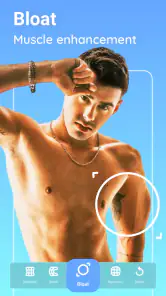
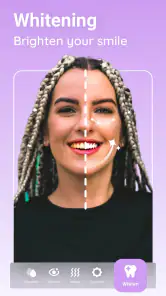
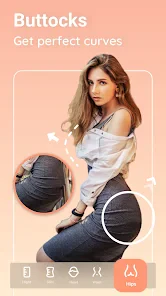
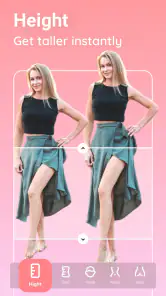
Analysis by Reviewed
I reach for Peachy - AI Face & Body Editor when I want to polish a portrait without turning the edit into a project. It is a photography app from InShot Video Editor, built around retouching faces and adjusting body appearance. The appeal is straightforward: make a few targeted changes, check that the result still looks like the person in the photo, and move on. I find that focused approach more useful than opening a broad editor and hunting through a long list of controls.
A quick starting point for portrait edits
The app makes the most sense when you already have a photo and a clear idea of what you want to improve. A selfie for a profile, a group shot where one person wants a small touch-up, or a portrait that needs a little more polish are all natural starting points. Peachy is less suited to building a complete visual design from scratch: its center of gravity is the person in the picture, not layouts, captions, or elaborate compositing.
For a realistic everyday example, imagine taking a selfie before heading out and noticing a temporary blemish or uneven makeup in the lighting. I would make the smallest correction that solves the issue, then look at the whole image again rather than judging the edited area in isolation. That second look matters: a face can seem smooth on a close crop while appearing noticeably artificial at normal viewing size. Subtle edits usually travel better from a phone screen to a social post than maximum-strength changes.
Transform Your Photos with Ease
First things first, Peachy - AI Face & Body Editor is all about making photo editing accessible to everyone, regardless of your tech skills. The app is designed with an intuitive interface, so even if you're a beginner, you'll find it a breeze to navigate. Just fire up the app, and you're greeted with a clean layout that guides you through the process step by step. No need to fumble around with complicated tools!
Features That Stand Out
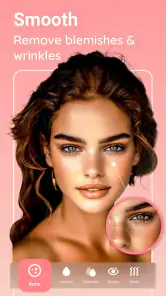
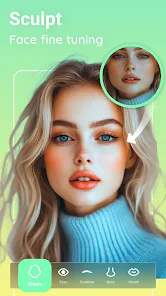
What really sets Peachy apart from other photo editors is its AI-powered editing capabilities. This isn't just any run-of-the-mill filter app; it's got some serious tech behind it. The app automatically detects facial features, allowing you to make precise adjustments with just a tap. Want to smooth out blemishes, whiten teeth, or even reshape your face slightly? Peachy has got you covered.
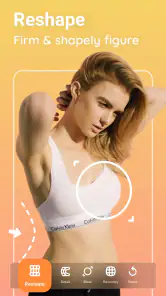
But it doesn't stop at faces. The body editing tools are equally impressive. Whether you're looking to tone up, slim down, or add some curves, the app lets you do it all without making your photos look overly edited or fake. It's like having a personal trainer and a makeup artist right in your pocket!
Getting a natural result takes a light touch
Automatic detection is a helpful shortcut, but it is not a substitute for checking the whole frame. I would begin with one adjustment, pause, and compare the edited image with the original before adding another. This makes it easier to spot when several individually modest changes start to add up. It is especially useful in group pictures: edits intended for one face or body can look mismatched beside everyone else, so consistency across the image is worth checking before sharing.
More From Our News Desk

Weather by Xiaomi Review: Clear at a Glance, Less Clear Up Close

X Under Pressure: Can It Recover When Posting Goes Wrong?

Clash of Clans Is Won Between the Battles

Android Auto Makes the Case for Quieter Car Software

MobiOffice: Transforming Mobile Productivity with Seamless Integration

EA SPORTS FC™ Mobile Soccer: Redefining Mobile Sports Gaming
Body reshaping also calls for a quick background check. Straight edges such as door frames, tiles, or furniture can make distortions more noticeable than the subject itself. I would inspect those lines around the edited area and ease off if they bend or appear out of place. That small review is a practical safeguard when the goal is a believable portrait, rather than an obviously stylized transformation.
A User-Friendly Experience
One of my favorite things about Peachy is how user-friendly it is. The developers have clearly put a lot of thought into making the app accessible for everyone. Each tool comes with a simple slider, so you can adjust the intensity of the effects to your liking. Plus, there's an undo button for those "oops" moments we all have. It's like they knew exactly what we needed!
That simplicity is a strength for quick retouching, though it is not the same as the detailed control you get from a more comprehensive photo editor. If I were correcting color across a whole image, making a careful crop, or preparing a layered design, I would choose a general-purpose editor instead. Peachy is the more direct choice when the main task is facial or body refinement; the trade-off is that portrait-focused tools are not a replacement for every stage of photo work.
Choosing it over a general photo editor
Compared with the usual all-purpose editing apps, Peachy narrows the work to face and body adjustments, which can save time when that is all a picture needs. A broad editor is better for exposure, color grading, collage layouts, or text overlays, while a camera app’s built-in filters are quicker if you only want a uniform look with no detailed retouching. I would skip Peachy if I dislike appearance-altering edits or need precise professional retouching; its appeal is convenience, not a full desktop-style workflow.
It is free to install, with optional in-app purchases ranging from $0.99 to $39.99 per item. It has a 4.8 average from around 108,000 ratings and has been installed over 10 million times. The app is rated for Everyone 10+, and version 1.180.52 requires Android 7.0 or later. Those details make it easy to judge whether it suits your device and budget, but the more important question is whether its focused toolkit fits the edits you actually make.
From a finished edit to a shareable image
And for those of you who love sharing your creations, the app makes it super easy to export and share your photos directly to social media. No more saving to your camera roll and then uploading separately. It's all about convenience, and Peachy nails it.
For a smoother handoff, I would decide on the destination before editing: a tightly cropped profile image and a full-frame post do not always need the same degree of retouching. Check the image at the size people are likely to see it, and keep an untouched original if you may want to revisit the edit later. That habit also helps when you are unsure whether a change is too strong; comparing versions is more reliable than trying to remember the starting point.
Who will get the most from it
I think Peachy is a good fit for casual portrait makers who want accessible controls and a focused route to a quick result. It can also suit someone preparing a batch of personal photos, provided they take time to keep the edits consistent rather than applying the same intensity automatically to every image. If your priority is natural-looking retouching, treat its face and body tools as small corrections, not a checklist of changes to apply to every portrait.
On the other hand, people who want every edit to remain entirely untouched, or who need detailed control over layers and whole-image color, will likely be happier elsewhere. I would also avoid using body reshaping to create a look that the surrounding scene cannot support; obvious warped edges can undermine an otherwise good photo. The most useful question to ask before opening any tool is whether the edit improves the picture for you, not whether the app can change it further.
Making a small edit work across a set
One less obvious challenge is keeping a group of portraits coherent. If I am preparing several images for the same profile or event, I would edit one representative photo first and use it as a visual reference for the others. That does not mean copying every adjustment at the same strength: lighting, distance, and expression change how retouching reads. The useful takeaway is to compare the finished images side by side, rather than judging each one alone. A touch-up that looks restrained in a close selfie may appear too strong in a wider shot.
I would also separate correction from transformation before starting. Fixing a distracting temporary detail is a narrow task; changing facial proportions or body shape affects the character of the portrait and can be harder to reverse convincingly. Setting that boundary in advance helps prevent aimless tweaking. If I cannot name the specific issue I am trying to solve, I usually leave the photo alone or make a basic whole-image adjustment elsewhere.
Planning the edit around the final use
A portrait intended for a small profile thumbnail needs a different review from one people will inspect full size. At thumbnail scale, tiny retouching details may disappear, while an exaggerated overall shape can remain obvious. For a larger image, fine inconsistencies and softened texture are easier to notice. I would therefore check both the full frame and the likely viewing size before calling a portrait done. This is a simple workflow improvement, but it helps avoid spending time perfecting details that will not show—or missing changes that will.
If the image is part of a work portfolio, a product post, or a record meant to represent someone accurately, I would be especially conservative with appearance edits. Peachy is more appropriate for personal portraits where the subject is comfortable with retouching than for documentary images where fidelity matters. The same distinction applies to shared photos: it is considerate to keep changes modest when another person’s appearance is involved and to make sure the result still feels like them.
What to expect from the free-to-start approach
The free starting point makes it reasonable to try the portrait workflow before deciding whether it belongs in your regular toolkit. Still, optional purchases mean I would not assume every tool or treatment is included at no cost. I would first identify the specific edits I need and check whether those are available in the version I am using, rather than building a routine around an option that may require a purchase. The listed in-app purchase range runs from $0.99 to $39.99 per item, so it is worth paying attention to purchase prompts if you want to keep spending predictable.
That distinction also helps answer a practical question: is it useful if I only edit occasionally? I think so, as long as the occasional task is a portrait touch-up and not a full photo-production workflow. A dedicated editor can be convenient even when used infrequently because its tools are easy to find for that narrow job. If you mainly want filters, cropping, or color correction, a general editor you already know may be simpler and avoid adding another app to your routine.
Limits that matter in everyday use
The biggest limitation is not that Peachy is difficult; it is that a portrait-focused tool can encourage changes simply because they are available. More editing is not automatically better, and face detection does not guarantee that a result will suit every angle, expression, or lighting condition. I would be cautious with unusual poses and busy backgrounds, where subtle adjustments can be harder to assess. If an edit seems plausible only when zoomed in or viewed from one angle, I would undo it and start again more lightly.
There is also a difference between easy controls and fine control. Sliders make it quick to change intensity, but people who want detailed retouching with careful masks, layers, or exact color work may find the approach limiting. For that sort of job, I would move to a more capable photo editor and use Peachy only for a quick portrait-specific pass, if at all. The right choice depends on whether speed or precision matters more for the image in front of you.
Final Thoughts
All in all, Peachy - AI Face & Body Editor is a fantastic app for anyone looking to enhance their photos without the hassle of complex editing software. It's perfect for those quick touch-ups before posting online or even for giving your favorite selfies a little makeover. So if you're on the hunt for a reliable and easy-to-use photo editor, Peachy might just be the app for you. Give it a try, and who knows? You might just fall in love with your photos all over again!
Peachy - AI Face & Body Editor Frequently Asked Questions
Is Peachy - AI Face & Body Editor free to download?
Yes, Peachy is free to download, so you can install it and explore its photo-editing tools without paying upfront. The app also offers in-app purchases, with individual items ranging from $0.99 to $39.99. If you plan to use paid options, check the purchase details in the app before confirming, so you know what you are selecting.
Who is Peachy - AI Face & Body Editor intended for?
Peachy is aimed at people who want to refine selfies, portraits, and other photos featuring faces or bodies. Its focus is on retouching and appearance adjustments rather than broad image creation, so it may suit casual users as well as people preparing pictures to share. The app is rated Everyone 10+, which is useful to consider when choosing apps for younger users.
What kind of photos can I edit with Peachy - AI Face & Body Editor?
Peachy is a photography app focused on editing faces, bodies, selfies, and portraits. It is a good fit when you want to retouch a photo or make adjustments to your appearance before sharing it. The tools are designed around photo enhancement rather than general-purpose image creation, so the app is most relevant for users who want to refine existing pictures.
What features does Peachy - AI Face & Body Editor offer?
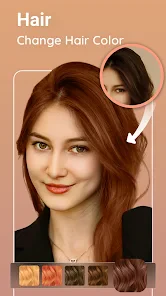
Peachy - AI Face & Body Editor provides a comprehensive set of tools for enhancing selfies and portraits. It offers features like face slimming, body reshaping, skin smoothing, and blemish removal. Additionally, users can apply makeup effects, change hair colors, and even adjust lighting. These tools are powered by AI, ensuring realistic edits that enhance natural beauty.
Is Peachy - AI Face & Body Editor easy to use for beginners?
Yes, Peachy is designed with user-friendliness in mind, making it accessible for beginners. The interface is intuitive, with a straightforward layout that guides users through each editing step. The app also offers tutorials and tips to help new users get started quickly and make the most of its features.
Pros
- User-friendly interface makes editing simple.
- Offers a wide range of editing tools.
- Real-time preview of edits.
- High-quality output images.
- Fast processing and saving of images.
Cons
- Contains in-app purchases for advanced features.
- May require frequent updates.
- Some tools need internet connection.
- Ads can be disruptive during use.
- Limited free version features.
- Category
- Photography
- Version
- 1.180.52












