Parental Control App- FamiSafe
- 1.17K
- 4.2
- Installs
- 5.00M
- Price
- Free

Screenshots


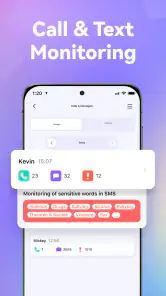

Analysis by Reviewed
In my view, FamiSafe earns a lasting place on a parent’s phone only when its checks lead to useful decisions, not a habit of watching every move. Location tools, screen-time limits, and app blocking can help make family rules more practical, but they also require attention and honest discussion. I’d approach it as a shared safety routine: decide what you need it to do, set a few clear boundaries, and check whether those boundaries still suit your child’s day.
The first week is about setting expectations
The first week with a parental-control app can feel reassuring: one place to check a child’s location, review device habits, and set boundaries. I see FamiSafe as most useful when those tools support conversations at home rather than replace them. Its focus on location, screen time, and blocking makes it a practical fit for parents who want a clearer picture of everyday device use, though it works best when children understand what is being monitored and why.
Before adding rules, I’d talk through the reason for each one. A location check for a trip home is different from expecting a child to account for every stop, and a limit on entertainment apps is different from cutting off a device during homework. Making those distinctions early can prevent the app from feeling like a hidden test. It also gives a child a chance to point out practical exceptions, such as needing a device for a school task or to contact family.
When the novelty wears off
The lasting value is less about checking a map repeatedly and more about building a routine. A quick look at screen-time patterns can help a parent decide whether a limit needs adjusting, while app blocking can reinforce an agreed boundary. I’d treat reports as prompts for a calm conversation, not as a scorecard: a busy day, a school project, or a family trip can all make device use look different from the usual pattern.
A realistic example is a child walking home from an activity. Location information may help a parent check that the trip is progressing as expected, while a screen-time rule can keep entertainment apps from taking over the evening. The useful habit is to check at sensible moments, then put the phone away. Constantly refreshing location updates can create more worry than reassurance.
Who will get the most from it
I’d consider this app for families who want several kinds of oversight in one place and are willing to review settings as children grow. It may be especially useful when a younger child is just beginning to use a personal device, or when parents need a shared plan for screen limits and age-appropriate access. A good starting point is to agree on a small number of rules, then revisit them together instead of blocking everything at once.
Families who only need a simple daily screen limit may be better served by built-in controls on a phone or tablet. Those tools can involve less setup and may be enough if location checks and broader monitoring are not priorities. FamiSafe makes more sense when a parent values having location tools alongside digital boundaries, rather than wanting a single, minimal setting.
More From Our News Desk

Clash of Clans Is Won Between the Battles

Android Auto Makes the Case for Quieter Car Software

MobiOffice: Transforming Mobile Productivity with Seamless Integration

EA SPORTS FC™ Mobile Soccer: Redefining Mobile Sports Gaming

How Microsoft OneDrive Became a Mobile Productivity Giant

How Google Translate Breaks Language Barriers Effortlessly
It can also suit households where one parent is not always the adult doing pickup or supervising device use. A shared family plan is easier to follow when the adults agree on what a check means and how they will respond to it. I’d settle that before relying on the app: if one parent treats a limit as firm and another routinely overrides it, the child receives mixed signals and the tool becomes another source of arguments.
What to check before relying on it
Parental controls depend on both devices being set up and linked correctly, so I would test the rules and location view together before relying on them for a time-sensitive pickup. I’d also check that the limits fit the child’s actual schedule: a blanket restriction can interrupt homework or a planned call just as easily as it can curb recreational scrolling. The trade-off is straightforward—more oversight can bring reassurance, but it also asks parents to maintain settings and explain their choices.
My practical tip is to test one boundary at a time. Start with a rule that is easy to explain, check how it works during an ordinary weekday, and ask whether it caused an avoidable interruption. If it did, adjust the plan rather than adding more restrictions to compensate. This makes it easier to work out whether a problem comes from the rule itself, the child’s routine, or a setup detail that needs attention.
How it compares with simpler controls
Compared with the built-in screen-time controls many families already have, FamiSafe is most compelling when you want location and device boundaries considered together. A phone’s native tools may be a cleaner choice for a parent who only wants to schedule downtime or review basic usage. The trade-off with a dedicated parental-control app is that it can bring more oversight into one routine, but that comes with extra setup and more settings to revisit.
I wouldn’t choose it simply because a longer list of controls sounds safer. A family that is comfortable with the device’s existing settings may gain little from adding another layer, especially if nobody has time to maintain it. On the other hand, when location checks and app restrictions are both part of the family’s plan, having them under one parenting-focused approach may be more convenient than treating each concern separately.
Price, platform, and fit
FamiSafe is a free parenting app from Shenzhen Wondershare Software Co., Ltd., with in-app purchases ranging from $5.99 to $109.99 per item. It is rated for Everyone, has a 4.2 average from around 14,000 ratings, and has passed 5 million installs. It was released on July 13, 2018; version 8.6.21.1120 requires Android 5.0 or later. Those details make it easy to identify the Android app, but I would still check that its current controls match your household’s needs before committing to a paid option.
For me, the key question before paying is not whether more controls sound appealing; it is whether the features you will actually use justify adding a recurring management task. I’d first identify the specific problem—such as coordinating a child’s route or applying agreed app limits—then look at the available options and their costs. A free starting point can make it easier to explore the approach, while purchases deserve a closer look against your budget and needs.
When a control app is the wrong answer
If your child is old enough to negotiate boundaries, involve them in choosing what gets limited and when. That simple step can make a control routine feel less like a surprise inspection and more like a family agreement. I’d skip this kind of app if you want invisible monitoring or expect software alone to prevent every online risk; it is a tool for supporting parenting, not a substitute for trust, guidance, or direct conversation.
It may also be the wrong fit when a family’s main need is a quick, occasional location check and its current phone tools already handle that comfortably. In that situation, the additional controls could be more work than value. Likewise, if the child is old enough to manage device use with a conversation and a mutually agreed routine, frequent monitoring may undermine independence rather than help it. I’d choose the least intrusive option that addresses the actual concern.
Living with the app beyond setup
If you're a parent, you know that keeping an eye on your kids in the digital age can feel like a full-time job. That's where FamiSafe comes into play, a parental control app that promises to take some of that burden off your shoulders. Today, I'll share my experience with this app and whether it's worth your time and investment.
Setting It Up: A Breeze or a Hassle?
When I first downloaded FamiSafe, I was pleasantly surprised by how easy it was to set up. The app guides you through the installation process with clear instructions, and before you know it, you're up and running. You just need to install it on both your device and your child's, and link them together. The whole process took me about 10 minutes, which is a big plus for busy parents.
Features That Stand Out
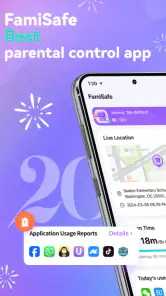
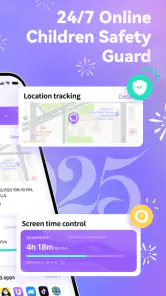
One of the most impressive features of FamiSafe is its real-time location tracking. It gives you peace of mind knowing exactly where your child is at any given moment. I also appreciated the geofencing feature, which alerts you when your child enters or leaves designated areas. This can be a real lifesaver if your kids are prone to wandering off.
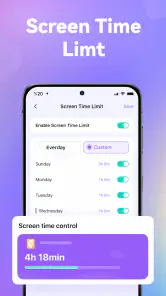
Another feature worth mentioning is the app’s ability to monitor screen time. With FamiSafe, I was able to set limits on how long my kids could use their devices each day. It’s a great way to ensure they're not spending too much time glued to their screens. Plus, the app provides detailed reports on app usage, which helped me understand my kids’ digital habits better.
Keeping Tabs on Digital Content
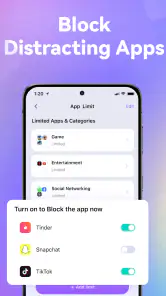
FamiSafe also excels in content filtering. The app allows you to block inappropriate websites and apps, which is crucial in today’s internet landscape. I found this feature particularly useful for protecting my younger ones from harmful content. The app’s ability to detect explicit content in social media is another standout feature, giving me the power to intervene when necessary.
For less friction, I’d use blocking sparingly and explain the reason for each blocked app or site. A block can stop access, but it cannot teach a child how to judge a suspicious link or handle an uncomfortable online interaction. Pairing a restriction with a brief conversation about what to do next makes the control more useful than treating the block itself as the whole solution.
Ease of Use and Overall Experience
Using FamiSafe felt intuitive and straightforward. The interface is clean and user-friendly, which made navigation a breeze. Even if you're not tech-savvy, you'll find it easy to manage the app’s features. The customer support is also worth noting; they were responsive and helpful whenever I had questions.
The main maintenance burden is not learning the interface once; it is remembering that a child’s schedule and independence change. A rule that made sense at the start of a school term may be awkward during a holiday or a new activity. I’d put settings on the agenda for a regular family check-in rather than waiting for a conflict. That keeps changes deliberate and reduces the temptation to adjust controls in the heat of an argument.
Whether it earns a permanent place
Overall, my experience with FamiSafe was overwhelmingly positive. The app delivers on its promise to provide robust parental controls without being intrusive. If you're looking for an app to help protect your kids online and ensure they use their devices responsibly, FamiSafe is definitely worth considering. It's an investment in peace of mind that I believe every parent should consider.
My longer-term verdict is more conditional: it earns its place when the family keeps using a small set of relevant controls and talks openly about them. The appeal can fade if checks become automatic, reports go unread, or restrictions stay in place long after they stop fitting. I’d keep it only while it makes a specific parenting task easier; if built-in controls already do that, switching to the simpler option is a sensible choice.
Parental Control App- FamiSafe Frequently Asked Questions
Is FamiSafe free to download, and what should I check before installing it?
FamiSafe is free to download, and its content rating is Everyone. Before installing, check that the parent and child devices meet your family’s needs and that the app’s parental-control approach suits your household. Some features may involve optional purchases, so it is worth reviewing the available options and deciding what you want to use before getting started.
What operating system does FamiSafe require on Android?
For Android, FamiSafe requires version 5.0 or later. Checking the child’s device software before downloading can help avoid compatibility problems. FamiSafe is also available for iOS, so families using different mobile platforms may find it useful to consider whether the devices they want to manage are supported for their setup.
Can I use FamiSafe if the parent and child have different types of phones?
FamiSafe is compatible with both Android and iOS devices, which can make it an option for households where parents and children use different mobile platforms. For Android, the listed minimum operating system is version 5.0. Check that each device is suitable before setting up the app, then consider which controls you want to use across the family’s devices.
What does FamiSafe do, and who is it designed for?
FamiSafe is a parenting app designed to help parents support their children's online safety and digital routines. Its tools include GPS location tracking, screen time control, and app blocking, bringing several common parental controls into one app. It may suit families who want a way to manage device use and keep an eye on their child's location.
Does FamiSafe cost anything to download, and are there optional purchases?
FamiSafe is free to download, so you can get started without paying for the initial installation. The app also offers in-app purchases, with listed items ranging from $5.99 to $109.99 each. Before choosing a purchase, review the options shown in the app and consider which features your family needs; the free download does not mean every option is included at no cost.
Pros
- Comprehensive monitoring tools
- User-friendly interface
- Real-time location tracking
- Flexible screen time management
- Geofencing alerts
Cons
- Premium features require purchase
- Limited free features
- Occasional app crashes
- High battery consumption
- Complex setup for beginners

- Category
- Parenting
- Version
- 8.6.21.1120