OurFamilyWizard Co-Parent App
- 2.07K
- 4.5
- Installs
- 500.00K
- Price
- Free

Screenshots







Analysis by Reviewed
When co-parenting plans are already tense, even a small mix-up about pickup times or a shared bill can turn into a long exchange. I see OurFamilyWizard Co-Parent App as a place to keep those practical details together, rather than relying on scattered texts, email threads, and paper notes. It is a parenting app from OurFamilyWizard, LLC, and its focus is coordinating children’s schedules, communication, expenses, and documents between parents.
Where people can get stuck
The app’s value depends on both parents using the same shared routine. If one parent keeps sending changes by text while the other checks the app, the information can still get split across channels. I would agree on a simple rule first: put schedule changes and expense details in the app, then use another channel only for urgent matters if that is what works for both households.
There can also be a learning curve when a family is used to informal messages. A shared calendar is most useful when entries are specific enough to act on: include the event, time, and who is handling transport, rather than assuming the other parent knows the context. The same principle helps with expense records; a clear description and receipt make a request easier to understand later.
Setup checks that save effort
Before relying on the calendar, I would check that both parents are looking at the same dates and have entered the recurring handoffs and known activities. Then add one upcoming event and confirm that each person can see the details. This small trial is more useful than transferring an entire schedule before agreeing on how changes should be recorded.
For expenses, decide what information you both expect to see with each item, such as its purpose and supporting receipt. For documents, choose sensible names that make school or medical records easy to recognize. These are simple habits rather than app tricks, but they prevent a shared space from becoming another pile that needs sorting.
Recovering a workflow after a mix-up
If a handoff detail is unclear, I would check the calendar first, then send a concise message that states the exact question and the proposed plan. Avoid replying across several old threads; keeping one topic together makes it easier to follow what was agreed. If a receipt or document is hard to find, search the relevant area and use a more descriptive label when adding it next time.
A realistic example: a child’s activity changes on a day when the usual parent is responsible for pickup. One parent updates the shared schedule and sends a short message explaining the change; the other checks the event before leaving work. That does not remove the need to coordinate, but it gives both parents a clearer place to verify the plan than a text buried among unrelated messages.
More From Our News Desk

 Remini - AI Photo Enhancer
Remini Is Our App of the Week for Bringing Old Photos Back to Life
A quick AI restoration tool earns its place by making faded portraits and soft, older photos feel vivid again—provided you know where its polish ends.

 PayPal - Pay, Send, Save
PayPal Reviewed: Who Benefits from Its Reach, and Who Should Skip It
PayPal is most useful when its reach and familiar checkout solve a real payment problem. These reader-by-reader recommendations show where it earns a place—and where friction wins.

 Millionaire 2026 Quiz & Trivia
 Makes Every Answer Count
A familiar quiz-show format succeeds or falters on tiny design decisions: how clearly the game guides a first answer, handles hesitation, and invites one more round.

 Decor Life - Home Design Game
Decor Life Turns Short Breaks Into Bite-Sized Decorating Jobs
A room-by-room decorating game built for quick sessions gains from modern phone habits, but its gentle pace still depends on patience, repetition, and a steady stream of design jobs.

 Sniper 3D:Gun Shooting Games
Sniper 3D’s Quick-Shot Appeal Faces the Upgrade Treadmill
The appeal is immediate: line up a target, steady your aim, and fire. The harder question is whether Sniper 3D can keep players returning after the first rush.

 Blockudoku®: Block Puzzle Game
Blockudoku vs. the Puzzle Pack: A Quick Puzzle With a Repetitive Edge
Blockudoku turns a clean grid into a quiet test of foresight. Against match-three polish and head-to-head simplicity, its lasting appeal is also its biggest limitation.
Latest News



How the tools fit everyday co-parenting
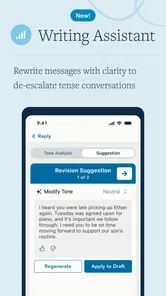
One of the standout features of the OurFamilyWizard Co-Parent App is its ability to streamline communication between parents. The app provides a secure messaging platform where you can exchange messages without the usual text or email mishaps. The best part? There’s a tone meter that helps you keep your messages civil, avoiding any unnecessary drama or misunderstandings. It's like having a digital mediator right in your pocket!
Shared Calendars and Schedules
Keeping track of your kids' schedules can be a job in itself. With this app, you can create shared calendars that both parents can access and update. Whether it's a soccer game or a piano recital, you can ensure that everyone is on the same page. Plus, the notifications will keep you in the loop without having to pester the other parent constantly.
Expense Tracking Made Easy
Splitting expenses can be one of the trickiest parts of co-parenting. Luckily, OurFamilyWizard makes it simple. You can log expenses, attach receipts, and even send payment requests through the app. It's an easy way to keep financial matters transparent and fair, reducing the stress that often comes with shared expenses.
Document Storage
Ever needed to quickly access a document related to your child’s school or medical records? The app provides a secure place to store and share important documents. This ensures that both parents have access to the latest information and can make informed decisions together. No more scrambling through emails or physical files!
When the app is not the cause
A shared tool can make information easier to find, but it cannot make two households agree or guarantee that a message is read in time. If a plan is disputed, keep the discussion focused on the child and the specific decision rather than expecting a tone prompt or calendar entry to settle the disagreement. For urgent safety or health concerns, use the appropriate direct contact instead of assuming an app message is enough.
It is also worth separating a technical problem from a coordination problem. If something appears missing, first check the relevant calendar, message, expense, or document area and confirm that you are viewing the expected item. If the other parent has not entered a change, no troubleshooting step can create that shared information; a direct, neutral request is the practical next move.
Who will benefit, and who may prefer another approach
I would recommend it most to parents who need a consistent record across two homes, especially when schedules, reimbursements, and child-related documents otherwise end up in different places. It may also suit families who want to keep co-parenting communication distinct from personal texts. Compared with ordinary messaging apps and a shared calendar, its appeal is having these co-parenting tasks gathered in one environment; the trade-off is that both parents need to participate and maintain the habit.
If you already communicate easily and only need to share an occasional appointment, a basic calendar and direct messages may be simpler. Likewise, anyone unwilling to move routine coordination into a dedicated app may find the extra step frustrating. The app can organize information, but it is not a substitute for a workable agreement or a conversation both parents are prepared to have.
The Bottom Line
All in all, the app is a useful option for anyone navigating the complexities of shared parenting. It provides tools that not only help in organizing day-to-day tasks but also foster healthier communication between parents. While no app can solve all parenting challenges, this one can make the practical side of the journey easier to manage. It is free to download, rated for Everyone, and has a 4.4 average from around 12,000 ratings, with more than 500,000 installs. In-app purchases range from about $150 to $300 per item, so I would check the available purchase details before committing to a paid arrangement. The app has been available since July 10, 2012, and version 2025.11.2 requires iOS or Android 10 or later. If you need a shared system for recurring schedules and records, it is worth considering; if your needs are occasional and already handled smoothly, a simpler setup may be enough.
OurFamilyWizard Co-Parent App Frequently Asked Questions
Is OurFamilyWizard free to download, and what might I need to pay for?
OurFamilyWizard is free to download, but using the app may involve in-app purchases. These are listed at prices ranging from around $150 to $300 per item, so it is worth checking the available purchase details before getting started. The app is intended for co-parenting, and its tools are designed to support shared communication and organization.
What devices and operating systems can run OurFamilyWizard?
The app is available for Android and iOS, so co-parents using different mobile platforms can access it. On Android, it requires version 10 or later. If you plan to use the app on more than one device, check that each device meets the relevant system requirements and has the app installed so you can keep up with family information.
What is the primary purpose of the OurFamilyWizard Co-Parent App?
The OurFamilyWizard Co-Parent App is designed to help divorced or separated parents manage their co-parenting responsibilities more effectively. It provides tools for communication, scheduling, expense tracking, and sharing important information about their children. This centralized platform aims to reduce conflict and improve coordination between co-parents, ensuring that both parties are on the same page regarding their children's needs.
How does the OurFamilyWizard app help with communication between co-parents?
The app offers a secure, private messaging system that allows parents to communicate directly within the platform, reducing misunderstandings and keeping all conversations documented. It also features a tone meter to help parents monitor the tone of their messages, promoting respectful communication. This feature is particularly beneficial in high-conflict situations where clear and constructive dialogue is crucial.
Can children access the OurFamilyWizard app?
Yes, the OurFamilyWizard app includes a feature that allows children to have their own accounts. This access is limited and controlled by the parents, allowing children to view the family calendar and other relevant information without participating in parental communications. This ensures that children stay informed about their schedules while maintaining boundaries between parental interactions.
Pros
- Streamlines co-parenting communication
- Easy-to-use interface for all users
- Comprehensive shared calendars
- Secure data storage and privacy
- Expense tracking and management
Cons
- Requires subscription for full features
- Limited free trial period
- Notifications can be overwhelming
- Some features need internet access
- May require tech support for setup