Offline Music Player: Play MP3
- 4.50K
- 4.5
- Installs
- 10.00M
- Price
- Free

Screenshots

Analysis by Reviewed
For a local music library, the important question is not how many tracks an app promises to stream, but how easily it helps you play the audio you already have. Offline Music Player: Play MP3 is built around that straightforward job: listening to music stored on your device. I find that focus useful when I want playback without depending on a mobile connection, though it also means the app is a different proposition from a streaming service with a vast online catalogue.
What the free price does—and doesn’t—tell you
The app is free to download, with in-app purchases listed at $1.99 to $39.99 per item. That gives you a no-cost way to try its basic role as an offline player; paid items may suit people who want whatever optional extras they cover, but I wouldn’t treat the price range alone as proof of what each purchase unlocks. If you’re deciding whether it is worth paying, check the purchase details in the app before committing and compare them with the features you actually need.
Its scale suggests it has found a broad audience: it has over 10 million installs and an average rating of 4.5 from around 346,000 ratings. Those figures are useful context, not a guarantee that it will fit every music library or listening habit. It is a Music & Audio app from Dairy App & Notes & Audio Editor & Voice Recorder, rated for Teen users. It was released on December 29, 2021; version 1.02.109.1201 lists Android 6.0 as the minimum requirement.
Getting Started with Offline Music Player
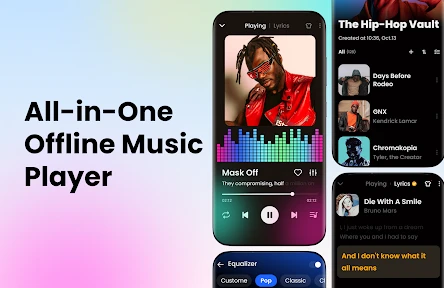
First things first, the installation process is a breeze. You download it, open it up, and you're greeted with a simple and intuitive interface. No unnecessary bells and whistles here, which I think is fantastic. The app is designed to make your life easier, not more complicated.
Features That Hit the Right Note
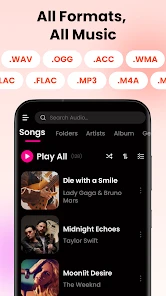
Once you have your music files on your device, the Offline Music Player: Play MP3 app shines. It supports a wide range of audio formats, so whether you have MP3s, WAVs, or even FLAC files, this app has you covered. The sound quality is crisp, which is a big plus for all the audiophiles out there.
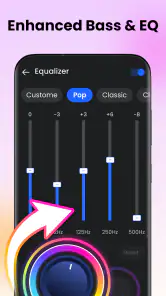
One of the standout features is the equalizer. This lets you customize your listening experience with various presets or manual settings. Whether you want more bass or clearer vocals, it's all at your fingertips.
Usability and Performance
What I love about this app is its focus on offline capabilities. In a world where everything seems to demand an internet connection, having an app that works seamlessly without one is refreshing. It runs smoothly, with no glitches or hiccups, even when handling large music libraries.
More From Our News Desk

Weather by Xiaomi Review: Clear at a Glance, Less Clear Up Close

X Under Pressure: Can It Recover When Posting Goes Wrong?

Clash of Clans Is Won Between the Battles

Android Auto Makes the Case for Quieter Car Software

MobiOffice: Transforming Mobile Productivity with Seamless Integration

EA SPORTS FC™ Mobile Soccer: Redefining Mobile Sports Gaming
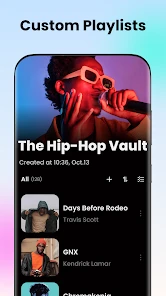
The playlist management is another feature worth mentioning. You can easily create, rename, and edit playlists, allowing you to organize your music exactly how you like it. Plus, the search function is quick and efficient, which is essential when you have a ton of songs to sift through.
Making it work with your music routine
A useful habit is to build a few playlists around situations rather than genres: a short commute mix, a longer workout queue, and something calm for winding down. That keeps the library practical when you are in a hurry. Before leaving home, I’d also open a playlist and check that the tracks I expect to hear are actually available on the device; an offline player can play local files, but it cannot replace files that were never saved there.
The equalizer is worth adjusting with your own headphones instead of choosing a preset by name alone. A bass-heavy setting may make a workout playlist feel lively, but it can muddy spoken vocals or acoustic tracks. I’d make small changes and listen to a familiar song before applying a setting to everything. If you switch between headphones and a car stereo, revisiting the adjustment can be more helpful than keeping one setting for every situation.
Where it fits beside streaming apps
Compared with the usual streaming alternatives, the practical difference is the source of the music. This player is a better match for audio files already on your phone, especially when you want to avoid using mobile data or when a connection is unreliable. Streaming services are usually the more convenient choice for discovering unfamiliar artists and accessing music you have not downloaded as files. I see the two approaches as complementary: use this app for a personally collected library, and a streaming service when breadth and discovery matter more.
There is a trade-off to that local-library approach. You need to manage the files yourself, and a crowded collection can take some initial sorting before playlists and search feel genuinely useful. If you mainly listen to online radio, podcasts, or subscription catalogues, an app designed around those sources will probably suit you better. This is not the right pick for someone expecting it to fetch songs from the internet or replace a streaming subscription.
Who is likely to get the most value
I’d recommend it to someone who already keeps music files on an Android device and wants a focused way to play and organize them. It can also make sense for a commute or trip where mobile coverage is patchy: prepare the local music beforehand, then listen without relying on a live connection. If you are starting from scratch with no saved audio, the free download alone does not solve the job of finding and obtaining music.
For someone unsure about paying, my advice is to start with the free access and see whether the player handles your everyday listening comfortably. Only consider an in-app purchase after checking what that specific item offers and deciding that it addresses a real need. The app is free, but the presence of optional purchases means “free” should not be read as a promise that every possible extra is included.
Wrapping Up
In conclusion, the Offline Music Player: Play MP3 is a solid choice for anyone looking to enjoy music without the constraints of an internet connection. It’s user-friendly, feature-rich, and performs exceptionally well. Whether you're commuting, working out, or just relaxing at home, this app has something to offer.
So, if you're in the market for a reliable music player that won't eat up your data, give this app a try. I think you'll find it hits all the right notes!
Offline Music Player: Play MP3 Frequently Asked Questions
Can I listen to music through Bluetooth headphones or a car audio system?
Offline Music Player: Play MP3 is designed for playing audio stored on your device, so it can be a convenient option when you want to listen through your usual phone audio setup. If your phone is already paired with Bluetooth headphones or a car audio system, playback may be routed through that connected device. The app’s offline focus means the music files themselves need to be available on your phone.
Will my music keep playing when I lock my phone or switch to another app?
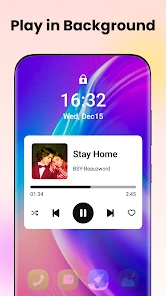
A music player is most useful when it can continue playing while you do other things, such as checking messages or locking your screen. Offline Music Player: Play MP3 is intended for listening to locally stored audio, so you can use it as a dedicated player rather than keeping your music open in a browser. Background behavior can also depend on your phone’s settings and power-management choices.
What devices can install Offline Music Player: Play MP3?
Offline Music Player: Play MP3 is an Android app that requires Android 6.0 or later. Before downloading, check your device’s operating system version to make sure it meets that requirement. The app is listed in the Music & Audio category, so it is intended for people who want a dedicated way to listen to music stored on their device.
What is Offline Music Player: Play MP3 and how does it work?
Offline Music Player: Play MP3 is a versatile music application designed to play MP3 files directly from your device without needing an internet connection. Users can create playlists, organize their music library, and enjoy high-quality audio playback. Its user-friendly interface ensures easy navigation, making it ideal for music enthusiasts looking to listen offline.
Can I use Offline Music Player: Play MP3 without an internet connection?
Yes, Offline Music Player: Play MP3 is specifically designed to be used without an internet connection. Once you have downloaded your MP3 files to your device, you can access them anytime, anywhere. This feature makes it a perfect choice for users who want to save on data usage or listen to music in areas with poor connectivity.
Pros
- Supports multiple audio formats.
- No internet required for playback.
- User-friendly interface.
- Customizable equalizer settings.
- Lightweight and fast app.
Cons
- Limited playlist management features.
- No cloud sync for music files.
- Ads can be intrusive at times.
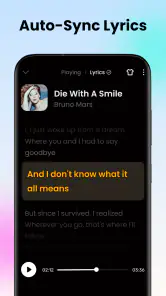
- No lyrics support.
- Lacks advanced audio features.
- Category
- Music & Audio
- Version
- 1.02.109.1201













