My Diary - Daily Diary Journal
- 27.25K
- 4.8
- Installs
- 50.00M
- Price
- Free

Screenshots






Analysis by Reviewed
I find the biggest question with a diary app is not whether it has enough decoration, but whether it feels easy enough to open on an ordinary day. My Diary - Daily Diary Journal is aimed at people who want a private place for everyday thoughts, and its mix of writing and personal touches makes that routine feel less like filling in a form.
What you get without paying
The app is free to download, so you can try it as a lifestyle journal without paying upfront. In-app purchases are available, ranging from $0.99 to $59.99 per item; those prices do not tell me which purchase is worthwhile for a particular person, so I would begin with the free experience and only consider paying if I found a specific option I genuinely wanted.
That distinction matters: the free starting point is useful for testing whether journaling suits you, while the existence of purchases does not by itself make every feature essential. I would avoid treating an upgrade as a requirement before I had established a writing habit. The app is rated for Everyone, and its developer is Dairy App & Notes & Audio Editor & Voice Recorder.
Where its format can earn a place in your day
Rather than keeping every memory in plain text, I can attach different kinds of material to an entry. That creates a practical middle ground between a traditional diary and a photo album: a short note can preserve the reason a picture mattered, while a longer entry can hold thoughts that would be awkward to post publicly. The useful trade-off is that mixed-media entries may take more effort to create than a quick note in a basic notes app.
A realistic routine might be writing a few lines after getting home, adding a photo from the day, and recording a thought while it is still fresh. If I am tired, I can keep the entry brief rather than turning journaling into homework. Later, the combination of words and personal details can make that moment easier to remember than a bare calendar entry.
Privacy and practical habits
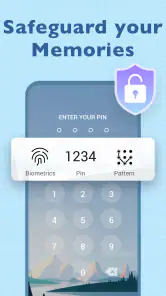
A lock can make a diary feel more comfortable to use, particularly if I sometimes hand my phone to someone else. Still, I would treat a screen lock as a helpful barrier, not a reason to write anything without considering the device and account I use. The original article describes password, fingerprint, or face recognition protection and a cloud backup option; anyone relying on backup should check how it behaves in their own setup before making the diary their only copy of something irreplaceable.
One useful habit is to keep entries focused: a date, what happened, and one detail I might otherwise forget. Prompts can help when I draw a blank, but I would not force myself to answer one every day. A prompt is a starting point, not a test, and skipping it is better than making the journal feel like another obligation.
More From Our News Desk

Weather by Xiaomi Review: Clear at a Glance, Less Clear Up Close

X Under Pressure: Can It Recover When Posting Goes Wrong?

Clash of Clans Is Won Between the Battles

Android Auto Makes the Case for Quieter Car Software

MobiOffice: Transforming Mobile Productivity with Seamless Integration

EA SPORTS FC™ Mobile Soccer: Redefining Mobile Sports Gaming
Getting Started with Your Digital Diary
From the moment I downloaded My Diary - Daily Diary Journal, I was impressed by its sleek and intuitive design. Setting it up was a breeze, and within minutes, I was ready to start chronicling my day. The app offers a range of customization options, allowing you to select from various themes, fonts, and colors to personalize your diary just the way you like it. It's like having a personal sanctuary on your phone!
Features That Make Journaling Fun
One of the standout features of the app is its ability to attach photos, audio, and even hand-drawn doodles to your entries. This feature really brings your diary to life, turning it into a vibrant scrapbook of memories. Whether you're jotting down a quick note or writing a detailed entry, the app makes it easy to capture the essence of your day.
Another aspect I love is the password protection feature. With the option to secure your journal with a password, fingerprint, or face recognition, you can rest assured that your secrets are safe. The app also offers a cloud backup option, so you never have to worry about losing your precious entries.
Reflecting and Growing with Daily Prompts
For those days when you're not sure what to write about, the app offers daily writing prompts. These prompts are a wonderful way to get your creative juices flowing and encourage you to reflect on different aspects of your life. I found myself exploring new ideas and gaining insights I hadn't considered before.
For me, prompts work best when I use them selectively. I might answer one when I want a fresh angle on a routine week, then ignore them when I already know what is on my mind. This keeps the journal personal rather than making each entry feel like a response to an assignment. It also gives the app a different role from a plain notes tool: notes are usually for information I need to retrieve, while a prompted diary entry is more about noticing how I felt.
How it compares with simpler alternatives
If I only needed a shopping list, a reminder, or a quick thought to find later, I would use a basic notes app instead. This diary makes more sense when I want a record that feels like mine, with photos, audio, doodles, visual customization, and prompts all supporting reflection. Compared with handwriting in a paper notebook, it is easier to add media and keep the journal with me, but paper avoids putting private thoughts on a phone and never needs a device charge. The right choice depends on whether convenience and mixed media matter more to me than keeping the ritual offline.
It is also worth considering how I will use the journal over time. If I expect to write long entries every day, the easiest system is the one I will actually keep using, not necessarily the one with the most ways to decorate a page. I would try a short entry first, then see whether the layout and prompts encourage me to return. If I mainly want searchable work notes or shared planning, I would choose a tool designed for those jobs rather than making a personal diary do everything.
Who is likely to find it worthwhile?
The app suits someone who wants a private, personal-feeling place for memories and reflection, especially if a photo or voice recording can say more than a paragraph. It may also help a new journal writer get past the blank-page problem with prompts. On the other hand, I would skip it if I want a completely offline paper routine, a collaborative notebook, or a bare-bones place for reminders. Those are different needs, and adding diary features would not make them better served.
My Diary - Daily Diary Journal is free to start, has a 4.8 average from around 1.2 million ratings, and has passed 50 million installs. It was released on September 5, 2020, and its current version is 1.04.04.1126 for Android 7.0 and up. Those figures suggest that it has found a large audience, but they do not decide whether its style fits my routine; a few honest trial entries are a better test.
Why You Should Give It a Try
In a world where things move so fast, taking a moment to pause and reflect can be incredibly grounding. My Diary - Daily Diary Journal offers a simple yet powerful way to do just that. Whether you're looking to track your personal growth, record memories, or simply vent your feelings, this app is a fantastic tool to have in your arsenal.
Overall, I find this app to be a perfect blend of functionality and creativity, making journaling a joy rather than a chore. So, if you're ready to start your journaling journey, give My Diary - Daily Diary Journal a try. It's more than just an app; it's a companion in your life's adventures.
A low-pressure way to build a useful record
One way I would make the diary more sustainable is to decide on a tiny entry format before opening it. For example, I might write one sentence about the event, one about how I felt, and attach a picture only when it adds context. That prevents the photo-and-audio options from turning every entry into a small project. The app’s flexibility is most valuable when the extras stay optional.
It can also work well for brief voice reflections when typing is inconvenient, such as during a quiet walk after an appointment. I would record the thought first and then, if useful, add a short written note explaining why I wanted to remember it. That combination can preserve tone and detail, though it is less suitable when I need a concise, searchable fact for a task list.
Making entries easier to revisit
A diary becomes more useful when future-you can understand why a moment mattered. I would avoid entries that are only a photo or a vague phrase; adding a few words about the setting or feeling makes the memory clearer months later. Likewise, a doodle can capture a small visual detail, but it does not replace a sentence when the meaning would otherwise be ambiguous. These small choices help keep a mixed-media journal personal without making it cluttered.
If you are deciding whether to use it for daily journaling, try a week of short entries rather than planning an elaborate routine. Notice whether you naturally reach for text, photos, audio, or prompts, and whether the app feels comfortable to reopen. That trial tells you more about fit than customizing every visual option on the first day. If you stop after a few entries, the free start has still let you test the habit without committing to a purchase.
Security, backup, and sensible expectations
Readers often ask whether a diary lock means every entry is completely protected. I would not equate an app lock with a guarantee of privacy in every circumstance: it is a useful access barrier, but I would still use a secure device and be thoughtful about what I store. The same care applies to cloud backup. Before depending on it, I would check that entries are being preserved as expected and keep another copy of especially important writing when appropriate.
Another practical question is whether paying is necessary to get started. It is not: the app is free to download, while optional in-app purchases are offered. Since the available price range alone does not explain what each purchase includes, I would decide based on a specific need I encounter rather than buying in anticipation. If the basic journaling routine already works for me, there is no reason to spend simply because an upgrade exists.
Who should choose a different journal?
This is not the best fit for someone whose main goal is managing deadlines, collaborating on notes, or keeping a minimal record with no personal touches. A task manager is better for reminders that must trigger at the right time, and a shared document is more practical when several people need to edit the same material. A paper notebook remains a strong alternative for anyone who prefers an offline ritual or does not want personal writing on a phone.
I would also be cautious about making any single mobile diary the only home for memories that would be painful to lose. Media and backups can make entries richer, but they also make it sensible to think about device changes and how you will preserve important writing. For casual reflections, that may be a manageable consideration; for a long-term archive, I would first make sure the storage and export options suit my own plans.
My buy-or-skip verdict
For someone who wants a private-feeling lifestyle journal that can combine writing with photos, audio, doodles, and prompts, I think this is a worthwhile app to try. Its strongest value is not that it can replace every note-taking tool, but that it gives ordinary memories a more personal shape and makes reflection approachable. The large audience—around 1.2 million ratings and over 50 million installs—shows broad adoption, although personal fit still matters more than popularity.
I would start free, keep the first entries simple, and see whether the habit feels natural before considering any purchase. Choose another option if you need collaboration, task management, or an entirely offline notebook. But if you want a journal you can personalize and return to in small moments, My Diary - Daily Diary Journal is an easy one to test without turning journaling into a major commitment.
My Diary - Daily Diary Journal Frequently Asked Questions
Can I use My Diary - Daily Diary Journal without an internet connection?
A diary is often something people want to write in wherever they are, so offline access can be an important consideration before downloading. My Diary - Daily Diary Journal is designed as a personal journaling app, but its cloud backup and syncing features involve online access. If you plan to keep entries available across devices, connect to the internet when using those options.
Can I add photos or audio to my journal entries?
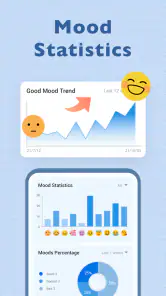
Yes. My Diary - Daily Diary Journal supports adding photos and audio recordings to entries, which can make a journal more expressive than text alone. These options may be useful for saving a visual memory or capturing a thought in your own voice. You can also use mood tracking and daily prompts as part of your journaling routine.
What devices can run My Diary - Daily Diary Journal?
My Diary - Daily Diary Journal is a Lifestyle app for Android devices running version 7.0 or later. If your device meets that requirement, you can install it and use it as a personal space for writing and keeping daily entries. The app is free to download, so you can try its basic journaling experience before deciding whether its optional paid features suit you.
Who is My Diary - Daily Diary Journal intended for, and is it suitable for all ages?
The app is intended for people who want a private place to record thoughts, memories, and everyday experiences. Its content rating is Everyone, making it suitable for a broad audience. Features such as mood tracking and writing prompts may appeal to both regular journal keepers and people who want gentle inspiration to begin building a journaling habit.
What features does My Diary - Daily Diary Journal offer?
My Diary - Daily Diary Journal offers a variety of features designed to enhance your journaling experience. These include customizable themes, the ability to add photos and audio recordings, mood tracking, password protection for privacy, and cloud backup to ensure your entries are never lost. It also supports daily prompts to inspire your writing.
Pros
- User-friendly interface
- Customizable themes
- Secure with password lock
- Cloud backup available
- In-app mood tracker
Cons
- Ads in free version
- Limited templates
- No collaboration feature
- Subscription for advanced features
- Occasional sync issues
- Category
- Lifestyle
- Version
- 1.04.04.1126