To-Do List - Schedule Planner
- 6.64K
- 4.6
- Installs
- 10.00M
- Price
- Free

Screenshots
Analysis by Reviewed
I like a planner best when it reduces the effort of deciding what to do next, rather than turning planning into another job. To-Do List - Schedule Planner is a productivity app built around tasks, schedules, reminders, and a calendar. Its broad appeal is reflected in a 4.6 average from around 641,000 ratings and more than 10 million installs. I’d consider it for everyday planning, especially if seeing tasks laid out by date is more useful to you than keeping everything in a plain checklist.
Starting with a small, useful plan
The easiest way to judge whether this planner fits is to give it a real week rather than trying to build a perfect system on day one. I’d enter a handful of current commitments, add one repeat task, and look at how the calendar makes the week feel. That gives you a practical sense of whether dates and reminders genuinely help you act—or simply add another layer to maintain.
A useful distinction is between a task and a time commitment. “Buy groceries” may only need a place in the day, while “leave for an appointment” has a time-sensitive cue attached. If I gave both the same kind of reminder, the notifications could become noise. I’d reserve the stronger scheduling attention for things that are easy to miss or difficult to move.
What to expect from the pace
For a routine list—adding errands, setting a deadline, or checking what is due—the app’s straightforward task-first approach should feel more practical than opening a large project-management workspace. I’d use it to capture a task when it occurs to me, then sort out its timing when I review the day. That small separation can help keep quick notes from becoming a long session of reorganizing.
The app is free to start, with optional in-app purchases ranging from $0.99 to $52.99 per item. It is developed by Dairy App & Notes & Audio Editor & Voice Recorder and is rated for Everyone. The release date is December 14, 2020. Those details make it easy to place: this is an established, general-purpose planner rather than a niche tool aimed only at work teams or specialist workflows.
When a day gets crowded
One realistic use is a day that mixes fixed obligations with flexible jobs: a class or shift, a deadline, a pharmacy stop, and dinner planning. I’d put the fixed items in view first, then decide which errands can fit around them. If the day looks full before every small task is added, that is useful information; it is a reason to move or defer something, not a challenge to squeeze the whole list into the calendar.
For a student, the same approach can separate coursework deadlines from study sessions. A deadline is a result that must be reached; a study block is a plan that may need adjustment. Keeping those ideas distinct makes the list more honest and helps prevent a calendar full of optimistic blocks from looking like completed work.
You May Like

Clash of Clans Is Won Between the Battles

Android Auto Makes the Case for Quieter Car Software

MobiOffice: Transforming Mobile Productivity with Seamless Integration

EA SPORTS FC™ Mobile Soccer: Redefining Mobile Sports Gaming

How Microsoft OneDrive Became a Mobile Productivity Giant

How Google Translate Breaks Language Barriers Effortlessly
Features That Make Life Easier
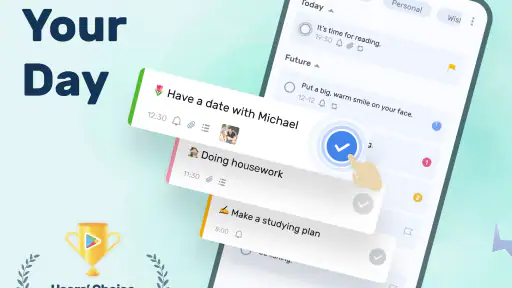
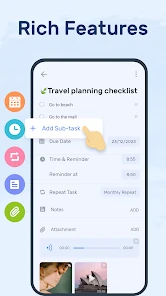
From the moment you open the To-Do List - Schedule Planner, you’re greeted with a clean, intuitive interface that makes adding and organizing tasks a breeze. The app offers a variety of features that cater to both simple and complex scheduling needs. You can easily create tasks, set deadlines, and even categorize them by priority. The color-coded system is a lifesaver for visual people like me!
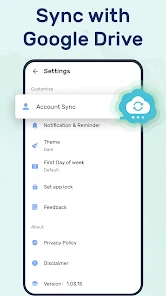
One of my favorite features has to be the recurring tasks option. Whether it's a daily workout or a monthly bill, setting up tasks that repeat saves me a ton of time and ensures I never miss an important deadline. And let’s not forget the sync capability across devices. You can start planning on your phone and pick up right where you left off on your tablet or computer. Talk about seamless integration!
Making a busy day workable
A useful way to combine these tools is to make recurring chores or routines repeat, then reserve individual dated tasks for things that genuinely change week to week. That keeps a regular appointment from having to be recreated, while leaving room for one-off commitments. If a day starts to look overloaded in the calendar, moving a flexible errand before adding another reminder can make the schedule more realistic.
For example, I might check the calendar over breakfast, keep a work deadline visible, and add a grocery stop after the day’s fixed commitments. A reminder is most helpful when it points to a moment I can act on; setting one for every small task would quickly make nudges less useful. I’d start with reminders for time-sensitive items, then add more only if I find I’m missing something.
Getting Things Done
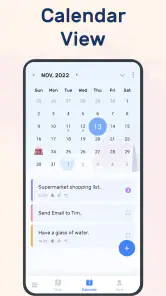
The app also includes a nifty calendar view, allowing you to see your tasks spread out over the weeks. This is particularly helpful for planning ahead and avoiding overcommitting to too many tasks in one day. There's something incredibly satisfying about checking off tasks, and the app rewards you with a little cheer every time you complete one.
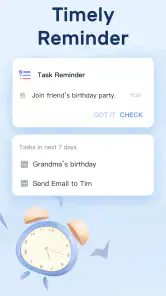
I also appreciate the reminders feature. It’s like having a gentle nudge that keeps you on track without being intrusive. You can customize how and when you receive these reminders, which is perfect for someone like me who needs that little extra push sometimes.
Choosing the right level of detail
For a personal planner, a little structure can be enough: a short task name, a sensible date, and a priority only when it helps decide what comes first. I would avoid turning every task into a finely categorized entry. Color cues work best when they carry meaning—such as distinguishing home errands from work obligations—rather than when every item gets its own visual treatment.
That restraint is also a useful answer to the question of whether the app can handle a busy routine. It can help organize many kinds of personal commitments, but the quality of the result still depends on keeping the list readable. If I were coordinating a group project with ownership, dependencies, and frequent status changes, I’d choose a tool designed around shared project work instead of stretching a personal to-do list into one.
Where it fits—and where it doesn’t
Compared with a basic notes app, this planner gives tasks more structure through dates, priorities, repeat schedules, and a calendar view. Compared with heavyweight project tools, it is better suited to personal routines and a manageable set of commitments than to coordinating a team’s work or tracking a complicated project. I’d skip it if what you need is primarily shared team planning, or if you prefer a completely bare list with no scheduling layer.
One practical trade-off is that a calendar can make a crowded week easier to spot, but it cannot make that week less crowded. I’d use priorities sparingly and treat the calendar as a capacity check, not just a place to fit every task. That approach makes the visual organization more useful and reduces the temptation to turn every small intention into a deadline.
Who is likely to get the most from it?
I think it makes the most sense for someone who regularly asks, “What do I need to do today, and when should I remember it?” A freelancer keeping track of follow-ups, a household managing repeating chores, or a student balancing deadlines and ordinary errands can all benefit from having dates and tasks together. The app is particularly appealing if a plain list feels too easy to forget, but a full project dashboard feels like overkill.
It is less compelling for someone who already has a reliable paper-planner habit and does not want notifications, or for a person whose work depends on assigning tasks to colleagues and tracking progress across a team. It also may not suit anyone who finds color and calendar views distracting. In that case, a basic checklist can be faster because it asks for fewer planning decisions.
Why You’ll Love It
What sets this app apart is its simplicity coupled with powerful features. It’s designed for everyone, whether you’re a student managing coursework, a professional with multiple projects, or just someone who loves to keep their life organized. To-Do List - Schedule Planner is user-friendly and doesn’t overwhelm you with unnecessary features.
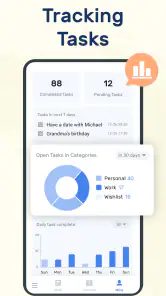
Additionally, the app offers insights into your productivity patterns. It keeps track of your completed tasks and shows you how you’re progressing over time. It’s quite motivating to see how much you’ve accomplished, and it encourages you to maintain the momentum.
Keeping progress useful, not judgmental
Completion history can be encouraging, but I would treat it as a reflection tool rather than a scorecard. A day with fewer completed tasks may simply have involved longer or less predictable work. Looking at progress over time is more useful when it prompts a practical adjustment: perhaps a recurring chore needs a different day, or a daily list needs fewer commitments.
A small weekly review can make that information actionable. I’d clear out obsolete one-off tasks, check whether repeating items still belong in the routine, and move unfinished work deliberately instead of letting it drift forward without thought. The goal is not to keep the list immaculate; it is to make the next planning session easier.
Reliability, devices, and sensible expectations
A recurring schedule and a reminder are only useful if they fit the way you actually plan, so I’d test a repeat task with an ordinary routine before relying on it for something important. Similarly, synchronization is appealing when you switch between devices, but I’d check that the list is consistent after setup rather than assuming every change appears instantly. These are sensible habits for any planner that becomes part of a daily routine.
For people who mainly use a phone, the calendar and priority cues can help turn a quick list into a day plan. If you prefer doing detailed planning on a larger screen, the ability to continue across devices may be useful, though the experience will depend on how you like to work. On a device where you want minimal distractions, keep the number of reminders and categories modest; a planner stays quick to scan when its organization reflects real decisions instead of decoration.
Speed, stability, and device demands
I would expect a task-and-calendar planner to feel most responsive when it is being used for its ordinary purpose: capturing a few items, checking the day, and marking work complete. A long, heavily categorized list is a different experience from a short daily plan, so I’d judge the pace after entering the kind of workload I actually intend to keep. The practical test is whether I can find and update an item without stopping to manage the system around it.
There is no benefit in keeping every past intention active. Periodically removing completed or irrelevant entries should make the current plan easier to scan, even apart from any technical considerations. If the app feels cluttered, I’d simplify the list and reduce decorative categories before assuming that a device needs replacing or that a planner needs more features.
On an older or storage-constrained phone, I’d be especially mindful of how many apps and notifications compete for attention, and I would keep the planner setup lean. The app’s basic value does not depend on elaborate customization: a few meaningful priorities, dates, and reminders can be enough. For urgent commitments, I’d also keep an independent backup habit until I’m comfortable that the recurring schedule and device-to-device workflow behave as expected.
The app’s 4.6 average and roughly 6,600 written reviews suggest that many people have taken time to share their experience, but no rating can tell you whether its workflow will suit your habits. Since it is free to download, I’d try a small, realistic setup first: a few current tasks, one recurring routine, and only the reminders that matter. The optional purchases are worth considering only after you know which parts you use regularly.
My performance verdict
For the everyday workload it is meant to organize, I see the strongest case in how its task list, calendar, repeat schedules, and reminders work together. That combination can make a personal plan easier to act on than a pile of notes, without requiring the habits of a full project-management system. I would still keep the setup simple and verify recurring items on the devices I rely on, especially before trusting a reminder for something consequential.
Overall, if you’re looking for an app that helps you manage your time efficiently, look no further. With its robust set of features and ease of use, To-Do List - Schedule Planner is a must-have for anyone aiming to boost their productivity. Give it a try and see how it transforms your daily routine!
To-Do List - Schedule Planner Frequently Asked Questions
Does To-Do List - Schedule Planner work on Android and iOS?
To-Do List - Schedule Planner is a mobile productivity app for organizing schedules, tasks, and reminders. Before downloading, check that its store page is available for your device and operating system, since app availability can differ between platforms. The app’s purpose is to help keep everyday plans in one place, making it a practical option for people who prefer managing tasks from a phone.
What is To-Do List - Schedule Planner designed to help me manage?
The app is presented as a daily schedule planner, task organizer, to-do reminder app, and calendar. That makes it relevant for people who want a single place to keep track of planned activities and responsibilities. If you mainly need a straightforward way to collect everyday tasks and organize your day, its focus is easy to understand before you install it.
Is To-Do List - Schedule Planner suitable for everyday personal planning?
To-Do List - Schedule Planner is a productivity app for organizing everyday plans, tasks, and reminders. Its focus on a daily schedule and task organization can make it useful for keeping personal to-dos in one place, whether you are planning a busy day or tracking ongoing responsibilities. It is free to download, and the app is rated for Everyone.
What features does the To-Do List - Schedule Planner offer?
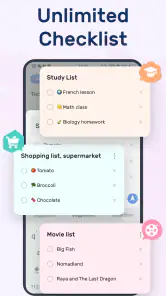
The To-Do List - Schedule Planner app provides a comprehensive suite of features designed to streamline your daily tasks and schedules. Users can create task lists, set deadlines, and receive reminders. It also offers priority settings, so you can focus on what's important, and integrates with your calendar to ensure you never miss an appointment. Additionally, it provides collaboration options for team projects.
Is the To-Do List - Schedule Planner app free to use?
The To-Do List - Schedule Planner app is free to download and offers a free version with basic features suitable for personal use. In-app purchases are available, ranging from $0.99 to $52.99 per item, so check the options shown in the app before purchasing. However, for more advanced functionalities like additional customization options, an ad-free experience, and enhanced collaboration tools, users can opt for a premium subscription.
Pros
- User-friendly interface for quick task management.
- Seamless synchronization across multiple devices.
- Customizable reminders to keep you on track.
- Integration with calendars for better planning.
- Offline mode available for uninterrupted access.
Cons
- Limited free version features.
- Occasional syncing issues reported.
- No collaboration features for team tasks.
- Ads in the free version can be intrusive.
- Premium version is relatively expensive.
- Category
- Productivity
- Version
- Varies with device













