Audio Editor & Music Editor
- 2.68K
- 4.4
- Installs
- 10.00M
- Price
- Free

Screenshots
Analysis by Reviewed
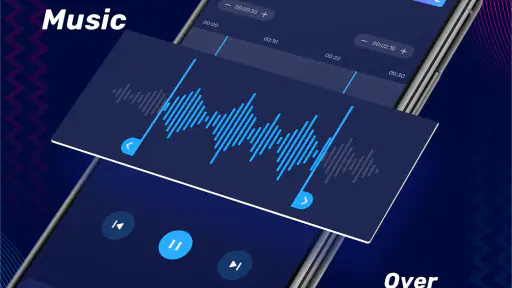
I’d approach Audio Editor & Music Editor as a practical phone tool for small audio jobs, rather than as a replacement for a full desktop recording setup. If you want to shorten a song, prepare a sound clip, or combine audio without opening a complicated production program, that’s the kind of first project that makes sense here. The app sits in the music and audio category, is free to install, and is made by Dairy App & Notes & Audio Editor & Voice Recorder.
Who it suits—and where to begin
For a first-time user, I’d keep the opening task modest: choose an audio file, find the portion you want to keep, and make a clean trim. That gives you a useful result while helping you learn the editing flow before you try more involved changes. If you’re making a short clip for a personal project or tidying a recording for someone else, that simple workflow is more valuable than trying every tool at once.
Before committing to an edit, keep an untouched copy of the original file. That small habit makes experimenting less stressful, especially when you’re still learning what each control changes. I’d also listen to the result from the beginning and end of the selected section; a cut can look neat on screen but still sound abrupt. A tiny adjustment to either edge can make the clip feel much more deliberate.
A useful everyday workflow
Picture a practical situation: you have a longer recording and need a shorter passage to share or reuse. I’d import it, locate the section by listening rather than relying only on a visual selection, trim around the natural start and finish, then play the edited version through once before saving. That final listen is easy to skip when you’re in a hurry, but it catches clipped words, leftover silence, or a cut that lands mid-beat.
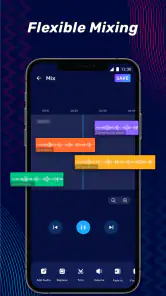
When you move on to mixing, work in small steps and preview after each change. That makes it easier to tell which adjustment helped and which one made the result less clear. For spoken audio, keeping voices understandable matters more than making the track sound heavily processed; for music, preserving a natural transition can matter more than squeezing two sections together quickly. Make one change, listen, then decide instead of stacking edits blindly.
Getting Started: First Impressions
Upon downloading the Audio Editor & Music Editor app, the first thing I noticed was its sleek and user-friendly interface. Now, I’m no tech wizard, so I was relieved to find that everything was laid out intuitively. The app opens up with a simple dashboard, guiding you through the basic features with a quick tutorial. It’s perfect for someone who’s new to audio editing or even if you're just looking for a refresher.
Features That Make It Stand Out
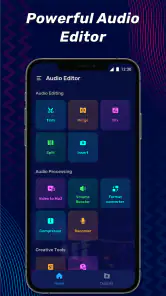
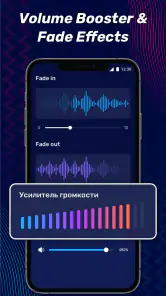
Let’s delve into what makes this app a must-have for any music enthusiast. The app offers a variety of editing tools, from basic trimming and cutting to more advanced features like audio mixing and pitch adjustment. One feature that really caught my eye was the noise reduction tool. It’s like magic – one click and all those pesky background noises vanish!
More From Our News Desk

Weather by Xiaomi Review: Clear at a Glance, Less Clear Up Close

X Under Pressure: Can It Recover When Posting Goes Wrong?

Clash of Clans Is Won Between the Battles

Android Auto Makes the Case for Quieter Car Software

MobiOffice: Transforming Mobile Productivity with Seamless Integration

EA SPORTS FC™ Mobile Soccer: Redefining Mobile Sports Gaming
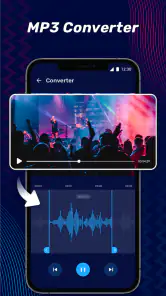
Another highlight is the app's support for multiple audio formats. Whether you’re working with MP3, WAV, or even FLAC, this app can handle it all. This is especially handy if you’re like me and have a diverse music library.
Small choices that improve the first edit
After the basic trim, I’d use a deliberately short test project to learn how the app handles saving and playback before editing anything important. Pick a section you can easily find again in the original, make one change, save it, and compare the result with the untouched file. This gives you a low-risk way to check whether the exported clip sounds as expected and whether the format suits the place you plan to use it.
There’s also a useful distinction between making a clip shorter and making it feel finished. A spoken excerpt benefits from a little breathing room before the first word and after the last; a music excerpt usually needs the cut to respect the rhythm. I wouldn’t choose the boundary by waveform shape alone. Listening around the transition, including a few seconds on either side, is a more reliable way to avoid a technically tidy but awkward-sounding edit.
If your source is a voice memo, try deciding first what the listener needs to hear. Removing a pause can make a message easier to follow, but cutting every silence may make speech feel rushed and unnatural. For a musical snippet, preserving the phrase’s beginning and resolution often matters more than making it as short as possible. Those choices are small, but they are what make a quick phone edit sound intentional rather than merely shortened.
What to know before choosing it
The app has an average rating of 4.4 from around 414,000 ratings, with 10 million-plus installs and roughly 2,700 written reviews. That level of adoption makes it an easy option to consider for casual editing, though popularity alone can’t tell you whether it fits your particular workflow. It is rated for everyone, and the current version is 2.01.29.1201; Android 7.0 or later is required.
Free to install does not necessarily mean every option is included at no cost: in-app purchases range from $1.99 to $49.99 per item. I’d start with the task you actually need and check how the relevant tool behaves before spending anything. If you need detailed multitrack production, precise mastering controls, or a consistent desktop workflow, a dedicated computer audio editor is likely a better fit. If you mainly want quick edits on a phone, this app is more approachable than learning a full workstation just to make one short clip.
Seamless User Experience
What truly sets this app apart is its seamless integration of features. You can easily switch between editing modes, and the real-time preview is a lifesaver. Imagine tweaking your track and being able to hear the changes immediately – it’s a total game-changer!
The app also excels in its export options. Once you’re done crafting your masterpiece, you can save your edits in the format of your choice or even share them directly to social media platforms. It’s like having a mini music studio that fits right in your pocket.
Choosing the right tool for the job
The choice between this and a simple cutter depends on how often your projects grow beyond one cut. A basic ringtone tool can be quicker if all you ever need is a short excerpt, because extra editing choices may be unnecessary. Here, the broader set of tools makes more sense when the same file needs trimming, a small mix, or a pitch adjustment. The trade-off is that you should take a moment to identify the tool you need instead of treating every edit as a one-button task.
On the other side, a computer-based editor is preferable when you need to inspect several parts of a project together, make detailed adjustments, or return to a complex session later. I’d use this app for a quick phone-based pass, not as the only home for work that depends on a carefully organized production session. If you only need a clean excerpt for a message, a class project, or a casual video, opening desktop software can be more effort than the edit warrants.
For a first project, I’d avoid using a long, irreplaceable recording as the test file. Start with a copy of something familiar, make one trim, and check the saved result in the context where you intend to play it. That simple check answers a practical question people often have: not just whether an edit sounds good inside the editor, but whether the finished file is useful after it has been saved or shared.
Where a careful ear still matters
I wouldn’t treat noise reduction as a guaranteed one-tap fix. It can help tame unwanted background sound, but processing may also affect the voice or music you want to keep, so compare the preview with the original before saving. If the recording is already clean, leaving it alone may sound better than applying an effect simply because it is available.
Compared with a basic ringtone cutter, the appeal here is having mixing and other editing tools alongside trimming. Compared with a full-featured workstation, the trade-off is convenience over depth: a phone interface is handy for quick jobs, but it is not where I’d want to handle a complex session with many layers. I’d skip it if your main goal is professional recording or fine-grained production; for occasional edits, the shorter learning path is the stronger reason to try it.
Good habits for sharing and keeping edits
Before sharing a finished clip, I’d listen to it outside the editing step and make sure it starts and ends where I intended. It is easy to focus on the selected region and overlook a stray fragment or a sudden ending. If the audio is meant to sit under a voice or accompany a short video, check it at the level and in the setting where it will actually be heard; a result that seems balanced while editing may not feel the same in a different context.
I’d also give files clear names that distinguish the edited version from the source. That is especially helpful when trying a few different trims or mixes: a name that describes the content or purpose is easier to recognize than a sequence of nearly identical files. Keeping the original nearby makes it simple to revisit the project with a different cut, rather than trying to reconstruct the starting point from memory.
One question a new user may have is whether to begin with trimming, mixing, or an effect. I’d start with trimming because it teaches the basic selection-and-preview habit without adding too many variables. Mixing is a sensible next step when there is a clear reason to combine material, while noise reduction or pitch changes are best tested on a copy so you can judge the difference fairly. The right order is less about mastering every feature and more about making one useful result at a time.
Final Thoughts
Overall, the Audio Editor & Music Editor app is a stellar choice for both novices and seasoned music editors. Its combination of simplicity and powerful features makes it a top contender in the audio editing app market. If you’re looking for an app that’s easy to navigate yet doesn’t skimp on advanced tools, give this one a go. Trust me, your inner DJ will thank you!
My practical recommendation is to begin with one short trim, keep the source file, and listen to the saved result before sharing it. If that first edit feels straightforward, try mixing or adjusting pitch next, one change at a time. That route gives you a clear sense of whether the app’s balance of quick access and editing options matches the way you actually work.
I’d especially recommend it to someone who occasionally needs to prepare audio but doesn’t want to learn a full production workflow just to make a small change. It can also be a handy companion for a student cleaning up a short spoken excerpt or a hobbyist shaping a music clip on the go. If your projects are mostly quick, self-contained edits, having trimming and additional tools in one phone app is a useful middle ground.
I’d be more cautious if you expect every recording to become polished automatically. Editing still depends on the source, and noise reduction or other processing cannot replace a clean recording or careful listening. Likewise, anyone who needs detailed control over a large arrangement will be happier with a dedicated workstation. For everyone else, the best test is simple: make one copy, complete one small edit, and see whether the saved result fits your real need.
Audio Editor & Music Editor Frequently Asked Questions
Can I edit a short recording or music clip without a complicated setup?
Audio Editor & Music Editor is aimed at common audio tasks such as trimming, cutting, and mixing, which can be useful when you want to make a quick change to a recording or music clip. It is categorized as a Music & Audio app, so it may be worth considering for everyday edits. Before downloading, think about whether its editing tools match the specific result you want.
Who develops Audio Editor & Music Editor, and is it a widely used app?
Audio Editor & Music Editor is developed by Dairy App & Notes & Audio Editor & Voice Recorder. It has been installed over 10 million times and has an average rating of 4.4 from around 414,000 ratings, indicating broad use among people looking for an audio editing app. Those figures can offer a useful sense of its reach, though your experience will depend on the features and workflow you need.
Can I use Audio Editor & Music Editor to record audio as well as edit it?
The app is described as an audio editor, with tools for trimming, cutting, mixing, and editing sound. Its store summary also mentions a voice editor and voice recorder, so it may suit users looking to work with spoken audio as well as music. If recording is your main need, check that the recording options fit your workflow before downloading.
Is Audio Editor & Music Editor free to download, and what might cost extra?
Audio Editor & Music Editor is free to download, so you can try it without paying upfront. It also offers in-app purchases, with listed item prices ranging from $1.99 to $49.99. Consider whether the tools you want are available at no cost and review any purchase details in the app before confirming a transaction.
What features does Audio Editor & Music Editor offer?
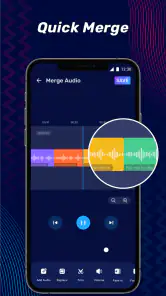
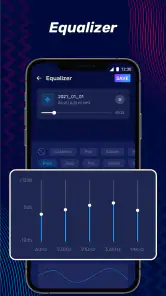
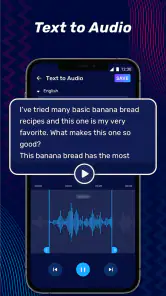
Audio Editor & Music Editor provides a comprehensive set of features for audio manipulation, including cutting, merging, and mixing tracks. Users can apply various audio effects, adjust speed and pitch, and convert audio files to different formats. It also supports multi-track editing, making it a versatile tool for both beginners and professionals.
Pros
- User-friendly interface for easy editing
- Wide range of audio formats supported
- High-quality sound output
- Fast processing speed
- Multiple track editing available
Cons
- Limited free version features
- In-app purchases can be pricey
- Occasional crashes on older devices
- Requires internet for some features
- Ads can be intrusive
- Category
- Music & Audio
- Version
- 2.01.29.1201













