OBD2 Car Scanner - ELM Torque
- 50.00
- 3.8
- Installs
- 500.00K
- Price
- Free
Screenshots

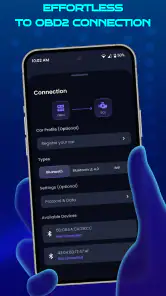
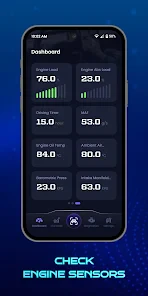


Analysis by Reviewed
I like the idea of checking a car’s condition without turning every dashboard warning into an immediate trip to the garage. OBD2 Car Scanner - ELM Torque is an Android vehicle-diagnostics app built around an OBD2 adapter, so it can be useful for a curious owner who wants to understand what the car is reporting. The key thing to keep in mind is that a phone and an adapter can help you investigate; they do not replace a mechanic’s diagnosis or repair.
What to expect before you begin
This is a free app in the Auto & Vehicles category, developed by Digital Car Key LLC. It has a 3.8 average from around 4,500 ratings and over 500,000 installs. The current version is 1.9.0, it is rated for Everyone, and it runs on Android 7.0 or later. Some in-app purchases are offered, ranging from $3.99 to $49.99 per item, so I’d check what is included before paying for anything. It was released on March 12, 2024.
In practical terms, the app is not a standalone scanner: you need a compatible OBD2 Bluetooth adapter that fits your car’s diagnostic port. That is the first decision to make, and it matters more than downloading the app. Adapter compatibility, connection reliability, and the vehicle’s support for particular readings can all affect what you see. If you’re borrowing an adapter, ask what type it is and whether it has worked with your phone and car before.
That adapter requirement also shapes who is most likely to enjoy the app. If you already have one, trying the free app is a fairly straightforward way to explore vehicle information without committing to a separate diagnostic device. If you do not, think about how often you will use it before buying hardware: a one-time warning-light check may be better handled by a local garage or a borrowed scanner, while someone who likes keeping an eye on recurring symptoms may get more out of owning an adapter.
Getting from setup to a useful first check
First off, let’s talk setup. You’ll need an OBD2 Bluetooth adapter, which plugs into your car’s OBD2 port (usually found under the dashboard). Once that’s done, fire up the OBD2 Car Scanner - ELM Torque app and pair it with your adapter. It’s as simple as pairing your phone with a Bluetooth speaker. Before you know it, you’re diving deep into the inner workings of your ride.
Latest News
Dashboard Delights
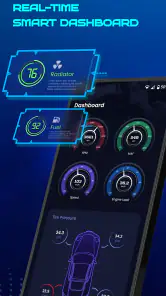
This app offers a customizable dashboard that’s not just practical but also kind of fun! You can set it up to display real-time data like speed, RPM, fuel efficiency, and more. It’s like having a digital cockpit at your fingertips. The interface is clean and intuitive, making it easy for even the least tech-savvy among us to navigate.
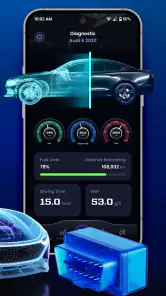
Diagnostics and Monitoring are where this app truly shines. Got a mysterious check engine light? No worries. The app pulls the error codes and gives you a breakdown of what might be wrong. It’s like having a mechanic in your pocket. You can monitor everything from engine temperature to voltage, keeping you informed about potential issues before they become costly repairs.
A useful first success—and what a code can’t tell you
For a first session, I’d keep the goal modest: connect while parked, find one reading you recognize, and see whether it updates consistently. If a warning light brought you to the app, note the code before deciding what to do next. A code points toward a system or fault to investigate; it is not, by itself, proof that one particular part needs replacing. That distinction can save you from buying a component based on a guess.
If the adapter does not appear straight away, I’d check the basics in order: make sure it is seated firmly, confirm Bluetooth is enabled, and verify that the car is in the state needed for the adapter to communicate. Avoid trying to troubleshoot the connection while driving. Once connected, let the readings settle before treating a changing value as meaningful; a display is only helpful when you know what the car was doing at the time.
A reassuring first test is to do this in a parked car when nothing urgent is happening. Locate the port before you need the app, plug in the adapter, and see whether you can establish a connection and find one familiar reading. That small practice run helps separate a setup problem from a vehicle concern later, when you may be tempted to rush. I would not make the first attempt on the shoulder of a busy road or while the car is moving.
Fuel Economy and Journey Tracking
If you’re someone who obsesses over fuel economy stats, this tool is a dream. It tracks your fuel usage and even offers tips on how to improve efficiency. Plus, with the journey tracking feature, you can log your trips and get insights into your driving habits. It’s perfect for those who want to squeeze every mile out of their tank.
Another cool feature is the ability to log your data and export it. Whether you’re keeping tabs for personal records or sharing with your mechanic, it’s all right there, making car maintenance less of a headache.
For those records to mean anything, consistency matters more than collecting a large pile of readings. If I wanted to compare fuel use or a recurring symptom, I’d keep the route and driving conditions reasonably similar and make a short note when they differ. A cold start, heavy traffic, or a longer highway run can change what the car is doing, so comparing unlike trips as if they were identical can lead to the wrong takeaway.
When this kind of scanner fits—and when it doesn’t
A realistic use is checking a warning after your commute, then saving the code and any useful readings to discuss with a mechanic. For a recurring issue, comparing logs from different trips may give a clearer picture than relying on memory. Keep notes about conditions such as a cold start or a long drive; context makes those records more useful than a code on its own.
Compared with a basic code-reader that only displays a fault, a phone-based setup can be more convenient for keeping readings and trip information together. A dedicated professional scan tool is usually the better choice for workshop-level diagnosis, while a mechanic remains the right call when a problem affects safety, drivability, or needs hands-on testing. I’d skip this app if you want a tool that works without buying an adapter, or if you expect it to identify a repair with certainty.
That difference is worth keeping in mind when choosing between this and the usual alternatives. A simple handheld reader may be less fiddly if all you want is to retrieve a code once; this app is more appealing if you prefer viewing selected readings on your phone and keeping trip-related notes in one place. At the other end, a workshop scanner may offer a technician a broader diagnostic workflow, but it is not the same purchase or learning experience as a phone-and-adapter setup. I see this app as a useful owner’s instrument, not a bargain substitute for professional equipment.
It also suits a particular kind of driver: someone who is curious, patient, and willing to treat readings as clues. A new driver who only wants reassurance that a car is safe may be better served by a mechanic’s inspection. Likewise, if a warning comes with loss of power, unusual noises, overheating, or another immediate concern, I would prioritize safe parking and professional help instead of spending time exploring dashboards. The app is most valuable when information can help you ask better questions, not when it encourages you to delay necessary care.
Common confusion and a sensible next step
One useful habit is to record a code before clearing anything. Clearing a warning can erase information that helps explain an intermittent problem, and it does not fix the underlying cause. I’d also avoid treating every available dashboard value as equally dependable: vehicles expose different information, and an unfamiliar reading needs interpretation rather than an instant conclusion.
Another easy mistake is assuming that a successful Bluetooth connection means every displayed value will be available or equally informative. The adapter links the phone to the car, but the readings depend on what the vehicle reports and what the connected setup can communicate. If a value is absent or does not behave as expected, I would not immediately conclude that the car has a fault. Start with a reading you recognize, check it under a steady condition, and use the vehicle’s manual or a mechanic for interpretation when the result matters.
For routine use, start with a simple dashboard rather than filling it with every metric. Choose only the readings tied to your question—perhaps engine temperature for a concern about overheating, or voltage when investigating an electrical symptom. This makes the display easier to follow and keeps a quick check from becoming a distracting wall of numbers.
There is a practical safety trade-off here: live information can be interesting, but it can also invite too much attention to the phone. I would configure the screen while parked and leave it alone on the road. If you want to study a reading during a trip, have a passenger handle it or review the information after stopping. The app’s value is in making a check easier, not in turning the driver’s seat into a place to troubleshoot.
Community and Support
No app is complete without a supportive community, right? With OBD2 Car Scanner - ELM Torque, you get access to a vast community of car enthusiasts and experts. It’s a great space to share tips, troubleshoot issues, and even brag about your latest mileage record!
I’ve also got to mention the support team behind this app. They are responsive and genuinely helpful, ensuring that you’re never left in the lurch if you encounter any hiccups.
Before spending on an in-app purchase, I’d first decide what I am trying to accomplish and check the exact item’s description in the app. The available purchases range from $3.99 to $49.99 per item, which is a wide enough spread that I would not assume every option serves the same purpose. I’d begin with the free experience and the adapter I already have, then pay only if a clearly relevant option solves a real limitation for my own use.
For a first-time owner, that leads to a simple path: install the app, confirm that your adapter and car can connect, and choose one question rather than trying to understand everything at once. If the question is a warning light, save its code and note when it appeared. If it is everyday monitoring, choose just a couple of useful readings and review them when parked. Either way, the best result is a clearer conversation with yourself or a mechanic—not a confident repair guess based on one screen.
Overall, if you’re a car enthusiast or just someone who wants to keep tabs on their vehicle’s health, this app is a must-have. It puts a wealth of information in your hands, empowering you to take charge of your car like never before. So, if you haven’t yet, give the OBD2 Car Scanner - ELM Torque app a spin—you might just find it’s the tool you never knew you needed.
My recommendation is more measured: I’d try it if I already had a compatible adapter, enjoy learning what the car’s data means, or want a tidy record to bring to a service appointment. I wouldn’t buy an adapter or pay for an upgrade expecting a guaranteed diagnosis. Start with one practical question, use the app to gather clues, and let a qualified mechanic handle anything that calls for a repair decision.
OBD2 Car Scanner - ELM Torque Frequently Asked Questions
What should I check before connecting the app to my car?
Before using OBD2 Car Scanner - ELM Torque, confirm that your vehicle has an OBD2 port and that you have a compatible adapter. The app works through the adapter rather than connecting directly to the car, so you will need both the right hardware and a supported vehicle. Checking your vehicle’s manual and the adapter’s compatibility details can help avoid connection issues.
What is OBD2 Car Scanner - ELM Torque used for?
OBD2 Car Scanner - ELM Torque is a versatile application designed to help car owners and mechanics diagnose vehicle problems using an OBD2 adapter. By connecting your smartphone to your car's onboard diagnostics system, you can access real-time data about your vehicle's performance, read trouble codes, and even customize dashboards to monitor specific parameters. It's an essential tool for anyone looking to keep their vehicle in top condition.
Is OBD2 Car Scanner - ELM Torque compatible with my vehicle?
OBD2 Car Scanner - ELM Torque is compatible with most vehicles manufactured after 1996, as these are generally equipped with the OBD2 system. However, compatibility can vary depending on the specific make and model of your vehicle. It's advisable to check the app's compatibility list or consult your vehicle's manual to ensure it supports OBD2 connections before downloading the app.
What type of OBD2 adapter is required to use the app?
To use OBD2 Car Scanner - ELM Torque, you'll need a compatible OBD2 adapter, which can be either Bluetooth or Wi-Fi based. These adapters plug into your vehicle's OBD2 port, usually located under the dashboard. It's important to choose a reliable adapter to ensure accurate data transmission. Many users recommend ELM327-based adapters for optimal performance with this app.
Does the app require an internet connection to function?
OBD2 Car Scanner - ELM Torque does not require a constant internet connection to function. It connects to your vehicle via the OBD2 adapter, allowing you to access real-time data and diagnostics offline. However, an internet connection may be needed for certain features like app updates, accessing online resources, or troubleshooting guides.
Pros
- Easy to install and connect with your car.
- Supports a wide range of car models.
- Provides real-time car diagnostics.
- User-friendly interface for all levels.
- Regular updates with new features.
Cons
- Requires an OBD2 adapter to function.
- Some features are locked behind a paywall.
- May drain your phone's battery quickly.
- In-app ads can be distracting.
- Limited customer support options.
- Category
- Auto & Vehicles
- Version
- 1.9.0











