mobile.de - car market
- 176.00
- 4.7
- Installs
- 10.00M
- Price
- Free

Screenshots


Analysis by Reviewed
I find mobile.de most useful as a starting point for a car search: it brings a broad range of vehicle ads into one place, but it works best when you treat listings as leads to investigate rather than decisions already made. The app is free, developed by mobile.de GmbH, and built for browsing Germany’s vehicle market. Its 4.7 average from around 662,000 ratings and over 10 million installs suggest it has become a familiar tool for many shoppers, though a strong rating cannot replace checking an individual car and seller carefully.
Start with the car you need, not the car you imagine
A useful search begins with a short list of practical requirements: how many people usually ride with you, what you need to carry, the kind of journeys you make, and the upper limit you can sensibly spend. I’d also decide how far I’m willing to travel before looking at individual ads. These choices help keep the search grounded and prevent an appealing but unsuitable vehicle from becoming the new benchmark.
There is a trade-off in setting filters too tightly. A very specific combination can make the results feel precise while hiding nearby alternatives that may be better value or easier to view. I’d start with the non-negotiables, then loosen one preference at a time—perhaps body style or equipment—if the shortlist is thin. That makes it easier to see which requirement is genuinely important and which is simply a wish.
Make a shortlist before you get lost in options
A large marketplace can make it tempting to scroll without a plan. I’d begin with the essentials that affect daily life: the kind of vehicle, a realistic budget, and how far I’m prepared to travel to view it. Then I’d narrow the results in stages instead of stacking every preference at once. That keeps useful alternatives visible and makes it easier to spot which requirement is ruling out otherwise suitable cars.
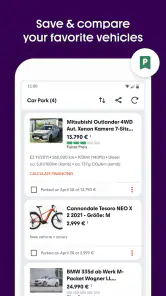
For example, if I needed a family car for a regular commute, I’d compare a few practical body styles and focus on the details that matter to that routine, rather than choosing by paint colour first. Saving a small shortlist outside the browsing session—such as by noting the asking price, mileage, location, and questions for the seller—also helps when several ads start to blur together.
Use the listing as a prompt for questions
Photos and specifications can help me decide whether a car deserves a closer look, but they are not a substitute for seeing it in person. I’d compare the stated details across similar ads, check that the photographs show the areas I care about, and contact the seller about anything unclear before arranging a trip. A useful message is specific: ask about the point that could change your decision, rather than sending a vague “is it available?” and making several trips to fill in basic gaps.
It helps to turn each promising advert into a small checklist before getting in touch. I’d note what is clearly stated, what needs explanation, and what I can only judge during a viewing. For instance, if the photos do not show an area I want to inspect, I’d ask for clarification rather than assume the omission means anything. This is a simple way to compare ads fairly and keep the conversation focused on decisions that matter.
More From Our News Desk

Weather by Xiaomi Review: Clear at a Glance, Less Clear Up Close

X Under Pressure: Can It Recover When Posting Goes Wrong?

Clash of Clans Is Won Between the Battles

Android Auto Makes the Case for Quieter Car Software

MobiOffice: Transforming Mobile Productivity with Seamless Integration

EA SPORTS FC™ Mobile Soccer: Redefining Mobile Sports Gaming
Seller signals are useful, but they are not a vehicle inspection
Seller ratings and buyer reviews can offer context, but I would read them as one signal, not a guarantee of a vehicle’s condition or a successful purchase. I’d still inspect the car, verify its paperwork, and make sure the answers I receive match the listing. That extra care matters in any vehicle marketplace, especially when an attractive ad encourages a quick decision.
A sensible workflow is to keep the seller’s conduct and the car’s condition as separate questions. Clear, consistent replies may make arranging a viewing easier, but they do not establish that a vehicle is mechanically sound. Conversely, a sparse profile alone cannot tell me whether a particular car is worth seeing. I’d use any available seller feedback to inform how I communicate, while making the vehicle itself the focus of the eventual checks.
Where it fits among other ways to shop
Compared with checking one dealer’s inventory at a time, a marketplace is handy for seeing more choices side by side and getting a feel for asking prices and availability. It is less personal than visiting a dealership, where someone can walk you through a specific car, and it cannot make the inspection or negotiation for you. If I already know the exact dealer or vehicle I want, contacting that seller directly may be quicker; if I’m still exploring, browsing a broad pool of listings is the stronger first move.
It also differs from relying on recommendations from friends or local groups. Those can narrow the search through personal knowledge, but they may leave you with fewer comparable options. A marketplace gives me a broader view, while asking people I trust can provide context about a seller, a model, or the realities of owning a particular kind of vehicle. I see the two approaches as complementary: use listings to build a comparison, then bring independent judgement to the decision.
How the browsing experience holds up
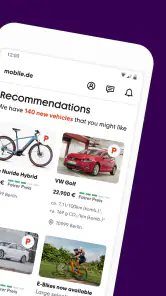
First off, let me say, the mobile.de - car market app is seriously comprehensive. You’ve got your new cars, used cars, or even those fancy vintage rides if you’re into that kind of thing. It’s like stepping into a car wonderland! The app’s design is sleek and super intuitive, so even if you’re not the most tech-savvy person, you’ll find it a breeze to navigate.
Browsing and Filtering
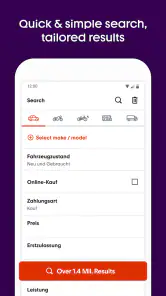
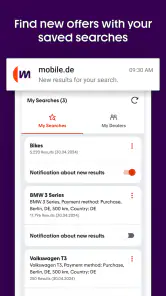
What I absolutely love about this app is the filtering options. Want a red convertible with leather seats and low mileage? No problem! You can filter down to the tiniest detail. I spent hours just playing around with different combinations, dreaming about my next adventure on the open road.
For a serious search, though, I’d treat detailed filters as a second step rather than the first. Begin with broad criteria and look at what the market actually offers, then add the preferences that will make a genuine difference to everyday use. This avoids a common trap in car shopping: mistaking a long list of desirable extras for a realistic definition of the right car.
Detailed Listings
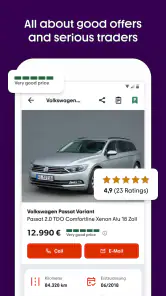
Once you find a car that catches your eye, the listing details are top-notch. We’re talking full specs, high-quality photos, even videos sometimes. It’s like getting a mini tour of the car without leaving your couch. Plus, the app provides direct contact options to the seller, making the whole process smooth and hassle-free.
Even a thorough advert has limits. A photo can show visible condition but cannot tell me how a car feels on the road, whether a control works as expected, or whether the paperwork supports the description. I’d use the listing to decide whether a viewing is worthwhile, not to decide that the car is ready to buy. If I’m comparing two candidates, I’d note what each advert actually documents rather than letting one polished set of pictures carry more weight than the evidence deserves.
Trust and Transparency
In the world of online car shopping, trust is everything, and the app gets this right. They have a rating system for sellers, and you can see reviews from other buyers. It’s like having a friend vouch for you on every purchase.
I’d soften that last comparison in practice: reviews can help me judge the experience other people describe, but they are not quite the same as a friend who knows my needs and has inspected the specific car. I would never let a positive impression of a seller substitute for checking the car, asking direct questions, and taking time over a decision. That distinction is especially important when buying remotely or travelling a long way to view an advert.
For sellers and curious browsers
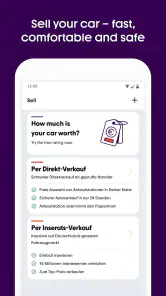
The marketplace can also suit someone who is preparing to sell a vehicle, since it brings potential buyers and sellers into the same browsing environment. I’d use it to understand how comparable cars are presented and what details shoppers expect to see, then make sure an advert is clear and accurate. For a seller who wants personal help handling the sale, a dealer or a more hands-on service may be a better fit.
Someone selling privately can use comparisons as a reality check, not as an automatic pricing formula. I’d look at vehicles that are genuinely similar in type, age, condition and equipment, then consider how location and presentation affect what a buyer might notice. A headline figure from a neighbouring advert is only an asking price; it does not prove that the car sold for that amount. Clear photographs and a complete description can help avoid basic back-and-forth, but the seller still needs to handle enquiries and viewings.
For a realistic weekend search, I’d narrow the field during the week, message a few sellers with focused questions, and group any promising viewings by location. That turns casual browsing into a manageable plan instead of a string of disconnected trips. If I’m only curious about cars with no intention of contacting sellers, the app can still be enjoyable, but the breadth of listings may be more than I need.
Practical limits and who should choose it
Browsing is not the same as buying safely. Ads depend on the information and images sellers provide, and a polished presentation cannot establish mechanical condition. The app’s value therefore depends partly on how carefully I use it: compare similar vehicles, read the description closely, and verify important claims in conversation and in person. The interface may make discovery easy, but it cannot remove the work involved in choosing a sound car.
The app is aimed at Everyone, is free, and its current version is 10.6 for devices running OS 10 or later. It was released on April 14, 2020, and has 176 written reviews alongside its much larger rating pool. Those figures give a sense of its established presence, but the practical question is whether a broad German vehicle marketplace suits your search. I’d recommend it to buyers who want to compare options before visiting sellers, and to sellers who want their vehicle in front of a wide browsing audience. I’d skip it if I expect a curated recommendation, a guaranteed inspection, or a complete purchase handled for me.
In everyday terms, the app is best for someone willing to be an active shopper. If you have a shortlist of needs, can judge which ads deserve a closer look, and are comfortable contacting sellers, it can help organise the discovery stage. If you want a person to explain every option, arrange the checks, and guide you through a purchase, a dealer or other hands-on route may suit you better. The difference is not simply convenience; it is how much responsibility you want to keep for comparing and verifying each car.
A sensible way to finish the search
My advice is to use mobile.de to discover and compare, then slow down at the point where a listing looks promising. Keep a shortlist, ask targeted questions, and arrange an inspection before making a commitment. That balance captures the app’s real strength—convenient access to many possibilities—without mistaking convenience for certainty. For a buyer willing to do those checks, it is a practical companion; for anyone wanting the marketplace to make the decision on their behalf, it is not enough on its own.
My overall recommendation is straightforward: I’d install it when I’m actively comparing vehicles in Germany, especially if I want to see alternatives before committing to one seller. I’d use the breadth of the marketplace to form a shortlist, not treat it as a stamp of approval for any advert. That makes mobile.de - car market a useful search tool rather than a shortcut around careful buying. If that is the kind of help you need, it earns a place in the process; if you need the process managed for you, look elsewhere for that support.
mobile.de - car market Frequently Asked Questions
Does mobile.de focus only on cars, or can I look for other types of vehicles too?
Mobile.de is a vehicle marketplace, not just a place to browse cars. It can be useful if you are comparing different kinds of vehicles or are still deciding what best suits your needs. The app’s store summary presents it as a place to buy and sell vehicles in Germany, so you can explore the marketplace with that broader focus in mind.
Is mobile.de mainly for the German vehicle market?
Yes. Mobile.de is presented as a marketplace for buying and selling vehicles at Germany’s largest vehicle market. That makes it particularly relevant if you are searching for vehicles in Germany or want to compare listings connected with that market. Before arranging a purchase, review the listing and make sure the vehicle, seller, and any transaction arrangements meet your needs.
Can I use mobile.de on my phone, and which devices are supported?
Mobile.de is a mobile app for finding and selling vehicles, so you can browse listings and manage your activity from a phone rather than relying only on a computer. It is available for Android, and the minimum operating-system requirement is version 10. Before downloading, check that your device meets this requirement and has enough space for the app.
Who is mobile.de intended for, and is it suitable for first-time car buyers?
Mobile.de is designed for people looking to buy or sell vehicles, including buyers comparing cars and sellers presenting vehicles to potential customers. Its search filters can help narrow down listings by details such as make, model, price range, and location, which is useful if you are still exploring your options. First-time buyers should still inspect a vehicle and its documents carefully before agreeing to a purchase.
What is mobile.de and how does it work?
Mobile.de is an online marketplace dedicated to the sale and purchase of cars and other vehicles. Users can browse a vast selection of new and used vehicles from private sellers and dealerships across various regions. The platform allows users to filter their searches based on specific criteria such as make, model, price range, and location. Additionally, mobile.de provides valuable tools for both buyers and sellers, including price evaluations and professional vehicle inspections.
Pros
- User-friendly interface for easy navigation.
- Comprehensive listings of new and used cars.
- Advanced search filters for tailored results.
- Detailed car descriptions and history reports.
- Regular updates with the latest car offers.
Cons
- Limited availability in some regions.
- Occasional inaccuracies in car listings.
- Requires stable internet connection.
- Advertisements can be intrusive at times.
- Some features locked behind premium access.
- Category
- Auto & Vehicles
- Version
- 10.6