Whoosh
- 287.00
- 4.5
- Installs
- 10.00M
- Price
- Free

Screenshots

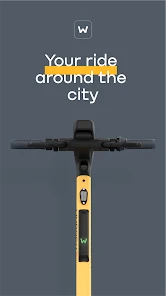
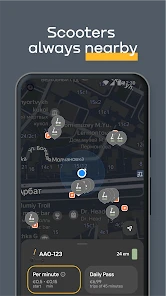
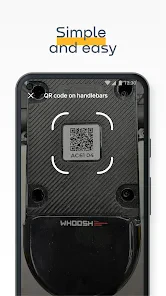
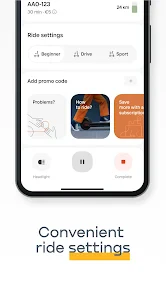


Analysis by Reviewed
I’d start by checking what kind of “Whoosh” you need, because the name can point to very different apps. The Whoosh covered here is a scooter-sharing app in the auto and vehicle category, not a tool for sending photos or documents. That distinction matters: it is designed around getting a short urban trip underway, rather than managing a personal scooter or replacing a map app. If you already use shared electric scooters for quick journeys, it is worth considering; if you want file transfers, this is the wrong app.
Where it fits into a city journey
I see the strongest case for Whoosh when a walk is a little too long, a car feels excessive, and public transport does not take you close enough to your destination. A scooter can bridge that gap, especially for a short trip between a station and an office, or between two nearby errands. In that role, the app is a practical starting point for using a shared scooter, not a reason to ride when walking or a direct transit connection would be simpler.
A realistic example is arriving at a station with a few minutes to spare before a meeting across town. Rather than guessing whether a scooter will be available, I would open the app and check the nearby options before deciding whether the ride is worthwhile. If there is a convenient scooter, it may save a walk; if not, I would switch to the original plan instead of building the whole journey around a vehicle I have not yet found.
That small decision is one of the useful habits with any sharing service: check availability before committing. It helps avoid wasting time searching on foot and makes it easier to compare the ride with a bus, a taxi, or simply walking. Whoosh is most useful when the scooter is already close to where you are and the destination is a sensible riding distance away.
Who benefits, and who may prefer another option
Whoosh is aimed at people who want occasional access to a scooter without owning one. It can suit visitors and residents alike, but it makes most sense for someone whose everyday routes pass through places where shared scooters are available. If your travel is mostly on roads or in areas where a scooter is not a comfortable choice, a transit app or a walking route will be more dependable.
I would also think about the shape of the trip, not just its length. A scooter is less appealing if you need to carry bulky shopping, keep a child with you, or arrive without room to secure or park the vehicle appropriately. For those journeys, public transport, a taxi, or a regular bicycle may be a better fit. The key trade-off is flexibility against the need to find a usable shared vehicle and follow the service’s riding and parking rules.
Compared with owning a scooter, a sharing app avoids the responsibility of storing and maintaining a personal vehicle, but it cannot guarantee that one will be waiting exactly where you need it. Compared with a taxi, it gives you more independence on a short urban trip but requires you to ride yourself. And compared with public transport, it can offer a more direct route, while transit is usually the more sensible choice for longer journeys or when weather and traffic make riding unpleasant.
More From Our News Desk

Weather by Xiaomi Review: Clear at a Glance, Less Clear Up Close

X Under Pressure: Can It Recover When Posting Goes Wrong?

Clash of Clans Is Won Between the Battles

Android Auto Makes the Case for Quieter Car Software

MobiOffice: Transforming Mobile Productivity with Seamless Integration

EA SPORTS FC™ Mobile Soccer: Redefining Mobile Sports Gaming
Small decisions that make a ride smoother
Before setting off, I would check the route and destination rather than treating the scooter as a door-to-door solution. Think about where you can finish the ride and whether that spot is convenient for the rest of your day. A short trip can become frustrating if you arrive near your destination but still have to walk a long way, or if the final parking area is not where you expected.
It is also worth leaving a little time for the practical parts of a shared ride: locating the scooter, getting ready, and ending the trip properly. That buffer matters most when you are heading to an appointment. If you are in a hurry, compare the full journey—not just the riding time—with walking or transit before deciding. This is a more useful test than assuming that a scooter will always be the fastest choice.
For a first ride, I would choose a familiar, straightforward route rather than a complicated trip through unfamiliar streets. That gives you a chance to get comfortable with the app’s rental flow and the scooter itself without adding navigation pressure. Once you know how the service works in your area, you can judge more confidently whether it fits your regular commute or only occasional errands.
A closer look at Whoosh
Ever had one of those moments when you need to quickly share a file or a photo with a friend, but the process feels more like a complicated science experiment? Well, let me introduce you to Whoosh, the app that promises to make file sharing as easy as pie. I’ve been playing around with it for a while now, and let me tell you, it’s quite the game-changer.
What is Whoosh All About?
So, Whoosh is essentially a file transfer app available on both Android and iOS. The main idea is to make sending files between devices as swift and painless as possible. Whether it’s photos, videos, or documents, Whoosh claims to handle it all without breaking a sweat. And the best part? It doesn’t require any internet connection! You just need to have the app on both devices, and you’re all set to share away.
Getting Started with Whoosh
First things first, downloading and installing the app is a breeze. Just head over to your respective app store, and you’ll have it ready to go in no time. Upon opening, you’re greeted with a clean and straightforward interface. I mean, who has time to navigate through a labyrinth of menus, right? With Whoosh, everything is right there at your fingertips, ready to be used.
To start sharing, you simply select the files you want to send, and Whoosh will do its magic to find nearby devices. The app uses a combination of Bluetooth and Wi-Fi Direct to ensure that your transfers are not only fast but also secure. I’ve tried sending a few high-resolution photos and a couple of large video files, and I was genuinely impressed by how quickly they went through.
Performance and Reliability
Now, what’s an app without a bit of testing? I’ve used Whoosh in various situations—at home, in a crowded café, and even while on the go. In every scenario, it performed consistently well. The connection was stable, and there were no annoying drops or hiccups during transfers. It’s like having your own personal assistant to handle all your file-sharing needs. Pretty neat, huh?
One feature that I found particularly useful is the ability to pause and resume transfers. It’s super handy, especially when you’re in the middle of sending a large file and need to step away for a moment. You won’t have to start from scratch, which is a huge relief.
Final Thoughts
All in all, Whoosh is a solid app that delivers on its promises. It’s fast, reliable, and incredibly user-friendly. Whether you’re a tech-savvy individual or someone who just wants a simple way to share files, Whoosh is definitely worth checking out. It’s like having a trusty sidekick that ensures your files get where they need to go, hassle-free.
So, if you’re tired of the usual file-sharing headaches and want something that just works, give Whoosh a try. You might just find yourself wondering how you ever managed without it!
What the current version tells me
The real product is a scooter-sharing service developed by WSH MOBILITY. Its current version is 3.2.0, and it has been available since March 21, 2019. Those details show that this is an established service with an ongoing app version, but a version number alone does not tell me exactly which screens or functions have changed over time. I would treat it as a sign of continued maintenance, not a promise that every feature will work identically in every city.
That distinction matters for returning users. App updates can change how a familiar rental flow looks, so I would take a moment to review the on-screen instructions when opening a newer version instead of relying on memory. The service’s practical value still depends heavily on local scooter availability and the places where rides can start and end; the app version cannot remove those real-world constraints.
Whoosh is free to download, and the service has a 4.5 average from around 739,000 ratings, with more than 10 million installs. I take that as evidence that many people have tried it, not as proof that it will suit every neighborhood or every trip. The app is rated for Everyone, while actual riding still calls for sensible judgment and attention to local rules.
Where I would draw the line
The biggest limitation is inherent to shared scooters: the app can help you use the service, but a useful ride depends on having a scooter in the right place at the right time. I would not make it my only plan for a time-critical journey. If being late would cause a real problem, keep a transit or walking alternative in mind and check the scooter situation before leaving.
It is also not a substitute for learning how to ride safely or checking the rules that apply where you are. A convenient vehicle does not make every street suitable, and an unfamiliar route can be a poor place to learn the controls. I would choose a calm, manageable trip first and avoid riding when conditions make it difficult to stay in control.
For someone deciding whether to install it, the useful question is not simply whether scooter sharing sounds appealing. Ask whether your regular destinations are reachable by scooter, whether you are comfortable riding, and whether you can adapt when no vehicle is available nearby. If the answer to those questions is mostly yes, Whoosh is worth trying; if you need guaranteed transport, a bus route, taxi, or privately owned vehicle may be the safer plan.
What I would watch on a first visit
When I first use the app in a new area, I would check the map before setting off, confirm that the destination makes sense for a scooter trip, and leave time to complete the ride without rushing. I would also read the current in-app guidance rather than assuming the process is the same as another sharing service. These simple checks reduce the chance of choosing a ride that looks convenient on screen but does not fit the actual journey.
My overall recommendation is conditional but positive: Whoosh is a sensible option for short urban trips when a nearby scooter can solve a specific transport gap. Its appeal is convenience without ownership, while its main compromises are availability, route suitability, and the need to handle the ride yourself. I would keep it as one useful travel option rather than treating it as a replacement for every other way of getting around.
Whoosh Frequently Asked Questions
Is Whoosh available for both Android and iOS?
Whoosh is a mobile app for Android and iOS, so users on either platform can look for a version suited to their device. Before downloading, check the app store on your phone and confirm that your operating system is supported. On Android, Whoosh requires Android 8.0 or later. The app is free to download and has an Everyone age rating.
What is Whoosh, and what is it used for?
Whoosh is a scooter-sharing app from WSH MOBILITY. It is intended for people who want to use shared scooters, with the app serving as the digital starting point for the service. Its store summary is “Whoosh Scooter Sharing.” If you are considering a download, the app’s relevance will depend on whether scooter sharing fits your travel needs and is available where you plan to use it.
Is Whoosh compatible with my phone, and what should I know before installing it?
Whoosh is an app for Android and iOS, and the Android version requires Android 8.0 or later. It is free to download and has an Everyone age rating, so it is presented as suitable for a broad audience. Before installing, check that your device meets the operating-system requirement and that the app is available for your device.
What is Whoosh and how does it work?
Whoosh is a cutting-edge app designed to revolutionize the way you manage your daily tasks and communications. It integrates seamlessly with your calendar and messaging apps to streamline your workflow. With its intuitive interface, Whoosh allows you to set reminders, schedule meetings, and send quick messages, all from one convenient platform. It's available for both Android and iOS devices, making it a versatile tool for productivity on the go.
Is Whoosh free to use, or does it require a subscription?
Whoosh offers a freemium model, meaning you can download and use the basic features for free. However, to unlock its full potential, including advanced scheduling options and ad-free experience, a subscription is required. The subscription plans are competitively priced and provide great value for those looking to enhance their productivity with premium features.
Pros
- Intuitive user interface for easy navigation.
- Fast performance with minimal lag.
- Offers customizable features.
- Supports multiple languages.
- Secure login and data protection.
Cons
- Limited free version features.
- Occasional ads disrupt user experience.
- Requires internet connection.
- High battery consumption.
- No offline mode available.
- Category
- Auto & Vehicles
- Version
- 3.2.0