AUTODOC: buy car parts online
- 418.00
- 4.0
- Installs
- 50.00M
- Price
- Free

Screenshots


Analysis by Reviewed
For a first-time buyer, the hardest part of ordering car parts is often knowing how to begin: a familiar-sounding component can still come in several versions, and the wrong choice can waste time and money. AUTODOC: buy car parts online is a free shopping app from AUTODOC SE - Auto Parts Online Store, built around finding parts for different car makes. I’d treat it as a useful place to research and compare options, while taking the time to verify that any part matches your exact vehicle before buying.
What to expect when you open it
This is an Auto & Vehicles app rather than a general car-maintenance guide: its purpose is to help you shop for replacement parts. AUTODOC has a 4.0 average from around 534,000 ratings and more than 50 million installs, so it has a broad audience, but those figures don’t tell you whether a particular component fits your car. I’d use the app as a purchasing tool, not as a substitute for checking vehicle details or getting a mechanic’s advice when a repair is unfamiliar.
Make vehicle identification your first step
When you start browsing, have your car’s make, model, year and any relevant engine or trim details close by. Similar-looking cars can use different parts, so relying on a broad search such as “brake pads” is a poor shortcut. If you have the old part, its markings or part number can also help you compare candidates. Take a moment to check the product description against your vehicle information before adding anything to your basket; that small pause is more valuable than quickly filling a cart.
From search to a useful shortlist
A practical first goal is not to order immediately, but to find a shortlist of parts that appear to match. Compare the specifications and brand options, and look for details that distinguish one version from another. If you’re buying several items for one repair, check each one separately rather than assuming that a shared search result means every component is compatible. This is especially worthwhile for safety-related parts, where a mechanic or a trusted parts professional can help resolve uncertainty.
Why AUTODOC is a Game Changer
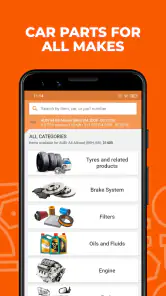
First things first, let's talk about the app's user interface. It's sleek, intuitive, and most importantly, user-friendly. The moment you open AUTODOC, you're greeted with a clean layout that's easy to navigate. Even if you're not a tech wizard, you'll find it pretty straightforward to search for the parts you need. Whether you're looking for brake pads, filters, or spark plugs, AUTODOC makes it as simple as pie.
Vast Selection at Your Fingertips
One of the things I love most about AUTODOC is its extensive catalog. The app boasts a colossal range of over a million products. Yes, you read that right! A million! From renowned brands to budget-friendly options, they have it all. You can filter your search by brand, price, or even specific car models. It's like having a personal car parts warehouse right in your pocket.
A realistic first order
Imagine noticing that your cabin filter needs replacing before a routine service. Rather than buying the first result, I’d use the vehicle details to narrow the search, compare the listed choices, and confirm the part against the existing filter or the service recommendation. I’d also put all items needed for the same job in one planned basket, then review the selection again before checkout. That workflow helps prevent a common mistake: ordering a plausible-looking part that belongs to a different engine or model variant.
More From Our News Desk

Weather by Xiaomi Review: Clear at a Glance, Less Clear Up Close

X Under Pressure: Can It Recover When Posting Goes Wrong?

Clash of Clans Is Won Between the Battles

Android Auto Makes the Case for Quieter Car Software

MobiOffice: Transforming Mobile Productivity with Seamless Integration

EA SPORTS FC™ Mobile Soccer: Redefining Mobile Sports Gaming
Easy Peasy Shopping Experience
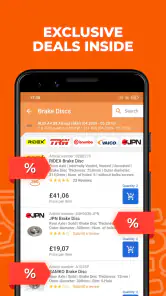
The buying process on the AUTODOC app is as smooth as butter. Once you've picked out your desired parts, adding them to your cart is a breeze. The app supports multiple payment methods, ensuring a hassle-free checkout experience. Plus, they often have discounts and special offers, so keep an eye out for those!
Bonuses, bargains, and the real comparison
Daily bonuses are part of the app’s appeal, but I wouldn’t let a promotion decide which component to buy. Compatibility and the suitability of the part should come first; a lower-cost option is only useful if it is right for the job. Compared with searching general online marketplaces, AUTODOC keeps the experience focused on car parts and vehicle-specific browsing. A local parts counter may still be better when you need someone to inspect a sample, answer a technical question face to face, or help urgently. The app is more convenient for researching choices at home, especially when you already know what repair you’re planning.
Delivery and Customer Support
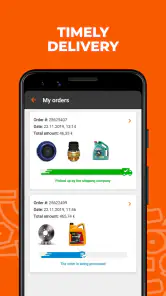
Now, let's chat about delivery. AUTODOC offers fast and reliable shipping options. Depending on your location, you can expect your parts to arrive within a few days. The app also keeps you updated with tracking information, so you're never left in the dark. And if you ever hit a snag or have questions, their customer support is just a tap away. The support team is responsive and genuinely helpful, which is always a big plus in my book.
Where I’d pause before checkout
Parts shopping can be unforgiving when vehicle details are incomplete, and a large selection can make near-matches look convincing. If you aren’t sure which component has failed, the app cannot replace a diagnosis; I’d ask a mechanic before choosing between parts that address different problems. Likewise, if the repair is time-sensitive, a nearby supplier may be the safer choice than waiting for an online order. AUTODOC suits people who can identify the job and are comfortable comparing listings; it is less suitable when you need immediate hands-on guidance or don’t know what needs replacing.
Build confidence one purchase at a time
My advice for a first order is to begin with a familiar, clearly identified maintenance item rather than a complicated repair. Check the vehicle details, compare the exact specifications, and review the basket before paying. The app is free, rated for Everyone, and its current version is 3.7.0, with support for Android 7.1 and later. Those basics make it easy to try, but careful part identification remains the key to a successful purchase.
A calmer way to handle a repair list
For a planned service, I find it useful to treat the app as a place to assemble and check a repair list, not as a reason to buy every item that appears alongside the one I searched for. If a mechanic has given you a written list, compare each named part against your vehicle details and keep the list nearby while browsing. This makes it easier to spot when two similar names refer to different components, and helps avoid adding an extra item simply because it looks relevant.
There is also a practical distinction between knowing what you need and knowing what has gone wrong. If your car has a symptom but no diagnosis, searching that symptom can lead you toward parts that may not solve the problem. I’d use AUTODOC after a clear recommendation from a repair manual or professional, rather than letting search results determine the diagnosis. That boundary makes the app more useful: it can help with the shopping decision without pretending that choosing a part is the same as fixing a fault.
Useful checks for less familiar parts
For an unfamiliar item, I’d compare more than its name and price. Check whether the listing’s description corresponds to the part you intend to replace, then cross-check any visible identification on the old component or the documentation for the vehicle. If the wording still leaves room for doubt, stop and ask someone qualified before ordering. This is a slower route than tapping the first plausible result, but it is sensible when a mistaken purchase could delay a repair or create a safety concern.
Buying a set of related items deserves the same care. A search for one maintenance job may show several options, but that does not automatically mean they are all needed together or suitable for the same vehicle configuration. I’d separate “required for this repair” from “worth considering later,” then review the basket with that distinction in mind. It keeps the order focused and makes the final check less overwhelming, especially if you are comparing parts for more than one task.
When online browsing beats the counter
The app’s strongest fit is a driver who can plan ahead, knows the vehicle, and wants to compare car-part options without beginning at a general shopping site. Browsing at home gives you room to check a part number, compare alternatives, and revisit the list before committing. That can be more comfortable than trying to make a quick decision at a counter, particularly when you already have the exact item identified and do not need urgent advice.
On the other hand, an in-person supplier has a real advantage when you can bring the old component along and need help matching it, or when the vehicle cannot wait for an online order. A mechanic is the better starting point if you have not established what is wrong. I would not choose an online parts catalogue simply because it offers many results; the best channel depends on whether your main problem is finding a product, diagnosing a fault, or getting a replacement immediately.
Keep price and convenience in perspective
Daily bonuses and offers may make it tempting to focus on savings, but a discount has little value if the part is incorrect or unsuitable. I’d decide what specification the repair requires first, then compare options within that requirement. That approach also makes it easier to judge whether a cheaper alternative is genuinely comparable or merely looks similar in a short search result. For parts where a small difference matters, asking a professional is a better use of time than relying on a bargain alone.
Convenience also depends on timing. Online ordering is naturally easier when a repair is planned and you can wait for the item to arrive. If your car is already off the road, or you need to finish a job on the same day, check local availability rather than assuming that an online choice will solve the immediate problem. I’d use AUTODOC to prepare and compare in advance, and keep a nearby supplier in mind for situations where speed matters more than browsing choice.
Who will get the most from it
I’d recommend AUTODOC to owners who do routine maintenance themselves, people who already have a mechanic’s parts list, and drivers who want to compare options for a known repair. It can also help a first-time buyer learn how much care vehicle-specific shopping requires: entering the right details and checking each item is part of the task, not an optional extra. Starting with a straightforward maintenance replacement is a sensible way to become familiar with the process before tackling a more involved order.
I’d be more cautious if you are new to cars and only know that something sounds or feels wrong. In that situation, choosing between listings is not the first step; get a diagnosis and then use the app to research the named component. I’d also skip online ordering when a repair is urgent, or when you cannot resolve a fit question from the information you have. Those are not failures of the app; they are cases where a different kind of help is more useful.
Finish with a deliberate basket review
Before placing an order, I’d pause on the basket and check each item against the same vehicle and repair plan. Confirm that no part was carried over from an unrelated search, that the selected option matches the details you checked, and that you have not mistaken an optional extra for something required. If another person identified the parts, compare the basket with their list rather than relying on memory. This last pass is a simple safeguard against the small, easy-to-miss errors that can undo careful browsing.
It is also worth keeping your reasoning clear: note which part number or vehicle detail led you to a choice, and retain the service recommendation or old-part information you used to check it. If you later need to ask a mechanic or parts specialist about the selection, that context makes the question easier to answer. I would rather spend a little time confirming the match than treat a completed basket as proof that every item is right.
In conclusion, if you're in the market for car parts, AUTODOC is a fantastic choice. It simplifies the entire process, from browsing to purchasing, and delivers a stellar user experience. Whether you're a seasoned car enthusiast or someone who's just starting to learn the ropes, this app is bound to make your life a whole lot easier. So go ahead, give AUTODOC: buy car parts online a try and never look back!
AUTODOC: buy car parts online Frequently Asked Questions
What should I check before ordering a car part in AUTODOC?
Before ordering, make sure the vehicle details you enter match your car and that the product description corresponds to the part you need. AUTODOC’s catalog covers parts for many car brands, but similar-looking parts can have different specifications. Reviewing the listing carefully before checkout can help you avoid choosing an item that is not suitable for your vehicle.
Can I use AUTODOC to find parts for different car brands?
AUTODOC is intended for shopping for car parts across a range of car brands, making it useful if you are looking for a replacement part for a particular vehicle. You can browse or search the catalog and compare relevant product details. As with any parts order, check that the selected item matches your vehicle before placing it in your cart.
Is AUTODOC free to download, and what devices can run it?
AUTODOC is free to download and is designed for Android and iOS devices. On Android, it requires version 7.1 or later. The app is rated Everyone, so its content is intended for a broad audience. Before downloading, check that your phone’s operating system meets the requirement and that you have enough space for an online shopping app.
What is AUTODOC and how does it work?
AUTODOC is an online platform that allows users to purchase car parts conveniently from their mobile devices. The app provides a comprehensive catalog of car parts for a wide range of vehicle makes and models. Users can search for specific parts, compare prices, read detailed descriptions, and place orders directly through the app. AUTODOC also offers various payment options and delivery services to make the buying process seamless.
Is AUTODOC available for both Android and iOS devices?
Yes, AUTODOC is available for download on both Android and iOS devices. Users can find the app on the Google Play Store for Android devices and the Apple App Store for iOS devices. The app is designed to be user-friendly and compatible with a wide range of smartphones and tablets, ensuring accessibility for most users.
Pros
- Wide variety of car parts available.
- User-friendly interface for easy navigation.
- Competitive pricing with regular discounts.
- Quick delivery and reliable service.
- Detailed product descriptions and reviews.
Cons
- Limited customer support hours.
- Some parts may not be in stock.
- App can be slow at times.
- Occasional discrepancies in product images.
- No installation services offered.
- Category
- Auto & Vehicles
- Version
- 3.7.0