AutoScout24: Buy & sell cars
- 447.00
- 4.6
- Installs
- 50.00M
- Price
- Free

Screenshots


Analysis by Reviewed
I find AutoScout24: Buy & Sell Cars most useful when I treat it as a way to build a shortlist, not as a shortcut around the work of buying a vehicle. Its central strength is the breadth of its marketplace: I can look across cars, vans, and motorcycles, then use that range to see which options deserve a closer look. That matters when my needs are clear but the right make, model, or seller is not.
Why a wide marketplace can help
AutoScout24 is a free vehicle-marketplace app from AutoScout24 GmbH, in the Auto & Vehicles category. Its scale is a practical advantage if I want to compare different kinds of listings without beginning over on a separate site for each seller. A broad selection can help me spot alternatives I might not have searched for by name, especially when I am open to more than one model.
That breadth does not make every result equally useful. A listing can look promising while still being a poor fit once I consider its location, condition, or the questions I need answered. I use the marketplace to find candidates and compare what sellers say; I still expect to verify details directly and see the vehicle before deciding.
Finding Your Dream Car Made Easy
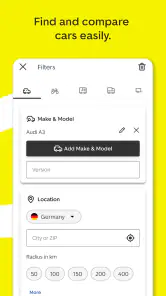
One of the first things that struck me about AutoScout24 is just how user-friendly it is. The interface is clean, intuitive, and doesn’t overwhelm you with too many options at once. You can search for cars based on a variety of filters like make, model, price range, and even mileage. It’s like having your own personal car marketplace in your pocket. Plus, the app’s search feature is downright speedy, which is perfect for those of us who value our time.
A practical way to use those filters is to begin broadly, then narrow the results only after you see what the market offers. If I set a strict model and mileage limit too early, I can miss a nearby alternative that fits my actual needs better. I would compare several listings against the same priorities—such as budget, vehicle type, and distance—rather than letting one appealing photo set the standard.
Turning a search into a useful shortlist
For me, the strongest workflow is to decide what is essential before opening the results: the kind of vehicle I need, a realistic budget, and the compromises I can accept. I then use the filters to reduce the noise, but leave room for alternatives where it makes sense. Someone shopping for a practical van, for example, may care more about suitability and price than a particular badge; a buyer set on one model may reasonably search more narrowly.
When several listings appear close on paper, I compare them using the same questions rather than relying on whichever description sounds most persuasive. Are the details clear? Do the photos show enough to know what I would want to inspect? Is the seller easy to contact? This simple comparison makes the shortlist more useful and helps me avoid confusing a polished presentation with a better vehicle.
More From Our News Desk

Weather by Xiaomi Review: Clear at a Glance, Less Clear Up Close

X Under Pressure: Can It Recover When Posting Goes Wrong?

Clash of Clans Is Won Between the Battles

Android Auto Makes the Case for Quieter Car Software

MobiOffice: Transforming Mobile Productivity with Seamless Integration

EA SPORTS FC™ Mobile Soccer: Redefining Mobile Sports Gaming
If I am choosing between a private seller and a dealer, I would not assume one is automatically the safer or better choice. I would use the listing and any available seller feedback as starting points, then ask the questions that matter for that specific vehicle. The app can bring options together, but it cannot remove the need to judge the answers and arrange appropriate checks.
Detailed Listings and Useful Features
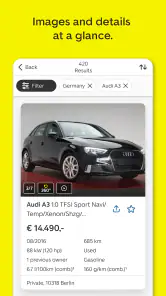
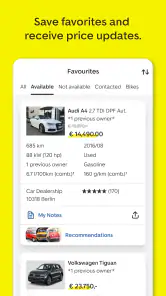
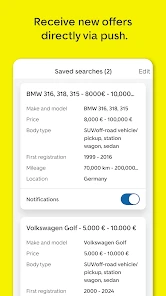
Once you dive into a car’s listing, you get all the juicy details you need. We're talking high-quality photos, comprehensive descriptions, and even a history check option for those who want to dig deeper. It’s this attention to detail that really sets the app apart. I also appreciated the “save search” feature which lets you bookmark your criteria and receive notifications when a car that matches your dream ride pops up.
Saved searches are especially handy when I am browsing over several days rather than making a decision in one sitting. I can keep the criteria consistent and revisit new matches instead of repeating the same search from scratch. My tip is to save a practical search as well as an ideal one: a slightly wider set of requirements can reveal options worth considering without replacing the focused shortlist.
Make follow-up checks part of the process
A listing’s photos and description are useful for deciding whether a conversation is worthwhile, but they are not a substitute for seeing the vehicle. I treat a history check option as one possible source of context rather than a complete assessment. Before travelling to view a car, I would ask the seller to clarify anything that seems incomplete or inconsistent, then check that the answers match what I see in person.
It is also worth keeping a short comparison note outside the browsing session: the asking price, the details that matter to me, and the questions still open. That way, if I return to several saved results later, I am less likely to mix up sellers or forget why one listing made the shortlist. This is particularly helpful when a search is spread across days and new matches arrive alongside earlier ones.
Notifications from a saved search can bring fresh candidates to my attention, but I would not let them create pressure to act without checking. A match means that a listing fits the criteria I chose; it does not mean it is the best available choice or that its information has been independently verified. I use alerts as a prompt to review, not as a reason to skip the usual questions.
Contacting sellers without rushing a decision
Let’s be real, buying a car isn’t just about finding the right one; it’s also about getting the best deal. AutoScout24 makes it easy to contact sellers directly through the app. You can send messages, set up test drives, and even negotiate prices without ever leaving the app. It’s a hassle-free way to ensure you’re getting the most bang for your buck.
I find direct contact most useful when I prepare a few specific questions before messaging: whether the vehicle is still available, what I should check in person, and when a viewing might work. That keeps the exchange focused and helps me compare sellers fairly. I would still confirm important details directly and arrange any inspection or test drive before committing; messaging is a convenient first step, not a substitute for doing the checks yourself.
When I am considering more than one vehicle, I try to ask comparable questions of each seller. It is easier to weigh the answers when I have not asked one person about condition and another only about availability. I would also avoid treating a quick reply as proof that a vehicle is a good deal: communication helps me decide whether to take the next step, while the viewing and checks remain essential.
Trust and Safety are key when buying a vehicle, and AutoScout24 doesn’t skimp on these. The app includes features like dealer reviews and ratings, helping you to make informed decisions. It’s like having a buddy who knows the ins and outs of car buying right there with you, ensuring you don’t end up with a lemon.
In an everyday search, I might check a few listings during a lunch break, save the strongest matches, and return later when I can compare the descriptions calmly. That workflow is more useful than trying to make a snap decision on the move. I would also use dealer feedback as one signal among several: it can inform my choice of whom to contact, but it cannot tell me the condition of a particular car.
Where the marketplace fits—and where it does not
Compared with checking one dealership’s own inventory, a marketplace is useful when I want to see offers from different sellers and keep a wider shortlist in view. It can also be more convenient than checking separate classified-ad pages one at a time. On the other hand, a local listing service may suit someone whose search is tightly limited to one small area or who prefers a narrower set of offers.
The trade-off is that a large choice takes effort to manage. Search filters and saved criteria help, but they do not make the comparison decision for me. If I already know which local seller I want to visit, or I need a vehicle immediately and do not have time to compare, going directly to that seller may be more efficient than browsing a broad marketplace.
For a buyer who is flexible, the range can be valuable: I can compare a few vehicle types or models before deciding which one best fits my everyday needs. For someone who wants a very particular vehicle, the app is still useful as a discovery tool, but a narrow search can return fewer suitable results, and I may need patience rather than a quick conclusion. Either way, I would judge the result by the quality of the individual listing and the follow-up, not by the number of options on screen.
Who gets the most from it
If you’re someone who loves cars or simply needs a reliable way to buy or sell them, this app is a must-have. It’s comprehensive yet easy to use, making the car-buying process as stress-free as possible. Whether you’re a first-time buyer or a seasoned car enthusiast, AutoScout24 is designed to cater to your needs.
The app is also relevant to sellers who want to put a vehicle in front of people already browsing for their next purchase, while buyers get a central place to explore different types of vehicles. Still, I would skip it if I only want a quick, guaranteed purchase with no comparison or follow-up: browsing listings, contacting sellers, and checking a vehicle take time, and the app cannot make those decisions on my behalf.
It is a particularly good fit for someone who wants to compare several candidates over time, whether that means weighing different models or checking new listings against a saved search. A first-time buyer may appreciate having multiple offers to examine before contacting anyone, while an experienced shopper can use the same process to keep a search organized. Sellers may find the marketplace relevant when they want to reach people actively browsing vehicles, though posting a listing does not guarantee a quick sale.
I would be less enthusiastic about using it as my only source if I needed expert mechanical advice or a vehicle assessment. A marketplace can help me find and contact a seller, but that is different from an independent inspection. If I am uncertain about a vehicle’s condition, I would make room in my process for a qualified check rather than asking the app to answer a question it is not designed to settle.
Availability and the final decision
AutoScout24 is rated 4.6 on average, with around 632,000 ratings and more than 50 million installs. It is free to download, is rated for Everyone, and its current version is 25.48.9; optional in-app purchases are available. It was released on April 7, 2015, and requires Android 9 or later on Android devices. Those details make it easy to try, while the large audience suggests it has become a familiar place for vehicle searches.
For an everyday example, imagine I am replacing a car but have not settled on a specific model. I could start with my budget and the type of vehicle I need, look through the results, then save both a focused search and a more flexible one. When a promising listing appears, I would compare its details with other candidates, message the seller with direct questions, and arrange a viewing if the answers make sense. That sequence turns browsing into a considered decision rather than an impulse driven by one attractive listing.
All in all, using AutoScout24 was a refreshingly simple experience in what can often be a complicated and stressful process. It’s like having your own personal car buying assistant, ready to help you find that perfect ride. So if you’re in the market for a new car, give this app a spin. You might just find your dream car waiting for you.
AutoScout24: Buy & sell cars Frequently Asked Questions
Can I compare vehicles from different sellers in one app?
Yes. AutoScout24 brings vehicle listings together so you can browse options from different sellers in one place instead of checking each seller separately. You can explore the vehicles available and use the app to compare the choices that matter to you, such as vehicle type and listing details, before deciding which seller to contact.
Is AutoScout24 only for people who already know which vehicle they want?
No. The app can also help if you are still exploring your options. You can browse new and used cars, vans, or motorcycles, then narrow your search to the type of vehicle that suits your needs. This makes it useful both for shoppers with a specific model in mind and for people who want to compare different kinds of vehicles before making a decision.
What kinds of vehicles can I find on AutoScout24?
AutoScout24 is designed for people looking for more than just a passenger car: its listings include new and used cars, vans, and motorcycles. That makes it useful if you are comparing different types of vehicles in one place. You can explore the available listings and narrow your search to the kind of vehicle that suits your needs.
Is AutoScout24 free to download, and are there in-app purchases?
The app is free to download, so you can install it and browse without an upfront purchase. AutoScout24 also offers in-app purchases, with prices ranging from $8.49 to $34.99 per item. These purchases are separate from the download itself, so check the purchase details shown in the app before choosing an optional item.
What features does AutoScout24 offer to help me buy or sell a car?
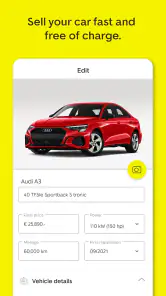
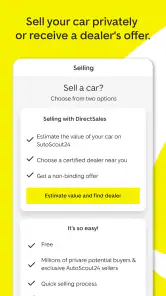
AutoScout24 provides a comprehensive platform for both buying and selling cars. For buyers, it offers advanced search filters, detailed vehicle descriptions, high-quality images, and the ability to contact sellers directly. Sellers can list their vehicles easily, reach a wide audience, and access valuation tools to price their cars competitively.
Pros
- Wide selection of vehicles
- User-friendly interface
- Comprehensive car details
- Advanced search filters
- Secure transaction options
Cons
- Limited customer support
- Occasional app crashes
- No financing options
- Region-specific listings
- Ads can be intrusive
- Category
- Auto & Vehicles
- Version
- 25.48.9