Android Auto
- 484.05K
- 4.1
- Installs
- 10.00B
- Price
- Free

Screenshots
Analysis by Reviewed
I judge Android Auto less by how many things it can put on a dashboard and more by whether it makes a familiar drive feel simpler without tempting me to handle my phone. At its best, it does exactly that: directions, audio and basic messaging are easier to reach in a car that supports the system. But the experience depends on the vehicle and on keeping expectations modest; this is a useful driving interface, not a guarantee that every phone task belongs on the road.
That convenience is the central reason I’d recommend this free driving app, though it works best when your car and phone cooperate. Made by Google LLC, it has a 4.1 average from around six million ratings and more than ten billion installs. It is rated for Everyone and has been available since March 19, 2015. Those figures suggest a familiar tool, but they don’t guarantee that every dashboard offers the same experience.
How it fits into a real drive
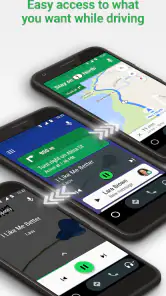
What I absolutely love about Android Auto is its seamless integration with your car’s infotainment system. Once you plug your phone in, the app takes charge, transforming your car's screen into a simplified interface that's easy to navigate. It's like your phone and car had a baby, and it's glorious!
The Latest on Android Auto
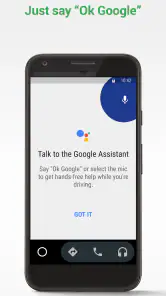
You get access to all the essentials without taking your eyes off the road - maps, music, and even messages. The voice command is the real MVP here; just say "Hey Google" and you can ask for directions to the nearest coffee shop, play your favorite tunes, or send a quick text. It feels like you’re having a conversation with your car, and it's surprisingly responsive.
Navigation Made Easy
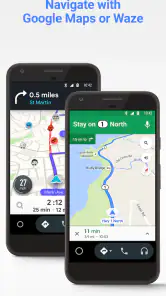
Let’s talk about navigation. Google Maps on Android Auto is like having a GPS that actually listens to you. It provides real-time updates, alternative routes to avoid traffic, and even points out fuel stations and restaurants along the way. I’ve used it to travel to unfamiliar places, and it’s been a lifesaver. Plus, the large buttons and clear display make it super easy to follow directions without squinting at the screen.
A useful habit is to let one person handle the destination before the car moves, especially when travelling with family or friends. A passenger can compare possible stops or check a street name while the driver stays focused; if I’m alone, I do that planning while parked. This division of effort makes the interface more valuable than simply putting a map on a larger screen.
For a routine trip, I find it useful to set the destination before pulling away, then rely on spoken directions rather than trying to adjust the route once moving. Voice input is helpful when plans change, but a noisy cabin or an unclear place name can make a spoken request less dependable than a quick check while parked. I’d rather take a moment to stop safely than keep repeating a command.
More From Our News Desk

Weather by Xiaomi Review: Clear at a Glance, Less Clear Up Close

X Under Pressure: Can It Recover When Posting Goes Wrong?

Clash of Clans Is Won Between the Battles

MobiOffice: Transforming Mobile Productivity with Seamless Integration

EA SPORTS FC™ Mobile Soccer: Redefining Mobile Sports Gaming

How Microsoft OneDrive Became a Mobile Productivity Giant
One practical trade-off is that the dashboard display is not a replacement for every function of a phone navigation app. If I need to inspect a complicated route or make a more careful choice between destinations, I prefer to do that before setting off. During the drive, the larger controls and audio guidance are the stronger fit; at the curb, the phone can be easier for detailed planning.
Entertainment without endless browsing
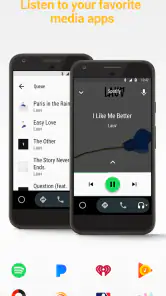
No road trip is complete without some tunes, and Android Auto has you covered. Whether you're into Spotify, Pandora, or just streaming from your library, the app lets you control everything with just your voice. I found it incredibly convenient to switch playlists or podcasts without needing to touch my phone. It's these little conveniences that make long drives much more enjoyable.
There’s a small planning trick I find worthwhile on longer journeys: choose something with enough variety before leaving, rather than expecting to browse for the perfect album at every stoplight. If a podcast episode ends or a playlist is no longer the mood, a brief voice request can be less distracting than searching through a catalogue. When I want to make a considered choice, I wait until I’m parked.
For a weekday commute, I’d queue a playlist or podcast before leaving and use voice controls to change what’s playing later. That small bit of preparation matters: browsing through options is precisely the sort of distraction the simplified screen is meant to reduce. If you mainly want a phone mounted on the dash for entertainment, your usual apps may feel more flexible, but they do not provide the same unified car-screen experience.
Audio is also where expectations need to stay realistic. The app brings compatible media controls into the driving interface; it does not make every service or every action equally convenient. I’d choose a familiar player and keep the session simple rather than assume I can comfortably explore a large library while on the road.
Messaging with sensible boundaries
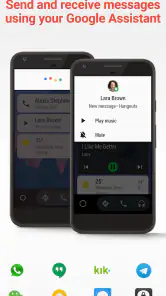
One of the best features is staying connected without being distracted. Your messages pop up as notifications and you can have them read out loud. Replying is just as easy, thanks to voice-to-text. It's like having a personal assistant who won’t let you miss anything important, all while keeping your hands firmly on the wheel.
For an everyday example, imagine leaving work and getting a message about a change to the evening plan. Hearing it read aloud may be enough to understand the change; if the answer needs an address, a time, or careful wording, I’d wait until I’d stopped. That distinction is more useful than treating hands-free access as permission to carry on a conversation while driving.
I still treat incoming messages as optional, not urgent. Hearing a notification can be useful, but it can also pull attention away from traffic, and voice recognition may not catch names or wording perfectly. I use spoken replies for short, straightforward messages and leave anything complicated until I’ve parked. The hands-free approach reduces the temptation to pick up the phone; it doesn’t remove the need to make a safe choice about when to respond.
This is why Android Auto suits drivers who already use a compatible car display and want navigation, audio and basic messaging gathered in one place. It is less compelling if your vehicle cannot use its dashboard interface, if you prefer handling every task directly on a phone, or if you want a setup that encourages frequent interaction. Compared with switching among separate phone apps, its main advantage is a more driving-oriented presentation; the separate apps can still be preferable when you are parked and want more detailed controls.
Where the convenience has limits
The biggest practical question is whether the car you drive supports the experience you want. A polished interface is only helpful if it works comfortably with your vehicle’s display and audio. I’d connect the phone while parked before depending on it for an unfamiliar trip, then check that directions can be heard clearly and that voice input is usable from the driver’s seat. This quick trial also gives you a chance to learn the layout without traffic demanding your attention.
It is also worth thinking about how you normally use your phone. If you rely on detailed map views, frequently compare several possible stops, or like to browse media until you find something specific, the simplified driving screen may feel restrictive. That is not necessarily a flaw: limiting choices is part of what makes the setup more appropriate for a moving car. Still, someone who wants unrestricted access to a phone’s full interface may prefer a mounted phone for parked use, while keeping it untouched once driving.
Another trade-off is that voice control works best when the request is short and clear. Road noise, passengers talking, or an unfamiliar name can turn a simple instruction into a frustrating exchange. I don’t keep repeating the same request while moving; I wait until the car is stopped or ask a passenger to help. The system is most helpful as a way to reduce routine taps, not as a substitute for judgement when it misunderstands.
Who will get the most from it
I’d recommend trying it if you spend time commuting or driving to unfamiliar places, your car has a compatible display, and you want maps, audio and basic messages in one driving-oriented arrangement. It is especially convenient for people who already use Google’s navigation and voice features, because the routine can feel familiar rather than requiring a new set of habits. It can also make a shared drive easier when a passenger can choose a destination or manage audio while the driver concentrates on the road.
I would not make it the first choice for someone whose vehicle cannot use the dashboard interface, or for a driver who would rather keep all controls on a phone and rarely needs in-car integration. A basic phone mount can be enough for occasional navigation, and it may offer a more direct view of the phone’s usual map controls while parked. If your main concern is avoiding distraction, neither setup makes it sensible to read or compose messages in traffic; delaying the task remains the better option.
As an app in the Auto & Vehicles category, Android Auto occupies a different role from a stand-alone map or music player. Those apps may give you more direct control over their own features, but moving among them can mean more screen changes and more temptation to interact. This app’s advantage is the shared car interface, not replacing every individual app or making every function easier in every situation.
In conclusion, Android Auto is not just an app; it's an experience that transforms your driving into something smarter and safer. It’s designed with the driver in mind, making sure you get where you need to go without a hitch. If you have a compatible car and haven’t tried it yet, I highly recommend giving it a spin. Trust me, once you’ve driven with Android Auto, there’s no going back to the old ways.
A sensible fit for everyday driving
My recommendation is more measured than “no going back”: it depends on the car, the phone, and how you drive. Android Auto is most useful when you want directions, familiar audio and essential messages accessible through the car’s screen, without handling the phone. Before relying on it for a long journey, I’d connect it while parked and check that the display, sound and voice input behave as expected in that vehicle.
If you’re choosing between this and simply using a phone holder, ask what you need most. A mounted phone can be enough for occasional navigation and may suit someone who wants direct access to mobile apps. Android Auto is the better match for a supported car interface and a more focused in-car layout. Either way, I would set up destinations and media before driving, and pull over whenever a task needs more attention than a brief voice command.
Overall, I see it as a practical companion rather than a magic fix for distracted driving. Its strongest value is bringing common driving tasks together in a readable, voice-friendly arrangement; its limitations show up when compatibility, speech recognition or a need for detailed controls gets in the way. If that balance fits your daily routes, it is well worth trying. If not, a simpler navigation setup—or waiting until you are parked to use your phone—may be the wiser choice.
Android Auto Frequently Asked Questions
Can Android Auto run on a tablet, or is it intended for phones?
Android Auto is designed to connect an Android phone with a compatible vehicle system, bringing supported maps, media and messaging to the car’s display. It is not a general-purpose dashboard app for any screen, so a tablet should not be assumed to work as a substitute for a compatible phone-and-car setup. Check your device and vehicle compatibility before downloading.
Will Android Auto use my phone’s data plan?
Android Auto connects in-car features with services on your phone, and online functions may use your phone’s mobile data. Navigation, media and messaging can rely on different services, so data use depends on what you access and how those services work. If you are concerned about data consumption, review the settings of the relevant phone apps before a drive and prepare what you can in advance.
Can passengers use Android Auto while the car is moving?
Passengers can help with supported features through the vehicle’s system, depending on the car and setup. Android Auto is intended for an in-car driving environment, but that does not make every interaction appropriate for the driver while the vehicle is moving. It is best to set up the connection and destination before departure, and let a passenger assist when needed so the driver can focus on the road.
Can Android Auto play music and other media in the car?
Yes. Media is one of the main types of features Android Auto brings together for use while driving, alongside maps and messaging. The specific options depend on the compatible apps available on your phone and vehicle system. Set up or select your preferred media while parked when possible, and use voice interaction or the car’s controls rather than handling your phone on the road.
Does Android Auto work with every navigation, music, or messaging app?
No. Android Auto presents supported apps and features through a compatible vehicle system, rather than making every app on your phone available on the car display. What you can access depends on the apps and services that support in-car use and on your setup. Before a trip, check that the navigation, media or messaging options you want are available, and avoid browsing your phone while driving.
Pros
- Seamless integration with car systems.
- Supports a wide range of apps.
- Voice command enhances safety.
- Regular updates improve features.
- Customizable interface.
Cons
- Limited app compatibility.
- Requires Android device.
- Can be distracting while driving.
- Connectivity issues reported.
- Not all vehicles are supported.
- Category
- Auto & Vehicles
- Version
- Varies with device