Infocar - OBD2 ELM Scanner
- 227.00
- 3.7
- Installs
- 5.00M
- Price
- Free

Screenshots
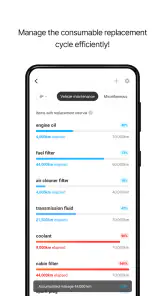
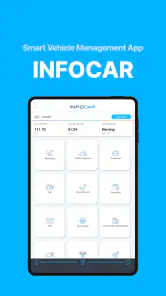
Analysis by Reviewed
I like having a clearer idea of what my car is doing before I decide whether a warning light calls for a quick check or a trip to the workshop. That’s the appeal of Infocar - OBD2 ELM Scanner: it turns information from a car’s diagnostic system into something I can check on a phone. It’s an Auto & Vehicles app from Infocar Co., Ltd., and I’d treat it as a practical companion for curious drivers, not a replacement for a mechanic.
What to check before you install it
The app is free to download, though it includes in-app purchases, with items ranging from $2.99 to $94.99. It has an Everyone age rating, a 3.7 average from around 24,000 ratings, and over 5 million installs. It was released in September 2018, and version 2.27.10 requires Android 7.0 or later.
The main decision is whether you already have, or are willing to get, a compatible OBD2 adapter. Infocar reads vehicle information through an adapter plugged into the car’s OBD2 port, so the app alone won’t provide a connection. Before relying on it, check that your vehicle and adapter work with the setup. If you want a tool that works immediately without extra hardware, a general car-maintenance app may suit you better.
I’d also decide what question I want the app to answer before connecting anything. “What code is showing?” is a useful starting point; “Which exact part should I replace?” is not a safe conclusion from a code alone. That distinction matters because an OBD2 reader can make information easier to access without removing the need to interpret it in the context of the car’s symptoms and service history.
Where the app earns its place
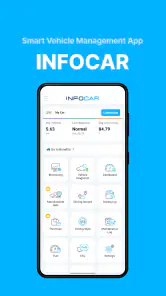
First off, Infocar - OBD2 ELM Scanner is incredibly user-friendly. I mean, I’m no car expert, but I found it super easy to navigate. The app connects seamlessly to your car’s OBD2 port using an ELM327 adapter. If you don’t know what that is—don’t worry! It’s basically a small device you plug into your car to get all the diagnostic data. The app then reads this data and translates it into something we can all understand.
Its strongest use is helping me ask better questions, rather than pretending to diagnose every fault myself. A reading or fault code can point toward an area that needs attention, but it isn’t a repair instruction or proof of one specific failed part. I’d note what the app reports and describe the symptoms to a mechanic instead of buying parts based on a code alone.
A practical advantage is that I can prepare for a conversation before I’m standing at the service desk trying to remember what happened. I’d write down whether the warning appeared once or repeatedly, whether the car felt different, and what the app showed. Those details help keep the code in perspective; the same warning can mean more than one thing, and the driving symptoms provide important context.
More From Our News Desk

Weather by Xiaomi Review: Clear at a Glance, Less Clear Up Close

X Under Pressure: Can It Recover When Posting Goes Wrong?

Clash of Clans Is Won Between the Battles

Android Auto Makes the Case for Quieter Car Software

MobiOffice: Transforming Mobile Productivity with Seamless Integration

EA SPORTS FC™ Mobile Soccer: Redefining Mobile Sports Gaming
Live readings are most useful with a purpose
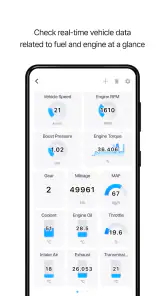
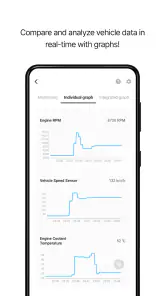
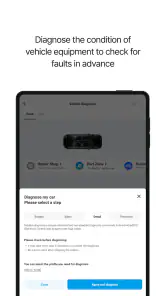
One of the coolest features is the real-time diagnostics. The app provides live data on your vehicle’s performance, like speed, RPM, and engine load. It’s like having a front-row seat to your car’s inner workings. Plus, it alerts you to any potential issues before they become serious problems. How handy is that?
For an everyday check, I’d look at live readings while parked, or ask a passenger to handle the phone during a drive. That keeps attention where it belongs: on the road. A useful, less obvious approach is to compare readings under similar conditions rather than treating one number as a verdict. Changes between comparable trips can give context, while a single reading may simply reflect how the car was being driven at that moment.
This is also where I’d keep expectations modest. Live figures are most valuable when I have a reason to check them, such as noticing a change in how the engine behaves, rather than scrolling through values without knowing what normal looks like for my vehicle. If a number seems surprising, I’d verify the conditions and look for a pattern before treating it as evidence of a fault. The app can make data visible; it cannot decide on its own whether a reading is harmless or urgent.
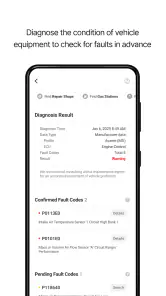
The app can also clear fault codes, which is handy after a problem has been investigated or repaired. I wouldn’t clear a warning just to make it disappear: doing so can erase useful diagnostic context without fixing the cause. If a warning returns, or the car feels unsafe, I’d stop relying on an app check and get qualified help.
My preferred order would be to record the code and any symptoms first, then decide whether clearing it is appropriate after a repair or professional advice. That small habit avoids losing a clue that could help explain an intermittent problem. It also prevents the common mistake of treating a dashboard light going out as proof that the underlying issue has been solved.
Fuel insights and reports in a real routine
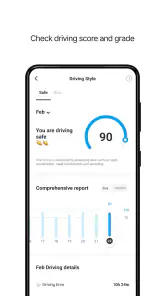
Another awesome thing? Fuel efficiency insights. With gas prices these days, who doesn’t want to save a buck or two? The app analyzes your driving habits and offers tips on how you can get more miles per gallon. It’s like having a personal driving coach, minus the backseat driving!
I’d use those insights as a prompt for a small experiment: keep the route and driving style broadly similar, then see whether a gentler approach makes a noticeable difference. That’s more useful than judging fuel use from one unusual journey, where traffic, weather, or a different route can skew the comparison. The trade-off is that any advice is only as helpful as the information your car and adapter can provide.
For example, on a regular commute I’d avoid changing several things at once. If I try smoother acceleration, I’d keep the route and usual timing in mind, then compare the general pattern rather than expecting an exact prediction. The point is not to turn every drive into a test; it’s to see whether a suggestion fits my routine and is worth keeping. If the feedback feels too broad to act on, I would not let it distract me from more direct maintenance needs.
Infocar doesn’t just stop at diagnostics, though. It generates detailed reports that you can review later or share with your mechanic. This feature is a lifesaver if you’re like me and tend to forget things the moment you leave the car.
And let me just say, the detailed reports have helped me understand my car’s needs better than ever. I can now go into the workshop sounding like I know what I’m talking about, and not just nodding along to whatever the mechanic says.
A realistic time to use that report is before a service appointment: review what the app recorded, write down when a warning appeared, and bring the notes along. That gives the conversation a useful starting point without asking the mechanic to accept a phone reading as a complete diagnosis. If you prefer to keep car records in one place, also consider whether you’ll actually revisit the reports; a tool you only open once may not justify the adapter and setup.
There’s a small but important difference between sharing a report and asking someone else to interpret the whole situation from it. I’d explain what the car was doing when the reading appeared, whether anything changed afterward, and whether a repair has already been made. That turns the report into supporting context instead of a substitute for a proper inspection, which is the most sensible way to get value from it.
When another approach makes more sense
Compared with basic maintenance-log apps, Infocar is better suited to someone who wants diagnostic information from the car itself. Compared with a dedicated workshop scan, it’s a more approachable way to inspect available readings, but it shouldn’t be treated as an equivalent professional service. Drivers who only need reminders for routine maintenance may find a simpler tracker easier, while anyone dealing with a serious fault should prioritize a mechanic’s assessment.
There is some setup friction: you need the adapter, a working connection, and a vehicle that exposes useful information to the app. Compatibility and the amount of readable data can vary with the car and adapter, so I’d test the connection before planning around a diagnostic check. The free entry point is appealing, but check the in-app purchase options against what you actually expect to use rather than assuming every function or longer-term use is included at no cost.
The alternatives make sense for different reasons. A maintenance log is a better fit if the main task is keeping track of service dates and notes without connecting to the car. A basic code reader may suit someone who only wants to retrieve a fault code, while a workshop diagnostic is the better choice when the issue is persistent, difficult to explain, or tied to how safely the car drives. Infocar sits between those approaches: more connected to vehicle data than a manual log, but not a replacement for professional equipment or judgement.
That middle ground is useful for a particular kind of owner: someone who likes being prepared and is willing to learn what the readings can and cannot tell them. It is less appealing if you rarely inspect car information, dislike pairing devices, or expect every message to come with a simple fix. In that case, paying attention to symptoms and booking a qualified inspection may be more straightforward than adding another tool to the process.
When choosing an adapter, I’d treat compatibility as a practical test rather than assume that a device advertised for OBD2 will expose everything I want. Connect before an urgent situation, check that the app receives information from your car, and keep the adapter’s limitations in mind. That avoids discovering a connection problem beside the road or shortly before an appointment when there is little time to troubleshoot.
Another worthwhile habit is to use the app at home before anything feels wrong. A calm first connection lets me learn where the code information and reports are, so I’m not figuring out the interface while worried about a warning light. It also gives me a chance to see whether the readings are useful for my particular car. If the connection proves unreliable or the information is too limited, I can decide that early and choose a different route.
For a common day-to-day scenario, imagine a warning appears during a commute but the car otherwise feels normal. I’d wait until safely parked, note what the dashboard showed, connect the adapter, and save the relevant result rather than clearing it immediately. If the warning persists, the car behaves unusually, or I’m unsure whether it is safe to continue, I’d seek professional help instead of letting a phone reading make that decision. The app is most helpful in that situation as a way to collect details, not as permission to keep driving.
Some readers may wonder whether the app can replace a mechanic, whether it works without an adapter, or whether it will show identical information on every vehicle. My practical answer is no, no, and not necessarily: its usefulness depends on the connection and the data the car makes available, and even a readable code still needs interpretation. If you are comfortable with those limits, it can be a handy preparation tool. If you need a definitive diagnosis or immediate repair advice, go straight to a qualified technician.
The purchase range is broad enough that I would look carefully at the available in-app options before spending anything. I’d first use the free entry point to decide whether the connection and everyday information suit my needs, then consider a paid item only if its purpose is clear to me. That is a better approach than paying in anticipation of features I may not use, especially if my goal is just an occasional check before a service visit.
Overall, I’m pretty impressed with how much Infocar - OBD2 ELM Scanner offers. It’s not just an app; it’s a tool that empowers you to take control of your vehicle’s health. So if you’re looking to get more connected with your car and understand it better, give this app a whirl. Who knows—you might even save some money in the process!
I’d recommend it to drivers who enjoy understanding their car, want a clearer record to discuss with a mechanic, and are comfortable pairing an app with an OBD2 adapter. I’d skip it if you expect a phone-only solution, a guaranteed diagnosis, or a substitute for professional repair. Used with those limits in mind, it can make everyday car questions easier to approach and help you arrive at the workshop better prepared.
Infocar - OBD2 ELM Scanner Frequently Asked Questions
Can Infocar - OBD2 ELM Scanner diagnose a problem without replacing a mechanic’s inspection?
Infocar can help you read diagnostic trouble codes and view vehicle data, which may give you a useful starting point when a warning light appears. Clearing a code does not repair the underlying fault, however, and app readings are not a substitute for a qualified inspection. Treat the information as a way to investigate and communicate a concern, not as proof that a vehicle is safe to drive.
Does Infocar - OBD2 ELM Scanner work without an internet connection?
The app communicates with your vehicle through a separate OBD2 adapter, so the essential connection is between the phone, adapter, and car. Features that rely on online services may behave differently when your phone is offline, while live vehicle readings depend on a working adapter and supported vehicle systems. If you plan to use it where mobile service is limited, test the functions you need beforehand.
Can I use Infocar - OBD2 ELM Scanner while driving?
The app presents vehicle information and diagnostic tools, but interacting with a phone while driving can distract you. Set up the adapter and choose any display or data views before setting off, and have a passenger handle the app if adjustments are needed on the road. For troubleshooting, it is safer to pull over and stop before reading codes or exploring the available information.
Who makes Infocar - OBD2 ELM Scanner, and what devices can install it?
Infocar - OBD2 ELM Scanner is an Auto & Vehicles app from Infocar Co., Ltd. The Android version requires Android 7.0 or later, so check your device’s system version before downloading. The app is free to install and has an Everyone content rating. Its vehicle functions still require a compatible car and an OBD2 adapter, which are separate from the phone app.
Is Infocar - OBD2 ELM Scanner available in multiple languages?
The app is intended to help users understand vehicle diagnostics and data, but available languages can depend on the app version and device settings. Before relying on it in a language other than the one you normally use, check the language options on your device and inside the app after installation. Clear understanding matters when interpreting trouble codes or vehicle readings, especially before making maintenance decisions.
Pros
- User-friendly interface for easy navigation.
- Compatible with most OBD2 devices.
- Real-time data monitoring and logging.
- Comprehensive diagnostic trouble code library.
- No subscription required for basic features.
Cons
- Limited advanced features in free version.
- Some devices may require manual setup.
- Occasional connectivity issues reported.
- Interface may feel outdated to some users.
- Ads present in the free version.
- Category
- Auto & Vehicles
- Version
- 2.27.10