My Verizon For Business
- 2.87K
- 4.7
- Installs
- 500.00K
- Price
- Free

Screenshots

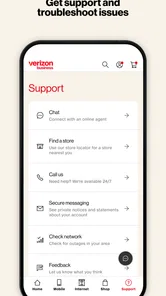
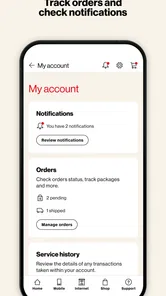
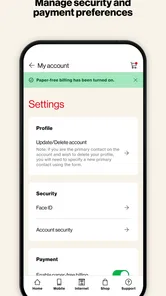
Analysis by Reviewed
When a business line needs attention while I’m away from a desk, I want to deal with the account rather than hunt for the right page or wait until I’m back at a computer. That is the practical purpose I see in My Verizon For Business: it puts Verizon business wireless account tasks on a phone, so I can check in and handle routine work wherever I am. It is a free business app from Verizon Consumer Group, and its appeal is less about replacing every account-management tool than making common tasks easier to reach.
A useful fit for busy account owners
I’d consider it most useful for a small-business owner or employee who is responsible for several Verizon lines and occasionally needs to check usage, review a bill, or keep track of devices between other tasks. If your workday involves moving between locations, a quick mobile check can be more convenient than opening a laptop just to answer a basic account question. The app is rated for Everyone, and its 4.5 average across around 19,000 ratings suggests that many users find the general approach worthwhile.
There is a sensible boundary, though: this is for managing Verizon business services, not a general-purpose business dashboard. If your company uses another carrier, or you rarely need to manage wireless lines, it is unlikely to earn a regular place on your home screen. I’d also keep a browser or desktop account option in mind for longer tasks where a larger display makes reviewing details easier.
Getting Started with Convenience
When I first downloaded My Verizon For Business, I was pleasantly surprised at how user-friendly it is. Setting it up was a breeze. After logging in with my business account, I was greeted with a clean and intuitive dashboard. Everything I needed was right there at my fingertips. No more endless searching or navigating through complicated menus.
Features That Make Life Easier
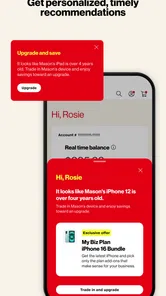
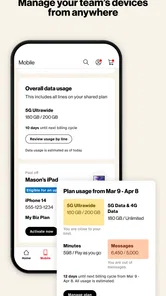
This app is packed with features designed to make managing your business’s wireless services a walk in the park. Need to check your usage? It’s just a tap away. Want to pay your bill? Done in seconds. One of my favorite features is the ability to monitor all the devices under my business account. From checking data usage to managing device settings, it’s all incredibly straightforward.
Another neat feature is the support for multiple lines. If you’re like me and handle multiple devices, you’ll love how easy it is to switch between different accounts and manage them seamlessly. It’s like having a command center for your business, right in your pocket!
A real-world check-in, from question to action
Picture a workday when a team member says their phone is running low on data just before an appointment. I can open the account, check the relevant line’s usage, and get a clearer sense of whether the issue is tied to the plan or simply heavy use. That quick check helps me decide whether to follow up with the employee, review the account later, or take an available account action. The useful part is not just seeing a number; it’s being able to connect a device to the person and the business decision behind it.
More From Our News Desk

Weather by Xiaomi Review: Clear at a Glance, Less Clear Up Close

X Under Pressure: Can It Recover When Posting Goes Wrong?

Clash of Clans Is Won Between the Battles

Android Auto Makes the Case for Quieter Car Software

MobiOffice: Transforming Mobile Productivity with Seamless Integration

EA SPORTS FC™ Mobile Soccer: Redefining Mobile Sports Gaming
For a smoother handoff, I’d make a habit of confirming which line is selected before changing settings or paying a bill. When several devices sit under one account, a quick glance at the line details can prevent an action on the wrong phone. I’d also use the app for short, focused tasks and save complicated account reviews for a time when I can check the details carefully. That division makes mobile access convenient without turning a small screen into a source of avoidable mistakes.
Security and Reliability
In today’s digital age, security is paramount, and My Verizon For Business doesn’t skimp on it. The app provides robust security features to keep your business information safe. With secure login options and encryption, I felt confident that my data was in good hands.
Moreover, the app’s reliability is top-notch. I’ve been using it for a while now, and it has never crashed or lagged on me. It’s always ready to help, ensuring that my business operations run smoothly without any hiccups.
How it compares with other account options
Compared with handling the same account through a desktop browser, the app’s advantage is immediacy: it suits a quick usage check or bill payment while I’m out. A browser can still be the better choice when I want more screen space or need to take my time reviewing account information. And compared with calling support for a straightforward check, opening the app can be a faster first step; for a complicated account issue, direct assistance may be more appropriate than trying to resolve everything on a phone.
One practical tip is to treat it as a quick control point, not as a substitute for keeping track of business decisions. If I make an account change, I’d note who requested it and why through the process my business already uses. That small handoff matters when more than one person manages the lines: the app can help complete an account task, while a shared record helps colleagues understand what changed.
Where the mobile workflow can stall
The main trade-off is that convenience depends on being able to sign in and identify the right business account and line. If account access is held by someone else, or if I’m unsure which device a line belongs to, the app cannot remove the need to clarify those details first. A phone interface is also less comfortable for comparing lots of information at once, so I would not choose it for a lengthy review when a desktop is close by.
Its role is specific, too. The app is aimed at Verizon business wireless management; it is not the right choice for organizing unrelated company services or for someone who only wants a general view of business expenses. That focus is a strength when I need a line-level task done, but a limitation if I expect one mobile app to oversee every part of a company’s operations.
Who benefits from keeping it installed
I’d keep it on my phone if I’m the person colleagues turn to when a business line needs checking, a bill needs attention, or a device setting needs a closer look. It is especially handy for owners who split time between a shop, a vehicle, customer visits, and an office, because the account question can be handled at the point it comes up instead of becoming another item to remember later. Employees with a defined account-management role may also find it useful, provided they have the access needed to do their work.
On the other hand, a team member who only uses a company phone and never deals with the account has little reason to install it. The same goes for a business with just occasional administrative contact and no need for on-the-go checks. In those cases, the person who already manages the account can use the mobile app when needed, while everyone else avoids another app and another login to maintain.
Making a small-screen check more reliable
For multiple lines, I’d establish a simple routine before acting: identify the employee or device, confirm the selected line, inspect the detail relevant to the request, and only then make a change or payment. That may sound cautious, but it is a useful safeguard when line names or device assignments are easy to confuse. If a colleague reports a usage problem, I’d ask which phone they mean rather than relying on a vague description like “the spare” or “the work mobile.”
I’d also separate looking from changing. Checking a bill or usage is a low-commitment way to answer a question; a payment or settings change has a more direct effect on the account. When I’m interrupted or handling a request on behalf of someone else, pausing to verify the line before the second kind of task is sensible. This is not a special feature of the app so much as a practical way to use any mobile account tool without turning speed into a mistake.
What to expect from access and account roles
A common question is whether downloading the app alone is enough to manage a company’s lines. In practice, I’d treat the business account login and its access arrangements as the starting point: the app is an account interface, not a workaround for missing authorization. If another person controls the account, it is better to settle access with them before a time-sensitive issue arises. That preparation matters most when the person who usually handles billing or line changes is away.
Another reasonable question is whether the app replaces the website. I would not plan on that. It is a convenient route for focused tasks from a phone, while the browser remains useful when I need more room to inspect information or want to take a slower, more deliberate pass through the account. Keeping both options in mind makes the app a useful complement rather than a promise that every business task fits comfortably on a small screen.
Why You Should Give It a Try
All in all, if you’re a business owner looking to simplify the way you manage your Verizon services, I highly recommend giving it a shot. It’s designed with the user in mind, making it easy to handle everything from billing to device management. Plus, with its security features, you can rest easy knowing your business information is protected.
The app has been available since May 25, 2016, and version 6.2.0 supports devices running Android 7.0 or later. With more than 500,000 installs and around 2,800 reviews, it has a substantial audience, but those figures matter less than whether you actually manage Verizon business lines. If you do, its focused mobile access can be handy; if you need broad business management or rarely touch your wireless account, a browser or another tool may suit you better.
So, go ahead and download it today. Trust me, you’ll wonder how you ever managed without it!
My Verizon For Business Frequently Asked Questions
Who publishes My Verizon For Business, and is it intended for personal accounts?
My Verizon For Business is a business-focused app from Verizon Consumer Group. Its purpose is to help users manage a Verizon business account from a mobile device, rather than serve as a general personal-account app. If you are looking for a way to handle company services while away from a computer, its business orientation is central to what the app is designed to do.
How popular is My Verizon For Business, and what do user ratings suggest?
My Verizon For Business has an average rating of 4.5 from around 19,000 ratings, with roughly 2,800 written reviews. Those figures indicate that many users have rated and discussed the app, but individual experiences can differ depending on account needs and how they use its tools. Its business focus is worth considering when deciding whether it fits your day-to-day account management.
Is My Verizon For Business free to download, and what devices can run it?
My Verizon For Business is a free business app for Android and iOS. On Android, the listed minimum requirement is version 7.0, so check your device’s operating system before installing. The app is intended for Verizon business customers who want to manage their account from a mobile device, making it useful for handling account tasks while away from a computer.
What is My Verizon For Business, and how can it benefit my company?
My Verizon For Business is a comprehensive mobile application designed for business customers to manage their Verizon accounts effectively. It offers features like billing management, service monitoring, and device control. By using this app, businesses can streamline their communication services, gain insights into usage, and optimize their telecom expenses, ultimately enhancing operational efficiency.
Is My Verizon For Business available for both Android and iOS?
Yes, My Verizon For Business is available for both Android and iOS platforms. Users can download the app from Google Play Store for Android devices and the Apple App Store for iOS devices. This ensures that businesses using different types of smartphones and tablets can easily access and manage their Verizon accounts on the go.
Pros
- Easy account management
- Real-time data insights
- Seamless billing process
- User-friendly interface
- Strong customer support
Cons
- Limited customization options
- Occasional app crashes
- Requires strong internet
- Complex initial setup
- Limited international features













