My Verizon
- 344.38K
- 4.6
- Installs
- 100.00M
- Price
- Free

Screenshots
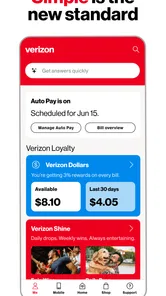
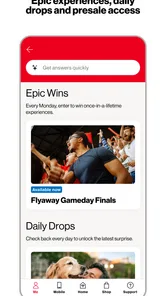
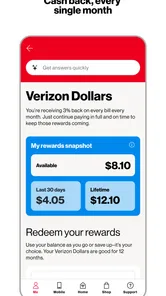
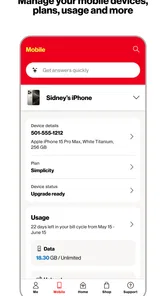
Analysis by Reviewed
I find My Verizon most useful when I want to handle routine account tasks without switching between a browser and other tools. It’s a free tools app from Verizon Consumer Group, aimed at people who already use Verizon services. That distinction matters: its value is in keeping account-related tasks together, not in serving as a general phone manager for customers of any carrier.
What free access means in practice
There’s no purchase price to weigh against its convenience: the app is free to use. That makes trying it a low-commitment choice for an existing Verizon customer, although free access by itself doesn’t make it useful to someone who doesn’t have a Verizon account. I’d judge its value by whether I actually use it to check account details or take care of recurring tasks, rather than by the download alone.
Useful when account tasks pile up
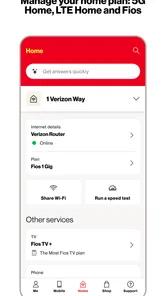
On a busy day, I might open the app to check usage, review billing, and take care of a payment in one sitting. That’s more practical than hunting through separate pages, particularly when I’m trying to answer a quick question before deciding whether to change my habits or look into a plan. If I manage more than one line, having account tasks in one place can also make a quick review easier.
My tip is to use it as a checkpoint, not just as a bill-paying shortcut. A quick look at usage before the billing cycle ends can help me notice a pattern while there’s still time to adjust how I use mobile data. I’d also review account details before traveling or making a plan-related decision, so I’m not relying on memory. These habits make a carrier app more useful without assuming that every account option will matter to every customer.
Where a carrier app is—and isn’t—the better choice
Compared with a phone’s built-in settings, a carrier account app is the better place to handle billing and plan matters; device settings are more direct for checking how apps use data on the phone itself. I wouldn’t treat the two as interchangeable. If I’m troubleshooting one app’s unusually high data use, I’d start in the phone settings, then use the Verizon account view to understand usage in the context of my service.
There is a trade-off to this convenience: the app is tied to Verizon, so it offers little reason to install it if I use another carrier or prefer to manage everything on a website. And if I only need to make an occasional payment, opening an app may not feel meaningfully easier than using another route. I’d skip it if I don’t have a Verizon account, and I’d keep using device settings or a browser when those are a better fit for the task.
The app has a 4.6 average from around 1.3 million ratings, with over 100 million installs. Those figures suggest it has broad use, but they don’t guarantee that its layout or account workflow will suit me personally. It’s rated for Everyone, and version 21.3.5 requires Android 7.0 or later, useful details to check before installing on an older device.
More From Our News Desk

Weather by Xiaomi Review: Clear at a Glance, Less Clear Up Close

X Under Pressure: Can It Recover When Posting Goes Wrong?

Clash of Clans Is Won Between the Battles

Android Auto Makes the Case for Quieter Car Software

MobiOffice: Transforming Mobile Productivity with Seamless Integration

EA SPORTS FC™ Mobile Soccer: Redefining Mobile Sports Gaming
Everyday decisions that benefit from a quick account check
A realistic use for me is checking the account before a long day away from home. If I expect to rely on mobile data, I can look at current usage and billing details in the same place, then decide whether I need to change my habits. The important point is not that the app makes the decision for me; it puts account information within reach when I need to make one.
I’d also use it when helping a family member think through a shared account, provided I’m authorized to access the relevant details. Rather than guessing which line has a particular concern, I can start from the account view and then follow up with the person using that line. That can make a conversation about usage or billing more concrete, though it does not replace checking the phone itself when the question is about a particular app or device setting.
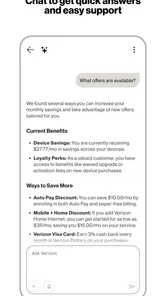
For a plan change, I’d treat the app as a place to inspect the account and explore available choices, not as a reason to change anything immediately. I would first note what I actually use and what I pay attention to, then compare that with the options shown. That small pause matters: convenience can make it easy to act before deciding whether a change solves a real problem.
How it fits beside other ways to manage service
Among the usual alternatives, the closest comparison is Verizon’s account website. I’d choose the app when I want a quick check from my phone or expect to return to account tasks regularly. A browser may be more comfortable for a longer review, especially if I prefer a larger screen or already handle bills there. Neither route is automatically better; the practical choice depends on where I can review details carefully and finish the task with less friction.
The phone’s settings serve a different purpose. They are better for identifying which installed apps consume data on the device, while the carrier account view is more useful for understanding service and billing at the account level. If the numbers or timing seem confusing, I’d avoid assuming that one screen answers every question. I’d check the relevant device and account views separately before deciding whether there is an issue.
That distinction is one of the most useful ways to avoid frustration. If I’m trying to reduce data use, I can use device settings to find a local source and the carrier app to check the broader account context. If I’m trying to understand a charge or plan detail, I would begin with the account rather than searching through unrelated phone menus. Choosing the right tool for the question is more helpful than expecting a single app to manage every part of a mobile service.
Small habits that make the app more useful
I’d make a brief account check part of a routine that already exists, such as reviewing bills or preparing for travel, instead of opening the app repeatedly without a specific question. A clear purpose makes it easier to notice what matters and avoid getting drawn into browsing plan or device options that I did not intend to consider.
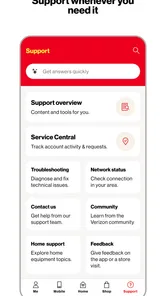
Before contacting support about an account issue, I’d first gather the relevant billing period, line, and usage information available to me. That gives me a more focused starting point for explaining the problem. It is a practical preparation step, not a promise that the app will resolve every account question by itself.
For households with several lines, I would be deliberate about which line or account detail I’m reviewing before taking action. A quick account overview can help orient me, but a payment or plan decision affects real service and should not be made from a hurried glance. I’d slow down, confirm that I’m looking at the intended account information, and then decide whether any change is necessary.
Who is likely to get the most value
I’d recommend giving it a try if you are a Verizon customer who regularly checks billing, usage, or plan information and wants those tasks accessible on a phone. It is especially sensible for someone who handles more than one line or prefers an account-focused app over repeatedly signing in through a browser. Since it is free, the decision can be based on whether the workflow suits you rather than on an upfront purchase.
It is less compelling if your service is with another carrier, if you rarely need to look at your account, or if you already find the website straightforward. It is also not the right first stop for every technical problem: questions about how a particular app behaves on your phone are usually better investigated in device settings. I would not install it expecting a universal phone-cleanup or data-management tool.
People who share account responsibilities should also think about how they prefer to handle account access and decisions. An app can make information easier to reach, but that convenience does not remove the need to understand which line or account action is involved. I find it most valuable when it supports a clear task, rather than when I treat it as a place to tap through without a purpose.
For prospective users wondering whether it costs anything to try, the app is free. That answers the purchase question, but not whether it will save time: that depends on how often you manage Verizon service and whether the app feels easier than your current route. I’d install it for recurring account tasks, then keep it only if it genuinely becomes the more convenient habit.
I also wouldn’t choose it solely because many people have installed or rated it. The 4.6 average and broad adoption give useful context, but personal fit depends on your account needs, preferred screen, and comfort with managing service on a phone. If a website or another routine already works well, there is no practical reason to switch just for the sake of using an app.
Have you ever found yourself in a situation where managing your mobile services feels like a never-ending chore? Well, that’s where My Verizon comes to save the day! As someone who has spent a fair share of time juggling different mobile plans, I can say that this app is a game-changer.
Effortless Account Management at Your Fingertips
Let’s face it, keeping track of your mobile data, billing, and plan details can be a headache. But with My Verizon, it’s like having a personal assistant right in your pocket. The app provides a seamless way to view and manage your Verizon account. You can easily check your data usage, pay your bills, and even manage your plan. It's all about making life easier, and who doesn’t want that?
Features That Make a Difference
One of the coolest features of the app is its ability to let you track your data usage in real-time. No more surprises at the end of the billing cycle! Plus, if you’re like me and always forget when your bill is due, the app sends you reminders. It’s like having a little nudge that keeps you on track.
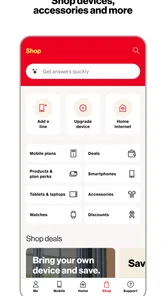
Another neat feature is the shop option. You can browse through the latest devices and plans right from the app. And if you’re planning a trip, the app helps you manage international services. It’s like having a travel guide that ensures you stay connected wherever you go.
User Interface: Simple and Intuitive
The user interface is a breath of fresh air. It’s clean, intuitive, and user-friendly. Whether you’re tech-savvy or just getting started with tech, navigating through the app is a breeze. Everything is categorized neatly, so finding what you need is quick and easy.
And hey, for the forgetful folks out there, the app allows you to set up autopay. It’s the kind of feature that makes you wonder how you ever lived without it. Imagine never having to worry about late fees again. It’s pure bliss!
Making a careful choice before changing plans
Even when a plan or device option catches my eye, I try to separate browsing from deciding. I would first compare the account’s current needs with the choices presented, then consider whether the change addresses a specific usage or billing concern. This is where the app’s convenience has a small downside: a few taps can bring an option close at hand, but easy access is not the same as a reason to buy or switch.
If I’m preparing for international travel, I’d check the service options before leaving rather than waiting until I need to connect. The app can help me manage international services, but I would still review the details of the choice I make and confirm it fits the trip. Treating that check as preparation, rather than assuming the app automatically handles every travel need, is the more sensible approach.
Final Thoughts
All in all, the app is more than just an app. It’s a tool that brings convenience, efficiency, and peace of mind. Whether you’re managing multiple lines or just your own, this app is a must-have for anyone using Verizon services. So, next time you’re feeling overwhelmed managing your mobile services, remember there’s an app for that!
In a world where we crave simplicity and efficiency, having an app that takes the hassle out of managing mobile services is like hitting the jackpot. So, go ahead, give it a try, and thank me later!
My Verizon Frequently Asked Questions
Is My Verizon available for iPhone and Android?
My Verizon is an app for managing Verizon services from a mobile device. It is available for Android and iOS, so customers can use it on compatible phones and tablets. On Android, it requires version 7.0 or later. Before downloading, check that your device meets that requirement and that you are choosing the app published by Verizon Consumer Group.
What devices can run My Verizon?
My Verizon is an app for Android and iOS devices, giving Verizon customers a way to manage account tasks from a phone or tablet. On Android, it requires version 7.0 or later. Before downloading, check that your device meets that requirement and that you are choosing the app published by Verizon Consumer Group.
Do I need to be a Verizon customer to use My Verizon?
My Verizon is intended for Verizon customers who want to access account tools through a mobile app. It is most useful when you need to manage Verizon services, such as checking usage, handling bills, or changing account settings. The app is free to download, but its account-management features are designed around Verizon services rather than general phone management.
Who can use My Verizon, and is it suitable for all ages?
My Verizon is intended for Verizon customers who want to access account tools through a mobile app. Its content rating is Everyone, so the app is rated as suitable for users of all ages. Account-related features are most useful to people who manage Verizon services, such as checking usage, handling bills, and managing account settings.
What is My Verizon and what does it offer?
My Verizon is a comprehensive mobile application designed for Verizon customers to manage their accounts efficiently. It provides users with a variety of features such as checking data usage, paying bills, and managing account settings. Additionally, the app offers personalized deals, tech support, and the ability to shop for the latest devices and accessories directly from the app.
Pros
- User-friendly interface for easy navigation.
- Real-time data usage monitoring.
- Convenient bill payment options.
- Reliable network performance insights.
- Customizable account alerts.
Cons
- Occasional app crashes reported.
- Limited features on older devices.
- Slow customer support response.
- Frequent login issues.
- In-app ads can be intrusive.









