GizmoHub
- 6.31K
- 3.8
- Installs
- 1.00M
- Price
- Free

Screenshots
Analysis by Reviewed
When a child is old enough to travel short distances more independently, I find the practical question is often how to stay reachable without turning every outing into a string of calls. GizmoHub is a communication app from Verizon Consumer Group, built around compatible Gizmo wearables for children. It is free, rated for Everyone, and its current version is 9.3.8.201. The app has an average rating of 3.8 from around 15,000 ratings, with over a million installs. Those figures suggest many families have tried it, though they don’t tell you whether it will suit your child’s particular routine or device.
What speed feels like in everyday use
I would approach GizmoHub as a companion to a wearable, not as a general family chat app. Its value depends on being able to get to the useful task quickly: checking a location, placing a call, or managing the child’s device. When you are in a hurry, a clear route to those actions matters more than a long list of extras. I’d test the workflow at home before relying on it during a school pickup or an unfamiliar trip, so both parent and child know what to do without searching through screens.
The app’s focus can also be a limitation. Families who want to message across a mix of phones, tablets, and other wearables may find a mainstream messaging app more flexible. GizmoHub makes most sense when the child has a Gizmo wearable and the adults are comfortable managing that setup. It is not a substitute for talking through safe meeting points or what to do if a device is unavailable.
Keeping Tabs Without Being Overbearing
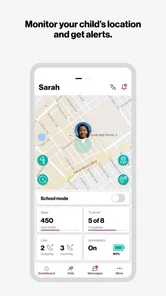
The beauty of GizmoHub lies in its ability to let parents monitor their child's location seamlessly. The app is designed to work with Gizmo devices, allowing you to track your child's whereabouts in real-time. It's like having a magic wand that tells you where your little one is, without constantly having to call or text them.
Simple Setup and User-Friendly Interface
One thing I absolutely loved about this app is how user-friendly it is. Setting up the app is a breeze, and the interface is intuitive enough that even the least tech-savvy person can navigate it. The dashboard gives you a clear view of all the connected devices, and you can easily set up location alerts, so you're notified when your child arrives at or leaves a specific location.
Communication Made Easy
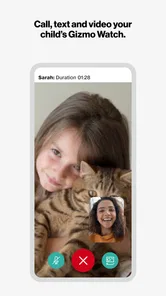
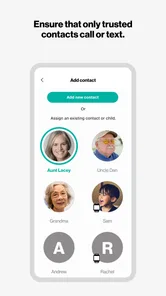
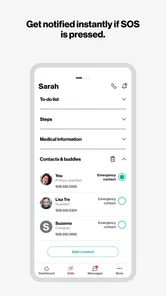
GizmoHub doesn't just stop at location tracking; it also makes communication between you and your child incredibly easy. The app allows for quick calls and messaging, so you can check in with your kid whenever necessary. Plus, with the ability to set up a list of trusted contacts, your child can reach out to you or other family members in case of an emergency.
Geo-Fencing for Added Security
One feature that stood out to me was the geo-fencing capability. You can set up virtual boundaries and receive notifications if your child steps outside these predefined areas. It's like setting up a digital fence, providing an extra layer of security and ensuring your child's safety.
More From Our News Desk

Weather by Xiaomi Review: Clear at a Glance, Less Clear Up Close

X Under Pressure: Can It Recover When Posting Goes Wrong?

Clash of Clans Is Won Between the Battles

Android Auto Makes the Case for Quieter Car Software

MobiOffice: Transforming Mobile Productivity with Seamless Integration

EA SPORTS FC™ Mobile Soccer: Redefining Mobile Sports Gaming
Making alerts useful rather than noisy
For a realistic routine, I’d set only the location boundaries that answer a real question, such as whether a child has reached a regular destination. Too many alerts can turn a helpful signal into background noise, and then it is easier to overlook the one notification that matters. I’d also agree with the child on what a location check means: it is a way to coordinate and offer reassurance, not a reason to demand constant updates.
For example, if my child is walking from an after-school activity to a familiar pickup point, I could use an arrival alert to avoid repeatedly calling while they are on the way. If the plan changes, a quick call is more useful than treating a boundary notification as a complete explanation of what happened. That distinction keeps the app in its proper role: a practical aid, not a replacement for communication or adult judgement.
Busy moments and recovery expectations
On a crowded day, the app’s usefulness comes from having a simple fallback plan. I’d make sure the child knows whom to call and what to do if a check-in does not happen as expected, rather than assuming an app notification will resolve every uncertainty. Location information can help guide a follow-up, but it should not be treated as proof that a child is safe or as a substitute for contacting them when something seems wrong.
I also wouldn’t judge reliability from a single smooth session. Before making GizmoHub part of a daily routine, I’d try the key actions at a calm time and make sure the adults who may need to help know how to use them. If something appears slow or a device is unreachable, a direct call or the family’s agreed backup plan is sensible. That is especially important for parents who need dependable coordination during a time-sensitive commute.
A routine that works across caregivers
One practical question is who will be responsible for checking in. If a child moves between households, a grandparent’s care, or an after-school pickup, I’d agree in advance which adult is expected to act on an alert and who the child should contact first. That prevents two adults from assuming the other has noticed a notification. It also keeps the child’s contact routine predictable instead of making them guess which grown-up is available.
I’d keep the instructions simple enough for a child to remember: where to wait, whom to call, and what to do if the wearable is not with them. A location app is most useful when it supports a plan the child already understands. This is a small but important trade-off: the more adults rely on the app, the more worthwhile it is to make sure everyone shares the same expectations.
Who will get the most from it
I see the strongest fit for parents whose children already use a compatible Gizmo wearable and who want a focused way to coordinate calls and location checks. It may be less suitable for families seeking a broad messaging platform, or for children who are not ready to carry and manage a wearable. Compared with ordinary phone messaging, the appeal is the parent-facing connection to the child’s Gizmo; compared with a general location-sharing app, the experience is tied more closely to that device rather than the whole family’s collection of phones.
Before choosing it, I’d ask whether the wearable will actually be with the child during the moments that matter, and whether the family is happy to make it part of the routine. I’d also keep expectations modest: the app can make contact and location checks more convenient, but it cannot guarantee that every check-in will be immediate or replace a clear plan for missed contact. Families who want an independent child-safety setup without relying on a Gizmo device should consider a different approach.
Questions to settle before relying on it
Parents often want to know whether this can replace a child’s phone. I wouldn’t treat it as a direct substitute: its purpose is to work with a Gizmo wearable, while a phone offers a broader range of communication and everyday functions. If your child needs access to services beyond simple family contact, a phone may be a better fit. If your main aim is a wearable-based way to stay in touch, this narrower setup may be easier to manage.
Another useful question is whether every caregiver needs to use the app. I’d have the primary adults learn the same basic steps and agree on who responds, rather than assuming that installing it automatically creates a shared routine. And if a location alert arrives late or does not answer the question you have, I’d call the child or the responsible adult instead of repeatedly refreshing and treating the screen as definitive.
Performance and device constraints
Because GizmoHub works alongside a wearable, the experience depends on more than the app screen alone. I would avoid promising myself that every location update or call will feel instant in every situation; the sensible test is how it behaves with the family’s actual device and usual routes. The app’s focused purpose is a plus when I need a straightforward action, but it also means it is not designed to replace a full-featured phone or a universal family communications hub.
As a communication app, GizmoHub is best judged by whether it makes everyday check-ins simpler without encouraging parents to watch every movement. It was released on November 19, 2014, and is developed by Verizon Consumer Group. I’d try its core routines before depending on it, keep a backup way to reach the child, and use alerts selectively. That balance is what makes the app useful: not constant supervision, but a more manageable way to stay connected while a child gains independence.
My performance verdict
I’d judge the app less by whether it feels fast in a quiet moment and more by whether the family can use its main actions without hesitation when a plan changes. A sensible first test is to check the location, place a call, and confirm that the relevant adults understand what an arrival or boundary alert should prompt them to do. That gives you a more meaningful picture than assuming the experience will be identical on every outing.
For families already committed to a compatible wearable, the focused design is a real advantage: it keeps the purpose centered on reaching a child and checking the routine. The trade-off is that it is not a universal communication solution, and it should not become the only layer in a safety plan. I’d choose it when wearable-based check-ins are the goal, and look elsewhere if the family needs broad messaging across many kinds of devices or wants a child to have a conventional phone experience.
Overall, GizmoHub is a fantastic tool for parents who want to keep an eye on their children without being helicopter parents. It offers peace of mind while allowing your kids the freedom to explore their world. If you're looking for a reliable and easy-to-use app to ensure your child's safety, this might just be the perfect fit.
GizmoHub Frequently Asked Questions
Does GizmoHub work without a child’s Gizmo wearable?
GizmoHub is designed to call, find, and control Gizmo wearables for children, so its central purpose depends on having a compatible wearable to manage. Without one, the app’s family communication and device-management functions may not be useful. Consider whether you already have, or plan to use, a child’s Gizmo wearable before downloading.
Who can use GizmoHub to manage a child’s wearable?
GizmoHub is intended to help parents and guardians stay connected with children who use Gizmo wearables. It brings wearable-related calling, location, and control functions into an app for the adults responsible for the child. Families should think about who needs access and how the app will fit into their routine before installing it.
What age rating does GizmoHub have, and who is it intended for?
GizmoHub is a communication app intended to help parents and guardians stay connected with children who use Gizmo wearables. Its content rating is Everyone, making the app suitable for a general audience. Before downloading, parents should consider whether the app fits their family’s needs for communicating with and managing a child’s wearable.
What is GizmoHub and what does it do?
GizmoHub is a versatile application designed to help parents and guardians stay connected with their children through GPS technology. It allows users to locate their child's device, manage their contacts, and receive alerts about the child's whereabouts. The app is compatible with a range of devices, making it a comprehensive solution for family safety and communication.
Is GizmoHub free to use or does it require a subscription?
GizmoHub is free to download. Whether particular services or features involve additional costs may depend on the Gizmo wearable and its associated service, so check the terms that apply to your device before relying on a feature. The app is developed by Verizon Consumer Group and is designed to call, find, and control Gizmo wearables for children.
Pros
- Intuitive user interface for easy navigation.
- Real-time location tracking for peace of mind.
- Customizable alerts and notifications.
- Supports multiple devices and users.
- Strong privacy controls and data security.
Cons
- Battery consumption can be high.
- Limited features on free version.
- Occasional location inaccuracies.
- Requires stable internet connection.
- User interface may seem outdated to some.













