Verizon Family
- 7.90K
- 4.4
- Installs
- 1.00M
- Price
- Free

Screenshots

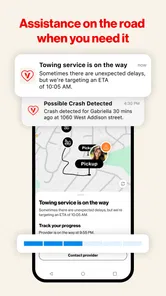
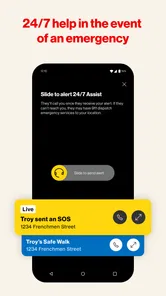

Analysis by Reviewed
The first-week appeal of Verizon Family is easy to understand: it puts location, screen-time management, and driving-related oversight in one family-focused app. I can see the value for a parent who wants fewer check-in texts and a clearer routine, without turning every conversation into a debate about phone use. Verizon Consumer Group makes it as a free lifestyle app, and its 4.5 average from around 32,000 ratings suggests many users find that kind of practical support worthwhile.
What feels useful right away
For a family trying it for the first time, the strongest starting point is choosing one or two needs rather than switching on every control at once. Location sharing can make an ordinary school pickup less uncertain, while screen-time tools can help make homework or bedtime expectations more consistent. I would explain the reason for each setting to a child before relying on it; the app works better as part of a family agreement than as a silent monitoring system.
A realistic routine might be a parent checking that a child has reached school during a busy morning, then using a planned device pause during dinner. That is more manageable than watching a map all day or repeatedly adjusting limits in response to every small disagreement. The useful question is not whether a parent can track everything, but which check-ins genuinely reduce stress for everyone.
A Family's Best Friend
First off, I have to say, the Verizon Family app does a stellar job at bringing peace of mind to parents. It's like having a digital nanny that watches over your child’s online activities without hovering too much. The app is designed to keep track of your kids' digital habits, and it does this in a way that feels more like a supportive partner than a strict enforcer.
Features That Make a Difference
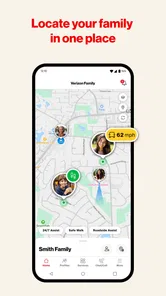
One of the standout features is the location tracking. Imagine this: you’re busy at work, and you get a notification that your child has arrived safely at school. That’s one less thing to worry about, right? Plus, with geofencing, you can set up alerts for when they leave or arrive at certain locations.
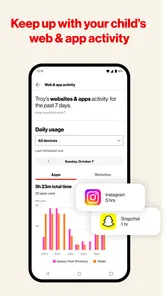
Another feature worth mentioning is the screen time management. With so many distractions online, it’s easy for kids to lose track of time. This app allows you to set limits on how long they can use their devices, which is great for encouraging them to engage in offline activities too. You can even pause their internet connection when it’s time for homework or family dinner.
Making location checks less intrusive
There is a useful difference between having location information available and checking it constantly. I would decide in advance which arrivals or departures actually matter—school, an agreed pickup point, or another regular stop—and use alerts for those moments. That turns the map into a quiet reassurance tool rather than a reason to refresh it whenever a child is away from home.
More From Our News Desk

Weather by Xiaomi Review: Clear at a Glance, Less Clear Up Close

X Under Pressure: Can It Recover When Posting Goes Wrong?

Clash of Clans Is Won Between the Battles

Android Auto Makes the Case for Quieter Car Software

MobiOffice: Transforming Mobile Productivity with Seamless Integration

EA SPORTS FC™ Mobile Soccer: Redefining Mobile Sports Gaming
For a changing schedule, I would treat saved places and their alerts as things to review, not permanent rules. A new school term, a different route, or a holiday routine can make yesterday’s notifications irrelevant. Removing alerts that no longer answer a practical question is a small maintenance habit, but it helps prevent notification fatigue and makes the remaining ones easier to notice.
Keeping It Simple
One of the things I appreciate most about this app is its user-friendly interface. It doesn’t take a tech guru to navigate through its features. The dashboard is intuitive, and setting up controls is a breeze. Whether you’re tech-savvy or not, you’ll find it easy to customize the settings to suit your family’s needs.
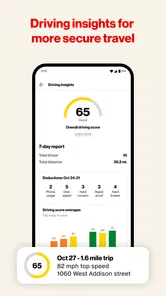
For lasting value, I would revisit the setup when a child’s timetable changes: an alert that made sense during the school term may be noisy during holidays or a new commute. Keeping only the location notifications that answer a real question helps the app stay useful instead of becoming another stream of alerts to ignore. Driving-related oversight may also matter more as a teen becomes more independent, though families should discuss what is being monitored and why.
Where the routine can rub
Controls can create friction if a child sees them as punishment, and strict limits may not fit every day’s homework, travel, or family plans. I would treat the settings as a starting point for a conversation, not a substitute for one. Location information is also most helpful when everyone understands when it is being checked; constant checking can undermine trust even when the intention is safety.
Compared with using a phone’s built-in family settings, Verizon Family’s appeal is the combination of family location and digital routines in one place. A basic map-sharing option may be enough for a household that only wants to coordinate pickups, while built-in screen controls may suit parents who prefer fewer apps. Families already committed to another ecosystem’s parental controls should compare the day-to-day workflow before adding another dashboard. Verizon Family is aimed at everyone and has more than a million installs, but broad reach does not mean every household needs it.
Choosing the right scope for your household
This app is best suited to households that want a parent-facing place for several related routines, rather than a single-purpose tracker. A caregiver coordinating school arrivals may value location alerts, while a parent trying to make device breaks predictable may care more about screen limits. The benefit comes from matching each tool to a specific recurring need, not from enabling every option simply because it is available.
It may be the wrong choice if the family only wants occasional location sharing, already has a control system everyone uses comfortably, or expects an app to settle arguments about screen habits. In those cases, a simpler map-sharing arrangement or the phone’s built-in controls can involve less setup and fewer notifications. I would also think twice if a child is likely to interpret monitoring as secrecy or punishment; agreeing on boundaries first matters more than choosing a particular dashboard.
For a practical first setup, I would agree on a small number of rules together: what locations matter, when a device pause is expected, and what the family will do when plans change. Then I would leave the routine alone long enough to see whether it helps. If there is a problem, adjust the relevant setting rather than changing several controls at once; that makes it easier to tell whether the change solved anything.
It is also worth being clear about the limits of the idea: a location signal cannot replace a call when plans change, and screen-time limits cannot teach judgment on their own. I would use the app to support predictable routines, then review whether each rule still makes sense rather than leaving controls untouched indefinitely. That small check-in is one of the best ways to prevent helpful settings from turning into background noise.
Turning screen rules into a routine
Screen limits are most useful when they support an expectation the family has already discussed. For example, if dinner is meant to be device-free, a planned pause can make that boundary easier to apply consistently than negotiating it anew every evening. It is less helpful to use a limit as an automatic response to a bad grade, a late arrival, or a disagreement; tying controls to unrelated conflicts can make them feel arbitrary.
I would also leave room for ordinary exceptions. Homework may require a phone, a family plan may change, or a child may need to contact someone during a busy day. A control that cannot accommodate the household’s actual routine may prompt repeated workarounds, which defeats the point of having a predictable setting. The practical test is whether the rule remains understandable when the day does not go exactly as planned.
And let’s not forget about the educational aspect. The app provides useful insights into your child’s online behavior. It helps you understand what’s consuming their time and offers suggestions on how to discuss healthy online habits with them.
Keeping it useful after the novelty
Month to month, the app earns its place only if it answers recurring questions without demanding constant attention. I would keep a short family routine: check whether the location alerts still match regular destinations, adjust device limits when schedules shift, and talk through any driving-related expectations as independence grows. The point is not to fine-tune every setting weekly, but to make occasional changes that reflect real life.
For a teen who is beginning to drive, oversight needs an especially clear purpose. I would talk through what the family hopes to learn from driving-related features before treating them as a scorecard or a way to police every trip. If the family cannot agree on what information matters and how it will be discussed, the feature may create more tension than reassurance. As with location sharing, trust depends on expectations being stated openly.
One recurring question is whether the app can stand in for direct communication. I would not use it that way. If a pickup is delayed, a destination changes, or a child needs help, a call or message still gives the context that a location screen cannot. The app is useful for reducing routine uncertainty, but it does not tell a parent why someone is late or whether a plan has changed.
If you are wondering whether it is suitable for a younger child, the all-ages content rating makes it broadly accessible, but the controls still need an adult to tailor them to the child and the household. If you are deciding whether to keep it, ask whether it has reduced uncertainty or helped establish a calmer screen routine over time. If not, a simpler location-sharing or built-in device-control option may be a better fit.
When convenience becomes fatigue
The main long-term risk is not a complicated interface so much as letting alerts and rules outlive their purpose. A family can start with sensible check-ins and gradually accumulate notifications for places or situations that no longer matter. I would periodically ask which alert I have acted on recently and which one I routinely dismiss. If an alert is almost always ignored, it probably needs to be removed or reconsidered.
There is also a social cost to account for. A child who knows a parent can check a location may feel reassured, watched, or both, depending on how the arrangement is introduced. The same feature can serve as a safety net for one family and a source of resentment for another. Explaining the reason, agreeing on reasonable use, and revisiting that agreement as a child grows are more important than trying to find a perfect setting.
Final Thoughts
All in all, the Verizon Family app serves as a valuable tool for parents looking to guide their children through the digital landscape. It strikes a nice balance between supervision and independence, allowing kids to explore while keeping parents in the loop. If safety, simplicity, and peace of mind are what you’re after, this app is definitely worth considering. Just remember, it’s not about controlling your child’s every move, but rather about keeping them safe and informed as they navigate their online world.
For me, its strongest case is a household that will use a few shared routines consistently and talk openly about why they exist. Its weaker case is a family looking for a one-time install that will solve screen-time disagreements, replace check-ins, and never need revisiting. It is free, rated for everyone, and has been available since July 3, 2013; those details make it easy to consider, but the lasting value still comes down to fit. I would keep it only while the location and device routines make family life calmer rather than more closely monitored.
Verizon Family Frequently Asked Questions
Does Verizon Family require a Verizon account or service to use?
Verizon Family is developed by Verizon Consumer Group and brings family-management tools together in one place. Before downloading, consider whether your household already uses Verizon and whether the app’s account-based setup fits the way you manage your family’s devices. That can help you decide if it is a practical choice for your household before you begin configuring parental controls and safety features.
What information should my family agree to share before using the app?
Because Verizon Family focuses on parental controls and family safety, it is worth discussing expectations before anyone starts using it. Talk about which family members and devices will be included, how location sharing will be used, and what screen-time rules make sense. A clear conversation can make the app’s tools easier to introduce and help family members understand the purpose of the settings.
Who is Verizon Family intended for, and what should I consider before setting it up?
Verizon Family is a lifestyle app for families who want a shared place to manage parental controls and family safety. Its focus includes screen time, location, and driving, so it may be useful when parents and children agree on how those tools will be used. Before setting it up, consider which family members and devices you want included and discuss location sharing and screen-time rules together.
Who develops Verizon Family, and is it suitable for all ages?
Verizon Family is developed by Verizon Consumer Group and is rated Everyone. That rating makes it suitable for a broad audience, although its parental-control features are especially relevant to families with children. The app is free to download, and its purpose is to help families manage safety-related settings rather than to serve as a general entertainment app.
What is Verizon Family and how does it work?
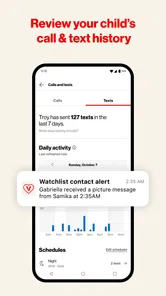
Verizon Family is a comprehensive family safety app designed to help parents manage screen time, track location, and ensure online safety for their children. The app allows parents to set content filters, monitor internet usage, and receive alerts about their children's whereabouts. It works by integrating with your Verizon account and providing a central hub for managing all family devices. Its main appeal is bringing several family-management tools together rather than requiring parents to handle each concern separately.
Pros
- Comprehensive parental controls.
- Real-time location tracking.
- Screen time management.
- Customizable alerts and notifications.
- Supports multiple device platforms.
Cons
- Subscription required for full features.
- May drain battery quickly.
- Location updates are sometimes slow.
- Limited features on older devices.
- Complex setup for non-tech users.













