My Verisure
- 43.00
- 4.8
- Installs
- 5.00M
- Price
- Free

Screenshots

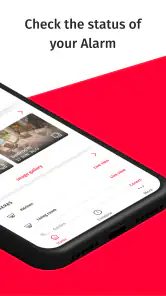
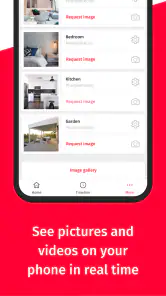
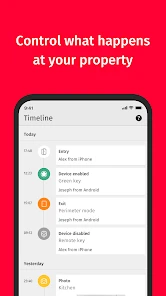
Analysis by Reviewed
I judge a home-security app less by how reassuring its screen looks and more by whether it helps me make sensible decisions when I’m away. My Verisure is the companion app for Verisure’s security service, developed by Securitas Direct - Verisure. It is free to download, rated for Everyone, and sits in the House & Home category. Its 4.8 average across around 120,000 ratings and more than 5 million installs suggest broad use, but those figures alone cannot tell me whether it suits a particular household. The practical question is whether you already use Verisure’s system and want a convenient way to manage it.
Trust starts with the service behind the screen
A security app handles decisions that matter: whether a system is armed, who can access it, and how an alert is handled. That makes a clear connection to the alarm service more important than decorative features. I would treat the app as a remote control and communication channel for a Verisure setup, not as a standalone substitute for installing a security system. If you are comparing home-security options, first decide whether you want a provider-managed alarm service or simply a self-managed device; the app is most relevant to the former.
The Android release began on June 29, 2020, and version 10.161.0 requires Android 8.0 or later. Those details can help with basic compatibility planning, especially if you keep an older phone as a household device. Before relying on it for an important routine, I would install it on the phone I actually carry and check that I can sign in and reach the controls I need.
Everyday controls and the choices they involve
First things first, let's talk about the interface. My Verisure offers a clean and user-friendly interface that even your grandma could navigate. Setting up the app is a breeze, and once you're in, you can easily arm or disarm your security system with just a few taps. That's right, no more fumbling around with complicated controls. Plus, you get real-time alerts and notifications, so you’re always in the loop. I mean, who wouldn’t want to know when the kids get home or if there’s unexpected activity around the house?
Make remote actions deliberate
Remote arming and disarming are useful precisely because they are powerful. If I were leaving in a hurry, I’d use the app to check the system rather than assume I remembered to set it. But a quick tap can also change the home’s security state, so I’d avoid treating the control as a casual button and make a habit of checking the displayed status after an action. That small pause is especially worthwhile when more than one person in the household uses the system.
Alerts are most helpful when they lead to a clear next step. For example, if a family member arrives while I’m out, a notification can help me understand what has happened without calling home. I would still consider who else receives alerts and whether phone notifications are visible on a shared or unlocked screen. That is a practical privacy choice: convenient updates should not automatically become information everyone nearby can read.
Multiple homes, different routines
One of the standout features of this app is its ability to manage multiple locations. Got more than one property to keep an eye on? No problem! You can switch between locations with ease, making it perfect for those who have a busy lifestyle. Additionally, the app integrates seamlessly with smart home devices, allowing you to turn on lights or adjust your thermostat remotely. It's like having a magic wand for your home!
More From Our News Desk

Weather by Xiaomi Review: Clear at a Glance, Less Clear Up Close

X Under Pressure: Can It Recover When Posting Goes Wrong?

Clash of Clans Is Won Between the Battles

Android Auto Makes the Case for Quieter Car Software

MobiOffice: Transforming Mobile Productivity with Seamless Integration

EA SPORTS FC™ Mobile Soccer: Redefining Mobile Sports Gaming
For anyone switching between a main home and another property, I would pause on the location name before changing a setting. The useful benefit is centralized access; the trade-off is that the same screen can put several places within reach, making a mistaken selection more consequential. A simple routine—confirm the address or location first, then check the status after acting—helps avoid managing the wrong property while distracted.
The smart-home angle may also make this more convenient than using separate apps for an alarm and connected household devices. Still, integration is only valuable if the devices you already use are supported and the controls you need are available in your setup. I would not choose a security service solely for the promise of smart-home convenience; I’d compare the actual household devices and routines I want to manage before making that decision.
Emergency access and real-world limits
Another great feature is the panic button. In case of an emergency, a simple tap alerts the Verisure Alarm Receiving Centre, ensuring rapid response. This is particularly reassuring for when you're home alone or traveling.
That emergency option can be useful in a very specific everyday situation: I’m home alone, something feels wrong, and reaching a phone contact list would take longer than using a clearly available control. It is worth learning where the button is before an emergency, and understanding what happens when it is activated. I would not use it to test the system casually; for any test or setup question, I’d follow the instructions provided for the Verisure service.
There is also a trade-off in relying on a phone for security tasks. A discharged battery, poor connection, or a phone left behind can make remote access less useful at exactly the wrong moment. I see the app as an added way to manage a security system, not a reason to abandon whatever normal access method and household plan the service provides. People who want a simple standalone camera or a DIY alarm without a provider relationship may find a device-specific app or a self-managed system a better fit.
Privacy is part of the daily workflow
Security is crucial, and My Verisure understands this perfectly. With its top-notch encryption and security protocols, your data and privacy are always safeguarded. This app doesn’t just offer convenience; it offers peace of mind, knowing that your home is protected by one of the leading security companies.
I would be careful not to treat a reassuring security message as a substitute for checking the choices available in the account and on the phone. During setup, I’d review who can access the account, use a private device where possible, and avoid sharing sign-in details casually. When reviewing alerts, consider whether lock-screen previews reveal household activity to people nearby. These are modest steps, but they matter because the app connects personal routines with home-security controls.
If you share responsibility for a property, agree in advance who is expected to arm or disarm the system and how everyone will respond to an alert. That reduces confusion more effectively than adding more notifications. For a household with guests, cleaners, or other regular visitors, the right access arrangement depends on the service’s available account controls; I would check those options directly rather than assume every household role can be managed in the same way.
Who will get the most from it?
But let's not forget about the customer support. Have a query or facing an issue? The support team is just a call or email away, ready to assist you in any way possible. It's like having a friendly neighbor who's always there to help.
This app makes the most sense for people who already have Verisure service, travel often, or need to coordinate security across more than one location. It may also suit a household that values a provider-linked emergency route and wants to check or change system status from a phone. If you are still choosing a provider, compare the service arrangement and the controls you need rather than relying on a high rating as proof that it matches your priorities.
How it fits into an ordinary day
Imagine I’m already on the train when I realize I can’t remember whether I armed the system before leaving. The useful workflow is not simply to tap a control and forget about it: I’d first confirm that I’m looking at the right property, check the status, make the change if needed, and then verify that the displayed state has updated. That sequence turns a vague worry into a quick, deliberate check. If another person is due to arrive, I’d also make sure our household has agreed who is handling the system, rather than assuming both of us will act.
This is where the app differs from a basic camera viewer or a manufacturer’s app for one smart device. Those alternatives may be a better match if all I want is to check a camera or control a particular accessory. My Verisure is more relevant when the household already uses the provider’s security service and wants a phone-based route into that setup. The trade-off is dependency: its value is tied to the service and compatible equipment, rather than being a universal dashboard for any alarm or camera I happen to own.
Small checks that make access more dependable
Before relying on mobile controls during travel, I’d sign in at home and learn where the status and important actions appear. I’d also check that notifications are enabled in the way I want on my phone, since an alert that is silenced or hidden may not help with a time-sensitive decision. These are simple preparation steps, but they are easy to overlook when installing a security app in a hurry.
For a shared household, I’d agree on a single response routine: who checks an alert, who contacts the other people at home, and what to do if the app is unavailable. That is more useful than asking everyone to keep watching every notification. The app can make coordination easier, but it cannot settle household responsibilities by itself; the people using it still need to know what a notification means to them and when they should act.
It is also worth separating convenience from assurance. A phone display can help me see or change a system state, but I would not treat a successful sign-in as proof that every part of a home-security arrangement is working as intended. I’d follow the service’s own guidance for setup and testing, and keep the household’s usual access method available. That cautious approach is especially sensible when someone else depends on the system while I’m away.
A cautious recommendation
I’d recommend it as a practical companion when you already rely on Verisure and want mobile access to its security routines. Its strongest case is everyday convenience—checking a system while away, managing multiple locations, and having an emergency control close at hand. The main cautions are to learn the controls before you need them, protect access to your account, and keep a backup plan for times when your phone is unavailable. If you want a standalone gadget app or prefer to manage every part of home security yourself, another category of product may suit you better.
My Verisure Frequently Asked Questions
Can I download My Verisure before becoming a Verisure customer?
You can download My Verisure, but its main purpose is to connect users with a Verisure Smart Alarm system. Without a Verisure service and an account to connect, the app will not act as a standalone alarm or provide independent security monitoring. If you are exploring the service, consider whether Verisure is available for your location and suits your security needs.
Is My Verisure free, and does that mean the security service is free too?
My Verisure is free to download. The app is an extension of Verisure’s security service, however, so downloading it does not itself provide an alarm system or monitoring. To make practical use of the app, you need a Verisure system connected to your account. Consider the service separately from the app before deciding whether to install it.
What does the Everyone content rating mean for My Verisure?
My Verisure has an Everyone content rating, making it suitable for a general audience from a content-rating perspective. The app is designed around accessing a Verisure security service, though, so its usefulness depends less on age rating and more on whether you have a compatible system and account. Review the app’s permissions and settings during installation to make sure they suit your preferences.
Do I need a Verisure alarm system to use My Verisure?
My Verisure is intended to connect customers with their Verisure Smart Alarm system, so the app is most useful when you already have a compatible Verisure service at home or at a business. Installing the app alone does not provide an alarm system or independent security monitoring. If you are considering Verisure, check that its service is available for your location and needs.
Is My Verisure suitable for someone who wants to check security while away from home?
Yes. My Verisure is designed to let users access and manage their Verisure security system remotely, making it useful when you are away from the protected property. You can use it to review security updates and interact with the alarm from your mobile device. The app’s practical value depends on having a Verisure system connected to your account.
Pros
- Easy-to-use interface for quick navigation.
- Real-time alerts for enhanced security.
- Comprehensive device control from one app.
- Efficient customer support through app.
- Secure login with biometric authentication.
Cons
- Some features require premium subscription.
- Occasional connectivity issues reported.
- Limited customization for alert settings.
- High battery usage during operation.
- Sometimes slow in loading live video.
- Category
- House & Home
- Version
- 10.161.0









