Music ringtones for android
- 9.99K
- 4.6
- Installs
- 10.00M
- Price
- Free
Screenshots
Analysis by Reviewed
I find ringtone apps most useful when I already know what I want to change: the sound that announces a call, message, or alarm has become so familiar that I barely notice it. Music Ringtones for Android is a free personalization app from Ringtones & Wallpapers, built around browsing music-style sounds and choosing one for an Android phone. It has a 4.6 average from around 158,000 ratings, and has been installed over 10 million times. That popularity makes it easy to consider, but what matters day to day is whether finding a sound and making it your own feels straightforward.
Start with the moment you want to improve
Before browsing, I’d decide whether I need a distinctive ringtone for calls, a calmer alarm, or simply a change from the default. That small choice helps narrow the search: a tune that is fun in a quiet room might be irritating when it interrupts a meeting, while a subtle sound could be easy to miss outdoors. The app’s focus on music ringtones suits people who want something more recognizable than a standard alert, rather than those looking for a complete phone-theme makeover.
The app is rated for Everyone, runs on Android 7.0 or later, and its current version is 3.6.5. There are in-app purchases, with items listed from $0.99 to $49.99, so I’d check what is included before paying. You can start without a purchase because the app itself is free; just treat optional spending as a separate decision, not a requirement for personalizing a phone.
Discover the World of Customization
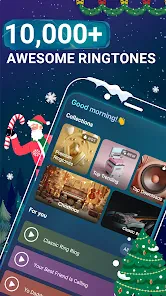
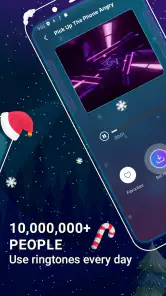
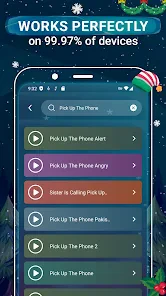
One of the standout features of Music Ringtones for Android is the sheer variety it offers. The app boasts an extensive library of sounds. Whether you're a fan of rock, pop, or classical music, there’s something here for everyone. The app allows you to preview each ringtone before you commit, making sure you find that perfect sound that resonates with your personality.
Browse, preview, then choose carefully
In practice, I’d preview a few candidates back to back instead of selecting the first catchy clip. Listen at a normal phone volume and consider whether the sound has a clear opening; a ringtone that takes too long to become recognizable may be less useful when a call is brief. A short listening test also helps avoid choosing a track that sounds pleasant once but becomes tiring after repeated alerts.
User-Friendly Interface
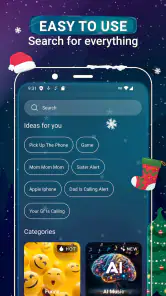
Now, let’s talk usability. The app’s interface is as smooth as a jazz saxophone solo. Navigating through the different categories is a breeze, thanks in part to the well-organized menu. You don’t have to be a tech guru to figure this one out. Within minutes, you’ll find yourself exploring and customizing your phone’s ringtones like a pro.
My practical workflow would be to browse when I have a few uninterrupted minutes, preview sounds, and settle on one ringtone before changing anything else. Then I’d make a test call or ask someone nearby to call, so I can hear how it comes through in the places I actually use the phone. That quick check is worth doing before relying on a new sound for important calls: a tune that seems distinctive through a preview may blend into background noise outside.
More From Our News Desk

Weather by Xiaomi Review: Clear at a Glance, Less Clear Up Close

X Under Pressure: Can It Recover When Posting Goes Wrong?

Clash of Clans Is Won Between the Battles

Android Auto Makes the Case for Quieter Car Software

MobiOffice: Transforming Mobile Productivity with Seamless Integration

EA SPORTS FC™ Mobile Soccer: Redefining Mobile Sports Gaming
Quality Over Quantity
In a world where there are countless ringtone apps, quality is what sets this one apart. The sound quality of each ringtone is top-notch; no muffled sounds or low-quality audio files here. The developers clearly put in the effort to ensure that each ringtone is crisp and clear. This attention to detail doesn’t go unnoticed, especially when you’re blasting your favorite tune as your alarm.
There is a useful trade-off between a memorable music clip and a practical alert. A recognizable melody can help me notice a call in a busy place, but it may be a poor choice for an alarm if I start associating it with a rushed morning. I’d use different sounds for those jobs where the phone’s settings allow it, and keep the loudest or most dramatic choice for the situation where it genuinely helps.
Personalize with Ease
Another cool feature is the ability to assign different ringtones to specific contacts. Imagine knowing who’s calling just by the tune that plays. It’s a small touch, but it really adds to the overall convenience and personalization of the app. Plus, it makes screening those annoying calls a whole lot easier!
Contact-specific tones are most useful when I limit them to a few people whose calls I want to recognize immediately, rather than assigning a different sound to everyone. For example, I might choose one distinctive ringtone for family and keep the general tone for other callers. That keeps the cue meaningful instead of turning the phone into a collection of sounds I need to memorize. The handoff to the phone’s contact settings is also a sensible point to double-check: confirm the intended person is selected before saving, especially if several contacts have similar names.
Compared with choosing one of the phone’s built-in tones, this app gives music-focused browsing a more central role, which is handy if the default list feels limited. It is less compelling if you already have a specific audio file you want to use or prefer to edit your own sound; a file manager or audio editor may suit that job better. For someone who simply wants to find a ready-made musical option, browsing and previewing in one place is the more convenient route.
Downloading your chosen ringtone is as easy as pie. A few taps, and voila, your phone is set to play your new favorite sound. The app also keeps things fresh by regularly updating its library, so you’ll always have access to the latest and greatest in ringtone technology.
One everyday example: I might pick a clear, upbeat tone before a commute, then check it once in a noisy setting so I know it will stand out without being startling. If I later get tired of it, I can return to browsing and choose another rather than committing to a permanent setup. I’d also keep a note of which sound I assigned to key contacts, so a change later does not make those familiar call cues confusing.
A commute-to-call workflow that stays practical
For a more deliberate setup, I’d make the change at home rather than while heading out. First I’d choose a tone that has a noticeable beginning, then apply it and place a test call while the phone is sitting where I usually keep it. Next, I’d listen from a short distance instead of holding it in my hand. That reveals whether the sound carries through a bag or across a room, without turning volume all the way up and discovering later that it is startling.
If I rely on my phone for both work and personal calls, I’d avoid making every contact sound different. A simple arrangement—one general call tone and a distinct cue for only a couple of people—takes less effort to remember and is less disruptive in shared spaces. Someone who receives calls in a quiet office may prefer a restrained choice; someone who often leaves the phone in another room may need a stronger, more immediate sound. The best pick is about the listening environment, not just the tune.
Choosing between this app and other routes
The main alternative is to use the tones already on the phone. That is quicker and avoids installing another app, but it may not be as enjoyable if I want to browse music-led options. A personal audio file is another route, especially when I have a particular song or recording in mind, though preparing and assigning it can take more steps than selecting a ready-made option. I see this app as the middle ground: more choice-oriented than the built-in list, but not a substitute for editing a custom clip.
That distinction matters before spending time browsing. If I want a specific passage from a song, I would look for an editing workflow rather than assume a catalog app can trim it exactly where I want. If my goal is simply to find a fresh musical sound without managing files, browsing here makes more sense. And if I only need a quiet notification, the phone’s own short alert tones may be more appropriate than a melody designed to be noticed.
Where the flow can break
The smoothest experience depends on the phone accepting the chosen sound and the user completing the selection in the right place. If the ringtone does not change as expected, I’d first revisit the phone’s sound settings and check which tone is actually selected; for a contact-specific choice, I’d check that contact’s own ringtone setting too. This is a practical troubleshooting step, not a reason to assume every device handles the handoff identically.
A second point to check is whether I changed the sound I meant to change. Calls, alarms, and other alerts can be managed in different places on a phone, so choosing a ringtone does not necessarily change every notification sound. I’d test the actual event—an incoming call for the general tone, or the relevant contact if I assigned an individual one—before trusting the setup. This quick check can prevent the common disappointment of previewing a sound in the app but hearing the old tone later.
The app is not the right choice for someone who wants a silent, minimal phone, needs fine-grained audio editing, or wants to create a ringtone from a personal recording. In those cases, built-in sound controls or an editor may offer a better fit. I’d also be cautious about paying for optional items until I know the free browsing experience meets my needs; the listed in-app purchases range from $0.99 to $49.99 per item, so checking the purchase screen matters.
Who will get the most from it
I’d recommend it most to someone who likes music as a personal cue and wants to browse before settling on a call sound. It can also suit a person refreshing an older phone’s familiar defaults, or someone who wants a particular family member’s call to stand out without repeatedly checking the screen. The app’s Android focus is useful here: this is a choice for people customizing an Android device, not a general solution for every phone platform.
I’d skip it if I rarely hear my phone ring, keep it on vibrate, or already have a carefully organized set of custom audio files. It is also a less natural fit for anyone who wants a full visual makeover; its purpose is sound personalization, not changing the whole look and feel of the device. For a shared home or workplace, I’d be selective too: a dramatic music clip may be fun privately but distracting when a call interrupts other people.
Final Thoughts
To wrap things up, if you’re someone who likes to stand out from the crowd, Music Ringtones for Android is a great way to start. It’s not just an app; it’s an experience. With its user-friendly interface, high-quality sounds, and vast selection, you’ll wonder how you ever lived without it. So why wait? Give your phone the upgrade it deserves and enjoy a symphony of sounds right at your fingertips!
My more measured recommendation is for Android users who want a ready-made music ringtone and enjoy comparing options before choosing. The app was released on July 30, 2019, and its current version is 3.6.5; its large audience suggests it has broad appeal, though that alone cannot guarantee every sound will suit your taste. I’d try it for a specific need, preview with care, and keep expectations practical: its value is in making ringtone selection more personal, not in replacing every sound-setting tool on your phone.
Music ringtones for android Frequently Asked Questions
Can I use Music Ringtones for Android on an iPhone?
Music Ringtones for Android is designed for Android phones, so it is not the right choice for someone looking to install a ringtone app on an iPhone. If you use an Android device, check that its operating system meets the app’s minimum requirement before downloading. The app focuses on music ringtones for personalizing phone sounds.
Will this app let me use my own music files as ringtones?
The app is presented as a source of music ringtones, making it useful for browsing tone options to personalize your phone. If your main goal is to select a song already saved on your device, check the app’s available options after installation rather than assuming every local audio file can be imported. Its described focus is on custom music ringtones.
Can I use downloaded tones for calls, notifications, and alarms?
The Music Ringtones for Android app is intended to help users personalize sound settings with ringtone choices. The published app description highlights custom music ringtones for Android phones. Before setting a tone for a particular alert, check the options available in the app and your phone’s sound settings, since the exact choices can depend on how your Android device handles ringtone and notification settings.
Is Music Ringtones for Android compatible with my device?
Music Ringtones for Android is a personalization app for Android phones, and it requires Android 7.0 or later. Before downloading, check your phone’s operating system version in its settings. The app is free to download, so you can try its ringtone options without an upfront purchase, while keeping in mind that some in-app purchases may be available.
What does the Music Ringtones for Android app offer?
The Music Ringtones for Android app provides a vast library of ringtones that users can choose from to personalize their phone's sound settings. It includes a wide variety of music genres, sound effects, and even classic tunes to suit different tastes. Users can easily download and set these tones for calls, notifications, and alarms, making it a versatile tool for enhancing the auditory experience of their devices.
Pros
- Wide variety of ringtones available.
- Easy-to-navigate user interface.
- Frequent updates with new ringtones.
- High-quality sound files.
- Works offline after download.
Cons
- Contains in-app advertisements.
- Limited customization features.
- Requires internet for initial download.
- No iOS version available.
- Some ringtones are premium only.
- Category
- Personalization
- Version
- 3.6.5











