Momly: Pregnancy App & Tracker
- 365.00
- 4.8
- Installs
- 5.00M
- Price
- Free

Screenshots





Analysis by Reviewed
When I first wanted a clearer picture of what was happening week by week, I was looking for something I could check quickly without turning every question into a research project. That is the practical appeal of Momly: Pregnancy App & Tracker: it brings a pregnancy calendar, baby growth information, symptom tracking, and advice into one place. It is a free parenting app from Momly: Pregnancy Apps,Due Date Tracker,Contraction, and its focus is straightforward: help you follow the pregnancy and keep useful details close at hand.
The app’s workflow makes the most sense when I treat it as a companion to regular care, not a replacement for it. I start with the due date, use the calendar to orient myself, and then return as questions or symptoms come up. That kind of routine can be especially helpful when the pregnancy feels busy and information is arriving from appointments, family, books, and the internet all at once.
From a due date to a useful daily routine
I find the most useful way to approach Momly is to decide what I want from it before opening it: a little context about the current stage, a place to capture a symptom, or a question to carry into an appointment. That small choice keeps a pregnancy tracker from becoming another stream of information to manage. From there, the routine can stay flexible, which matters when some days call for a quick check and others call for stepping away from the screen.
Getting oriented without adding another project
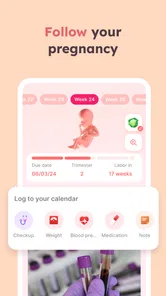
The first job is getting the timeline into place. Once I have set a due date, the calendar gives me a frame for understanding where I am in the pregnancy. That is more useful than it may sound: instead of searching a broad question and trying to work out whether the answer applies to me now, I can begin with the current stage and read from there. I would still check medical questions with a qualified professional, but having the timeline organized can make those questions easier to put into words.
Momly is most useful when I make its information part of a small habit rather than expecting it to manage the whole experience. A brief check-in at a calm moment can help me note a symptom, look at the current development information, or remember what I wanted to ask at the next appointment. If I only open it when I am worried, it is easier to treat general guidance as a personal answer; using it routinely makes it feel more like a reference and less like an emergency search tool.
Turning symptoms and questions into something manageable
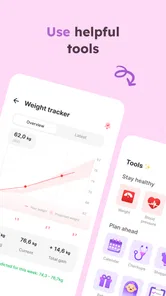
Pregnancy questions are not always dramatic. Sometimes I want to remember when a discomfort started, whether it has changed, or what I meant to mention to my clinician. The symptom-tracking side of Momly can give those observations a place to live, rather than relying entirely on memory. A useful approach is to keep entries plain and specific: what I noticed, when I noticed it, and whether anything seemed to affect it. That creates a clearer conversation starter without asking the app to diagnose anything.
This is also where I would be selective. Tracking every sensation can make an already anxious day feel more medical than it needs to be. I would record details that help me notice a pattern or explain a concern, then leave ordinary passing thoughts alone. If something feels urgent or worrying, I would contact a healthcare professional rather than waiting for an app entry or an informational article to settle the question.
More From Our News Desk

 Remini - AI Photo Enhancer
Remini Is Our App of the Week for Bringing Old Photos Back to Life
A quick AI restoration tool earns its place by making faded portraits and soft, older photos feel vivid again—provided you know where its polish ends.

 PayPal - Pay, Send, Save
PayPal Reviewed: Who Benefits from Its Reach, and Who Should Skip It
PayPal is most useful when its reach and familiar checkout solve a real payment problem. These reader-by-reader recommendations show where it earns a place—and where friction wins.

 Millionaire 2026 Quiz & Trivia
 Makes Every Answer Count
A familiar quiz-show format succeeds or falters on tiny design decisions: how clearly the game guides a first answer, handles hesitation, and invites one more round.

 Decor Life - Home Design Game
Decor Life Turns Short Breaks Into Bite-Sized Decorating Jobs
A room-by-room decorating game built for quick sessions gains from modern phone habits, but its gentle pace still depends on patience, repetition, and a steady stream of design jobs.

 Sniper 3D:Gun Shooting Games
Sniper 3D’s Quick-Shot Appeal Faces the Upgrade Treadmill
The appeal is immediate: line up a target, steady your aim, and fire. The harder question is whether Sniper 3D can keep players returning after the first rush.

 Blockudoku®: Block Puzzle Game
Blockudoku vs. the Puzzle Pack: A Quick Puzzle With a Repetitive Edge
Blockudoku turns a clean grid into a quiet test of foresight. Against match-three polish and head-to-head simplicity, its lasting appeal is also its biggest limitation.
Latest News



Making the handoff to appointments and home life
The best outcome is not simply having more pregnancy content to read. It is being able to carry a useful note from the app into a real conversation: a symptom to describe, a question to ask, or a reminder that would otherwise slip away. I can also see the calendar helping a partner or family member understand the broad stage of pregnancy, though I would share the relevant information directly instead of assuming they can see my account or activity.
There is a practical trade-off here. Momly can put several kinds of pregnancy support in one place, but it cannot know the full medical context behind an individual pregnancy. I would use its growth updates and advice to build general understanding, not to make decisions about medication, complications, or care. The app’s value is in helping me arrive better prepared, not in taking the clinician’s place.
Where the routine can break down
A pregnancy tracker is only helpful if it fits the person using it. If I dislike reminders, notifications can feel like another demand rather than support; I would keep only the prompts that genuinely help. If I prefer a paper journal or already have a trusted health app, maintaining the same information in multiple places may create extra work. Momly is a better fit when I want a single pregnancy-focused place to revisit, rather than a new system for recording every detail of daily life.
I would also be careful not to confuse a friendly tone with individualized medical advice. General tips can be reassuring, but pregnancy is not identical from one person to another, and an app cannot assess how a particular symptom fits someone’s history. The useful boundary is simple: use the app for orientation and preparation, and take personal concerns to a healthcare professional. That distinction lets the tracker support peace of mind without promising certainty it cannot provide.
Getting Started with Momly
First things first, downloading and setting up the app was a breeze. Available on both Android and iOS, all it took was a few taps, and I was in. The interface is surprisingly intuitive, which is a huge plus when your brain is already overloaded with baby books and prenatal classes. Once you set your due date, it feels like the app just gets you – it’s like having a mini pregnancy assistant right in your pocket!
In everyday use, the simplest workflow is often the one I stick with: check the current point in the calendar, read what is relevant, and jot down the questions I want to bring elsewhere. That avoids the common trap of collecting so much pregnancy information that it becomes hard to tell what matters today. I would not try to turn every feature into a daily task; the app works better as a resource I can return to when it has something useful to add.
Features That Stand Out
What really caught my attention with Momly is its plethora of features tailored to make your pregnancy journey smoother. Let’s dive into a few of them:
- Weekly Updates: Every week, Momly provides detailed updates about your baby’s development and changes happening in your body. It’s both educational and reassuring.
- Health and Nutrition Tips: The app offers personalized tips on nutrition and health, helping you make informed decisions about your diet and lifestyle.
- Kick Counter and Contraction Timer: These tools are lifesavers, especially as you approach the final stretch of your pregnancy.
- Community Support: There’s a built-in community feature where you can connect with other expecting parents, share experiences, and get advice. It’s comforting to know you’re not alone on this rollercoaster ride.
These tools are most useful when I give each a clear job. The weekly updates can satisfy curiosity without needing a long reading session; a kick counter or contraction timer can support a specific task when that becomes relevant; and the community can offer the comfort of hearing from people going through pregnancy too. I would not expect peer experiences to settle a health question, though. A fellow parent can share what helped them, but their situation is not a substitute for advice tailored to mine.
A small but worthwhile habit is to decide in advance what I want from a visit. If I am checking development, I can read the update and close the app rather than drifting into unrelated browsing. If I am tracking a symptom, I can make a concise note and save the medical question for the right person. If I am using a timer or counter, I can focus on that task instead of treating it as a general measure of how the pregnancy is going. This keeps the features practical instead of turning them into a source of constant monitoring.
Why I Love It
One of the things I absolutely adore about Momly is its simplicity and warmth. The app doesn’t overwhelm you with technical jargon or unnecessary frills. Instead, it focuses on what truly matters – supporting you through this incredible journey. It feels like a friendly nudge rather than a strict instructor, which is exactly what you need when navigating pregnancy.
Moreover, the personalized notifications and reminders are a godsend. Whether it’s reminding you to drink enough water or suggesting a prenatal yoga session, Momly has got your back.
That gentle approach is not automatically right for everyone. Someone who wants detailed clinical records, appointment management, or a tightly structured medical dashboard may prefer a healthcare provider’s own tools or a dedicated record-keeping system. Someone who mainly wants a calendar can also choose a simpler tracker and avoid features they will not use. I like Momly most for the person who wants pregnancy-specific context and a reassuring place to check in, without expecting a full medical platform.
It is also worth thinking about how much advice feels helpful. Health and nutrition guidance can give me ideas to discuss or investigate, but I would not read a general tip as a personal instruction, especially if I have dietary restrictions or a pregnancy-related condition. The practical test is whether the content helps me ask a better question or make a sensible everyday choice, not whether it removes the need to use my own judgment.
How it compares with other pregnancy tools
Compared with using a general calendar, search engine, and notes app separately, Momly has the advantage of keeping the pregnancy timeline and related information together. A plain calendar is better for appointments and practical scheduling if that is all I need. A notebook may be better if I want complete control over what I record and prefer not to build a digital habit. A clinician’s portal is the more appropriate place for formal medical communication and records. Momly sits between those options: it is a pregnancy companion, not a universal organizer or a clinical service.
That middle ground is its strength and its limit. The app can make routine learning and tracking feel less scattered, but the more complex the question, the less likely a general-purpose pregnancy app is to be the right final stop. I would use it to organize my thoughts before an appointment, not to replace the appointment; I would use community discussion for solidarity, not as proof that another person’s experience predicts mine.
Who will get the most from it
I would recommend trying Momly if you are expecting and want a friendly way to follow the pregnancy calendar, read about development, and keep track of symptoms or questions. It may be particularly useful if this is your first pregnancy and you are still learning what information is worth bringing to a clinician. It can also suit someone who likes short, regular check-ins more than sitting down with a long book or searching online whenever a new question comes up.
I would be less inclined to recommend it to someone who finds pregnancy reminders stressful, wants only a bare due-date countdown, or needs a detailed clinical record system. It may also not be the right place for someone who would rather avoid community content or already has a routine that works well. Choosing not to track everything is a perfectly reasonable approach; the point is to find support that reduces effort rather than adding another obligation.
A realistic day with the app
Imagine I have a busy day, a mild new discomfort, and an appointment coming up. I can take a moment to check the pregnancy calendar, make a short note of what I noticed, and write down the question I want to ask. Later, I can bring that note to the appointment instead of trying to reconstruct the details from memory. If the concern becomes urgent, I would seek professional help promptly rather than waiting for my next routine check-in. That is the kind of modest, practical handoff where a tracker earns its place.
For a partner, the app can also be a conversation prompt: I can share what I have learned or explain what I am tracking, then decide together what practical support would help at home. I would not assume that an app notification automatically communicates what I need. A direct conversation is still the useful handoff, especially for appointments, household tasks, or emotional support.
Cost, access, and what to expect
Momly is free to download, with in-app purchases ranging from $0.99 to $15.99 per item. I would start with the free experience and decide whether I actually need anything beyond it before spending money. That is a sensible way to approach any optional purchase: first see whether the calendar, information, and tracking fit your routine, then consider whether an extra item solves a real need rather than buying it because pregnancy can make every checklist feel urgent.
The app is rated for Everyone, has an average rating of 4.8 from around 62,000 ratings, and has been installed over a million times. It was released on July 31, 2019, and version 3.17.0 requires Android 7.0 or later. Those details suggest it is an established option, but popularity alone does not determine whether its tone or workflow suits me. I would judge it by whether I can use it comfortably and whether it helps me stay organized without making me more anxious.
Final Thoughts
All in all, if you’re expecting or planning to start a family soon, I’d highly recommend giving Momly: Pregnancy App & Tracker a try. It’s more than just an app; it’s like having a knowledgeable friend accompanying you on this beautiful journey. With its user-friendly design, comprehensive features, and supportive community, Momly truly stands out in the sea of pregnancy apps. So, why not give it a go and see for yourself? Happy parenting!
My recommendation comes with one clear qualification: I see it as a companion for context, routine, and preparation, not as a source of personal medical decisions. If that is the kind of support you want, Momly is an approachable place to begin. If you need clinical records, highly customized care, or simply prefer not to track pregnancy digitally, another option will serve you better. Used on its own terms, it can make the day-to-day flow feel a little more organized without pretending that pregnancy is one-size-fits-all.
Momly: Pregnancy App & Tracker Frequently Asked Questions
Can Momly help me keep pregnancy details organized in one place?
Momly is designed to bring several pregnancy-related tools together, including a calendar, baby-growth tracking, symptom tracking, and expert advice. This can make it easier to follow updates and record symptoms within one app rather than relying on separate notes. It is best viewed as an organizational companion for your pregnancy journey, not a replacement for personal medical care.
Do I need to pay to download and start using Momly?
Momly is free to download, so you can try it without paying upfront. Optional in-app purchases are available, priced from $0.99 to $15.99 per item. This means the app has a free starting point, while some additional options may involve a charge. Check the purchase details in the app before confirming anything, especially if you prefer to avoid paid extras.
What information should I have ready before setting up Momly?
Before getting started, it helps to know your pregnancy dates so you can use Momly’s calendar and follow baby growth and pregnancy updates in context. The app is designed around tracking pregnancy, symptoms, and related information, so keeping those details handy can make the experience feel more relevant from the beginning. You can explore its guidance alongside your personal care routine.
Is Momly suitable for first-time parents?
Momly is a parenting app focused on pregnancy, with a calendar, baby-growth tracking, symptom tracking, and expert advice. Those tools can give first-time parents a convenient place to follow pregnancy-related information and keep track of changes. It can complement conversations with a healthcare professional, while offering an app-based way to stay engaged with the pregnancy journey.
What features does Momly: Pregnancy App & Tracker offer?
Momly: Pregnancy App & Tracker provides a comprehensive suite of features designed to support expectant mothers through their pregnancy journey. These include a week-by-week pregnancy tracker, personalized health tips, nutritional advice, and a contraction timer. It also offers a community forum where users can connect with other moms-to-be and access expert advice on a variety of pregnancy-related topics.
Pros
- Comprehensive pregnancy tracking features.
- User-friendly and intuitive interface.
- Includes personalized health tips.
- Offers a supportive community forum.
- Regular updates with new features.
Cons
- Limited free features, paid subscription needed.
- Occasional app crashes reported.
- Some users find notifications overwhelming.
- Limited customization options available.
- Requires constant internet connection.