MM-Calendar
- 84.00
- 4.5
- Installs
- 1.00M
- Price
- Free

Screenshots
Analysis by Reviewed
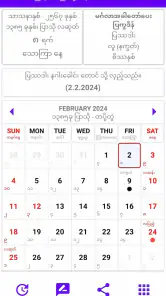
I find MM-Calendar most useful when I treat it as a reference for Myanmar dates rather than expecting it to replace every part of a modern scheduling setup. That distinction matters: the app is built around a Myanmar calendar covering more than a century, so its value is clearest when I need to check a date in that system or plan around it. For everyday appointments that already live in another calendar, I’d keep using that tool and reach for this one when the Myanmar date itself is the important detail.
A practical way to check dates
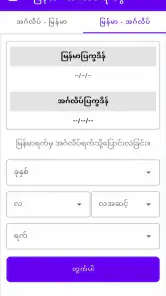
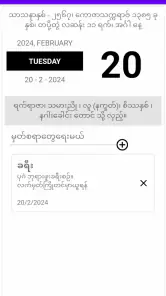
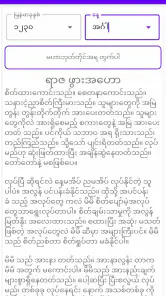
In a typical day, I might be arranging a family visit, checking a date someone has given me in the Myanmar calendar, or trying to make sense of a date on a local notice. Rather than converting it from memory or searching the web each time, I can use a dedicated calendar as the starting point. That makes the app especially handy for people who regularly move between Myanmar and Gregorian dates, and less compelling for someone who never needs that reference.
A useful habit is to confirm the calendar date before adding a related event to a separate planner. That small pause can prevent a mismatch when a message, paper notice, or conversation uses a different date system from the one I normally use. I would also keep important appointments in the calendar I already rely on for alerts, rather than assume a date reference app should become my only reminder system.
Who will get the most from it
MM-Calendar is a free Books & Reference app from KHUN AUNG. It has an average rating of 4.5 from around 16,000 ratings, and more than a million installs, which suggests it has found a substantial audience among people looking for this kind of calendar reference. It is rated for Everyone, and version 1.3.6 supports Android 6.0 and later.
I’d recommend it most to Myanmar calendar users who want a dedicated tool close at hand, especially if they check dates often enough that a general-purpose calendar feels awkward. People who only need a one-off conversion may find a quick web search simpler. Likewise, if your main need is shared work schedules, cross-device event management, or a deep reminder system, a full-featured calendar app is likely a better primary choice; MM-Calendar makes more sense as a focused companion.
Make the habit repeatable
The best way to get dependable value from a calendar reference is to use the same checking routine each time. I’d look up the Myanmar date first, verify that I’m reading the intended day, then copy the relevant information into whichever planner or message thread I use to coordinate with others. For recurring plans, I’d check each date individually instead of assuming that a familiar Gregorian pattern will map neatly onto the Myanmar calendar.
That workflow is not flashy, but it reduces the risk of carrying a date conversion forward without checking it. If I’m sharing a date with someone, I’d include both calendar forms when possible. That is a practical safeguard, particularly when the other person may be using a different calendar convention or may not have the app installed.
You May Like

Clash of Clans Is Won Between the Battles

Android Auto Makes the Case for Quieter Car Software

MobiOffice: Transforming Mobile Productivity with Seamless Integration

EA SPORTS FC™ Mobile Soccer: Redefining Mobile Sports Gaming

How Microsoft OneDrive Became a Mobile Productivity Giant

How Google Translate Breaks Language Barriers Effortlessly
Where a focused calendar has limits
A specialist calendar and a general digital planner solve different problems. The usual phone calendar is better suited to appointments, invitations, and reminders that need to stay connected to a wider schedule. A Myanmar calendar reference is more useful when the date system itself is the point. I wouldn’t expect a focused reference app to replace a shared family calendar or a work organizer, and I would avoid relying on any single app as the only record for an important commitment.
Before making it part of a routine, I’d open it and check how clearly the dates I care about are presented on my device. That is a sensible first step for any calendar tool: familiarity with the layout matters more than installing it and assuming it will fit every situation. It also helps answer the practical question of whether the app is convenient enough for frequent checks or better kept for occasional reference.
The app was released on December 20, 2020, and its appeal is its narrow purpose rather than a promise to manage every aspect of a busy schedule. If you want a specialized Myanmar calendar on Android and understand that a reference tool may sit alongside your regular planner, MM-Calendar is an easy one to consider. If your priority is a comprehensive agenda with teamwork and broad scheduling features, I’d choose a general calendar first and use this app only if its particular calendar reference is useful to you.
Features that Stand Out
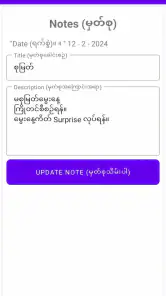
Let’s dive into what makes MM-Calendar a must-have for anyone looking to organize their life. First off, the app offers a variety of calendar views. Whether you’re a fan of the traditional monthly layout or prefer a more detailed daily agenda, this app has got you covered. You can easily switch between views with a simple swipe, ensuring you never miss an appointment.
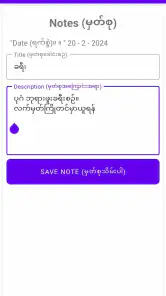
One of my favorite features is the task manager. It allows you to create, edit, and track tasks seamlessly. You can set deadlines, attach notes, and even prioritize tasks. It’s an all-in-one solution for managing your to-do list without any hassle.
Seamless Synchronization
Another noteworthy feature is the synchronization capability. MM-Calendar syncs effortlessly with all your devices, ensuring your schedule is up-to-date no matter where you are. It also integrates with popular calendar services like Google Calendar and Outlook, making it a breeze to import your existing appointments.
Moreover, the app supports reminders and notifications. You can customize alerts for upcoming events, ensuring you’re always prepared. No more last-minute rushes or forgotten meetings!
User Experience and Interface
The user interface is intuitive and easy to navigate. Even if you’re not tech-savvy, you’ll find setting up and using the app a walk in the park. The design is sleek and modern, with a color palette that’s easy on the eyes. You can even personalize the look with different themes to match your style!
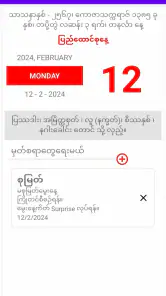
Adding events is as simple as tapping a button and filling in the details. The app also offers voice input for those times when typing just isn’t convenient. It’s these small touches that make using MM-Calendar a delightful experience.
Final Thoughts
In conclusion, if you’re on the hunt for a reliable and efficient way to manage your schedule, look no further than MM-Calendar. Its blend of functionality, ease of use, and customization options make it a standout choice in the crowded world of calendar apps. Give it a try, and you might just find it indispensable. Happy scheduling!
Build a reliable date-checking routine
For a day-to-day workflow, I’d use the app at the point where a Myanmar date enters my plans, not only when I am already trying to resolve a last-minute mix-up. If a relative mentions a date while we are arranging a visit, I can check it straight away, then put the corresponding appointment into my usual phone calendar. This keeps the specialized date reference and the practical reminder in the places where each is most useful.
A small but useful refinement is to record the source alongside the date when it matters: for example, whether it came from a family message, a printed notice, or a conversation. That is not an app feature; it is a habit that helps me revisit an assumption if plans change. When coordinating with someone who uses a different calendar, I’d send both date forms and ask them to confirm the one they intend, rather than relying on either person to infer the conversion.
If I am checking several dates for a plan, I would work through them one at a time and write each result down before moving on. That reduces the chance of mixing up adjacent entries while switching between a reference and a messaging app. It is especially helpful when the dates are being collected for a family gathering or a trip, where one incorrect conversion can affect several people.
Settings and shortcuts that are worth checking
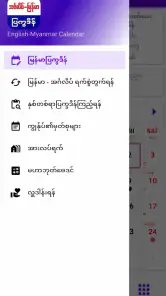
Calendar apps can differ in how they display dates and move between periods, so I would spend a moment exploring the controls that are actually available on my device. The most useful setup is the one that makes the date I need easy to identify at a glance. I’d test how I navigate between dates and views, then settle on a repeatable route rather than tapping around differently every time.
I would also check the phone’s text and display settings if Myanmar script or date labels are difficult to read. Increasing system text size can help with small calendar details, though it may change how much fits on screen. This is a practical accessibility adjustment, not a substitute for verifying that the calendar is displaying the intended date clearly.
For quicker repeat use, I’d keep the app somewhere easy to reach on the phone and make the lookup part of an existing habit, such as checking a message before replying with a proposed date. That simple shortcut avoids the friction of searching for the app each time. I would not assume it has a particular widget, home-screen shortcut, or notification option without seeing that control on my own installation.
What it does better than general calendar tools
The key comparison is not that one kind of calendar is universally better. A conventional phone calendar is usually the natural home for meetings, repeating reminders, invitations, and a day’s list of commitments. MM-Calendar’s appeal is its specialized Myanmar-date reference, which can make a date question easier to resolve than trying to work it out inside a planner designed mainly around everyday appointments.
Web searches can be convenient when I need a single answer and do not want another app. But a dedicated reference is more practical when the same kind of date check comes up repeatedly: opening one familiar tool is easier than searching again and judging which result applies. Conversely, a web result or another trusted reference may be preferable if I need a second check for a particularly important date.
I would not treat the app and my main calendar as competitors. They serve different stages of a plan: one helps me understand the date in the Myanmar calendar, and the other keeps the appointment visible among my daily commitments. This two-tool approach is less elegant than doing everything in one place, but it is clearer than expecting a focused reference to handle all scheduling needs.
Where I would be cautious
My main caution is about scope. A calendar date reference is not automatically a shared planner, and a user should not infer collaboration, backup, or synchronization behavior from the fact that an app is a calendar. I’d keep critical event details in a system I already know how to access and maintain, then use this app for the part that calls for Myanmar calendar dates.
There is also a modest workflow cost in switching between apps and, when coordinating, communicating both calendar forms. If I rarely encounter Myanmar dates, that extra step may not earn its place on my phone. If I use the calendar often, though, the routine becomes straightforward, and the focused purpose is an advantage rather than a limitation.
For a date with serious consequences, I would avoid relying on a hurried glance alone. I’d make sure I have selected the intended day, compare the result with the original message or notice, and confirm it with the other person if there is any ambiguity. That is sensible care with any calendar conversion, not a reason to distrust this particular tool.
My recommendation for the right reader
I’d choose MM-Calendar if I regularly need a Myanmar calendar close at hand and want a simple reference to support conversations, family planning, or reading local date information. It is also a reasonable companion for someone who has recently started using this calendar system and wants a consistent place to check dates before entering plans elsewhere.
I’d skip it if I only need an occasional conversion, if my priority is a unified agenda with shared events, or if I do not use Myanmar dates at all. In those cases, a search or a full-featured calendar may be less effort. For everyone else, the strongest approach is to use it deliberately: check the date, confirm the context, and carry the result into the planner that already manages the rest of life.
MM-Calendar Frequently Asked Questions
Is MM-Calendar free to download, and is it suitable for all ages?
MM-Calendar is free to download, so you can try it without paying an upfront price. It has an Everyone content rating, which makes it suitable for a broad audience. Its focus on Myanmar calendar information may be especially relevant to people who want to consult Myanmar dates from a phone app.
Who develops MM-Calendar, and when was it released?
MM-Calendar is developed by KHUN AUNG and was released on December 20, 2020. Those details can help you identify the app and understand its background before downloading. It is a calendar-focused reference app, so it may be worth considering if you are looking for Myanmar calendar information rather than a general-purpose scheduling tool.
What kind of calendar is MM-Calendar, and who might find it useful?
MM-Calendar is a Books & Reference app centered on the Myanmar calendar, with the store summary describing it as a Year 100+ Myanmar Calendar. It may suit people who want a calendar focused on Myanmar dates and are looking for a straightforward reference on their phone. The app is free, rated for Everyone, and developed by KHUN AUNG.
What features does MM-Calendar offer that make it stand out from other calendar apps?
MM-Calendar offers a range of unique features that set it apart from other calendar applications. It includes customizable themes, integrated task management, and an AI-powered scheduling assistant that helps optimize your time. Additionally, it supports multiple calendar integrations, allowing you to sync with Google, Outlook, and Apple calendars seamlessly. Its user-friendly interface and robust notification system ensure you never miss an important event or deadline.
Is MM-Calendar available on both Android and iOS platforms?
Yes, MM-Calendar is available for download on both Android and iOS platforms. The app is designed to provide a consistent user experience across devices, ensuring that you can manage your schedule efficiently whether you're using a smartphone or tablet. You can download it from the Google Play Store for Android devices and the Apple App Store for iOS devices.
Pros
- Intuitive user interface for easy navigation.
- Customizable calendar views and themes.
- Syncs seamlessly with other devices.
- Supports multiple calendar formats.
- Efficient event management features.
Cons
- Limited free features compared to competitors.
- Occasional sync delays.
- No offline mode available.
- Ads in free version can be intrusive.
- Some features locked behind paywall.

- Category
- Books & Reference
- Version
- 1.3.6