MiraManager - File Manager
- 23.00
- 4.3
- Installs
- 100.00K
- Price
- Free
Screenshots


Analysis by Reviewed
My day-to-day file problem usually starts with a small shortcut: I save a document, screenshot, or download wherever the phone puts it, then forget where I left it. A file manager can help, but only if it becomes part of a sensible routine rather than another place to browse. MiraManager - File Manager is a free Android productivity app from NOVAGE DEV, and its central appeal is straightforward: it gives me a place to manage files and tackle digital clutter.
Start with the mess you actually have
Before installing any cleaner or organizer, I find it useful to ask what is taking up attention: hard-to-find downloads, duplicate-looking photos, or files I no longer need. Those are different problems. A manager can make folders easier to work through, but it cannot decide which personal documents are safe to delete. I would start by reviewing one area, such as Downloads, rather than trying to tidy the whole phone in one sitting.
That distinction matters because a cleanup app is not a substitute for a backup. If a file is important, I would confirm that I have another copy before removing it. MiraManager’s store summary focuses on managing storage, clearing junk files, and removing clutter; I’d treat cleanup as a deliberate review, not an instruction to delete everything the app flags. That cautious approach is especially useful for receipts, travel documents, and work files that may look disposable until they are needed.
The Swiss Army Knife of File Management
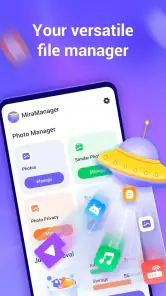
Let me tell you, the first time I opened the MiraManager - File Manager, I was blown away by its sleek and intuitive interface. It’s like the app knows exactly what you need and puts it right at your fingertips. Navigating through files is a breeze. With just a few taps, you can move, copy, rename, and delete files with ease. It’s as if you’ve hired a personal assistant just to manage your files!
Make capture easier to undo
For a realistic everyday routine, imagine downloading a form while commuting and needing it later at home. I’d put new downloads into a small number of recognizable folders, use clear names when renaming matters, and avoid building a deep maze of subfolders. The practical payoff is not a dramatic storage miracle; it is being able to find the form without remembering which app first saved it. When organizing, moving a file is less risky than deleting it, so I’d use that as a first step when I’m unsure.
Features That Make a Difference
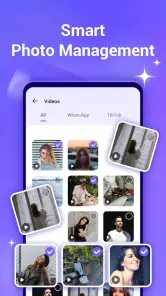
What sets MiraManager apart from other file managers is its robust set of features. First off, the app supports a wide range of file formats. Whether it's documents, music, videos, or images, this app can handle it all. Plus, the search function is incredibly fast and accurate, saving you time and frustration.
One of the standout features has to be the cloud integration. With MiraManager, syncing files across your devices is as simple as pie. You can connect to various cloud services like Google Drive, Dropbox, and iCloud, making it super convenient to access your files anywhere, anytime.
More From Our News Desk

Clash of Clans Is Won Between the Battles

Android Auto Makes the Case for Quieter Car Software

MobiOffice: Transforming Mobile Productivity with Seamless Integration

EA SPORTS FC™ Mobile Soccer: Redefining Mobile Sports Gaming

How Microsoft OneDrive Became a Mobile Productivity Giant

How Google Translate Breaks Language Barriers Effortlessly
Put a file routine into an ordinary day
The best time to sort a download is often right after using it, while I still remember what it is. For example, after submitting a form, I can decide whether it belongs with work documents, personal records, or nowhere at all. That small decision prevents the Downloads folder from becoming an archive of forgotten material. If I am busy, I can leave the file where it is and return during a short weekly check; a routine that survives hectic days is more useful than an ambitious cleanup plan I abandon.
Search and naming work best as a pair. If I keep a document, I would give it a filename that includes the subject or purpose rather than relying on a vague label like “new file.” Later, search can narrow the hunt, while a folder gives me a reliable home for related items. I would not rename everything just for neatness: filenames created by another app can carry useful context, and changing them may make a file harder to recognize in the place I originally received it.
A routine that avoids accidental cleanup
I’d make file maintenance a brief, repeatable check rather than a big monthly purge: look at recent downloads, decide what belongs in a lasting folder, and remove only items I recognize and no longer need. Search is most useful when a filename or file type comes to mind; consistent naming makes it more dependable than relying on memory alone. Before using any cleanup action, I’d pause over the selection and check whether anything is a working copy, an offline reference, or the only copy of a document.
There is a trade-off between convenience and control. A dedicated manager can put file operations in one place, while the phone’s built-in file browser is often enough for someone who only opens an occasional download. Gallery and cloud apps may be better for browsing photos or documents already organized there. I would choose MiraManager when local storage feels scattered and I want a focused place to sort it, not simply because every phone needs another utility.
Where it fits beside the tools you already use
I see a file manager as the workbench for local files, not as the owner of every kind of content. A gallery is usually a more natural place to scan pictures visually, and a cloud drive is often better when the main goal is keeping a remote copy or sharing documents. The phone’s built-in browser may also be perfectly adequate for opening a single download. MiraManager makes more sense when I repeatedly need to move, rename, search, or review items across folders and would rather do those jobs in one dedicated space.
That comparison also helps set expectations around cloud access. The published description of cloud integration names Google Drive, Dropbox, and iCloud, but I would check the actual connection options on my Android device before building a workflow around a particular service. Android file access and cloud-service behavior can differ, so I would first test with a nonessential file. If I only need to store a copy safely online, I would keep using the cloud app itself as the source of truth rather than assuming a file manager replaces its backup and sharing tools.
Why You'll Love It
There’s something incredibly satisfying about having control over your digital files, and MiraManager gives you just that. The app runs smoothly without any hiccups, even when handling large files. And let’s not forget the built-in security features that ensure your private files stay private. It’s like having a digital security guard at your service.
Another thing I absolutely love is its customization options. You can tweak the settings to suit your personal preferences, whether it's changing the theme or organizing files in a way that makes sense to you. It’s flexibility at its finest!
Small habits that prevent bigger file messes
One useful practice is to treat a file action as a decision with a destination. Before moving something, I would ask whether I want to keep it, share it, or remove it, then make the relevant choice rather than shuffling it between folders without a reason. This makes the manager useful for reducing clutter rather than merely relocating it. For a document I may need later, a descriptive name and a stable folder are usually more valuable than a complicated filing scheme.
I would also separate cleanup from organization. When I am sorting, I should not feel pressured to delete; when I am removing clutter, I should not rush through important folders just to make them look tidy. That distinction matters for people who use a phone for work or travel, where a small file can be essential even if it has not been opened recently. A conservative first pass—moving uncertain items aside or leaving them alone—keeps the routine safer and easier to repeat.
Where I’d be careful
File tools are only helpful when their actions are clear. Bulk cleanup can save effort, but it also raises the cost of a mistaken tap, so I would review what is selected before confirming removal and keep important material backed up separately. I would also avoid expecting a file manager to solve a full-device backup problem or replace a specialist photo library. Those are different jobs, and a familiar built-in tool may be the better choice if it already handles the files I use.
Another possible friction point is simply deciding how much structure to create. Too few folders can leave related documents mixed together; too many can make filing feel like a chore and turn every save into a choice between several nearly identical destinations. I would begin with a simple set of categories based on what I actually retrieve—such as work, personal records, and temporary downloads—and only add a folder when I repeatedly need it. That keeps the system understandable months later, not just on the day I set it up.
MiraManager is rated for Everyone and has a 4.3 average from around one thousand ratings, with over one hundred thousand installs. It was released in November 2024, and version 1.0.38 supports Android 7.0 and later. Those details make it accessible to many Android users, but they don’t replace the basic test I’d use myself: can I locate a file, understand what a cleanup action will affect, and keep the items I care about? I’d try it on a small, low-risk batch first.
Who should make it part of their setup?
I would recommend trying it if your phone regularly collects forms, work attachments, receipts, and downloads that you later need to find. The app is most useful when the problem is not just low storage, but the mental overhead of remembering where an item ended up. Someone who wants a central place for everyday file operations may appreciate that focus. The free price also makes a cautious trial straightforward, provided you begin with files you can safely replace or ignore.
I would skip it if you rarely handle local files, already find everything through your phone’s built-in file browser, or mainly want automatic photo backup. It is also not the right answer if your core need is a dependable backup plan: I would use a dedicated backup service and confirm that important material is saved separately. For a person who dislikes organizing, adding another app will not fix the underlying habit unless the routine stays small and practical.
Final Thoughts
In a world where our devices are overflowing with files, MiraManager - File Manager is a lifesaver. It’s user-friendly, efficient, and packed with features that genuinely make a difference. If you’re tired of the clutter and want a straightforward way to manage your files, this app is definitely worth checking out. Trust me, you’ll wonder how you ever managed without it!
My recommendation is narrower than “everyone should install it”: it suits Android users who regularly download files, want a more intentional cleanup habit, and are willing to check before deleting. If your storage is already easy to navigate, or you mainly need cloud backup and photo browsing, your existing apps may be enough. For me, its value is in making a small, repeatable sorting routine easier to keep—not in treating clutter as something one tap can permanently fix.
MiraManager - File Manager Frequently Asked Questions
What Android version do I need to use MiraManager - File Manager?
MiraManager - File Manager requires Android 7.0 or later, so check your device’s software version before downloading. It is a productivity app for managing phone storage, clearing junk files, and removing clutter. If your phone runs a compatible version of Android, you can consider whether these storage-management tasks match what you need.
Who develops MiraManager, and is it an established app?
MiraManager is developed by NOVAGE DEV. It has been available since November 10, 2024, and its current version is 1.0.38. The app has over 100,000 installs and an average rating of 4.3 from around 1,000 ratings, giving prospective users a snapshot of its adoption and user feedback before they decide whether to try it.
What is MiraManager - File Manager used for?
MiraManager is a versatile file management app designed to help users efficiently organize, access, and manage their files on Android and iOS devices. It provides features like file browsing, categorization, and search capabilities, making it easy to locate and handle various file types, including documents, photos, videos, and more.
Is MiraManager - File Manager easy to use for beginners?
Yes, MiraManager is designed with an intuitive user interface that is easy to navigate, making it suitable for beginners. It offers a simple drag-and-drop functionality, along with clear instructions and user-friendly icons, which help users manage their files without any hassle or technical expertise.
Does MiraManager - File Manager support cloud storage services?
Absolutely, MiraManager provides seamless integration with popular cloud storage services such as Google Drive, Dropbox, and OneDrive. This feature allows users to easily access and manage files stored in the cloud, ensuring that they can work with their documents and media files from anywhere, on any device.
Pros
- User-friendly interface for easy navigation.
- Supports multiple file formats seamlessly.
- Efficient file transfer with high-speed connectivity.
- Robust privacy features to secure your data.
- Integrates well with cloud storage services.
Cons
- Occasional bugs during file operations.
- Ads can be intrusive for free version users.
- Limited advanced features for power users.
- No dark mode to reduce eye strain.
- Updates can be slow to release.
- Category
- Productivity
- Version
- 1.0.38













