MiraClean Lite - File Cleaner
- 198.00
- 4.0
- Installs
- 5.00M
- Price
- Free

Screenshots
Analysis by Reviewed
Before I reach for any cleaner, I first ask what is actually making the phone feel cramped: a pile of old downloads, a few large personal files, or an app that has started behaving badly. That distinction matters with MiraClean Lite. I see it as a practical starting point for tidying storage, not an all-purpose repair tool, and the safest results come from treating cleanup suggestions as something to review rather than instructions to accept blindly.
Start with the storage problem you can name
A useful first step is to notice when the problem appears. If the phone warns that storage is nearly full while you are trying to save a document or take a photo, cleaning unwanted files may help with that immediate constraint. If the phone is slow even when storage is not close to full, I would look at the apps and tasks involved before assuming a cleaner is the answer. Matching the action to the symptom makes it less likely that you will delete something without solving the real issue.
I would also avoid treating a single cleanup as a permanent solution. Downloads and app-related clutter can accumulate again, while a library of photos or videos may simply need more deliberate organization. A cleaner is most useful when it helps you review what is taking up room; it cannot decide which personal files you still value. For irreplaceable material, I would check that I have another copy before removing it.
Make cleanup a deliberate, low-risk task
My preferred approach is to run a cleanup when I have a few unhurried minutes, not while rushing out the door or trying to free space during an important moment. I would look over the categories or files presented, remove only items I recognize as disposable, and then check whether the original issue has improved. If I am unsure about an item, leaving it in place is a sensible decision, not a failed cleanup.
This cautious routine is especially helpful on a phone used for both personal and work material. A saved attachment may look like an old download but still be the only copy of something useful. Likewise, a file associated with an app may not be obvious from its name alone. I would prioritize certainty over squeezing out every possible bit of space.
Where a focused alternative is better
For photos, videos, and documents I recognize, the phone’s own gallery or file-browsing tools can give me more context than a general cleaner. That extra control takes longer, but it is worthwhile when I am sorting personal media or deciding what to archive. If the issue is one app using too much space or repeatedly freezing, checking that app’s own storage and behavior is a more targeted next step than performing broad cleanup.
On the other hand, manually searching through folders can be tedious if I do not know where clutter tends to collect. This is where a simple cleaner can make the first pass less intimidating. I would use it to narrow down what deserves attention, then switch to a more specific tool or manual review when the files are important, ambiguous, or unusually large.
More From Our News Desk

Weather by Xiaomi Review: Clear at a Glance, Less Clear Up Close

X Under Pressure: Can It Recover When Posting Goes Wrong?

Clash of Clans Is Won Between the Battles

Android Auto Makes the Case for Quieter Car Software

MobiOffice: Transforming Mobile Productivity with Seamless Integration

EA SPORTS FC™ Mobile Soccer: Redefining Mobile Sports Gaming
A realistic way to fit it into a busy day
Picture getting ready to leave for a weekend and finding that the phone is low on space just as you want to save a map or take a few pictures. I would not start deleting things at random. I would use the cleaner to identify likely clutter, inspect the suggestions, and remove only what I can confidently replace or no longer need. Then I would test the task that prompted the cleanup, rather than assuming the phone is fixed because a scan finished.
If that does not free enough room, I would move on to a deliberate review of large videos, old downloads, or offline files. Those are personal choices, so a person who knows their own media library can often make a safer decision than an automated cleanup process. The useful trade-off is convenience versus control: the app can make the first look easier, while I remain responsible for deciding what stays.
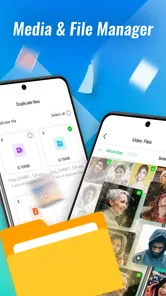
When a phone starts feeling crowded, a cleaner can look like a quick fix. I’d treat MiraClean Lite as a simple place to begin sorting out storage clutter, not as a guaranteed way to make every device faster. It’s a free productivity app from NOVAGE DEV, and its focus is cleaning junk files and organizing files rather than replacing a full file manager.
What a quick clean can—and cannot—do
The appeal is easy to understand: when storage is tight, it can be a relief to review unwanted files instead of hunting through folders one by one. The app has an average rating of 4.0 from around 9,600 ratings, and more than 5 million installs. That suggests plenty of people have tried it, though those figures alone can’t tell me whether a particular phone will feel faster afterward.
I’d set expectations around the task at hand. Removing files you genuinely don’t need may free space, but a cleaner can’t make an older phone’s processor newer or fix every cause of sluggishness. If the problem is an app that freezes or a battery that has worn down, deleting clutter may not address the underlying issue. I’d use a cleaner for housekeeping, then look at the specific source of a persistent problem.
Why Your Phone Needs MiraClean Lite
If you're like me, your phone is like a digital junk drawer – full of apps, photos, and random files. That's where MiraClean Lite steps in to save the day. It's like having a personal Marie Kondo for your phone! This app specializes in optimizing your device by cleaning up junk files, boosting memory, and even enhancing battery life.
The Setup Experience
Getting started with MiraClean Lite is a breeze. After downloading it from the app store, the installation is quick and straightforward. The interface is user-friendly, with everything laid out clearly. No confusing tech jargon to trip over, just straightforward options to clean and boost your phone.
It is currently at version 1.0.24 and supports Android 7.0 or later, so it may suit someone keeping an older compatible phone in service as well as someone with a newer device. Its Everyone age rating also makes it approachable for a broad audience. Before removing anything, I’d still pause to inspect what the app identifies: a file that looks disposable at a glance can matter to an app or to your own record-keeping.
Features That Shine
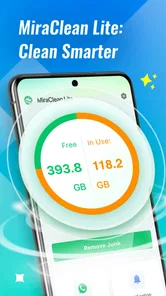
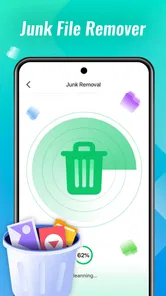
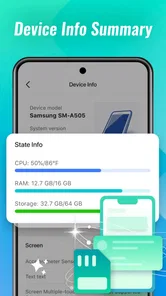
The app comes packed with numerous features that make it stand out in the crowded market of cleaning apps. First off, the junk file cleaner works like a charm. Within moments, it identifies and eliminates unnecessary files, freeing up precious storage space. Then there’s the memory booster, which helps speed up your phone by closing background apps that you’re not using. It’s like having a personal assistant that makes sure everything runs smoothly.
That memory-boosting approach has a trade-off worth keeping in mind. Closing background apps can feel satisfying, but apps you use regularly may need to reopen, and repeatedly closing them is not automatically better for everyday use. I’d reserve that option for a moment when the phone feels bogged down, rather than treating it as a routine button to press throughout the day. For a stubborn slowdown, checking which app is misbehaving may be more useful than closing everything indiscriminately.
One feature that I personally love is the battery saver. It analyzes which apps are draining your battery the most and offers solutions to extend battery life. For someone who’s always on the go, this feature is a real game-changer.
A practical way to use that advice is to check it when battery life seems unusually poor, then decide whether the apps it points out are essential while you’re away from a charger. I wouldn’t expect a cleaner to replace sensible battery habits or solve a battery that no longer holds charge well. Its value is in helping me notice possible causes and choose what to do, not in promising the same result on every phone.
Real-Time Usage and Impressions
After using the app for a few days, I noticed a significant improvement in my phone’s performance. Apps open faster, battery life is noticeably extended, and the overall experience feels much snappier. Plus, it’s satisfying to know that my phone is not cluttered with unnecessary files. It’s like giving your phone a breath of fresh air!
For a realistic routine, imagine running short on space before taking photos on a day out. I’d use the cleaner to review likely junk, remove only what I recognize as unnecessary, and then check whether the phone has enough room for the immediate task. That is a more dependable workflow than deleting a large batch in a hurry. If a file is personal or difficult to replace, I’d leave it alone until I have checked it elsewhere.
As for speed and stability, I’d judge the result by ordinary tasks after cleanup: opening the apps I rely on, switching between them, and seeing whether the original storage problem has eased. A quick scan may feel convenient, but the meaningful result is whether the phone is easier to use afterward. I would not keep running cleanup simply to chase a temporary feeling of speed, especially if the phone is already working comfortably.
When another approach makes more sense
Compared with manually reviewing folders, a cleaner can offer a more approachable starting point for someone who doesn’t know where to look. Compared with a full file manager, though, it is a narrower choice: people who want detailed control over folders and individual files may prefer managing them directly. If your main issue is a collection of large videos or duplicate personal photos, careful manual review can be safer than relying on a general cleanup routine.
I’d recommend this app most to someone who wants straightforward storage housekeeping and is willing to review suggested cleanup before acting. It is less suitable for anyone expecting a dramatic speed boost, detailed file-management tools, or a fix for a failing battery or a single troublesome app. Keeping a little free space and checking what is being removed are useful habits; no cleaner can replace those decisions.
Reliability also depends on using the app thoughtfully. I’d avoid tapping through cleanup prompts automatically and would make a habit of checking important files before removing anything. That small pause is especially useful when a phone contains work documents, saved downloads, or media that isn’t backed up. For an app whose purpose is to clear clutter, user review is part of the safety net.
Performance, fit, and final thoughts
For perceived speed, I would separate the scan itself from the phone’s day-to-day behavior afterward. A cleanup that takes little effort can be useful even if it does not transform performance; freeing needed storage and reducing the number of files you have to sort through are practical outcomes on their own. The app’s current version is 1.0.24, and I would still judge stability by whether it behaves consistently on the device in front of me, rather than assuming every Android phone will respond the same way.
Resource demands are another reason to keep expectations grounded. A cleaner is an extra app on a device that may already be short on storage, and running scans or closing background apps should be purposeful rather than constant. I would not leave a cleanup routine running as a substitute for checking the phone’s own storage tools. If you only need to remove one known file, direct deletion is simpler; if you want a guided first pass, a cleaner has a clearer role.
In a world where our phones are almost an extension of ourselves, keeping them in top shape is crucial. MiraClean Lite offers a simple yet effective solution to keep your device running smoothly. Whether you’re a tech novice or a seasoned pro, this app caters to everyone, ensuring your phone stays as efficient as the day you got it.
I’d describe its strongest case as convenient, basic cleanup for someone who wants help getting started, rather than a complete tune-up for every performance issue. The free price makes it easy to consider, but the right choice still depends on what is bothering you: clutter points toward cleanup, while app-specific trouble or battery wear calls for a more targeted response.
If your phone is starting to feel sluggish or if you’re constantly running out of space, MiraClean Lite might just be the app you didn’t know you needed. Give it a try and experience the difference yourself!
MiraClean Lite - File Cleaner Frequently Asked Questions
Is MiraClean Lite - File Cleaner suitable for older Android devices?
MiraClean Lite - File Cleaner is an Android app with a minimum OS requirement of 7.0, so it may suit older devices that run that version or newer. It is presented as a lightweight file-cleaning tool, which can be appealing when storage is limited. Check your device’s Android version before downloading to make sure it meets the requirement.
Is MiraClean Lite - File Cleaner free to download?
Yes, MiraClean Lite - File Cleaner is free to download. It is a productivity app from NOVAGE DEV, and its straightforward purpose is to help remove junk files and organize files. The app is rated for Everyone, making its intended audience broad. As with any download, use the official app store to get the authentic version.
What is MiraClean Lite - File Cleaner and how does it work?
MiraClean Lite - File Cleaner is an efficient mobile application designed to help users optimize their device's performance by removing unnecessary files, such as caches and residual files, that often slow down the system. It works by scanning your device for junk files, providing a comprehensive overview of everything that can be safely deleted, and allowing you to free up valuable storage space with just a few taps.
Is MiraClean Lite - File Cleaner safe to use on my mobile device?
Yes, MiraClean Lite - File Cleaner is safe to use. The app is designed with user security in mind, ensuring that only unnecessary files are targeted for deletion. It does not access personal data or sensitive information on your device, and it follows strict privacy policies to protect your data. Always download from official app stores to ensure authenticity.
Can MiraClean Lite - File Cleaner improve my device's speed and performance?
Absolutely! By cleaning out junk files, temporary caches, and other unnecessary data, MiraClean Lite - File Cleaner can significantly boost your device's speed and overall performance. By freeing up storage space, the app reduces the load on your device's processor, allowing apps and games to run more smoothly and efficiently.
Pros
- Efficiently clears cache and junk files.
- Boosts device speed and performance.
- User-friendly interface.
- Low battery consumption.
- Supports multiple languages.
Cons
- Limited features in free version.
- Advertisements can be intrusive.
- Occasional lag on older devices.
- Requires permissions access.
- No real-time protection feature.













