Mens Hairstyles And Haircuts
- 78.00
- 3.9
- Installs
- 1.00M
- Price
- Free
Screenshots

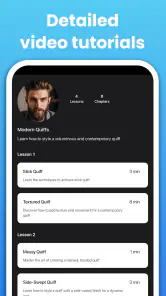
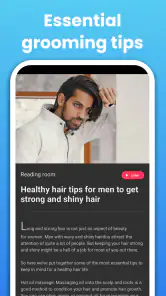

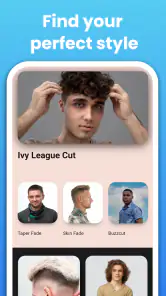
Analysis by Reviewed
When I use a hairstyle app to think through a change, I’m looking for a starting point rather than a digital barber who can guarantee the result. A photo preview can help me explain the direction I want, but it cannot tell me exactly how a cut will sit on my hair or how much daily styling it will need. That distinction matters with Mens Hairstyles And Haircuts: I find it most useful as a visual aid for narrowing down ideas, not as the final authority on what will suit me.
What to expect from a style preview
The appeal is straightforward: explore possible men’s cuts before asking a barber to make a lasting change. That can be especially handy if you are choosing between keeping more length and going shorter, or if you want to try a noticeably different look without committing on the spot. I would treat any virtual result as inspiration, since a preview is not the same as seeing the cut on your own head in real life.
A practical way to use a hairstyle preview is to save the few options that feel closest to your goal, then describe what you like about each one. You might prefer the outline of one cut but the length of another. Taking that distinction to a barber is more useful than asking for a style by name alone, because names can mean different things to different people. A reference image can start the conversation; your hair’s texture, growth pattern, and the time you want to spend styling it should shape the final decision.
Who may find it useful
I can see this being a good fit for someone who wants a low-pressure way to explore looks before a routine haircut, or who has trouble describing a style in words. It may also help if you are preparing for a bigger change and want to compare a few broad directions before booking a cut. If you already know exactly what you want and rely on a barber’s advice, a dedicated app may add less value than bringing a couple of clear reference photos.
For example, imagine you have a haircut appointment after work and only a few minutes to decide what to ask for. Rather than scrolling through unrelated inspiration images, use the app to shortlist a couple of looks, then think through what would need adapting for your own hair and lifestyle. If one option looks appealing but seems demanding to maintain, that is a useful discovery too: you can ask for a simpler variation instead of choosing a cut you may not enjoy managing every morning.
Trust, choices, and sensible caution
Because experimenting with a look may involve a personal photo, I would pause before choosing an image and consider what I am comfortable sharing with any photo-based tool. I would also check the permissions and privacy information shown on my device and in the app before granting access or selecting a picture. That is a practical habit, not a claim about this app’s specific data practices. If you would rather not use a personal image, you can still approach the app as a source of style ideas and discuss those ideas with a barber.
I also wouldn’t assume that an image-based suggestion understands everything that affects a haircut. Face shape is only one consideration; hair density, cowlicks, curl pattern, and how much upkeep you are willing to do can change whether a style works for you. The most helpful follow-up question is often not “Does this look good in the preview?” but “What would this take to maintain, and can it be adapted to my hair?” A barber can answer that in a way a visual mock-up cannot.
More From Our News Desk

Weather by Xiaomi Review: Clear at a Glance, Less Clear Up Close

X Under Pressure: Can It Recover When Posting Goes Wrong?

Clash of Clans Is Won Between the Battles

Android Auto Makes the Case for Quieter Car Software

MobiOffice: Transforming Mobile Productivity with Seamless Integration

EA SPORTS FC™ Mobile Soccer: Redefining Mobile Sports Gaming
The app is free to download, with optional in-app purchases ranging from about fifty cents to around sixty dollars per item, so I would check the available choices before buying anything. It is rated for Everyone and has an average rating of about 3.9 from around 21,000 ratings, with over a million installs. Those figures give a sense of its reach, but they do not tell me whether its previews will match my own expectations. I’d try the basic experience first and pay only if a specific option feels worthwhile.
Developed by Rstream Labs, this art and design app is at version 3.0.550 and runs on Android 7.0 or newer. That makes it accessible on a range of Android devices, though I would still consider how comfortable the screen is for judging a photo before making a decision. Compared with ordinary image searches, a purpose-built hairstyle app can make browsing feel more focused; compared with a professional consultation, it cannot assess your hair in person. I would choose the app for quick visual exploration and a barber for advice about the actual cut.
Making the preview useful in practice
I get more value from a try-on tool when I treat it as a comparison exercise rather than a pass-or-fail test of whether I look good. Start with a familiar cut, then compare one feature at a time: a tighter side, a longer top, or a different overall silhouette. That makes it easier to tell what you actually like. If you change several things at once, the result may be striking but hard to translate into a specific request at the barber’s chair.
Lighting and the angle of a photo can influence how convincing any visual mock-up feels. I would use a clear, front-facing image and avoid drawing a strong conclusion from one preview. If a style seems promising, check whether the same general idea still appeals when you look at a different reference image or view it from another angle. This is not a guarantee of accuracy; it is a simple way to avoid letting one flattering or awkward image decide the whole haircut.
Where the app fits among alternatives
Compared with searching social media or image results, this app’s appeal is the chance to focus on men’s hairstyle ideas and see them in relation to a photo. General searches offer a wider range of real people and finished cuts, which can be better for understanding how a style looks on different hair types. The trade-off is that browsing those images can become a long, unfocused scroll, while a preview can make experimentation feel more immediate.
A barber remains the stronger option when the decision depends on details such as how your hair grows at the crown, whether a fringe will fall naturally, or how often the sides need tidying. I would use the app to arrive with a clearer direction, not to insist that a particular simulated result can be copied exactly. If your haircut needs careful technical advice or you are correcting a result you dislike, a real consultation is a better use of your time than trying more mock-ups.
If you like trying out possibilities before changing your appearance, this can be a convenient place to begin. If you need reliable, personalized guidance about hair texture, maintenance, or what a stylist can realistically achieve, skip the preview as a decision-maker and talk to a professional. My cautious recommendation is to use Mens Hairstyles And Haircuts to clarify what you like, keep expectations realistic, and let the real-world conversation—not the screen alone—settle the final choice.
Ever found yourself staring in the mirror, comb in hand, pondering what your next hairstyle should be? I mean, let’s face it, the right haircut can make all the difference. That’s where the app steps in, acting like a personal stylist right in your pocket.
Discovering Your New Look
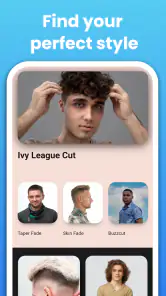
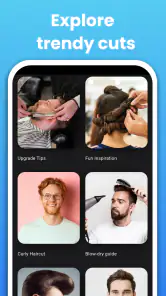
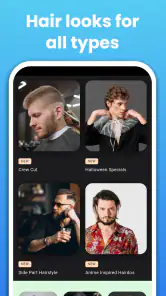
First off, let me just say that diving into this app is like opening a treasure trove of style possibilities. The app has a vast array of hairstyles, from classic cuts to the latest trends. It’s like having a stylist whispering the latest fashion tips directly to you. And the best part? You can try on different hairstyles virtually before making any real-world changes. How cool is that?
User-Friendly Interface
Navigating through the app is as smooth as a fresh fade. The interface is intuitive and user-friendly, making it accessible even for those who aren’t tech-savvy. Just snap a selfie, and you’re ready to explore. The app smartly detects your head shape and suggests styles that would suit you best. It’s like having a smart mirror that knows exactly what you need.
Customization at Your Fingertips
Customization is where this app truly shines. Want to see how you’d look with a pompadour or maybe a slick undercut? Just a few taps and you’re there. The app allows you to adjust hair length, color, and even texture, giving you a full preview of potential looks. It’s incredibly satisfying to experiment without the commitment, especially if you’re someone who likes to switch things up regularly.
Keeping Up with Trends
Stay ahead of the curve with the app’s trend update feature. The developers seem to have a knack for keeping up with the latest styles, ensuring that you’re always in the loop. Whether it’s the resurgence of retro styles or the latest influencer-inspired cuts, you’ll find it here. Plus, the app offers tips on how to maintain each style, so you’re not just looking good, but also keeping your hair healthy.
How to judge a look beyond the screen
A virtual result can be useful for answering a narrow question—such as whether you prefer a fuller outline or a shorter profile—but it is less useful for predicting how your hair will behave after washing, sleeping, or growing out. I would use the app to identify a shape I like, then ask a barber which parts are realistic for my hair and what the upkeep involves. That small step turns an appealing picture into a practical haircut discussion.
It also helps to separate the style itself from the way it is presented in a preview. A dramatic change in color or texture may catch your eye, but the part you want to keep could simply be the length on top or the cleaner shape around the ears. Pointing out that one detail is more actionable than asking for the entire image to be reproduced. For anyone who is nervous about making a big change, this is a low-pressure way to work out what question to ask before committing.
Who should take a different route
I would not make this my main tool if I needed a cut tailored around a difficult growth pattern, a sensitive scalp, or a specific professional dress code. Those decisions call for conversation and hands-on judgment, not just a visual idea. Likewise, if you are already comfortable communicating with your barber and have a reliable reference photo, another preview may add little. The app makes most sense when you are undecided, curious, or looking for a clearer way to explain a preference.
There is also a difference between wanting inspiration and wanting a dependable prediction. If you expect the screen to tell you exactly which style suits your face or guarantee that a particular cut will work, you may come away disappointed. I’d keep the question modest: “Which direction interests me enough to discuss?” For that purpose, browsing and comparing can be worthwhile even if you ultimately choose a variation that looks less dramatic in the preview.
Small choices that improve the experience
Before trying many options, I would decide what you want to compare. Is the goal a cleaner shape for work, less time styling in the morning, or simply a change from your usual cut? A clear goal keeps the exercise focused and helps you reject styles that look interesting but do not fit your routine. It can also prevent the common trap of choosing a look because it is new rather than because you would enjoy maintaining it.
Think about the barber conversation while browsing. Keep a note of the exact element you like—perhaps the top’s length, the transition at the sides, or the overall silhouette—and pair it with one real reference image if you have one. You do not need to know specialist terminology to communicate clearly. Describing what you want to preserve and what you want changed is often more helpful than relying on a style label alone.
Price, access, and a measured recommendation
The free starting point makes it reasonable to explore before deciding whether the app belongs in your routine. Optional purchases can change the value for someone who only wants a quick idea, so I would look carefully at what an item offers and whether it solves a problem I actually have before spending. A large range of possible looks is not automatically useful if you only need one clear reference for your next appointment.
The strongest reason to try it is convenience: when you are unsure how to describe a new men’s cut, a visual experiment may help you form a preference at home. Its main limitation is the same one that applies to any photo-based preview: it can help you imagine a direction, but it cannot replace an expert looking at your actual hair. I would recommend it to curious users who are comfortable treating the result as a prompt for discussion. For anyone seeking certainty, personalized technical advice, or a finished haircut decision, the better next step is a conversation with a barber.
In conclusion, the app is a game-changer for anyone looking to refresh their look. It’s packed with features that make the styling process fun, easy, and incredibly rewarding. So why not give it a shot and see where your next hairstyle adventure takes you?
Mens Hairstyles And Haircuts Frequently Asked Questions
Is Mens Hairstyles And Haircuts suitable for someone who is still deciding what style to try?
Yes. The app is intended to help users explore men’s hairstyles and find ideas that may suit the look they want. Browsing different styles can give you inspiration before choosing a cut, whether you already have a specific look in mind or are starting with a few possibilities. You can save styles you like and compare them later.
Can I find hairstyle ideas for a particular hair length or look?
The app focuses on men’s hairstyles and haircuts, making it a place to browse ideas before settling on a new look. If you have a particular hair length or general style in mind, exploring the available images can help you identify options to discuss with a barber or stylist. It can also be useful to save a few possibilities and compare them before making a choice.
What features does the Mens Hairstyles And Haircuts app offer?
The Mens Hairstyles And Haircuts app provides a variety of features designed to help you find the perfect hairstyle. It includes a vast collection of hairstyle images, interactive tools to try hairstyles on your photos, tips on hair care, and regular updates with the latest trends. Users can also save their favorite styles and share them with friends.
Is the Mens Hairstyles And Haircuts app free to use?
The app is available for free download and offers basic features at no cost. However, it may include in-app purchases for premium features, such as exclusive hairstyle collections, advanced photo editing tools, and ad-free experience. Check the app store listing for detailed pricing information.
Can I use the app to prepare for a barber or stylist appointment?
Yes. Browsing hairstyle ideas and saving the looks you like can help you communicate what you want when you visit a barber or stylist. You can compare several possibilities first and use the images as inspiration during the conversation. Treat the app’s examples as references rather than a guarantee that a cut will look exactly the same on you.
Pros
- Extensive style gallery.
- User-friendly interface.
- Regular updates with new hairstyles.
- Offline access available.
- Customizable hair filters.
Cons
- Ads can be intrusive.
- Limited free features.
- Some styles need in-app purchases.
- No hair care tips included.
- Requires registration to save styles.
- Category
- Art & Design
- Version
- 3.0.550













