Skincare and Face Care Routine
- 59.00
- 4.4
- Installs
- 5.00M
- Price
- Free

Screenshots



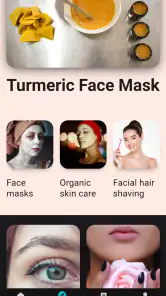

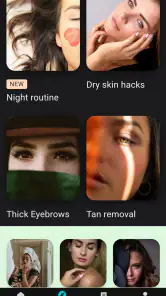
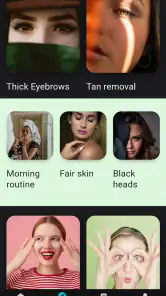
Analysis by Reviewed
Hey there, skincare enthusiasts! If you're anything like me, navigating the world of skincare can feel like being a kid in a candy store. There are just so many options! Today, I want to introduce you to an app that's been a game-changer in my skincare routine: Skincare Routine.
Your Personal Skincare Guru
So, what's the buzz all about? Well, Skincare Routine is essentially your personal skincare guru, right in your pocket. I found it while scrolling through the app store, desperately searching for a way to streamline my skincare process. And boy, did it deliver!
Easy-Peasy Setup
Let's talk about the setup process. It's as easy as pie. You download the app, and it greets you with a friendly interface that guides you through creating your personalized skincare profile. You're asked a series of questions about your skin type, concerns, and goals. It almost felt like chatting with a friend who genuinely cares about my skin woes!
Features Galore
The app has a plethora of features that cater to every skincare junkie's needs. From tracking your daily routine to offering product recommendations, it covers all bases. One feature I particularly love is the product ingredient analyzer. Ever been stumped by a long list of ingredients on a product label? This feature breaks it down for you, highlighting the good, the bad, and the ugly.
Routine Reminders
Another gem of this app is the routine reminders. I'm the kind of person who often forgets to apply that night cream or misses a step in my routine. With the app’s custom reminders, those days are long gone. It's like having a personal assistant who nudges you to take care of your skin.
Community and Feedback
What sets Skincare Routine apart is its community feature. You can connect with others who share similar skin concerns and exchange tips and recommendations. Plus, the app encourages user feedback, ensuring it evolves with its community's needs. It’s comforting to know that your voice matters.
Readable in a Busy Routine
I find the app easiest to use when I treat it as a place to organize decisions rather than a source of medical certainty. The profile questions give a beginner a useful starting point, while the ingredient analyzer can help me pause over a label instead of buying something simply because it is trending. I still check the product packaging and make my own judgment; an ingredient breakdown is a learning aid, not a guarantee that a product will suit my skin.
More From Our News Desk

Weather by Xiaomi Review: Clear at a Glance, Less Clear Up Close

X Under Pressure: Can It Recover When Posting Goes Wrong?

Clash of Clans Is Won Between the Battles

Android Auto Makes the Case for Quieter Car Software

MobiOffice: Transforming Mobile Productivity with Seamless Integration

EA SPORTS FC™ Mobile Soccer: Redefining Mobile Sports Gaming
For a practical workflow, I would enter the products I already own before shopping for replacements. That makes recommendations easier to compare against what is sitting on the bathroom shelf and helps avoid building a routine around duplicate products. I would also change one part of a routine at a time, rather than treating every suggestion as something to adopt at once. If irritation or a persistent skin concern is involved, an app cannot replace advice from a qualified professional.
Motor and Sensory Considerations
The app’s guided setup and reminders can reduce the amount I need to remember, which is helpful on tired evenings or when I am juggling other tasks. Reminders work best when they fit an existing habit: I would place a prompt near the time I usually wash my face, not at an arbitrary hour that becomes easy to ignore. Too many alerts can turn a caring routine into another demand, so I would keep only the prompts that solve a real problem.
For anyone who finds small text, busy screens, or frequent tapping tiring, the actual experience may depend on their device settings and comfort. I would try the profile flow before investing time in a detailed routine and see whether reading product information feels manageable. People who prefer spoken guidance or a very stripped-back checklist may find a simple notes app easier, because it asks less of them than exploring advice and community content.
Using It at Home and Away
A realistic use case is a rushed morning before work: I can check the routine I meant to follow, then use the reminder as a nudge rather than stopping to browse for new ideas. At night, the tracker can help me notice whether I am consistently skipping a step. The useful insight is not a perfect streak; it is spotting a pattern, such as forgetting a product when I get home late, and then simplifying the routine or moving the reminder.
Compared with beauty videos, which often mix personal preferences with product enthusiasm, this app is more practical for keeping my own steps and questions in one place. Compared with a plain checklist, it offers skincare-focused prompts, ingredient help, and a community, but those extra layers can also mean more to read. If I already know exactly what I use and only need a tick box, a basic notes or reminder app may be faster. If I enjoy learning and comparing, the added context is more worthwhile.
What to Expect Before You Install
Skincare Routine is a free beauty app from Rstream Labs, with optional in-app purchases ranging from under a dollar to about sixty dollars per item. It is rated for teens, has an average rating of 4.4 from around 22,000 ratings, and has been installed over five million times. The release date is September 25, 2019, and version 3.0.550 requires Android 7.0 or later. Those details make it easy to judge whether it fits your device and comfort with optional purchases; I would check any purchase screen carefully before confirming anything.
The main trade-off is that a personalized profile can make suggestions feel relevant without making them authoritative. Skin changes with weather, habits, and products, so I would revisit my answers when my needs change instead of assuming an old profile remains accurate. Community tips can be encouraging, but another person’s success is not proof that the same product or routine will work for me. I would use those conversations to generate questions, not as a substitute for individual judgment.
It is a good fit for someone starting to organize a routine, a forgetful user who values prompts, or a curious shopper who wants help making sense of ingredient labels. I would skip it if I wanted only a clinical diagnosis, dislike community features, or need an extremely minimal interface with no extra reading. The app can help me build consistency, but it cannot promise a particular skin result or remove the need to pay attention to how my own skin responds.
Community and Feedback
What sets Skincare Routine apart is its community feature. You can connect with others who share similar skin concerns and exchange tips and recommendations. Plus, the app encourages user feedback, ensuring it evolves with its community's needs. It’s comforting to know that your voice matters.
In conclusion, if you're on a quest for healthy, glowing skin, this app might just be your holy grail. It's packed with features that make skincare less of a chore and more of a joy. Whether you're a newbie or a skincare aficionado, Skincare Routine has something for everyone. So, why not give it a whirl and let me know what you think? Your skin will thank you!
Skincare and Face Care Routine Frequently Asked Questions
Is Skincare and Face Care Routine suitable for someone who is new to skincare?
The app is aimed at people who want daily tips and routines to make face care part of their day. Its focus on guidance may be useful if you are still working out how to build a consistent routine. Keep in mind that app guidance is not a substitute for professional advice, particularly if you have a skin condition or persistent irritation.
Can I use the app to create a consistent daily skincare habit?
Skincare and Face Care Routine centers on daily skincare tips and routines, which can help give your face-care habits more structure. You can use its routine-focused approach as a prompt to be consistent and pay attention to how your skin responds. Choose steps that feel manageable, and avoid adding products or changing your routine too quickly if your skin is sensitive.
What should I know about Skincare and Face Care Routine before downloading it?
Skincare and Face Care Routine is a beauty app from Rstream Labs focused on daily skincare tips and routines, with the aim of helping users work toward radiant, glass-like skin. It is free to download, has a Teen content rating, and has been installed over five million times. The app may suit people looking for guidance to make face care part of a regular routine.
Is Skincare and Face Care Routine available for my device?
The app is available for Android devices running version 7.0 or later. Before downloading, check your device’s operating system to make sure it meets that requirement. The app is listed at version 3.0.550, so keeping your device and apps updated can help you use the current release and its available features.
What features does the Skincare and Face Care Routine app offer?
The Skincare and Face Care Routine app provides a comprehensive suite of features designed to enhance your skincare regimen. It offers personalized skincare routines based on your skin type and concerns, a product ingredient analyzer, and daily reminders to help you stay consistent. Additionally, the app includes a progress tracker to monitor improvements in your skin health over time.
Pros
- Comprehensive skincare guide
- Customizable routines
- Ingredient analysis
- User-friendly interface
- Regular updates
Cons
- Limited free features
- Ads can be intrusive
- Requires internet connection
- Some features require subscription
- Occasional app crashes
- Category
- Beauty
- Version
- 3.0.550













