LogSense
- 49.00
- 4.3
- Installs
- 500.00K
- Price
- Free
Screenshots
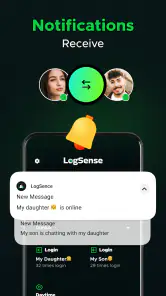
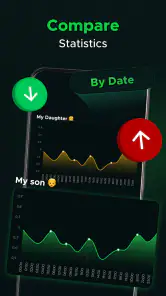
Analysis by Reviewed
For a first-time user, the key question is whether a logging app will help make everyday patterns easier to understand rather than create another chore. LogSense is presented as a place to record information and look for statistical patterns. I’d approach it with one small question in mind—such as whether a habit is becoming more frequent—rather than trying to track everything at once. A focused start makes it easier to decide whether its style suits you.
What to expect from a logging app
LogSense is a free parenting-category app from RAPID DIJITAL HIZMETLER LIMITED SIRKETI. Its store summary points to learning from logged information and viewing statistics, so the most useful outcome is likely to come from entering comparable details consistently. It has a 4.3 average from around 115,000 ratings and over 500,000 installs. That gives a sense of its reach, but I’d still judge it by whether its logging approach works for your family’s needs.
The app is rated for Everyone, and version 1.1.0 requires Android 8.0 or later. It also offers in-app purchases priced from $4.99 to $9.99 per item. The app itself is free, which makes it possible to try the basic experience before deciding whether any paid option is worthwhile. I would not pay simply because a feature sounds useful; first identify what you want to track and see whether the free experience helps you do it.
Choose a question that matters at home
It helps to turn a vague concern into something you can actually observe. Instead of trying to record whether a day was “good,” pick a detail you can describe in the same way each time, such as when a recurring routine happens or whether a particular event occurred. That distinction matters because broad, emotional labels are hard to compare, while a simple repeated note can reveal a useful rhythm without pretending to explain its cause.
For example, if mornings have felt rushed, you might record one concrete part of the routine for a while and later look for a pattern. The point is not to grade your family’s day or force a change after every chart. It is to replace a hazy impression with a clearer prompt for conversation: what seems to be happening, what might be affecting it, and whether a small adjustment is worth trying.
Getting Started with LogSense
Alright, so you know how we all have that one friend who’s super organized? Imagine if that friend was an app and could fit right into your pocket. That’s LogSense for you! Downloading it was a breeze and available for both Android and iOS, so no one’s left out of the fun. The interface? Slick, clean, and super intuitive. I mean, even your grandma could navigate this thing!
Make the first entry useful
When setting up any log, I’d begin with one repeatable detail rather than a long list. In a parenting routine, that could be noting a recurring event or a daily pattern you want to discuss later. Keep entries consistent: if you record the same kind of information in different ways, the resulting statistics may be harder to interpret. A short, steady record is more useful than a burst of detailed entries that quickly becomes tiring.
More From Our News Desk

Weather by Xiaomi Review: Clear at a Glance, Less Clear Up Close

X Under Pressure: Can It Recover When Posting Goes Wrong?

Clash of Clans Is Won Between the Battles

Android Auto Makes the Case for Quieter Car Software

MobiOffice: Transforming Mobile Productivity with Seamless Integration

EA SPORTS FC™ Mobile Soccer: Redefining Mobile Sports Gaming
Here’s a realistic way to test the fit: after a busy day, note one recurring event while it is still fresh, then return later to see whether the record is easy to understand. Before building a larger tracking habit, check that you can recognize what each entry means without relying on memory. That small review is a practical first success, because it tests not just how quickly you can log something but whether the information will be useful later.
Make logging fit the family’s day
A useful trial should survive the ordinary interruptions of parenting, not just a quiet moment when you have time to organize everything. If you miss an entry, I wouldn’t try to reconstruct a detailed account from memory; mark only what you genuinely remember, or leave the gap. Guesswork can make a chart look more complete while making it less trustworthy. A modest, honest record is better than a perfect-looking one built from uncertain recollections.
If more than one caregiver is involved, agree on a simple rule before asking everyone to contribute. Decide what counts as an entry and use familiar wording for the same event. This takes a little coordination up front, but it can prevent two people from logging the same thing differently and then treating the difference as a real change. If only one person will use the app, keep the routine personal and avoid making it another task someone else has to remember.
Features That Make You Go Wow!
Here’s where it gets exciting. LogSense doesn’t just log data; it turns data into pure gold. With a few taps, you can log everything from your daily coffee intake, workout routines, to those random thoughts that pop into your head at 2 AM. And the best part? It gives you insights that you didn’t even know you needed. Seriously, I found out I drink way more coffee than I thought. Who knew?
For a parent, the helpful question is not how many things the app can hold, but whether the details you choose are comparable over time. If you’re using it to notice a routine, decide in advance what counts as an entry and stick with that definition. That makes the later statistical view easier to discuss with another caregiver or use as a prompt for your own reflection. Treat patterns as clues, not as a diagnosis or a substitute for professional advice.
The app also supports voice logs, which is a game-changer. Sometimes typing can be a hassle, especially when you’re on the go. Just speak your mind, and LogSense does the rest. It’s like having a personal assistant who actually listens!
Keep categories manageable
Voice logging may be convenient when your hands are occupied, but I’d still take a moment afterward to make sure the entry captures the point you meant to record. A quick spoken note can save effort in the moment; a clear, consistent note is what helps when you review a pattern later. If you are recording something sensitive about family life, think carefully about what you want to put into an app before making it part of a regular routine.
There is also a practical difference between a note you make for yourself and a record you plan to share. For personal reflection, shorthand may be enough if you understand it later. For a conversation with another caregiver, write the entry so it makes sense without extra context. I’d avoid putting names or sensitive details into a label unless they are genuinely needed for your purpose; keeping the log focused can make it easier to review and less revealing if someone else sees the screen.
Why You’ll Love Using LogSense
One of the things that stood out to me was the customization. You can set up different categories, use tags, and even color code your logs. It’s like organizing a closet but way more fun. Plus, the app syncs seamlessly across devices. So, whether you’re on your phone or tablet, your data is always at your fingertips.
Those organizational choices can help distinguish separate topics, but there’s a trade-off: too many categories and tags can make logging feel like filing paperwork. I’d add only labels that answer a real question, such as separating two kinds of routine you want to compare. If you share caregiving tasks, a brief agreed naming convention can also make entries easier for both people to read. Avoid assuming that syncing alone creates a shared workflow; decide who is responsible for recording each detail.
Reading the patterns with care
Another cool feature is the analytics dashboard. It’s like having a mini data scientist in your pocket. The charts and graphs are super easy to understand, even for someone who flunked math like me. It’s all about making your data work for you, and boy, does it deliver!
I’d use the dashboard as a review tool, not a reason to log more than necessary. Look for a pattern that answers the question you started with, then decide whether it changes anything in your routine. If the chart feels unclear or the record is too patchy, go back to the entries before drawing a conclusion. For complex tracking or information that needs formal clinical records, a dedicated health or care tool may be a better fit than a general-purpose logging app.
Getting useful answers from a short review
When you return to your entries, compare like with like. A hectic weekend and a typical weekday may not belong in the same mental bucket, and a change in routine can affect what the chart seems to show. I’d use the visual summaries to spot questions, then check the underlying notes before deciding what they mean. That small pause is especially valuable when a trend could be explained by a schedule change or a missed record rather than a lasting shift.
It can also help to decide in advance what would count as a useful result. Maybe you want to know whether a routine is more predictable, or simply have clearer examples to discuss with another caregiver. If the entries make that conversation easier, the log has served a purpose even if it does not produce a dramatic pattern. If you keep checking charts without knowing what decision they could inform, tracking may be taking attention without giving much back.
Who it suits—and when another option is better
LogSense makes most sense for someone who wants to capture everyday details and then inspect them statistically, especially a parent who prefers a flexible log over a rigid form. Compared with a notebook, it offers a more structured way to sort entries and look at charts; compared with a specialist parenting tracker, its broader logging approach may feel less prescriptive. That flexibility is useful if your question is personal and changing, but less ideal if you need a specific, standardized record or a workflow built around a particular care task.
If your main need is a shared calendar, reminders, or a formal record for a professional, choose a tool designed around that job rather than expecting a general logger to replace it. Likewise, if you dislike maintaining categories or reviewing statistics, a simple note may be easier to keep up with. The best system is the one you can use consistently without turning family life into data entry.
I’d also think about who needs to act on the information. A flexible log is appealing when you want to explore your own question, but a structured specialist tool can be more dependable when several people must follow the same prescribed routine. A notebook may win when you need a quick, private scratchpad and do not care about charts. The trade-off is not simply digital versus paper; it is whether the extra organization and statistical view help enough to justify maintaining the record.
Questions worth settling before you commit
Before logging anything sensitive, consider what you are comfortable keeping in a digital record and how much detail your purpose actually requires. I would start with the least identifying information that still makes an entry meaningful. The app’s Everyone age rating describes its content classification, but parents should still use their own judgment about a child’s information and keep the device itself appropriately protected.
Another reasonable question is whether the free experience is enough. Since the app is free to try and optional purchases range from $4.99 to $9.99 per item, I’d first use it for the specific routine you care about and only consider paying if a paid item clearly addresses a limitation you have encountered. A price on its own does not tell you whether an option is useful for your household, so make that decision after you understand your actual workflow.
For someone wondering whether this can replace a medical or professional care record, my answer is no: I would treat it as a personal organization aid, not as an authoritative record or source of clinical conclusions. If a professional needs precise information, ask what format and details they want and use a tool suited to that requirement. LogSense may help you prepare a clearer conversation, but the responsibility for interpreting health or care concerns belongs with the appropriate professional.
Final Thoughts
In a world where data is king, LogSense is your trusty squire. It’s easy to use, packed with features, and honestly, quite addictive. Whether you’re a meticulous planner or someone who just wants to make sense of their daily chaos, this app has got your back. So go ahead, give it a whirl and let it transform the way you log your life. Trust me, you won’t regret it!
My practical advice is to begin with one question, make a few consistent entries, and only then decide whether the statistics add value. That approach keeps the first week manageable and helps you spot friction early: perhaps you prefer typing, perhaps voice notes fit better, or perhaps the labels require too much upkeep. Since optional purchases are available, evaluate any paid item against a concrete need rather than buying in anticipation. If the routine feels useful, keep going; if it feels like extra administration, it is perfectly reasonable to switch to a simpler method.
Ultimately, I’d recommend it to a parent who is curious about patterns and comfortable shaping a flexible log around a small, practical question. I’d skip it if you need a ready-made parenting workflow, reminders as the central feature, or records that must meet professional requirements. Give it a focused trial, keep the entries simple, and let the usefulness of your own review—not the promise of more data—decide whether it earns a place in your routine.
LogSense Frequently Asked Questions
What does LogSense’s description tell me about the app before I install it?
LogSense’s brief store description is simply “LogSense,” and its summary says, “Learn and view statistical details immediately.” These phrases suggest a focus on learning and viewing statistics, but they do not explain every feature. Before downloading, consider whether that broad purpose matches what you want from a parenting app and whether its functions are relevant to your family.
Who publishes LogSense, and when was it released?
LogSense is developed by RAPID DIJITAL HIZMETLER LIMITED SIRKETI. It was released on December 29, 2024, and its current version is 1.1.0. These details can help you recognize the app and its publisher when browsing for it. As with any download, check the app name and developer before installing to make sure you have selected the intended product.
Is LogSense designed for parents and family use?
LogSense is listed in the Parenting category, so it is presented for people looking for an app in that area. Its short description is simply “LogSense,” while its summary says, “Learn and view statistical details immediately.” That gives a broad sense of its purpose, but parents should consider whether those general functions suit their own needs before downloading.
What should I know about LogSense’s cost before downloading?
LogSense is free to download, which gives users a chance to try the app without paying upfront. It also offers in-app purchases priced from $4.99 to $9.99 per item, so some options may require an additional payment. Check the purchase details shown in the app before buying, and make sure they fit your budget and intended use.
What is LogSense and what does it do?
LogSense is a state-of-the-art application designed for logging and analyzing data from various sources. It helps users track events and performance metrics, making it easier to monitor system health and identify issues. The app's intuitive interface allows users to swiftly navigate through logs, providing insights into system operations and aiding in efficient data management.
Pros
- User-friendly interface enhances navigation.
- Real-time analytics for quick insights.
- Supports a wide range of log formats.
- Highly customizable dashboards.
- Seamless integration with existing systems.
Cons
- Steep learning curve for new users.
- Limited offline capabilities.
- Can be resource-intensive on devices.
- Occasional glitches in data visualization.
- Requires stable internet for optimal use.
- Category
- Parenting
- Version
- 1.1.0











