Little Stories: Bedtime Books
- 496.00
- 4.9
- Installs
- 5.00M
- Price
- Free

Screenshots
Analysis by Reviewed
In a shared household, a bedtime story often has to work around more than one routine: a parent may be finishing chores, a child may be staying with a grandparent, and a sibling may want to listen too. I like the idea of having Little Stories: Bedtime Books ready as a familiar reading option for those evenings, while keeping a grown-up involved in choosing what fits the moment. It is a parenting app from Diveo Media - Story Books for Kids, and its focus on illustrated stories with audio makes it especially relevant when reading together is welcome but everyone is tired.
A practical fit for busy evenings
For a realistic use case, picture a child settling down after a bath while a parent gets tomorrow’s things ready nearby. You can sit together for the first part of a story, then let the narration carry on while the child looks at the pictures. That can ease the pressure to perform every page yourself, but it is not a replacement for attention: younger children may still want help navigating or reassurance when a story ends. I would treat the app as a shared routine, not as a way to hand a device over and disappear.
Decide the device routine before opening a story
On a phone or tablet used by several people, I find it useful to agree on a simple boundary first: the adult picks the story, the child listens or follows along, and the device goes away when the routine is done. This avoids turning bedtime into a negotiation over what to open next. If a child is likely to tap around, staying close also helps keep the session focused on reading rather than letting the app become another open-ended screen activity.
That household approach matters because a shared device is not the same as a child-specific library. I would not assume that separate profiles, parent controls, or a particular way of syncing preferences are available. Instead, keep choices simple and make the adult responsible for setting the session up. For families with different bedtime rules between homes, a story can still be a familiar cue, but the device routine should be agreed by the adults rather than left to the child to manage.
What kind of reading experience to expect
Little Stories is free to install and is rated for Everyone; optional in-app purchases range from $0.99 to $50.00 per item. That makes it sensible to review purchase settings on a shared device before handing it to a child. The app has a 4.7 average from around 20,000 ratings and over one million installs, so many families have tried it, though popularity alone cannot tell you whether its stories suit your child’s taste. It was released in 2017, and version 5.3.2 is the current version; the stated minimum operating-system requirement is 8.1.
Age suitability is also about the child, not only a store label. A preschooler who enjoys pictures and listening may be content to follow a narrated story, while an older child who wants longer chapters, independent reading practice, or more control over what happens may prefer print books or a different reading app. I would preview a story together first and notice whether the narration, pace, and illustrations hold your child’s attention without winding them up just before sleep.
How it fits beside books and other reading apps
For a tired adult, audio narration is the practical difference between this kind of app and a print book: it can keep a story going while you sit nearby, rather than requiring you to read every line aloud. But a paper book is still the better choice when you want a screen-free wind-down, a child to turn pages at their own pace, or a conversation that follows the pictures rather than a recording. I would keep both options available instead of making the app the automatic answer every night.
More From Our News Desk

 Remini - AI Photo Enhancer
Remini Is Our App of the Week for Bringing Old Photos Back to Life
A quick AI restoration tool earns its place by making faded portraits and soft, older photos feel vivid again—provided you know where its polish ends.

 PayPal - Pay, Send, Save
PayPal Reviewed: Who Benefits from Its Reach, and Who Should Skip It
PayPal is most useful when its reach and familiar checkout solve a real payment problem. These reader-by-reader recommendations show where it earns a place—and where friction wins.

 Millionaire 2026 Quiz & Trivia
 Makes Every Answer Count
A familiar quiz-show format succeeds or falters on tiny design decisions: how clearly the game guides a first answer, handles hesitation, and invites one more round.

 Decor Life - Home Design Game
Decor Life Turns Short Breaks Into Bite-Sized Decorating Jobs
A room-by-room decorating game built for quick sessions gains from modern phone habits, but its gentle pace still depends on patience, repetition, and a steady stream of design jobs.

 Sniper 3D:Gun Shooting Games
Sniper 3D’s Quick-Shot Appeal Faces the Upgrade Treadmill
The appeal is immediate: line up a target, steady your aim, and fire. The harder question is whether Sniper 3D can keep players returning after the first rush.

 Blockudoku®: Block Puzzle Game
Blockudoku vs. the Puzzle Pack: A Quick Puzzle With a Repetitive Edge
Blockudoku turns a clean grid into a quiet test of foresight. Against match-three polish and head-to-head simplicity, its lasting appeal is also its biggest limitation.
Latest News



Compared with a broad children’s video or entertainment app, a story-focused experience gives the evening a clearer purpose. That focus is useful when you want to signal “story time” rather than invite browsing across unrelated content. It is not necessarily the best option for a child who needs structured phonics, writing practice, or an adult-led lesson; narrated tales can encourage attention and enjoyment, but they are not a substitute for teaching a child to read.
A small practical tip is to make the choice before the child is already overtired. I would select a story while the device is still with the adult, then bring it into the bedtime routine ready to start. That reduces the chance that a sleepy child will wander through menus or ask to keep choosing. If the child wants to hear the same story repeatedly, that can also be a comforting routine, though the adult may want to alternate app sessions with a familiar printed favorite.
Making one story work for siblings and caregivers
When siblings share a room, an audio story can give them a common focus, but their ages and interests may not match. I would let the younger child follow the pictures while asking the older one to listen for a detail or predict what might happen next. That makes the session more shared without assuming the app itself offers separate reading levels or sibling tools. If one child is ready to sleep and the other wants to keep listening, stopping at a clear point and switching to a quiet, non-screen activity is likely to work better than stretching the session.
For grandparents or babysitters, the simplest handoff is a short instruction: which story to open, how long the child is allowed to use the device, and where it should go afterward. The app can provide a familiar bedtime cue, but it cannot replace the adults’ agreement about household rules. This is particularly useful when a child moves between homes: keep the ritual consistent in broad terms, while letting each caregiver set boundaries that fit their own routine.
Purchases, access, and a sensible first try
Because the app is free to install but includes optional purchases, I would check the device’s purchase protections before a child uses it independently. That is a more dependable precaution than relying on a young child to understand what a purchase prompt means. The listed purchase range extends from under a dollar to fifty dollars per item, so it is worth treating the free starting point and any later spending as separate decisions. I would first see whether the available experience suits the child, then decide whether paying for anything is worthwhile rather than making that decision during a bedtime session.
If you are deciding whether to try it, begin with one story and sit with your child for the opening. Notice whether they follow the illustrations, respond well to the narration, and settle afterward. If the screen keeps them alert or leads to repeated requests to continue, that is useful feedback: save the app for daytime quiet time and use a printed book at night. Its Everyone rating is a broad age classification, not a promise that every story or interaction will fit every child’s maturity and temperament.
Once upon a time, I stumbled across an app that made bedtime stories a magical experience for both kids and parents alike. Enter Little Stories: Bedtime Books. This app is a delightful treasure trove of tales that whisk you away into enchanting worlds, right from the comfort of your own home. Let me take you through my journey with this app, and why it might just become your child’s favorite bedtime companion.
A Whimsical Library at Your Fingertips
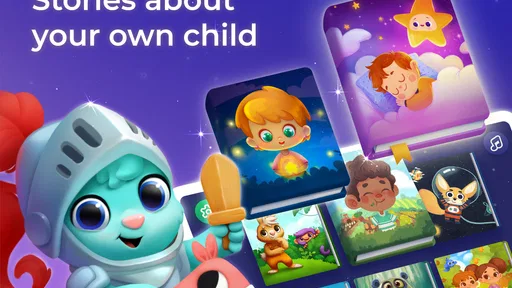
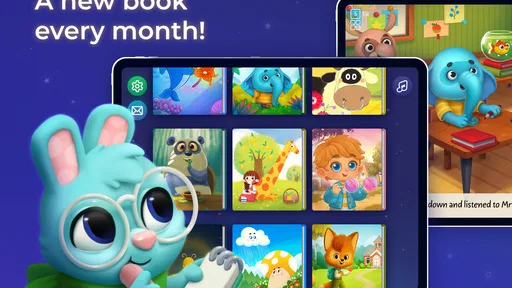
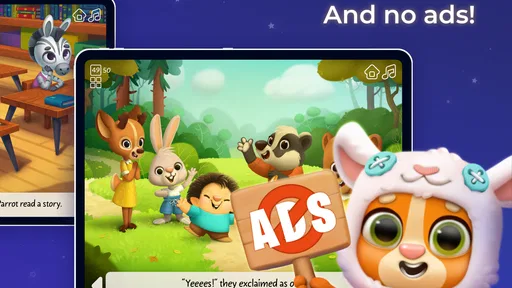
From the moment I opened Little Stories: Bedtime Books, I was greeted by a colorful array of story options. The app offers a vast library of beautifully illustrated tales, ranging from classic fairy tales to original stories that captivate young minds. The user interface is friendly and intuitive, making it easy for even the littlest of fingers to navigate. I found myself getting lost in the artwork, each page a masterpiece that brings the story to life.
Interactive and Personalized Storytelling
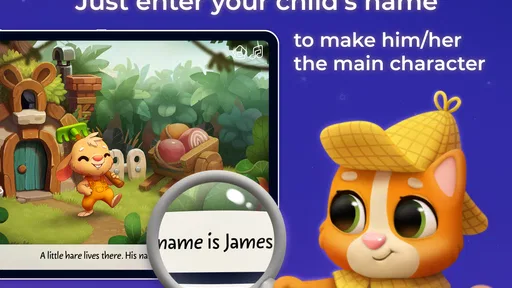
One of the standout features is the app’s ability to personalize stories. Imagine your child’s face lighting up when they hear their name as the main character in the story! You can customize characters' names and even choose avatars that resemble your little one. This personal touch transforms the reading experience into something truly special and engaging.
The interactive elements within the stories kept my little one engaged throughout. Whether it's tapping on the screen to discover hidden animations or choosing how a story unfolds, the app ensures each reading session is an interactive adventure. It's a fantastic way to foster a love for reading early on.
Bedtime Made Easy
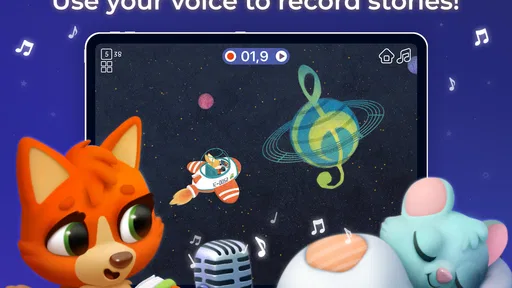
Getting kids to settle down at night can be a challenge, but with this app, bedtime becomes a breeze. The soothing narration options can lull even the most energetic child to sleep. I particularly appreciated the option to switch between reading the stories aloud myself or letting the app do the work with its calming voiceovers.
The stories are designed to be the perfect length for bedtime, ensuring your child is relaxed and ready to drift off to dreamland by the end of the tale. Plus, the gentle music and sound effects add an extra layer of tranquility to the experience.
Final Thoughts
In a world overflowing with apps vying for attention, Little Stories: Bedtime Books stands out as a gem. It combines the magic of storytelling with modern technology, creating an app that's as entertaining as it is educational. Whether you're looking to instill a love of reading in your child or simply want a more peaceful bedtime routine, this app is a must-try.
So, if you're ready to add a sprinkle of magic to your child's bedtime routine, give Little Stories: Bedtime Books a try. It might just be the fairy-tale ending you've been searching for.
Little Stories: Bedtime Books Frequently Asked Questions
Can Little Stories: Bedtime Books be used for both reading and listening?
Yes. Little Stories is described as a collection of children’s story books with audio, so it can suit families who want to read together as well as children who enjoy listening. That flexibility may be useful as part of a bedtime routine, whether a parent is following along with a story or letting a young listener enjoy its audio presentation.
Does the app support a regular bedtime reading routine?
Little Stories: Bedtime Books is centered on children’s stories and bedtime use, making it a natural option for families looking to build a shared reading habit. Parents can choose stories to enjoy with their child, while the audio option can add another way to experience the books. The best fit depends on your family’s preferred routine and your child’s interests.
Is Little Stories: Bedtime Books free to download?
Little Stories: Bedtime Books is free to download, so families can try the app before deciding whether to buy anything. It also offers in-app purchases, with items ranging from $0.99 to $50.00 each. If a child will be using the device, parents may want to review purchase settings and make clear which stories or features are available without an additional payment.
Who develops Little Stories: Bedtime Books, and what do families think of it?
Little Stories: Bedtime Books is developed by Diveo Media - Story Books for Kids. It has a 4.7 average rating from around 20,000 ratings, and families have left 408 written reviews. Those figures offer a quick sense of its reception, but every child has different interests, so it is still worth considering whether bedtime stories and reading together fit your family’s routine.
What is Little Stories: Bedtime Books?
Little Stories: Bedtime Books is an engaging app designed to transform bedtime into a magical storytelling experience for children. It offers a wide array of interactive stories that parents can read to their children, enhancing their imagination and love for reading. Each story is designed to captivate young minds with vibrant illustrations and interactive elements.
Pros
- Interactive storytelling enhances engagement.
- Beautiful illustrations captivate young readers.
- Customizable characters foster creativity.
- Offline access is available for convenience.
- Educational content promotes learning.
Cons
- Limited free content before purchase.
- Requires frequent updates for new stories.
- App size is large, may need more storage.
- Some stories lack diverse characters.
- In-app purchases can be costly.