Libre by Abbott
- 6.98K
- 4.4
- Installs
- 500.00K
- Price
- Free

Screenshots
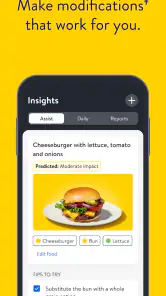
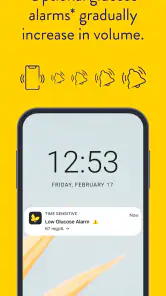
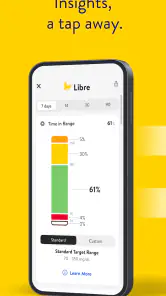

Analysis by Reviewed
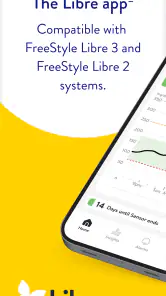
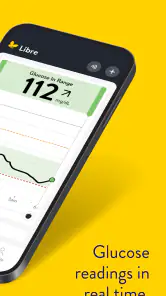
Libre by Abbott is the kind of medical app I would judge less by its welcome screen and more by what happens when I am busy, distracted, or worried about a glucose reading. Its purpose is continuous glucose monitoring, so the real value is not simply seeing a number once. It is having a dependable way to check glucose trends during ordinary parts of the day and to notice when a result deserves attention.
I approached it as an everyday tool rather than a novelty. The app is free, aimed at everyone from an age-rating perspective, and developed by Abbott Diabetes Care Inc. It has reached over 500 thousand installs, with an average rating of 4.4 from roughly 36 thousand ratings. Those figures suggest that many people find it useful, but they do not remove the need to set it up carefully or understand what the readings can and cannot tell you.
My main impression is simple: Libre by Abbott is most helpful when it becomes part of a consistent routine. It can make glucose monitoring feel less fragmented, but it is still a medical tool, not a replacement for professional advice or personal treatment instructions. If a reading looks unusual, symptoms do not match what appears on screen, or the app behaves unexpectedly, I would treat that as a reason to follow the safety guidance connected with the monitoring system and contact a healthcare professional when appropriate.
Where the experience usually gets stuck
The first hurdle is usually consistency, not the interface
People often expect a glucose-monitoring app to be as effortless as a general health tracker. In practice, the result depends on several pieces working together: the compatible phone, the monitoring setup, the app session, and the user’s routine. When one part is interrupted, the app can feel unreliable even when the underlying issue is elsewhere.
I would begin by deciding how the app will fit into the day. Checking only when feeling unwell creates a very different experience from checking at planned moments, such as before meals, after activity, or before bed. A regular habit makes trends easier to interpret and also makes it more obvious when something genuinely changed.
Another common sticking point is expecting every reading to answer a question immediately. A single result may be useful, but it does not automatically explain why glucose is changing. Food, movement, stress, illness, medication, and timing can all matter. The app can support observation, while the meaning of that observation still requires context.
What I would check before blaming the app
When a reading is missing or delayed, I would resist repeatedly tapping the same screen. First I would check whether the phone is the device I normally use for monitoring, whether it has enough battery, and whether the app is open in the expected account or session. I would also make sure the phone is not in a state that prevents normal app activity.
Small practical details matter. A phone carried in a bag may not be close enough at the moment I expect an update. A crowded notification area can also make an important alert easy to overlook. I would keep the app easy to reach, avoid changing phone settings casually, and make sure I know which screen shows the current result rather than assuming a notification tells the whole story.
The current version is 1.3.0 and requires iOS or Android 11 or newer. That requirement is important before installation: an older phone may be perfectly usable for other tasks but unsuitable for this app. I would check the operating system first, then install the app from the official store and keep the phone’s normal update process in mind.
Why setup deserves more attention than it receives
Medical apps are not the place for a rushed setup. I would read each instruction instead of skipping ahead, especially where the app connects with the monitoring process or asks me to confirm a step. If another person helps with setup, I would still make sure I understand what has been completed and what I am expected to do next.
A useful habit is to perform the first setup when I have time to troubleshoot, not while leaving the house or preparing for work. I would keep the phone charged, use a stable connection if the process requires one, and avoid switching repeatedly between devices during the initial configuration. This does not guarantee that every problem disappears, but it removes several avoidable sources of confusion.
I would also decide in advance who should see the information. If the app is being used as part of a care routine, the person relying on the readings should know how to open the app and what to do if it does not display an expected result. That is more useful than assuming someone else will notice a problem.
Recovering a disrupted workflow
A calm sequence is better than random troubleshooting
When the normal routine breaks, I would use a short sequence. First, I would look at the app itself and note whether the issue is a missing reading, a sign-in problem, an alert that did not appear, or a screen that will not load. These are different problems and should not be treated as one generic failure.
Next, I would check the phone: battery level, connection, operating-system compatibility, and whether the app has been left open or interrupted. I would then reopen the app normally rather than repeatedly force-stopping it. If the problem remains, I would restart the phone and review the app’s official help instructions before changing more settings.
The important recovery rule is not to guess at a medical decision just because the app is temporarily inconvenient. If the display is unavailable, I would follow the backup method recommended by my healthcare team or the monitoring instructions. I would not invent a correction, alter medication, or ignore symptoms simply because I expected the app to provide an immediate answer.
How I would make the app easier to use every day
I would keep the phone in a predictable place during periods when I usually check glucose. At home, that might mean leaving it on the same table rather than in another room. At work, I would make sure it is accessible without creating a distracting habit of checking constantly. The goal is a dependable workflow, not continuous anxiety about the screen.
I would also avoid making decisions from memory when the app can help me review what happened. After an unusual result, I would note the surrounding circumstances for myself: a meal, exercise, poor sleep, stress, or illness. This can make a later conversation with a clinician more useful, because I am bringing context instead of an isolated number.
One less obvious benefit of a routine is that it reveals operational patterns. If the app seems to fail only when the phone battery is low, when I change locations, or when I leave the device behind, the pattern points toward a workflow issue. That is more actionable than concluding that the whole monitoring system is unreliable.
What I would do after reinstalling or changing phones
Changing phones is a moment when I would slow down. I would confirm that the new device meets the minimum operating-system requirement, install the official app, and carefully follow the sign-in and monitoring instructions. I would not assume that moving an app to a new phone automatically recreates every part of the previous setup.
I would keep the old phone available until the new arrangement is working as expected, if that is practical and safe. I would also avoid making several changes at once. Replacing the phone, changing accounts, and altering notification settings together makes it difficult to identify the cause if something goes wrong.
If I were helping a family member, I would write down a simple recovery plan in plain language: where to open the app, what a normal check looks like, which backup method to use, and who to contact for medical questions. That small preparation can matter more than learning every screen in advance.
When the app is not the cause
Phone limitations can look like monitoring failures
A compatible app can still be affected by the phone around it. Low battery, an outdated operating system, unstable connectivity, notification settings, or a device that is rarely nearby can all change the experience. Before deciding that Libre by Abbott is malfunctioning, I would test the basic phone conditions and see whether the problem follows the device or the monitoring setup.
This distinction matters because reinstalling an app may not repair a phone-level problem. In some cases, it can add more work by requiring another sign-in or setup step. I would treat reinstalling as a later option, after checking simpler causes and making sure I understand what information or configuration may need to be restored.
The number on screen is not the whole clinical picture
Continuous monitoring gives a more useful view than occasional manual checks for many routines, but it does not turn every reading into a diagnosis. If I feel symptoms that do not match the displayed result, I would not dismiss those symptoms. I would follow the instructions provided for my monitoring system and care plan, including any recommended confirmation method.
The app is also not the right place to seek personalized treatment changes. I would use it to observe and communicate, then discuss patterns with a qualified healthcare professional. This is especially important when readings repeatedly seem unusual, alerts are missed, or the person using the app is unsure how to respond.
Who should consider a different approach
I would hesitate to recommend this app to someone whose phone cannot run iOS or Android 11 or newer, or to someone who cannot keep the phone available in the situations where monitoring matters. I would also be cautious if a person wants a completely passive experience and is unwilling to learn the setup and recovery steps.
Someone who only needs occasional glucose checks may prefer the simplicity of a conventional meter, depending on their healthcare plan. A meter-based routine can be easier for a person who does not want continuous app interaction. On the other hand, someone who wants trends throughout the day may find a continuous monitoring workflow more informative than isolated checks.
That comparison is not about declaring one method universally better. The right choice depends on the monitoring system prescribed or recommended, the person’s comfort with technology, and how reliably they can use it. Libre by Abbott makes the most sense when continuous information and phone-based access fit the user’s actual life.
My practical verdict after living with the workflow
I see Libre by Abbott as a focused medical companion rather than a broad wellness app. Its strength is the way it can place continuous glucose monitoring into a familiar phone routine, giving the user a practical place to check information and notice patterns. The free price removes one obvious barrier to trying the app, while the everyone age rating makes its presentation broadly accessible.
The friction is concentrated around setup, phone compatibility, attention to alerts, and knowing what to do when the expected reading is not available. None of those concerns makes the app a poor choice, but they do mean that I would not install it casually and assume the rest will take care of itself. A few minutes spent understanding the routine can prevent much more stressful troubleshooting later.
Its reception is encouraging: the app holds a 4.4 average from about 36 thousand ratings and has around 7 thousand written reviews. I would read that as evidence of broad interest and generally positive experiences, not as a promise that every phone, monitoring situation, or user will have the same result.
My recommendation is strongest for people already using Abbott’s continuous glucose monitoring approach and willing to keep their phone compatible, charged, and nearby. I would recommend it less confidently to someone seeking occasional checks, someone with an older device, or anyone who expects the app to make medical decisions for them.
Used thoughtfully, the app can turn glucose information into something easier to follow during real days: meals, commutes, work, exercise, and sleep. The best result comes from pairing that convenience with a backup plan and sensible medical judgment. For me, that balance is what makes it worth considering.
Pros
- Tracks glucose levels and trends with compatible Abbott sensors.
- Clear graphs make daily glucose patterns easier to understand.
- Supports sharing data with caregivers or healthcare professionals.
- Useful alerts can help identify high or low glucose readings.
- Available on compatible Android and iOS devices.
Cons
- Requires a compatible FreeStyle Libre sensor and smartphone.
- Some features may vary by country
- device
- or sensor model.
- Sensor readings can differ from traditional blood glucose tests.
- Bluetooth
- notifications
- and permissions must remain enabled.
- App access may be affected by phone compatibility or software updates.

- Category
- Medical
- Version
- 1.3.0