FreeStyle Libre 2 - US
- 5.01K
- 3.2
- Installs
- 1.00M
- Price
- Free

Screenshots
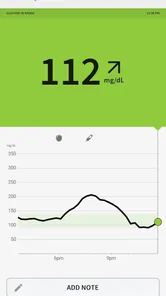
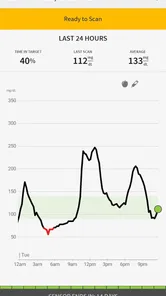
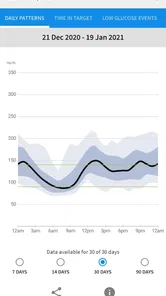
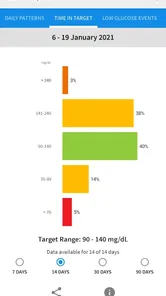
Analysis by Reviewed
I see FreeStyle Libre 2 - US as a phone companion for people who want glucose information to fit into ordinary routines rather than interrupt them. Its appeal is the combination of sensor-based readings and a familiar smartphone screen, but it is not a stand-alone health solution: the sensor and the way you use its readings matter just as much as the app. Abbott Diabetes Care Inc. makes this free medical app, and its 3.2 average from around 7,400 ratings suggests that experiences are mixed enough to make a little research worthwhile before relying on it.
What to consider before making it part of your routine
The first question I would ask is not whether a glucose app sounds convenient, but whether I actually want my phone involved in everyday monitoring. A phone-based workflow can make information easier to revisit than a paper log, yet it also asks you to keep the device available and build a habit of checking it. If you often leave your phone behind, silence notifications, or prefer to keep health tasks separate from screen time, that trade-off deserves attention before you start.
I would also separate two decisions that are easy to blur together: choosing a sensor-based monitoring approach and choosing this particular app to work with it. The app’s usefulness depends on the compatible sensor being part of the plan; downloading the app alone does not create a glucose-monitoring system. If you are still deciding how you want to monitor glucose, discuss the options with your healthcare professional rather than choosing solely on the strength of a phone interface.
That distinction helps set a realistic expectation for the app. It can help make readings and patterns more accessible, but it does not independently decide what a particular reading means for you. A number is not a complete explanation of how you feel, what you have eaten, or what action is appropriate. I find the healthiest way to use a tool like this is as an aid to observation and conversation, with personal care decisions grounded in professional advice.
Making checks useful instead of compulsive
One subtle trade-off with convenient access is that it can tempt a person to check constantly. More screen time does not automatically mean better understanding. I would use a purposeful rhythm—checking when it fits my routine, paying attention to a meaningful alert, and reviewing broader patterns when there is a reason—rather than reopening the app every few minutes. That approach keeps the information connected to real decisions and reduces the chance that monitoring becomes an anxious scrolling habit.
A simple note alongside a reading can also make later conversations more useful. If something seems unusual, I would remember the circumstances that matter to me, such as whether I was commuting, eating, exercising, or feeling unwell, instead of treating a graph as a complete story. This is not a claim that the app records those details for you; it is a practical way to add human context when reviewing information with a clinician.
Before relying on notifications, I would think through the settings and the situations in which I need to notice them. Work meetings, a quiet room, or a phone left in another part of the home can all change whether an alert is useful in practice. Rather than assuming a notification will always reach me, I would make sure my phone habits support the role I expect the app to play and follow the guidance given by my care team.
More From Our News Desk

 Block Blast!
 Makes Every Clear Feel Like One More Turn
A clean little block puzzle becomes a study in space, risk, and self-control. Its best moments come from one satisfying clear; its toughest test is knowing when to stop.

 Super Stylist Fashion Makeover
Super Stylist Turns Dress-Up into a Runway Career
Its makeover-to-client loop turns quick outfit decisions into shareable style theater. The question is whether the closet keeps giving players a reason to return.

 Block Craft 3D:Building Game
Block Craft 3D Under Pressure: How Well Does It Recover When Building Goes Wrong?
A failure-focused look at Block Craft 3D’s forgiving building loop, its uncertain recovery edges, and the moments that demand more than a cheerful village.

 Woodturning
 Trades Creative Freedom for a Satisfying Carving Loop
If your usual creative game is about building, decorating, or styling, Woodturning trades open-ended projects for a tactile, tightly guided carving loop. Here is what that switch really costs.

 PUBG MOBILE
 Shows What Battle Royale Must Get Right
PUBG MOBILE shows how battle royale has matured: bigger systems matter less than meaningful choices, readable fights, and a reason to return after every loss.

 Braindom: Brain Games Test
Braindom’s Social Life Happens Between Puzzles
Braindom turns quick logic traps into a personal ritual, but its community value is more about comparing answers than building together.
Latest News



Everyday monitoring, with some important boundaries
Imagine having a nifty little device that eliminates the need for those tiresome finger pricks. With FreeStyle Libre 2 - US, it’s not just a dream. This app pairs with a sensor you wear on your body, allowing you to monitor your glucose levels without the hassle. The best part? It gives you real-time data, so you’re always in the loop. It's like having a mini glucose lab right on your phone!
Easy Peasy Setup
Setting up the app is a breeze. Once you’ve got the sensor attached, syncing it with the app is straightforward. The user interface is intuitive, making it accessible even for those who aren't tech-savvy. Plus, the app provides clear instructions at every step, guiding you through the setup process effortlessly.
In practice, the most useful setup tip is to treat the first reading as the start of a routine, not the whole routine. Get comfortable opening the app and checking what it shows before you are rushed, then decide where that quick check fits into your day. A morning glance before breakfast, for example, can become a useful point of reference when you later discuss patterns with your care team. The app can make information easier to reach, but interpreting a reading still takes context and, when needed, professional guidance.
Real-Time Alerts and Insights
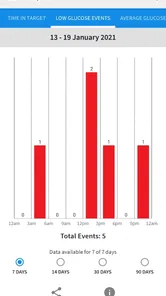
One of the standout features of this app is its real-time alerts. It’s like having a personal assistant who nudges you whenever your glucose levels are out of range. This feature is a lifesaver, especially for those with a busy lifestyle. Additionally, the app offers in-depth insights, helping you understand your glucose patterns and trends over time. It’s fascinating to see how different factors affect your levels, empowering you to make informed decisions.
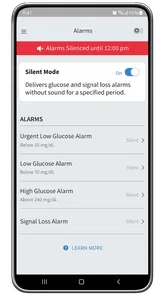
Alerts are most helpful when they prompt a calm next step rather than become background noise. I would take time to understand which notifications matter to me and how I want to respond, especially during work, sleep, or travel. A phone alert is useful only if the phone is nearby and the user can notice it, so it should not be treated as a guarantee that every change will be caught. If you are comparing this approach with a traditional meter, the app’s practical advantage is easier access to ongoing information; a meter-based routine may still suit someone who prefers occasional checks or does not want to depend on a phone-and-sensor workflow.
Moreover, the app ensures your data is securely stored, giving you peace of mind. You can also share your data with healthcare professionals, which is incredibly convenient for regular check-ups.
Where it fits—and where it may not
Sharing information can make an appointment more focused: instead of trying to remember how a particular week went, you can bring the patterns available in the app into the conversation. I would review the information before a visit and note the questions I want to ask, rather than expecting the app to make treatment decisions. That distinction matters; glucose data can support a clinician’s advice, but an app cannot replace that advice or determine what is right for an individual.
This is a stronger fit for someone who already uses the compatible sensor and wants readings close at hand, particularly if regular phone checks feel easier than keeping a separate log. It may be less appealing to someone who dislikes wearing a sensor, wants a monitoring method independent of a smartphone, or expects the app alone to provide medical care. Compared with manually recording readings, it can reduce the effort of maintaining a record, but that convenience depends on adopting the sensor-based system and making the phone part of the routine.
Choosing between ongoing readings and occasional checks
The usual alternatives serve different preferences. A traditional meter can suit someone who wants to take an occasional measurement and does not want to wear a sensor or depend on a phone for routine access. A written or manually maintained log can also feel more deliberate for someone who likes recording only selected readings and adding personal notes. By contrast, the Libre approach is more compelling when having sensor-based information available through a phone is itself the point.
That comparison is not a contest in which one method is universally better. A person who finds frequent access reassuring may value this workflow, while someone who finds repeated numbers distracting may prefer a simpler routine shaped with their clinician. I would judge the difference by asking which method I can use consistently and calmly, not which one sounds most advanced. The right choice is the one that supports the person’s care plan without creating a routine they resent or misunderstand.
There is also a practical distinction between having information and knowing what to do with it. A trend can give you a useful prompt for a conversation, but it should not encourage you to change treatment based on an assumption. If a reading or pattern raises a concern, the safe next step is to follow your established care instructions and ask a qualified professional when you need guidance. That boundary is especially important for anyone new to glucose monitoring.
A realistic day with the app
Picture checking in before leaving home, getting on with work, and looking at the app again when an alert calls for attention. Later, the information can help you describe what happened during the day at a clinical appointment. That is a practical workflow, not a promise that every day will be smooth: a busy schedule can make it easy to dismiss a notification or forget to review a trend. I’d make the app part of a deliberate check-in habit and keep any care instructions from a healthcare professional as the authority for what to do next.
For example, someone with a morning commute might decide to look at the app before heading out, then give an alert their attention when it arrives rather than checking repeatedly while travelling. At the end of the day, they could think about whether anything stood out and save questions for a future appointment. The value is not in turning every moment into a data review; it is in making relevant information easier to bring into an existing routine.
Travel and schedule changes call for a little more planning. If you rely on a phone notification, consider whether you will have your phone close enough to notice it and whether your ordinary habits will change while you are away from home. The app can be one part of a monitoring plan, but it should not be the only plan you rely on when you need care instructions or a response to a concern. I would keep the advice from my healthcare professional central, especially when my day is less predictable than usual.
Why It’s a Game Changer
What sets FreeStyle Libre 2 - US apart from other glucose monitoring systems is its simplicity and accuracy. The app not only simplifies the process but also enhances your understanding of glucose management. It’s a game changer for anyone looking to take control of their health without the constant worry of monitoring mishaps.
The wider context is worth keeping in mind when choosing it. The app has more than one million installs, an Everyone content rating, and a history that began on November 28, 2021; its current version is 2.7.8 and it requires Android 8.0 or later. Those details help set expectations about availability, but they do not tell you whether the sensor-based routine suits your needs. I’d check that the phone you plan to use meets the system requirement and that this US-focused app is the appropriate option for your situation before building a daily routine around it.
Who is most likely to appreciate it?
I would put it near the top of the list for someone who already uses the compatible sensor, wants glucose information close at hand, and is comfortable incorporating a phone into personal care. It may be especially useful for someone who finds it hard to reconstruct a week from memory before an appointment, because having information available can give them a more concrete starting point for questions. That does not make the app a substitute for a clinician, but it can help a patient arrive better prepared.
It is a weaker match for someone who wants to avoid wearing a sensor, prefers a device-independent approach, or is uncomfortable keeping a phone close for health-related notifications. It may also frustrate a person who expects an app to interpret every situation or provide individualized treatment decisions. If that describes you, a traditional meter or another approach chosen with your healthcare professional may fit better than trying to force a phone-centered routine.
New users should also think about the practical habit, not just the initial setup. A brief check at a consistent time can be easier to maintain than a vague intention to “keep an eye on things.” I would choose a moment that already exists in the day, such as getting ready in the morning, and decide in advance how I will handle an alert. Small choices like these help turn access to information into a useful routine instead of another source of interruption.
In a world where health technology is rapidly evolving, having a reliable and user-friendly app like this is invaluable. It's not just about keeping track of numbers; it's about improving your quality of life.
So, would I recommend FreeStyle Libre 2 - US? Absolutely. Whether you're tech-savvy or a newbie, this app makes glucose monitoring accessible and straightforward. It’s a tool that truly puts your health in your hands, quite literally!
My final take
My recommendation is positive, but it comes with a clear condition: choose it because the sensor-and-phone workflow suits your life, not because an app alone promises an easier answer to glucose management. It is free to download and focused on medical monitoring, yet the real commitment is adopting a routine that includes a wearable sensor, a phone, and thoughtful interpretation of information.
If that fits you, the convenience of having readings and patterns within reach can make day-to-day monitoring feel more integrated and can give you useful material for conversations with your care team. If it does not, a meter-based routine may be more comfortable and dependable for your preferences. I see this as a practical companion for the right person, not a universal replacement for other monitoring choices or professional care.
FreeStyle Libre 2 - US Frequently Asked Questions
Can the FreeStyle Libre 2 - US app replace medical advice or treatment decisions?
No. The app is a tool for viewing glucose information and supporting diabetes management, not a substitute for guidance from a healthcare professional. Use its readings and reports as part of the care plan you have discussed with your clinician, and follow the instructions provided for your sensor and app. If a reading or symptom concerns you, rely on your established medical guidance.
Is FreeStyle Libre 2 - US free, and who develops the app?
FreeStyle Libre 2 - US is a free medical app developed by Abbott Diabetes Care Inc. Its store listing has an Everyone age rating, so it is not presented as restricted to adults. Before downloading, make sure you are selecting the US version and that it suits your device and glucose-monitoring setup.
What is FreeStyle Libre 2 - US and how does it work?
FreeStyle Libre 2 is a continuous glucose monitoring system designed for people with diabetes to track their glucose levels in real-time. The system includes a small sensor worn on the back of the upper arm that measures glucose levels every minute and sends the data to a compatible handheld reader or smartphone app, allowing users to monitor their glucose levels without the need for fingerstick tests.
Is the FreeStyle Libre 2 sensor waterproof and how long does it last?
Yes, the FreeStyle Libre 2 sensor is waterproof, making it safe for activities such as showering, swimming, and exercising. The sensor is designed to be worn continuously for up to 14 days before needing replacement. This durability ensures that users can maintain consistent glucose monitoring without frequent changes.
What are the key features of the FreeStyle Libre 2 app?
The FreeStyle Libre 2 app offers several key features, including real-time glucose readings, optional alarms for low and high glucose levels, and the ability to share glucose data with healthcare providers and family members. The app also provides trend arrows and data reports to help users make informed decisions about their diabetes management and lifestyle choices.
Pros
- Easy glucose monitoring
- Real-time data updates
- User-friendly interface
- Long battery life
- No finger pricks needed
Cons
- Expensive sensors
- Limited device compatibility
- App syncing issues
- Sensor application discomfort
- Data security concerns