LED Keyboard: Colorful Backlit
- 12.83K
- 4.6
- Installs
- 50.00M
- Price
- Free

Screenshots

Analysis by Reviewed
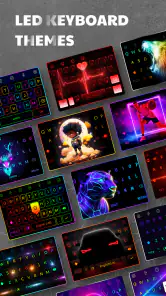
I tend to notice a keyboard most when it gets in the way: letters are hard to pick out, a theme feels cluttered, or changing a setting takes longer than it should. LED Keyboard: Colorful Backlit is aimed at people who want the keyboard itself to feel more personal, with illuminated styling, themes, fonts, and emojis. I find that idea appealing, but the useful question is whether the visual makeover still works when you need to type quickly, read comfortably, or use your phone in a different setting.
Who benefits from a more personal keyboard
I see the strongest case for this app among people who spend a lot of time messaging and would enjoy making the keyboard feel less like a fixed part of the phone. A chosen theme can add a small touch of personality to routine chats, and changing the font or visual style gives you something to explore beyond the default appearance. If you like adjusting your phone’s look but don’t want to change the wallpaper or icons again, the keyboard is another place to make that choice visible.
It is less compelling if your current keyboard already feels comfortable and you rarely notice how it looks. Switching input methods is a meaningful change to a tool you use constantly, so a decorative upgrade may not be worth the adjustment for someone who values consistency above all else. I’d approach it as a visual customization app first, rather than expecting a new keyboard to solve every typing annoyance.
Choosing a look that stays readable
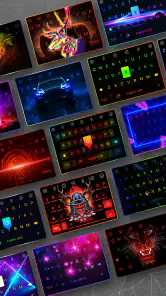
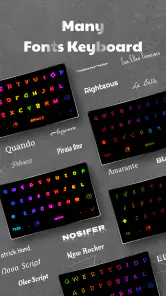
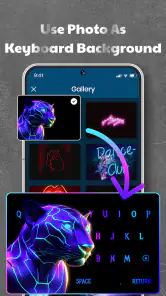
From the moment I installed LED Keyboard: Colorful Backlit, I was greeted with a user-friendly interface that didn't make me jump through hoops to get started. The app is available on both Android and iOS, making it accessible for everyone. With a straightforward setup process, it had me typing away with a new colorful keyboard in no time. The variety of themes and backlit options is truly impressive. Whether you're into neon lights, pastel shades, or something more subtle, this app has got you covered.
Readability before decoration
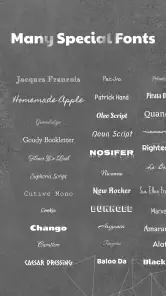
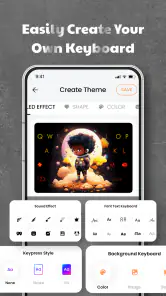
One of the standout features of this app is its customization capabilities. You can change the keyboard style, font, and even the typing sound. Yes, if you fancy a typewriter clack or a gentle swoosh, you can have it! The LED backlit feature is what steals the show—it adds a vibrant glow to your keyboard, making typing in the dark not only possible but enjoyable.
For everyday use, I’d choose a theme by testing it in the places where I actually type, not just by how it looks in a preview. A bright effect can be fun, but high contrast and clearly separated keys matter more when I’m replying quickly or reading small labels. I’d also try a calmer style before settling on a vivid one: a restrained look may be easier to scan during long messages, while a more decorative theme can suit short chats. That little check helps avoid choosing a keyboard that looks striking but makes typos more likely.
Comfort, control, and sensory load
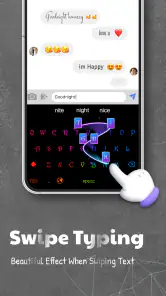
Another feature worth mentioning is the app's seamless integration with various messaging apps. Whether you're texting, emailing, or posting on social media, the keyboard works flawlessly. The predictive text and autocorrect options are pretty spot on, minimizing those pesky typing errors.
More From Our News Desk

Weather by Xiaomi Review: Clear at a Glance, Less Clear Up Close

X Under Pressure: Can It Recover When Posting Goes Wrong?

Clash of Clans Is Won Between the Battles

Android Auto Makes the Case for Quieter Car Software

MobiOffice: Transforming Mobile Productivity with Seamless Integration

EA SPORTS FC™ Mobile Soccer: Redefining Mobile Sports Gaming
Sound and lighting are personal, so I’d treat the available typing sounds and glowing styles as choices to test rather than settings everyone should use. If sound is distracting in a quiet room, a softer option—or no sound—may make typing less intrusive. If visual effects feel busy, a simpler theme can reduce competing details. The practical trade-off is that customization can improve comfort for one person while making the keyboard harder to use for another; I would change one element at a time so it’s clear what actually helps.
Small adjustments that make testing more useful
When I’m comparing themes, I’d use the same short text each time: a sentence with a capital letter, a number, punctuation, and a couple of common words. That gives me a quick sense of whether the key shapes and labels remain easy to distinguish, and whether my usual typing rhythm still works. It is more revealing than tapping a few letters in a preview, especially if the theme changes both the background and the visual treatment of the keys.
I’d also avoid changing the look, font, and sound all at once. If a setup feels tiring, changing one part at a time helps identify whether the issue is visual busyness, legibility, or an unwanted sound. And if a theme seems fine during a quick test but becomes distracting after a longer conversation, there is no reason to keep it just because it looked good at first. The point of customization is to make the keyboard suit your routine, not to turn every message into a design decision.
How it fits into a normal day
Performance-wise, the app runs smoothly without draining your phone's battery, which is a huge plus. It's lightweight and doesn't take a toll on your device's performance, which is something I truly appreciate. The app also updates regularly, ensuring any bugs are ironed out quickly.
A realistic way I’d use it is to pick a readable theme at home, then send a quick message while waiting for a bus or standing in a dim hallway. The backlit look can make the keyboard feel more visible in low light, but it doesn’t replace checking that the keys remain distinct or that the screen brightness suits the surroundings. I’d also keep a simpler option in mind for bright daylight, when decorative lighting may add little value. That’s a useful distinction: the app changes the keyboard’s appearance, while the phone’s screen and the environment still affect how easy it is to see.
For example, if I’m replying to a family message in a dim room, I might appreciate a brighter keyboard style. Later, if I’m typing outside, glare on the phone screen may matter more than the keyboard’s glow. I would judge the setup in both conditions before deciding it works for all-day use. This is especially worthwhile if I often move between indoor and outdoor settings or use my phone at different times of day.
The app is a personalization tool from Zayzik : LED Keyboard Studio, and it is free to install, with optional in-app purchases ranging from $2.49 to $27.99 per item. It is rated for Everyone, and its current version is 16.6.10, with Android 6.0 as the minimum operating system requirement. Its 4.6 average from around 577,000 ratings and more than 50 million installs suggest broad interest, though popularity alone can’t tell me whether a particular theme will suit my eyes or typing habits. The app has been available since January 9, 2019, and has around 13,000 written reviews.
What to expect from a free download
The app is free to install, but optional purchases are part of the experience. I’d start by exploring the available free choices and only consider paying if I find a style I genuinely want to keep. The listed purchase range runs from $2.49 to $27.99 per item, so I’d check the price shown for a specific option before confirming anything. A paid theme is a personal extra, not a requirement for deciding whether the keyboard itself suits me.
Its Everyone content rating makes it broadly suitable from a content perspective, but that does not mean the visual design will work for every person. Someone with a strong preference for steady, familiar layouts may find a constantly changing keyboard more tiring than enjoyable. Likewise, a person who relies on a particular system keyboard arrangement should prioritize that familiar workflow over experimenting with appearance.
Where a custom keyboard may not be the answer
Compared with sticking to a phone’s built-in keyboard, this app is for people who value visual choice more than a familiar, plain layout. The standard option is often the easier fit if you already rely on its appearance and behavior, or simply don’t want to change a system setting. I’d also skip a decorative keyboard if bright effects make letters harder to distinguish, if sound is unwelcome, or if switching keyboards adds friction to a routine that already works. Before committing to a theme, I’d test it in a short message and check the keys, punctuation, and suggestions rather than judging only the colors.
For longer writing, I’d weigh appearance against the comfort of the layout I already know. A custom look can make brief chats feel more enjoyable, but it won’t automatically make a small touchscreen easier for every hand or every level of vision. If you use a device setting or input method because it makes typing reliably accessible, keep that need ahead of decoration. I also wouldn’t assume that a glowing design improves visibility for everyone; glare, color sensitivity, and screen brightness can change the experience, so a plain alternative may be the better choice in some conditions.
When another keyboard is the better fit
If your main priority is a familiar typing layout, dependable text entry, or tools you already know how to use, the keyboard that came with your phone may be the sensible choice. A third-party keyboard can introduce a different look, but it also asks you to adjust to another input method. For people who write long documents on a phone or depend on a consistent arrangement for accessibility, familiarity can be more valuable than a colorful theme.
I’d also be cautious about making the switch on a device used for time-sensitive work until I had tried the keyboard in ordinary conversations. A few casual messages are enough to see whether the keys feel easy to locate and whether autocorrect behaves as expected for my own writing. If it slows me down or makes corrections awkward, I would switch back rather than trying to force a visual preference into a job it doesn’t do well.
My inclusive verdict
Using the app is a delightful experience. The customizable themes and backlit options allow you to express yourself in ways a standard keyboard simply can't. It's fun, it's funky, and it adds a personal touch to every message you send. Plus, the app supports multiple languages, so you're not limited to just English typing.
That language support is useful if I switch between languages in everyday conversations, though I’d still check that my preferred layout feels comfortable before relying on it for long or important messages. I’d recommend the app to someone who enjoys changing the look of their phone and is willing to spend a little time finding a readable setup. If predictability, minimal visual stimulation, or an established accessibility workflow matters more, keeping the keyboard already on the phone is a sensible choice.
In conclusion, LED Keyboard: Colorful Backlit offers an exciting way to liven up your typing experience. It's perfect for anyone who enjoys personalization and wants their device to reflect their unique style. From its plethora of themes to its seamless performance, this app is a must-try for keyboard enthusiasts. So, if you're ready to make your typing as colorful as your personality, this app is your go-to. Trust me, you won't look at your keyboard the same way again!
LED Keyboard: Colorful Backlit Frequently Asked Questions
What should I know about LED Keyboard: Colorful Backlit before downloading?
LED Keyboard: Colorful Backlit is a free personalization app from Zayzik: LED Keyboard Studio. Its focus is changing the look of your typing keyboard with RGB color effects, themes, fonts, and emojis. It is intended for Android devices, and checking compatibility and reviewing keyboard privacy settings are sensible steps before installing any keyboard app.
What Android version do I need to use LED Keyboard: Colorful Backlit?
The app requires Android 6.0 or later. Before downloading, check the Android version on your phone or tablet to make sure it meets that requirement. LED Keyboard: Colorful Backlit is a personalization app used on a compatible Android device, rather than a separate physical keyboard. If your device is compatible, you can then explore its keyboard appearance options.
Is LED Keyboard: Colorful Backlit free to download?
LED Keyboard: Colorful Backlit is free to download, so you can try its keyboard themes and colorful effects without paying upfront. The app also offers optional in-app purchases, with items priced from around $2.49 to $27.99. You can decide whether the free options meet your needs before choosing to buy anything.
What features does the LED Keyboard: Colorful Backlit app offer?
The LED Keyboard: Colorful Backlit app offers a variety of features designed to enhance your typing experience. With customizable backlight colors, a wide range of themes, and advanced auto-correction tools, it allows users to personalize their keyboard to match their style. Additionally, it supports multiple languages and includes fun emoji and GIF options to make typing more expressive.
Is the LED Keyboard: Colorful Backlit app suitable for all devices?
The LED Keyboard: Colorful Backlit app is designed for Android devices running Android 6.0 or later. Check your device’s operating system before downloading to make sure it meets this requirement. The app is a personalization tool rather than a standalone keyboard device, so you use it on a compatible Android phone or tablet to change the appearance of your typing keyboard.
Pros
- Customizable themes to suit your mood.
- Wide variety of LED color options.
- Easy-to-use interface for quick setup.
- Compatible with most Android devices.
- Enhances typing experience with vibrant lights.
Cons
- May drain battery faster due to LED lights.
- Contains ads that might interrupt usage.
- Limited free features
- in-app purchases needed.
- Can be resource-heavy on older devices.
- Some users report occasional app crashes.
- Category
- Personalization
- Version
- 16.6.10











