KRUU
- 22.00
- 4.8
- Installs
- 100.00K
- Price
- Free

Screenshots


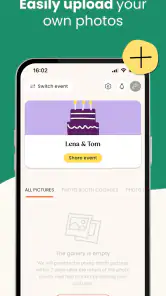
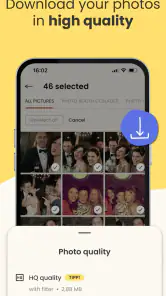

Analysis by Reviewed
When I’m helping organize a celebration, the hardest part is often not choosing the occasion or picking a date; it’s keeping everyone aligned without turning the plan into a stream of scattered messages. KRUU is an events app from KRUU GmbH, built around planning and remembering occasions. I’d consider it when a gathering needs more structure than a quick group chat, while remembering that an app-based plan works best when guests can access it and know where to find the important details.
What to check before inviting everyone
My first practical step would be to explore the event setup on my own before sending invitations. That gives me a chance to see whether the way the app organizes a plan suits the occasion and whether I can explain the next steps clearly to guests. It also avoids asking a whole group to adopt a tool before I know how I intend to use it.
A useful test is to imagine a guest opening the invitation while distracted: can they quickly understand what the event is and what they need to do next? If the answer is not obvious, I’d send a short note with the essentials in a familiar channel. That is not a knock against an event app; it is a sensible safeguard whenever some guests may be busy, unfamiliar with the interface, or reluctant to install something new.
Making one plan work for different guests
For a gathering with close friends who are already comfortable using apps, a shared event space can feel more organized than a long conversation where decisions and reminders gradually disappear. For relatives, neighbors, or a mixed-age group, I would not assume everyone wants to join the same digital workflow. The host can still use KRUU to organize the occasion while sharing crucial time-and-place information separately with anyone who prefers that.
This two-channel approach has a small cost: the organizer needs to keep the essential details consistent. I’d settle on one reliable version of the time and location, then reuse it rather than rewriting the details in several places from memory. It is especially useful if plans change, because a concise direct update can reach guests who might not revisit an app they only opened once.
A low-stress way to test the fit
Before choosing KRUU for a large or complicated gathering, I’d try it with a small event or a few willing guests. That helps reveal whether the app adds useful structure for this particular group, rather than merely adding another place to check. If people respond comfortably, I can make it part of the routine; if they keep asking for the same details elsewhere, I’d simplify the process and use the app only for the parts that genuinely help me.
That trial is also a fair way to judge the organizer’s workload. A tool may tidy up planning but still require the host to explain access, repeat key information, or monitor more than one channel. I would count those tasks as part of the real experience, not treat them as problems guests should solve on their own.
You May Like

Clash of Clans Is Won Between the Battles

Android Auto Makes the Case for Quieter Car Software

MobiOffice: Transforming Mobile Productivity with Seamless Integration

EA SPORTS FC™ Mobile Soccer: Redefining Mobile Sports Gaming

How Microsoft OneDrive Became a Mobile Productivity Giant

How Google Translate Breaks Language Barriers Effortlessly
Have you ever wondered how to make video conferencing a breeze? Well, let me introduce you to KRUU, the app that promises to revolutionize the way you connect with others virtually. I've had the chance to dive into this app, and trust me, it's a game-changer.
Getting Started: The User Experience
From the moment you download KRUU, you'll notice its sleek and intuitive design. The installation process is as straightforward as it gets — no unnecessary hoops to jump through. Once you open the app, you're greeted by a clean interface that makes navigation a piece of cake. Whether you're tech-savvy or a newbie, this app ensures you won't feel lost.
Features That Stand Out
Let's talk features! What sets KRUU apart is its impressive array of tools tailored for an enhanced virtual meeting experience. You can easily set up meetings, send invites, and even manage your schedule all in one place. The video quality is top-notch, ensuring that you see every expression and detail during your calls.
But wait, there's more! The app also offers screen sharing capabilities, which is perfect for presentations or collaborative work. And if you're worried about security, rest easy knowing KRUU has got you covered with its robust encryption protocols. Your meetings remain private and secure, just the way it should be.
Performance and Reliability
Now, let's get into the nitty-gritty of performance. During my time using KRUU, I was impressed by its reliability. Connection drops? Nope, didn't experience any. The app runs smoothly, even during long meetings, which is a relief when you're dealing with important discussions.
The app's developers clearly focused on creating a seamless experience, and it shows. The audio clarity is another highlight; you won't have to worry about missing out on crucial points due to muffled sound.
Planning a celebration, not a video call
One important correction changes how I would recommend this app: KRUU is an events app, not a video-conferencing service. Its purpose is to help people plan, celebrate, and remember occasions. The meeting, screen-sharing, encryption, and call-quality claims in the paragraphs above do not describe KRUU, so I would not rely on them when choosing or using the app. This distinction matters: if you need a tool for remote meetings, a dedicated conferencing app is the better fit.
For an event, the more useful way to think about KRUU is as a companion to the planning process rather than a replacement for every tool involved. A host might use it while coordinating a celebration, then keep other practical tasks—such as checking travel arrangements or sharing detailed directions—in whatever channel guests already use comfortably. That division of work can prevent a single app from becoming a bottleneck for the whole group.
Readability and navigation in a shared plan
A clean interface can make event planning less intimidating, particularly for someone who is not used to organizing gatherings. Still, a simple-looking screen does not guarantee that every guest will find every task equally clear. I would try the basic planning flow before inviting a large group, then ask one person who is less comfortable with apps to follow it independently. If they need you to explain each step, keep a plain-language message with the key details alongside the app.
KRUU is developed by KRUU GmbH and is free to download. Its 4.8 average rating, based on around two thousand ratings, suggests that many users respond positively, while the more modest pool of written reviews means I would treat individual experiences as useful context rather than a complete picture. It has passed one hundred thousand installs, is rated Teen, and its current version is 3.3.2. It was released on March 29, 2023, and requires Android 6.0 or later.
Motor, sensory, and situational access
For people who find precise tapping difficult, the practical question is whether the important planning steps can be completed without rushing or repeated small interactions. I would set up the event in advance rather than trying to add details while greeting guests, and I would avoid making the app the only route to essential information. If someone has trouble reading a phone screen, sharing the time and location in a familiar text message can be a considerate backup; it also helps guests who simply do not want another app.
A realistic use case is a friend arranging a birthday get-together between work and the school pickup. They can use a quiet moment to organize the event, then send a concise reminder through the channel their guests already check. The useful trade-off is convenience for the organizer versus extra steps for invitees: if the group is small and comfortable with apps, a shared digital plan may keep things tidy; for a mixed-age group or people with limited data access, a direct message or phone call may be easier.
Where the app fits—and where it doesn't
Compared with the usual alternatives, KRUU is best considered alongside general event-planning tools, group chats, and calendar invitations, not alongside video-call apps. A group chat is often quicker for casual plans, but details can get buried in a long conversation. A calendar invite is useful for a fixed date, yet it may not support the broader process of planning and remembering an occasion. KRUU makes most sense when you want an event-focused space; if your needs are only a time and place, the tools your group already uses may be simpler.
I would also decide early what information needs to reach every guest and keep that message easy to find. Send the essentials in a familiar format, then use the event app for the parts of planning it genuinely makes easier. That small workflow avoids a common snag: assuming that everyone has installed an app, knows where to look, and will notice a change at the right moment.
Choosing it for the right kind of occasion
I see the strongest case for KRUU when I’m coordinating an occasion that benefits from an event-focused home rather than a date in a calendar alone. A host handling a birthday, family gathering, or another celebration can decide whether the planning process deserves a dedicated space. The app is less compelling for an informal coffee where a couple of messages settle everything, or for a group whose members do not want to use another service.
It is also worth thinking about who owns the plan. If one person is comfortable organizing details and following up, a dedicated event tool may reduce the mental clutter of keeping decisions in several conversations. If several people need to make rapid changes and already coordinate in a shared chat, switching platforms could slow them down. I would choose based on the group’s habits, not on the assumption that a specialist app is automatically better.
Small workflow choices that prevent confusion
One non-obvious advantage of trying the plan before inviting everyone is that it helps the host separate information that belongs in the event from information that is better delivered personally. A general event outline can support coordination, while an individual accessibility or travel question may need a direct conversation. Keeping those purposes distinct makes the invitation easier to understand and avoids turning a shared plan into a substitute for every personal arrangement.
I would also choose a single place for last-minute changes and tell guests what it is. If the event details live in KRUU but urgent updates arrive in a chat, that division should be explicit. Otherwise, someone may check the app while another person is waiting for a message elsewhere. A short note explaining where to look is a modest effort that can prevent a frustrating mismatch on the day.
Why You Should Give It a Try
In today's digital age, where virtual meetings have become the norm, having an app like KRUU in your arsenal is invaluable. It's not just about connecting; it's about connecting with ease and quality. Whether you're a professional looking to streamline your meetings or someone who just wants to catch up with friends, KRUU delivers on all fronts.
So, if you're on the hunt for a reliable, user-friendly video conferencing app, look no further. KRUU has certainly earned its place on my list of must-have apps, and I have no doubt it will do the same for you.
My inclusive verdict
For event planning, I would consider KRUU when the organizer wants a dedicated place to manage a celebration and the invited group is willing and able to use it. I would not make it the sole source of urgent logistics, nor recommend it to someone specifically seeking meetings or video calls. Before committing the whole group, test the key steps yourself and offer guests a clear alternative for the essentials. That is the most practical way to make the app useful without assuming everyone reads, taps, or plans in the same way.
Who may prefer another approach
I would steer away from making KRUU mandatory for guests who have unreliable connectivity, limited confidence with apps, or a strong preference for phone calls and ordinary messages. The same goes for a gathering where plans are changing constantly and the group already has a channel everyone checks. In those situations, a familiar method may be more inclusive and efficient than asking people to learn a new routine.
Before the event, I’d consider whether each guest actually needs to interact with the app or whether only the organizer needs a dedicated planning space. That distinction can make participation less demanding: people who prefer another channel can still receive the essential information directly, while the host keeps the planning process organized. The right measure of success is not how many people use the same app, but whether everyone knows what matters and can take part comfortably.
KRUU Frequently Asked Questions
How old do I need to be to use KRUU?
KRUU is rated Teen, so it is intended for teen users and older. Before downloading, consider whether the app’s event-focused purpose suits the person who will use it and review the age guidance shown for the app on your device’s app store. Families can also use the device’s own settings to manage app access.
What does KRUU offer for planning and remembering events?
KRUU’s central idea is captured in its description: plan, celebrate, remember. It is an events app from KRUU GmbH, intended to support people around event-related activities. If you are looking for a dedicated event app, that focus is the main reason to consider it; the exact tools available can depend on the current app experience and version.
What is KRUU and what can I use it for?
KRUU is an innovative social networking application designed to connect people through shared interests and activities. Users can create profiles, join communities, and engage in discussions or events that align with their hobbies and passions. Whether you're looking to meet new friends, find a study group, or join a local running club, KRUU offers a platform to expand your social network and participate in engaging activities.
Is KRUU free to use, or does it require a subscription?
KRUU is free to download. That makes it easy to try the app before deciding whether it fits your needs. Check the app store page and any in-app purchase details shown on your device before proceeding, so you understand the available terms. The free price is a practical starting point for people who want to explore KRUU’s event-focused purpose.
How does KRUU ensure user privacy and data security?
KRUU prioritizes user privacy and data security through stringent measures. The app uses end-to-end encryption to protect user data during transmission and stores information on secure servers. Additionally, KRUU provides users with control over their privacy settings, allowing them to choose what information is visible to others. Regular audits and updates ensure compliance with global data protection standards, making it a safe platform for users.
Pros
- Intuitive user interface for easy navigation.
- Offers a wide range of customization options.
- Smooth performance with minimal lag.
- Comprehensive features for productivity.
- Seamless integration with other apps.
Cons
- Limited offline functionality.
- Occasional ads can be intrusive.
- Requires frequent updates.
- Some features behind a paywall.
- High battery consumption.

- Category
- Events
- Version
- 3.3.2