Kids360: Parental Control App
- 585.00
- 4.4
- Installs
- 5.00M
- Price
- Free

Screenshots





Analysis by Reviewed
Every parent knows the drill: keeping an eye on your kids while giving them the freedom to explore is a balancing act. Enter Kids360, the app that promises to bridge this gap with its innovative parental control features. Let’s dive into what makes this app a must-have for parents in the digital age.
Keeping Tabs Without Overstepping
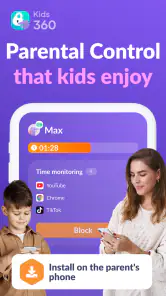
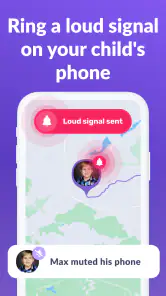
First off, the beauty of Kids360 lies in its ability to strike a fine balance between surveillance and trust. The app provides real-time location tracking, so you always know where your little explorers are. But it’s not just about locations; the app also checks what apps your kids are using and how much time they’re spending on each. It’s like having a digital nanny that gives you a heads-up when screen time is getting out of hand.
Easy Setup and User-Friendly Interface
Setting up the app is a breeze. Trust me, even if you’re not the most tech-savvy parent, you’ll find it straightforward. The interface is intuitive, making it easy to customize settings according to your family’s needs. Whether it’s setting time limits or blocking inappropriate content, everything is just a few taps away.
Features That Speak Volumes
One of the standout features is the ability to set geofences. Imagine getting an alert when your child steps outside a designated area—peace of mind right at your fingertips! Plus, the app’s monitoring tools are robust, allowing you to keep tabs on calls and texts. You can even set up notifications for when your child enters or leaves school, making it easier to coordinate pickups.
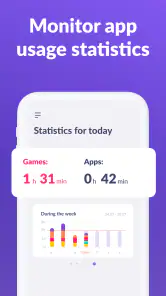
Another nifty feature is the app usage report. You get a detailed view of what apps are being used and for how long. It’s a great way to initiate conversations with your kids about healthy screen habits without coming off as overly intrusive.
Why It’s Worth Your Time
In a world where digital dangers lurk at every corner, Kids360 acts as your digital ally. It empowers you to give your kids the freedom to explore while ensuring they’re safe. It’s not just about control, but about building trust and understanding with your children. And honestly, isn’t that what every parent wants?
In conclusion, if you’re on the lookout for a reliable parental control app that blends functionality with ease of use, look no further. Kids360 is here to make your parenting journey a tad bit easier. So go ahead, download it today and take that first step towards a safer digital world for your kids.
Pros
- Easy setup and user-friendly interface.
- Real-time location tracking of children.
- Customizable screen time limits.
- App blocking to ensure safety.
- Compatible with both Android and iOS.
Cons
- May drain device battery quickly.
- Requires stable internet connection.
- Subscription needed for premium features.
- Limited features in the free version.
- Children may find ways to bypass it.

- Category
- Parenting
- Version
- 2.69.3