JoyNovel
- 12.00
- 1.6
- Installs
- 10.00K
- Price
- Free

Screenshots




Analysis by Reviewed
I tried JoyNovel as a mobile reading app for people who want romantic and dramatic fiction close at hand, and my first impression was mixed. Its store summary, “Tap and Get Lost,” captures the basic appeal: open the app, choose a story, and settle into a quick reading session. The app is developed by Hinovel and belongs to the Books & Reference category, but it feels more like a serialized entertainment library than a traditional reference tool.
That distinction matters when deciding whether it is right for you. If you enjoy discovering ongoing stories and reading in short bursts, JoyNovel can be an easy companion during a commute, a lunch break, or a quiet evening. If you expect a carefully organized digital library, strong reader controls, or a completely predictable cost, you may find the experience less comfortable. I also paid close attention to how usable it feels in different situations, including reading with tired eyes, navigating with one hand, and trying to concentrate in a noisy place.
How the reading experience feels in everyday use
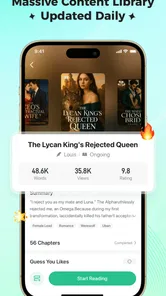
The app presents itself as JoyNovel, with a short store description that simply says “JoyNovel.” That minimal wording does not tell you much about the actual experience, so the important question is how quickly you can move from opening the app to finding something worth reading. In my experience, the appeal depends heavily on whether the available stories match your preferred tone. The app is not aimed at someone looking for manuals, academic references, or a broad nonfiction catalog. It is better understood as a fiction-reading destination built around escapism.
I found the basic reading idea easy to understand. You browse, select a story, and read it in sections rather than approaching one long book in the traditional way. That format suits people who like cliffhangers and regular stopping points. It also makes the app useful for fragmented time: I could read a small portion while waiting somewhere without needing to remember a complicated location or prepare a long session.
The same structure can become a weakness. Serialized reading encourages you to continue at the point where a chapter ends, which is entertaining when the story is working but frustrating when progress is tied to a purchase decision. I recommend treating the first reading session as a test of both the writing style and the payment model. Do not assume that downloading a free app means every story can be completed without spending money.
JoyNovel is free to install, while in-app purchases range from $0.99 to $204.99 per item. That is a wide span, and it changes how I would approach the app. I would browse first, read enough to decide whether a story deserves continued attention, and only then consider paying. Anyone who dislikes virtual currencies, chapter unlocking, or frequent prompts should be especially cautious before becoming invested in a long serial.
Readability and navigation
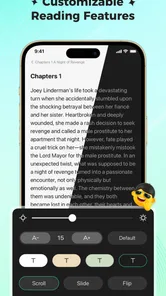
For a reading app, legibility is more important than decorative presentation. A story can be excellent, but it becomes tiring if the text is cramped, the contrast is weak, or moving between chapters feels confusing. JoyNovel works best when I give it a focused reading window rather than treating it as a replacement for a full e-reader. The short-session design makes it approachable, although readers who need extensive control over typography may want a more specialized alternative.
More From Our News Desk

Weather by Xiaomi Review: Clear at a Glance, Less Clear Up Close

X Under Pressure: Can It Recover When Posting Goes Wrong?

Clash of Clans Is Won Between the Battles

Android Auto Makes the Case for Quieter Car Software

MobiOffice: Transforming Mobile Productivity with Seamless Integration

EA SPORTS FC™ Mobile Soccer: Redefining Mobile Sports Gaming
My practical advice is to begin with a short session and check how your eyes feel after several pages. This is particularly useful if you read on a smaller phone, wear corrective lenses, or prefer larger text. A screen that seems comfortable for browsing can become tiring during a long chapter. If the reading view does not provide the level of adjustment you need, an app built specifically around e-books may be a better fit.
Navigation also affects people with different levels of digital confidence. JoyNovel is easier to approach when you are happy to explore by tapping through recommendations. It is less suitable for someone who wants to build a precise personal catalog, sort books through several layers, or manage a large collection with the discipline of a library app. I would keep expectations realistic: the experience is centered on discovering and continuing stories, not on scholarly organization.
A useful workflow is to separate discovery from commitment. First, browse several titles rather than opening the first recommendation. Next, read enough to identify the main characters, pacing, and tone. Finally, decide whether you want to follow that story before spending anything. This simple habit reduces the chance of paying for a serial that seemed attractive only because of its cover or opening hook.
The store lists the current version as 1.3.5, and the app requires Android 7.0 or later. That makes it relevant to people using older Android phones that still meet the requirement, although the quality of the experience will also depend on the device’s screen, performance, and available storage. Version information is useful when troubleshooting: if the interface behaves differently from what you expect, checking that the installed version is current is a sensible first step.
Motor and sensory considerations
JoyNovel is naturally suited to touch-screen reading, but touch interaction is not equally comfortable for everyone. One-handed use can be convenient when standing on public transport or holding a drink, yet repeated tapping and scrolling may be tiring for people with limited dexterity, tremors, joint pain, or reduced precision. I would test the app during a normal reading posture rather than assuming that a few taps in the opening screen represent the whole experience.
Short chapters can help reduce physical strain because they create natural stopping points. You can put the phone down before your hand or wrist becomes uncomfortable instead of feeling obliged to finish a long uninterrupted section. On the other hand, if the app encourages frequent screen interaction between sections, that rhythm may be less comfortable than turning pages in a dedicated reader or listening to an audiobook.
Sensory comfort is equally personal. A bright screen, dense text, animated transitions, or a busy discovery page can be distracting for readers who are sensitive to visual stimulation. I would use the phone’s own display settings, such as system-level brightness and night-time adjustments, where helpful. Those changes can make the overall session easier on the eyes, but they cannot compensate for every limitation in an app’s reading design.
People who rely on screen readers or other assistive technologies should test the app with their usual setup before committing to a paid reading path. The key issue is not simply whether the app opens; it is whether story selection, chapter movement, purchase prompts, and reading content remain understandable without precise visual interaction. Because reading accessibility can vary from screen to screen, a short trial is more informative than assuming that a general phone setting will solve everything.
Readers with hearing-related needs are unlikely to encounter audio as the central part of the experience, because JoyNovel is presented as a text-focused Books & Reference app. That may be a benefit for someone who prefers silent reading in a shared space. It is not a substitute for narration, however, so people who need text-to-speech or who prefer listening while walking should compare it with an audiobook service or a reader known for stronger spoken-content support.
Situational access: where the app fits best
The most convincing use case is a series of small gaps in the day. Imagine waiting for an appointment with ten minutes available. JoyNovel gives you a way to open a continuing story, read a section, and stop without carrying a paperback or remembering a bookmark. The same pattern works during a lunch break or before sleep, provided the story’s pace and the screen’s brightness do not keep you awake.
It is less comfortable in situations where attention is divided. Reading while walking, cooking, or supervising a child is not a good idea, and frequent interruptions can make serialized fiction harder to follow. If you are reading in a noisy café, the visual simplicity of text may help, but only if the screen remains comfortable and you can concentrate. For travel without dependable connectivity, I would check how the particular reading flow behaves before relying on it; do not make the app your only source of entertainment until you know it suits your routine.
The mature content rating of 17+ is an important part of situational access. JoyNovel is not an app I would hand to a child or recommend for a shared family device without thinking about who may open it. Adults should also consider whether mature themes are appropriate for the place where they plan to read. A private evening session is different from opening a story on a workplace screen or in a setting where younger readers may be nearby.
The mature rating also affects recommendations. If you want light, all-ages fiction for a family reading environment, a children’s library app or a general e-book platform with clear family controls may be more appropriate. JoyNovel makes more sense for an adult reader who is comfortable exploring fiction intended for older audiences and who is willing to judge individual stories rather than assuming every title has the same tone.
What makes it different from ordinary reading alternatives
Compared with a conventional e-book reader, JoyNovel is more discovery-driven and more focused on serialized entertainment. A traditional e-book app is usually better when you already own a book, want dependable page control, or need a calm shelf for a fixed collection. JoyNovel is more appealing when you want to browse and find a story without deciding in advance exactly what to read.
Compared with a physical paperback, the app is more portable and easier to fit into short breaks. A paperback can still win for eye comfort, tactile control, and uninterrupted reading without notifications or purchase prompts. I would choose paper for a long weekend reading session and JoyNovel for opportunistic reading when carrying another book is inconvenient.
Compared with an audiobook service, JoyNovel demands visual attention. That makes it useful in quiet moments but unsuitable for hands-free listening while driving, exercising, or doing household tasks. Compared with a public-library digital lending service, it may offer a different kind of immediacy, but readers who prioritize predictable access and avoiding in-app purchases should investigate library options first.
The low average rating of 1.6 from around 45 ratings and 12 reviews should temper enthusiasm. A small review pool cannot explain every person’s experience, but it is still a warning to approach the app carefully rather than assuming the store summary tells the whole story. I would read recent user comments, test the opening experience, and avoid spending heavily until the app has earned your trust.
Remaining barriers and practical ways to reduce friction
The largest barrier is the relationship between free access and paid continuation. When a story becomes engaging, the reader is emotionally committed, which can make purchase prompts feel more consequential than they did during casual browsing. My strongest recommendation is to set a personal spending limit before starting several stories. Keep track of which title you are following and what you have already paid, especially if you switch between multiple serials.
A second barrier is suitability for readers who need robust organization. If you want to annotate, export a personal archive, compare editions, or maintain a carefully structured reference collection, JoyNovel is unlikely to be the best primary tool. Its value is in immediate fiction consumption, not in replacing a research library. Use it alongside a conventional reading app rather than forcing it to serve purposes it was not designed to handle.
A third barrier is concentration. Cliffhanger-based reading can make the app engaging, but it can also encourage longer sessions than planned. I find it helpful to choose a stopping point before opening a chapter, particularly at bedtime. This is not a technical setting; it is a simple habit that protects sleep and keeps the app from turning a short break into an unplanned spending or reading marathon.
Device age can also shape the experience. Android 7.0 support allows access on older compatible phones, but an older handset may have a smaller display or feel less responsive than a newer one. If text looks cramped, try increasing system text size and changing the viewing environment before deciding that the entire app is unusable. If navigation remains uncomfortable, a larger-screen device or a dedicated e-reader may offer a clearer solution.
For people with motor or visual limitations, I would make the first test deliberately practical: hold the phone in your usual hand, use your normal accessibility settings, open a story, move through several sections, and reach the point where the app asks you to continue or pay. That workflow reveals more than simply checking whether the home screen is readable. It tests the complete path that matters to a regular reader.
Who should try it, and who should skip it
I would recommend JoyNovel to an adult who enjoys mobile fiction, likes discovering dramatic serials, and appreciates reading in compact sessions. It can be a good fit for someone who wants a story during a commute or while waiting, does not mind browsing through recommendations, and is comfortable making careful decisions about optional purchases.
I would suggest skipping it if you want a completely free reading catalog, dislike mature content, need a highly controlled e-book layout, or prefer to listen rather than look at a screen. I would also point readers toward library lending apps or established e-book stores if predictable ownership and transparent access matter more than rapid discovery.
Families should be particularly selective. The 17+ rating means this is an adult-oriented choice, not a general household reading app. On a shared phone or tablet, I would avoid assuming that a child will only see suitable material. The safer decision is to use a platform designed for the child’s age group when younger readers are involved.
My inclusive verdict
After considering readability, touch use, sensory comfort, and real-world situations, I see JoyNovel as a niche but understandable option rather than a universal reading solution. Its strongest quality is convenience: it turns spare minutes into serialized fiction without requiring a physical book. Its weakest points are the potential friction around paid continuation, the adult-only positioning, and the possibility that readers needing advanced display or organization controls will feel underserved.
The app is free to begin with, but I would not treat that as the full cost of the experience. Start slowly, test a story with your normal accessibility setup, and decide whether the reading flow remains comfortable when you reach a continuation prompt. That approach is especially important given the current 1.6 average rating and the broad range of in-app purchase prices.
My final recommendation is cautious: JoyNovel is worth trying for adults who specifically enjoy mobile serial fiction and short reading sessions, but it should not be your only reading app until you know how well it fits your eyes, hands, attention span, and budget. Its best feature is the low-friction path into a story; its biggest challenge is making sure that convenience remains inclusive and financially comfortable.
JoyNovel Frequently Asked Questions
What is JoyNovel, and what kind of content does it offer?
JoyNovel is a mobile reading platform focused mainly on serialized fiction and digital novels. Its library commonly includes romance, fantasy, drama, mystery, and other popular genres, with stories published chapter by chapter. The app is designed for readers who enjoy discovering new authors, following ongoing plots, and reading short installments whenever they have free time.
What devices and operating systems can run JoyNovel?
JoyNovel is a Books & Reference app from Hinovel, and its minimum operating-system requirement is Android 7.0. Before downloading, check your device’s software version and available storage, then confirm compatibility in the app store you use. The app is free to download, but some reading options may involve in-app purchases, so consider those separately from device compatibility.
Is JoyNovel free to download and use?
JoyNovel can generally be downloaded for free, allowing users to browse the catalog and read at least some content without an upfront purchase. However, access to complete stories may involve virtual coins, paid chapters, subscriptions, advertisements, or other in-app purchases. Before spending money, check the current pricing, payment terms, and whether the selected novel has enough free chapters for your reading preferences.
Does JoyNovel require an account to read novels?
Some features may be available without registration, but creating an account is usually useful for saving reading progress, synchronizing your library, receiving recommendations, and accessing the same profile on another device. Account requirements can vary by version and platform. Review the permissions and sign-in options carefully, especially if you prefer not to connect the app with a social media account.
Can I read JoyNovel stories offline?
Offline reading depends on the specific app version, title, and whether the chapters have been downloaded or unlocked in advance. If JoyNovel provides a download option, it may be limited to selected chapters or require an active account. Readers should download content while connected to Wi-Fi and confirm that saved chapters remain accessible without an internet connection before relying on the app during travel.
Pros
- Large catalog of romance and serialized fiction to explore.
- Frequent chapter updates keep ongoing stories engaging.
- Personalized recommendations help discover similar novels.
- Reading progress syncs conveniently across supported devices.
- Offline reading can be useful when traveling or without stable internet.
Cons
- Many chapters may require coins or in-app purchases to unlock.
- Some stories take a long time to reach a satisfying conclusion.
- Update schedules can vary considerably between different novels.
- The app may display frequent prompts encouraging purchases.
- Content quality and editing can differ from one story to another.












