IP Camera Viewer
- 128.00
- 3.7
- Installs
- 1.00M
- Price
- Free

Screenshots
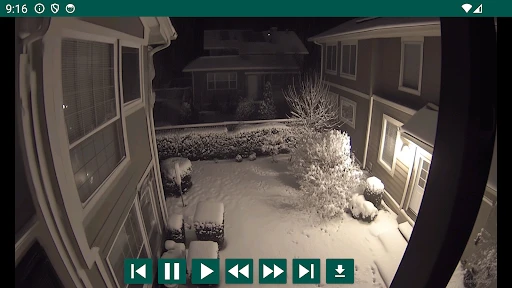
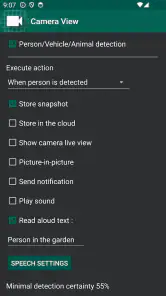
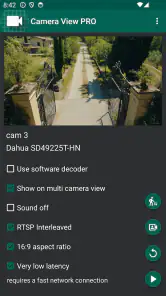
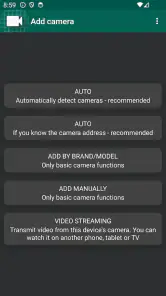
Analysis by Reviewed
If you already own a Wi-Fi camera or a home CCTV setup, the awkward part is often not buying another device; it is finding a practical way to check the picture when you are away. IP Camera Viewer is aimed at that everyday gap: opening a camera view on your phone and returning to footage when you need to look back. I see it as a companion for an existing system, rather than a replacement for the cameras themselves.
Start with the camera you already have
Before relying on any phone viewer, I would first check that the camera is working on your home network and that I can access its normal settings. That simple step helps separate a camera or Wi-Fi problem from an app setup problem. IP Camera Viewer, made by kapron-ap, is free to install and sits in the House & Home category; its purpose is straightforward, but how useful it feels depends heavily on whether it fits the camera arrangement you already use.
That makes this a better fit for someone who has a working camera and wants a convenient viewing route than for someone starting from zero. If you still need to choose hardware, compare camera systems first: the camera, its setup process and its own app may matter more than a separate viewer. I would not buy a camera on the assumption that this app will automatically work with it.
Check the route before leaving home
I would treat the first setup as a small end-to-end test, not just a successful app launch. First, confirm the camera’s normal view at home; then close and reopen the viewer, move between the camera and phone’s usual network conditions, and see whether the picture returns. The useful outcome is not simply seeing an image once, but knowing what to try if it does not load during a real check-in.
A practical routine is to test one camera at a time and give each a clear, recognizable place in your own setup. If you have several views, a confusing label can cost more time than the connection itself when you are checking quickly. I would also test the view at the time of day I expect to use it: a doorway that is clear in daylight may be harder to interpret after dark, regardless of which viewer is open.
Setting Up Your Surveillance
Getting started with the IP Camera Viewer is a breeze. I found the installation process straightforward, even for someone who's not super tech-savvy. Just download it from your app store, and you're good to go. What’s cool is that it supports a wide range of IP cameras, so there's a good chance your existing setup will work seamlessly with it.
User-Friendly Interface
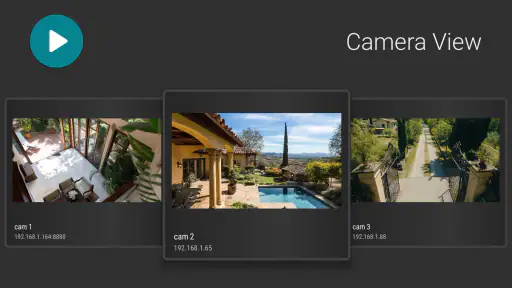
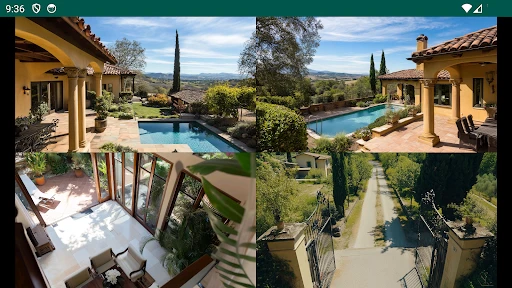
The interface is clean and intuitive. Navigating through the app felt natural, and I didn’t have to fumble around to find what I needed. The live feed is right there on the main screen, which is great because let’s be honest, nobody wants to dig through menus when they hear a suspicious noise at night.
More From Our News Desk

Weather by Xiaomi Review: Clear at a Glance, Less Clear Up Close

X Under Pressure: Can It Recover When Posting Goes Wrong?

Clash of Clans Is Won Between the Battles

Android Auto Makes the Case for Quieter Car Software

MobiOffice: Transforming Mobile Productivity with Seamless Integration

EA SPORTS FC™ Mobile Soccer: Redefining Mobile Sports Gaming
A useful check-in, not a substitute for planning
For example, if I leave home and want to see whether the dog is settled, a quick live view is more useful than searching through a camera manufacturer’s app that I rarely open. The same applies to checking a delivery area or seeing whether a room is occupied. I would set up and test the camera while at home, then try a remote check before depending on it during a real trip. That gives me a chance to discover connection snags when I can still fix them.
Compared with the usual alternative—a camera maker’s own app—a separate viewer can be appealing when I want one place to look at an existing camera setup. The trade-off is compatibility: a manufacturer’s app may be the safer choice for device-specific setup and controls. If a camera does not connect or its familiar functions are missing, I would use its original app rather than spend time forcing a different workflow.
When a quick check becomes a handoff
A camera view is often only one part of a household’s response. If I see a delivery at the door, for instance, I may need to message someone at home to bring it in; if a room looks occupied, I might simply stop checking and carry on. The viewer can help me make that decision, but the follow-through still depends on another person, a separate device, or the camera system’s own controls. I would decide in advance who should act on a concerning view rather than assume that seeing it automatically solves the problem.
This distinction also helps set realistic expectations for remote use. A live image can answer “what does it look like now?” but it is not the same as a guaranteed alert, a two-way conversation, or a response service. If my main need is to speak to someone at the door or get professional monitoring, I would choose equipment and software built around those tasks instead of treating a phone viewer as a complete security plan.
Customizable Alerts
One of my favorite features is the customizable alert system. You can set it to notify you only for specific movements or noises. This means fewer false alarms and more peace of mind. Plus, the notifications are prompt. I tested it a few times by walking past my camera, and each time, my phone buzzed almost instantly.
Make alerts useful rather than noisy
In practice, I would treat motion notifications as prompts to check the camera, not proof that something is wrong. A busy hallway, changing light or a pet moving through view can make alerts less meaningful. I would begin with a simple test at different times of day, then adjust the alert choices until ordinary activity does not drown out the events I care about. If constant notifications become distracting, live viewing without relying on every alert may suit me better.
There is a useful trade-off here: stricter alert choices may reduce interruptions, but they can also make a notification less likely for activity outside the pattern I have tested. I would not tune alerts once and forget them if the camera’s surroundings change—for example, when a room is used differently or lighting conditions shift. A short review after those changes is more sensible than assuming yesterday’s settings still match what I need today.
Playback and Recording
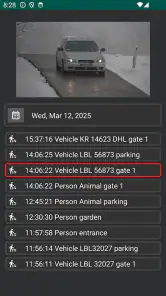
Another handy feature is the playback and recording option. Whether you want to save a clip for later or review past events, the app has got you covered. I found the playback smooth, and the video quality maintained its clarity even when I zoomed in on a particular event.
Playback is most useful when I have a specific question, such as whether someone arrived while I was out, rather than as a reason to watch hours of footage. I would note roughly when an event happened and go straight to that period. A camera’s recording setup still matters: if it has not captured the moment, a viewer cannot retrieve it. For an important incident, I would check that recording is working before assuming the phone app is keeping a complete archive.
Turn a clip into a useful answer
For a real household question, I would first use the live view to see what is happening now, then move to playback only if I need to establish what happened earlier. That order avoids spending time reviewing old footage when a quick glance already answers the question. If I do find a relevant moment, I would note the approximate time and check the recording through the camera’s normal setup as well, especially if the clip matters beyond casual reassurance.
That workflow is particularly useful for deliveries, a pet’s routine, or checking whether a familiar visitor stopped by. It is less suited to reviewing a long stretch of footage without a clear event to look for. A phone screen is convenient for locating a moment, but it is not a substitute for deciding beforehand what evidence you need or how you will keep it within your household’s privacy expectations.
Security and Privacy
In this age where privacy is a big concern, the app developers seem to have taken extra steps to ensure your data is safe. The data encryption is top-notch, so you can feel secure knowing your footage is for your eyes only.
Keep access deliberate
Because a home camera can show private rooms and routines, I would keep the camera pointed only where it has a clear purpose and limit who can access the device. I would also check the camera’s own account and network settings instead of assuming that choosing a viewing app settles every privacy question. This is especially important in a shared home: agree on which areas are monitored and who is allowed to view them before treating the feed as an everyday convenience.
I would also make privacy part of the handoff when another person helps manage the home. They should know which camera is being viewed and what to do with an alert, but access should not spread casually just because more people could find the feed convenient. For a shared household, a quick agreement about viewing access and camera placement is more useful than relying on an app choice alone to define the boundaries.
Who will get the most from it?
The app is most appealing if I already have an IP camera, want phone-based viewing and am comfortable checking compatibility before depending on it. It is less suitable if I expect a complete security system in one download, need guaranteed compatibility with a particular camera, or want alerts to replace a monitored alarm. In those cases, I would compare the camera maker’s own software or a dedicated security system instead.
I would also think about how often I need to manage the camera, not only how often I want to look at it. Someone who mainly needs a quick check of an existing setup may appreciate a separate viewer. Someone who frequently changes camera settings, relies on the maker’s specific controls, or wants one clearly supported route for troubleshooting may be better served by the manufacturer’s app. The best choice is the one that makes the whole routine dependable, not simply the one with the shortest path to a live picture.
What the app’s audience tells me
IP Camera Viewer has an average rating of 3.7 from around 6,700 ratings, with about 128 written reviews and over a million installs. It is free to download, though it offers in-app purchases, and it is rated for Everyone. The current version is 10.2.7 and it runs on Android 5.0 or later. Those figures suggest it has found an audience, but they do not tell me whether it will suit a particular camera; testing the connection with my own setup is the deciding step.
The app’s basic role is easy to understand, but the key question before installing is still practical: can I view the camera I already own in the way I need? I would begin with one camera and one simple task, such as checking a room or delivery area, then decide whether the connection and navigation are dependable enough for regular use. That small trial is a better guide than assuming broad camera support means every setup will behave the same way.
Where the flow can break
The most important friction is the dependence on the camera and the connection around it. If the camera is offline, poorly positioned, or not recording when an event happens, a viewer cannot repair that underlying problem. Likewise, a successful view while at home does not by itself prove that a remote check will work when needed. I would test the full route before relying on it and keep the camera’s own app available for setup or troubleshooting.
There is also a difference between a useful household convenience and a system I would trust as the only response to a serious risk. For casual checks, an occasional delay or need to switch apps may be tolerable. For urgent monitoring, guaranteed compatibility, or device-specific controls, I would choose a dedicated system with a clear fit for that job. This app makes more sense as a practical viewing option than as a promise that every part of home security is covered.
Overall, the IP Camera Viewer impressed me with its ease of use and reliability. Whether you want to keep an eye on your pets, check who’s at the door, or ensure your home is safe while you’re away, this app is a solid choice. It's like having an extra set of eyes you can trust, all accessible from your smartphone.
IP Camera Viewer Frequently Asked Questions
Is IP Camera Viewer free to download, and are there optional purchases?
IP Camera Viewer is free to download, so you can try the app without an upfront purchase. It also offers in-app purchases, with items priced from $1.99 to $10.99. Keep that distinction in mind before installing: the download is free, but some available options may require payment. Check the purchase details shown in the app before buying anything.
Who develops IP Camera Viewer, and what kind of app is it?
IP Camera Viewer is a House & Home app developed by kapron-ap. Its focus is viewing and playing back feeds from an IP camera, Wi-Fi camera, or home security CCTV system. If you want a mobile companion for checking camera footage, that purpose is the main reason to consider it. Its content rating is Everyone.
What is IP Camera Viewer used for?
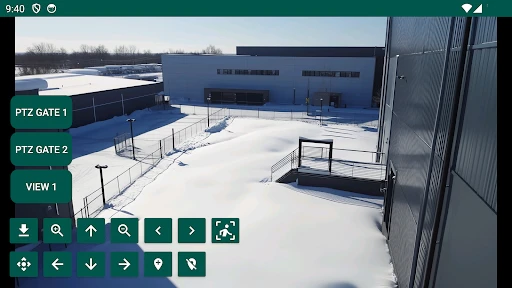
IP Camera Viewer is an application that allows you to monitor and control your IP cameras remotely. It's designed for both personal and professional use, providing features like real-time video streaming, camera control, and recording capabilities. It's particularly useful for home security, business surveillance, and monitoring pets or children, offering convenience and peace of mind.
Is IP Camera Viewer compatible with all types of cameras?
IP Camera Viewer supports a wide range of IP cameras from various manufacturers. However, it's essential to check the compatibility list provided by the app to ensure your specific camera model is supported. The app aims to offer broad compatibility but it's always best to verify before downloading to avoid any inconvenience.
How secure is the IP Camera Viewer app?
Security is a significant aspect of IP Camera Viewer. The app employs encryption protocols to protect video feeds and user data from unauthorized access. It's recommended to use strong, unique passwords for both the app and your cameras. Regular updates help maintain security, so ensure the app is up to date to benefit from the latest security enhancements.
Pros
- Easy setup and user-friendly interface.
- Supports multiple camera brands and models.
- High-quality video streaming capabilities.
- Remote access through mobile apps.
- Customizable alerts and notifications.
Cons
- Limited free version features.
- Occasional connectivity issues.
- No cloud storage for recordings.
- Requires stable internet connection.
- Interface can be cluttered at times.
- Category
- House & Home
- Version
- 10.2.7









