Index: Business Phone Number
- 83.00
- 3.8
- Installs
- 50.00K
- Price
- Free

Screenshots

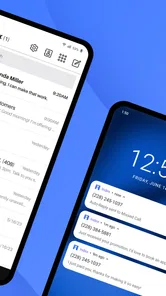

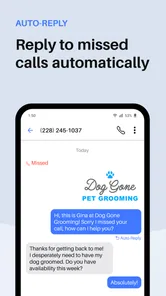

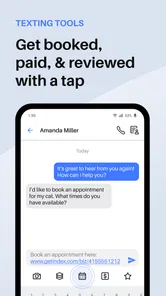
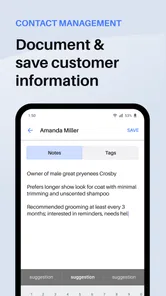
Analysis by Reviewed
Index: Business Phone Number is the kind of Android business app I would consider when I want work calls and customer conversations kept away from my personal number. I found its purpose easy to understand: it is built around organizing work communication and managing customer interactions, rather than trying to replace every business tool at once. That focused role is its main appeal.
My experience with it is best described as practical but dependent on a careful setup. A second business number only helps if calls, messages, contacts, and follow-up habits are arranged consistently. When that foundation is in place, the app can make a small operation feel more organized. When it is not, the extra number can become another inbox to check and another place where customer details may be missed.
Where users are most likely to get stuck
The first point of friction is deciding how the number will actually be used. A shop owner might want it for customer calls, a freelancer may use it for inquiries, and a small team may treat it as a public contact line. Those situations sound similar, but they create different routines. Before installing, I would decide whether the app is mainly for incoming calls, outgoing business conversations, customer follow-up, or a mixture of all three.
That decision matters because a separate business number is not automatically a complete customer-management system. I would not expect it to replace a dedicated customer relationship platform, a shared team inbox, or a full help-desk workflow. It is more useful as a communication layer: a way to separate work conversations from personal ones and keep customer contact more deliberate.
Another common stumbling block is treating the app like a normal personal phone dialer. Business communication usually needs context. If I answer a customer while walking between appointments, I need to remember what was promised, what still needs checking, and whether someone else is already handling the request. The app can help organize the communication channel, but I still need a simple habit for recording commitments and closing the loop.
The audience size gives some useful context. Index: Business Phone Number has passed around 50 thousand installs and holds a 3.8 average from roughly 200 ratings, with around 80 written reviews. I read that as a sign of a useful but not universally effortless tool: enough people are trying it for real work, while the middling average suggests that setup, expectations, or individual phone conditions can affect satisfaction.
Check the job before blaming the app
If a call does not behave as expected, I first separate the problem into three questions: is the app configured correctly, is the phone connected properly, and is the issue related to the other person or the network? This sounds basic, but it prevents wasted time. A missed call can come from an incorrect number, weak connectivity, a device setting, or a customer who simply did not answer.
More From Our News Desk

Weather by Xiaomi Review: Clear at a Glance, Less Clear Up Close

X Under Pressure: Can It Recover When Posting Goes Wrong?

Clash of Clans Is Won Between the Battles

Android Auto Makes the Case for Quieter Car Software

MobiOffice: Transforming Mobile Productivity with Seamless Integration

EA SPORTS FC™ Mobile Soccer: Redefining Mobile Sports Gaming
I also avoid changing several settings at once. If I alter the account, reinstall the app, and switch networks in the same session, I lose the ability to tell what helped. A slower, one-change-at-a-time approach is more useful, especially when the app is being used for customer contact and reliability matters more than experimentation.
For a small business, the most important early test is not a long conversation. I would make a short call to a trusted person, try the basic communication path I expect to use, and then check whether the conversation is easy to identify later. That test reveals more than simply opening the app and assuming everything is ready.
Setup checks that prevent avoidable trouble
Index: Business Phone Number is a free app, but it includes in-app purchases ranging from about 25 dollars to 200 dollars per item. I would therefore install it with a clear idea of what I need immediately and what I might consider later. A free starting point is helpful, but I would not build a business process around an optional purchase until I understood exactly how it fits my workload.
The app is listed for Everyone and works from Android 9 onward. That makes it approachable for many users, but compatibility alone does not guarantee a smooth experience on every phone. Android manufacturers often organize calling, notifications, battery behavior, and background activity differently. I would check the phone’s general notification and battery settings if alerts appear late or inconsistently, rather than assuming the app itself is broken.
During setup, I would keep the business identity simple and recognizable. If the number is used for customer calls, the person answering should know immediately that it is the work line. I would also create a short internal rule for naming or noting customer conversations. Even a basic format such as customer name plus reason for contact can make later follow-up much easier than relying on memory.
A useful non-obvious step is to test the app at the exact place where work normally happens. A call that succeeds on home Wi-Fi may not behave the same way in a warehouse, vehicle, back room, or shared office. If customer communication happens in several locations, I would test the busiest one first. That exposes practical connectivity problems before the number is printed on a sign or given to customers.
I would also check whether the people using the line understand which number to present. If one person gives customers a personal number while another gives the business number, the app cannot repair the resulting confusion. A short team instruction—use the business number for new inquiries, keep personal numbers private, and record promised follow-ups—can be more valuable than repeatedly adjusting the application.
Build a small routine around the number
The strongest use case I found is a solo professional or very small business that needs separation without adopting a large communications platform. Imagine a mobile repair specialist who receives inquiries during the day. The business number can act as the public contact point, while the personal number stays reserved for family and established contacts. After each customer exchange, the specialist can note the requested service and next action in the chosen work system.
The important detail is the handoff between communication and follow-up. I would not leave a customer promise inside a conversation and hope to remember it later. Instead, after a call, I would immediately write down the appointment request, quote to prepare, document to send, or question to answer. The app handles the communication channel; a separate note or task habit handles accountability.
For a small team, I would be more cautious. A business number can be useful when one person owns the customer relationship, but shared responsibility introduces questions about who answers, who follows up, and how duplicate replies are avoided. If the team needs simultaneous access, detailed assignment, searchable records, or formal reporting, a dedicated business communications service may be the better choice.
This is also where the app compares differently with ordinary alternatives. A personal phone number is simpler because it is already familiar, but it mixes work and private life. Email provides a written trail, yet it is not ideal for customers who expect a quick call or message. A full business phone platform may offer broader controls, but it usually brings more setup and potentially more cost. Index sits in the middle: more focused than a personal line, less expansive than a full communications suite.
How I would recover a broken workflow
When a customer says they tried to reach me, I would first recreate the event rather than immediately reinstalling the app. I would check whether the correct business number was used, whether the phone had connectivity at the time, and whether the device was showing other notification problems. Then I would perform a controlled test from another phone and record what happened. This creates a useful comparison instead of relying on a vague impression that “calls are not working.”
If incoming communication seems delayed, I would inspect general Android notification behavior, battery restrictions, silent modes, and connectivity. These checks are deliberately broad because the same symptom can have several causes. I would change one setting, repeat the test, and keep the successful configuration documented. That is especially important for a business phone that may be handed between staff or reset during troubleshooting.
If the issue affects only one customer, I would consider the possibility that the problem is on the other end. Their phone may have blocked the number, lost service, or used an outdated contact entry. I would confirm the number through another agreed channel and avoid sending sensitive information while troubleshooting. A communication failure is frustrating, but it is not automatically evidence that the app has lost customer data or that the account needs to be replaced.
When conversations become difficult to track, I would stop adding more channels until the existing one is under control. Moving the same customer between calls, personal messages, email, and handwritten notes can create duplicate promises. A better recovery workflow is to choose one primary business contact route, summarize the current status, and tell the customer what will happen next. The app can remain the contact point while the process becomes clearer.
One practical tip is to create a daily closing check. At the end of the workday, I would review unanswered inquiries, promised callbacks, and conversations waiting for information. This takes far less effort than discovering a forgotten customer several days later. It also reveals whether the app is genuinely reducing communication clutter or whether the business has outgrown a simple phone-number solution.
When a reset is reasonable
Reinstalling or resetting an app can sometimes be appropriate, but I would treat it as a later step, not the first response. Before doing that, I would make sure important customer details are recorded elsewhere and that I know the sign-in information needed to return to the account. A reset should never be the only copy of a customer follow-up plan.
I would also avoid assuming that removing and reinstalling the app fixes network or device-level problems. If other communication apps are also unreliable, the broader phone or connection deserves attention. If only this app is affected, a clean setup may be worth trying, but I would test the result with a trusted number before returning the business line to normal use.
When the app is not the right cause—or the right tool
Some frustrations are really workflow problems. If customers cannot tell when they will receive a reply, if staff members do not share responsibility, or if nobody records follow-up tasks, a second number may expose the disorder without solving it. In that situation, I would improve the operating routine first. The app can support a clear process, but it cannot create one by itself.
I would also skip this option if my business needs extensive team controls, formal call reporting, complex routing, or a central customer record shared by many employees. Those requirements point toward a more specialized business phone or customer-support platform. Choosing a lighter app for a heavier job usually creates workarounds, and workarounds are where customer details get lost.
On the other hand, I would not dismiss it simply because I already use email. Email is excellent for documents, detailed explanations, and searchable written history. A business phone number is better suited to quick clarification, appointment coordination, and customers who prefer speaking. For many small operators, the sensible arrangement is not phone instead of email, but a clear division of responsibility between them.
Privacy and boundaries are another reason to consider it. I like the idea of keeping a public work contact separate from my private number, especially when advertising services or dealing with new inquiries. Still, separation only works if I consistently use the business line. Giving out the personal number “just this once” gradually defeats the purpose and makes later boundaries harder to maintain.
The developer is Pinger, Inc, and the current version is 13.25. I would keep the app updated through the normal store process, particularly when it is used for customer-facing communication. At the same time, I would not treat a version number as proof that every phone-specific issue is resolved. Real reliability still depends on the device, connection, notification behavior, and the way the business handles incoming requests.
My practical verdict for small-business communication
After looking at the app as a working tool rather than just a phone-number download, I see Index: Business Phone Number as a reasonable fit for solo workers and small operators who want a dedicated business contact without adopting a large communications system. Its value comes from separation and focus: customers have a work route, while the owner has a clearer boundary around personal communication.
I would recommend it to someone who is willing to pair the number with a simple follow-up routine. Test it where work happens, confirm the correct number, check Android’s notification and battery behavior, and keep customer commitments in a separate task or note system. Those steps address the most likely sources of trouble and make the app more useful than simply installing it and waiting for organization to happen.
I would be more reserved for a growing team or a company that needs detailed customer histories, shared ownership, advanced routing, or formal reporting. In those cases, the familiar alternative may be more expensive or more complicated, but it is likely to match the real operational need better. A second number is not the same thing as a complete customer-service platform.
For my own recommendation, the deciding question is simple: do you need a cleaner business boundary, or do you need a full communications operation? If it is the first, this free business app is worth trying, provided you test the complete calling routine before depending on it. If it is the second, I would look beyond a lightweight phone-number app rather than forcing it to handle responsibilities it was not designed to carry.
The best result comes from treating the app as one dependable contact channel inside a clear work routine, not as the routine itself. That distinction explains both its practical strength and its limits.
Index: Business Phone Number Frequently Asked Questions
Who develops Index: Business Phone Number, and what kind of app is it?
Index: Business Phone Number is a business communication app developed by Pinger, Inc. Its focus is organizing work communication and making customer interactions easier to manage. It may suit people who want a dedicated way to handle professional conversations alongside their personal phone use, while the features available to each user can depend on their account and chosen plan.
What is Index: Business Phone Number used for?
Index: Business Phone Number is designed to help users manage a separate phone number for professional communication. It can be useful for freelancers, small businesses, sales teams, and anyone who wants to keep work calls and messages apart from personal conversations. Depending on the available plan and region, the app may provide calling, texting, voicemail, contact management, and business communication tools.
Can I use Index: Business Phone Number without sharing my personal number?
Yes, the main purpose of a business phone number app is to give you an additional number that you can use with customers, clients, or coworkers instead of revealing your private number. During setup, the app may still request your existing phone number for account verification, security, or recovery. Availability of additional numbers and supported area codes can vary by country and subscription.
Does Index: Business Phone Number support calls and text messages?
The app is intended to support business communication through features such as voice calls and text messaging, although the exact options can depend on your device, location, account type, and current version of the service. Before relying on it for important customer communication, check whether local numbers, international messaging, group texts, voicemail, and media attachments are supported under your selected plan.
Is Index: Business Phone Number free to download and use?
Downloading the application is free, but some features can require in-app purchases. Paid options are listed from $24.99 to $199.99 per item, so costs may apply when accessing particular services or tools. Review the purchase details in the app store before paying, and make sure the selected option fits how you plan to use Index: Business Phone Number.
Pros
- Keeps your personal number private when contacting clients.
- Supports separate business and personal communications on one device.
- Makes it easier to maintain a professional caller ID.
- Useful for freelancers and small teams without extra hardware.
- Can improve customer trust with a dedicated business identity.
Cons
- Some features may require a paid subscription or recurring plan.
- Call quality can depend heavily on your internet connection.
- A second number may confuse contacts if not managed carefully.
- Availability of local numbers varies by country and region.
- Business calls may stop if the account or subscription expires.













