Text Free: Second Phone Number
- 153.94K
- 4.5
- Installs
- 50.00M
- Price
- Free

Screenshots



Analysis by Reviewed
When I want a second number without carrying another phone, I look for something that stays simple in everyday use. Text Free: Second Phone Number is a social app from Pinger, Inc. that puts calling and texting on a separate line in one place. It’s free to install, though in-app purchases range from $1.99 to $99.99 per item, so I’d check what an optional purchase covers before spending. The app is rated for Everyone, has a 4.4 average from around 578,000 ratings, and has been installed over 10 million times.
Where a second line fits into daily life
Hey folks! Ever found yourself in need of a second phone number but didn’t want to go through the hassle of getting a new SIM card or device? Well, let me introduce you to an app that might just be the perfect solution for you—Text Free: Second Phone Number. This app is like having a second phone, without actually having to carry around another device. I’ve been using it for a while now, and here’s what I think.
Why You Might Need a Second Phone Number
There are a ton of reasons why someone might want a second phone number. Maybe you’re selling something online and don’t want to share your personal number with strangers. Or perhaps you’re juggling multiple gigs and need a way to keep your work and personal life separate. Whatever your reason, a second number can really help keep things organized and private.
A practical use is giving the app’s number to someone you’re coordinating with for a short-term task, such as arranging a pickup for an item you’re selling. That creates a useful boundary around your everyday number, but it isn’t a guarantee of anonymity or a substitute for careful judgment: messages and calls still need to be handled responsibly. I’d also keep the app’s number clearly labeled in my contacts so I don’t accidentally reply from the wrong line.
Speed, setup, and everyday handling
The app’s current version is 13.6, and it supports devices running OS 9 or later. Setting up a virtual line is a different experience from inserting a SIM: you use the app for the second number rather than adding another physical line to your phone. I’d expect calls and texts to depend on a working internet connection, so I wouldn’t treat it as a dependable fallback when connectivity is poor. For a quick exchange at home or on a stable connection, that arrangement can be convenient; for time-sensitive contact while traveling, a carrier line may be the safer choice.
When several conversations arrive close together, separating work and personal messages only helps if I make a small habit of checking the right inbox and replying from the intended number. Before sharing the new number widely, I’d test a call and a text with someone I know. That simple check helps catch setup or connection snags before they matter, and it gives me a feel for how the app behaves on my own device without assuming the same results for everyone.
The Nitty-Gritty of Text Free
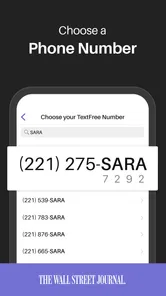
So, what’s the deal with Text Free? It’s an app that allows you to pick a custom phone number from a wide selection of available numbers in various area codes. Once you have your number, you can use it to send and receive texts and calls, just like your regular number. And the best part? You’re not tied to any contracts or monthly fees. You just need an internet connection, and you’re good to go!
More From Our News Desk

Weather by Xiaomi Review: Clear at a Glance, Less Clear Up Close

X Under Pressure: Can It Recover When Posting Goes Wrong?

Clash of Clans Is Won Between the Battles

Android Auto Makes the Case for Quieter Car Software

MobiOffice: Transforming Mobile Productivity with Seamless Integration

EA SPORTS FC™ Mobile Soccer: Redefining Mobile Sports Gaming
Setting it up is super easy. Download the app from the Google Play Store or Apple App Store, sign up with your email, and choose a number. It’s that simple! The interface is intuitive, so even if you’re not tech-savvy, you’ll have no trouble navigating through it.
Keeping the number useful, not confusing
I’d think of this as an app-based second line rather than a full replacement for my main phone service. A virtual number is handy for casual conversations and keeping a public-facing contact separate, while the familiar alternative—adding another carrier line—makes more sense if I need service that is independent of an app and internet access. I wouldn’t use either line carelessly for sensitive conversations; a second number can help with separation, but it doesn’t make every interaction private by itself.
For gigs, I’d put the second number on the relevant profile or messages and keep personal contacts on my usual line. For selling something, I’d share it only with the interested buyer, then stop using it for that exchange when the task is done. That controlled approach makes the number more useful and reduces the chance that I’ll mix up conversations or hand it out more broadly than I intended.
Features That Stand Out
One of the features I absolutely love is the ability to customize your voicemail. This is such a neat feature, especially for those who use this number for business purposes. You can set up different greetings for different contacts, which I find incredibly useful.
Another cool aspect is the group messaging feature. You can create groups and chat away without any limitations, making it ideal for coordinating plans or keeping in touch with multiple people at once. And yes, you can send emojis and stickers to make those messages a bit more fun!
Busy moments and practical limits
Group chats can get hectic, so I’d use a clear group name and keep separate circles for work and personal plans. That small bit of organization matters more when several people reply at once: a second number doesn’t automatically create a second routine, and checking both lines can add another inbox to manage. If I only need occasional contact, I’d avoid turning every conversation into a group just because the option is there.
The app is best suited to someone comfortable handling calls and texts through an app and keeping an eye on internet access. If you want one conventional number with no extra app to open, or you need a separate line that works independently of a data connection, a carrier plan is likely a better fit. I’d also be cautious about relying on a virtual number as the only contact method for something important; keeping a trusted alternative available is sensible.
Reliability and device expectations
Speed and stability can vary with the device and connection, so I wouldn’t promise instant delivery or uninterrupted calls in every setting. A quick test before an important conversation is more useful than assuming the app will behave identically on every phone. If the experience feels sluggish, I’d first check the connection and whether the device is running a supported OS before deciding the service itself is the problem.
Text Free is free to start, but optional purchases are part of the experience, so I’d review the in-app choices before treating it as entirely cost-free over the long term. It has been available since February 2, 2011, and its current version is 13.6; those details give useful context, but the best test is still whether it works comfortably on your own device and suits the way you communicate.
Choosing it for the right kind of communication
For a day-to-day example, I can imagine posting a desk for sale, sharing the second number with people who ask about it, and using the app to settle on a pickup time. I would keep the conversation there rather than moving it to my personal number, and I’d avoid putting the number in a public post that stays visible after the sale. That workflow makes the separation practical without asking the app to do more than provide another place for calls and texts.
It can also suit someone who takes occasional freelance jobs and wants clients to have a contact number that isn’t the one used by family and friends. The trade-off is that a second inbox still needs attention. I’d decide in advance when I’ll check it, and I’d tell important contacts which line is appropriate for urgent matters. Otherwise, the extra boundary can become an extra place to miss a message.
Compared with a messaging service tied to my usual number, this approach gives me a distinct number to share, which is useful when I want to separate audiences rather than just sort chats. Compared with adding a second carrier line, it avoids carrying another SIM or phone, but depends on using the app and having connectivity. That makes the choice fairly clear: I’d choose the app for flexible, casual contact, and a carrier line when independent service or more conventional availability matters more.
Small habits that make the second line easier
One useful habit is to include a short reminder in the contact name or notes about why I saved someone’s number, such as “marketplace pickup” or “client.” It helps me recognize the context later without searching through old messages. I’d also pause before sending a reply and check which number is active, especially when switching between personal and work conversations in a hurry.
If I plan to use the app for a longer-running gig, I’d test the whole routine before making it the only contact route: send a text, place a call, and make sure the other person can reach me back. That’s more useful than testing only outgoing messages. For a one-off exchange, I’d keep the process lighter and simply confirm that the other person received the details. These checks don’t guarantee perfect service, but they expose obvious problems while there is still time to use another method.
I’d be more cautious about using a virtual number for account recovery or any service where losing access could lock me out of something important. A separate contact number is not automatically a durable identity or a secure recovery method. For those situations, I’d follow the service’s requirements and use a number I expect to keep available. Texting a buyer or coordinating a casual plan is a much better match than making this app the foundation of essential account access.
Costs, expectations, and who should skip it
The app is free to try, but that doesn’t mean every optional feature or purchase is included at no cost. I’d look carefully at the purchase screen and consider whether I genuinely need what it offers before paying. If my aim is just to test whether an app-based second number fits my routine, I’d begin with the free experience and avoid making a purchase until I understand how often I use the line.
I’d skip it if I rarely need a second number, dislike checking more than one messaging space, or need calls to work regardless of internet access. It may also be a poor fit if I’m looking for complete anonymity, guaranteed privacy, or a substitute for a dependable primary line. The benefit is separation and convenience; those are useful, but they are not the same as a promise that every call will connect or every message will arrive immediately.
People who mostly communicate through one established messaging app may find that their existing setup already handles their needs. Text Free makes more sense when the actual number matters—when I want to give someone a different number, not merely create another chat thread. For occasional selling, temporary coordination, or keeping a work contact apart from personal calls, that distinction can make it worth trying.
Ending Thoughts
All in all, Text Free: Second Phone Number has been a game-changer for me. It’s convenient, easy to use, and offers a level of privacy that I appreciate. Whether you need it for business or just to have a separate number for personal use, it’s definitely worth checking out. Plus, you can’t beat the price—free!
If you’re in the market for a second phone number, give Text Free a shot. It might just be the perfect fit for your needs!
Text Free: Second Phone Number Frequently Asked Questions
Who develops Text Free, and what kind of app is it?
Text Free is a social communication app developed by Pinger, Inc. It is intended for people who want another way to call and text using a second virtual line and a new phone number. If you are comparing communication apps before downloading, its focus is straightforward: adding a separate number for calls and messages rather than replacing your regular phone service.
Which operating-system versions can run Text Free?
Text Free is available for Android and iOS devices, and the minimum supported operating-system version is version 9. Before downloading, check the software version installed on your phone and make sure it meets that requirement. The app is currently at version 13.6, so also review the app-store page on your device for compatibility and installation details relevant to your particular phone.
Can I choose a new number when I set up Text Free?
Text Free is designed to give you a second virtual phone number for calls and texts, separate from your primary number. That can be useful when you want another line for social conversations, business, or online transactions. The app is free to download, with optional in-app purchases, so review the available choices during setup before deciding how you want to use it.
What is Text Free: Second Phone Number?
Text Free: Second Phone Number is an app that provides users with a free phone number for texting and calling. It's particularly useful for people who want to keep their personal number private or need a secondary number for business or online transactions. The app works over Wi-Fi or your cellular data connection, allowing you to send texts and make calls without using your primary phone number.
How does Text Free manage to offer free calling and texting?
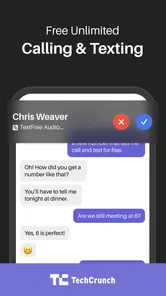
Text Free offers free calling and texting by utilizing your internet connection, either through Wi-Fi or mobile data. While the basic service is free, it is ad-supported, meaning you may see ads within the app. For users who prefer an ad-free experience, there is an option to upgrade to a premium version, which also includes additional features like voicemail and call forwarding.
Pros
- Easy setup process
- Free text messaging
- Call forwarding feature
- Customizable voicemail
- Multiple number options
Cons
- In-app ads
- Limited free minutes
- Occasional call drops
- No international texting
- Requires internet connection













