Sideline: 2nd Phone Line App
- 26.03K
- 3.8
- Installs
- 5.00M
- Price
- Free

Screenshots
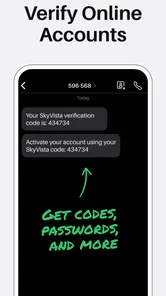
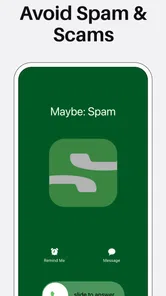
Analysis by Reviewed
When I need to give someone a number for work without handing over my personal one, I want a clean boundary, not another handset to charge and keep track of. That is the everyday problem Sideline is built around. It is a communication app from Pinger, Inc, and its appeal is straightforward: keep a second line on the phone I already use. The app is free to download, though in-app purchases range from $0.99 to $129.99 per item, so I’d check the options in the app before treating every capability as included.
Deciding whether a second number solves the problem
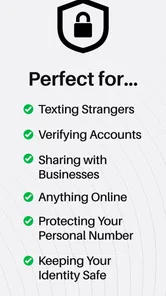
I find this most useful when a number needs to be public but my personal number does not. Think of a home baker taking orders, a freelancer scheduling calls, or a landlord coordinating viewing times. In each case, the same phone can handle everyday life and incoming work, while the second number gives customers or clients a distinct contact point. That boundary is practical, but it works only if I consistently use the work line for the conversations I want to keep separate.
It also helps to be clear about what “separate” means. A second number is not the same as a second phone: I still carry one device, and I still need to notice and manage the additional calls and messages. If I want a separate battery, separate apps, or a device I can leave at work, a second handset is the more complete solution. Sideline makes more sense when convenience and a clear contact boundary matter more than physical separation.
What is Sideline?
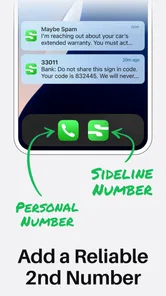
Sideline is a virtual phone app that allows you to have a second phone line on your existing smartphone. Whether you’re a small business owner, a busy professional, or just someone in need of a separate line for personal reasons, this app comes in handy. It’s like having a dual-SIM phone without actually needing a new device.
Setting Up Your Second Line
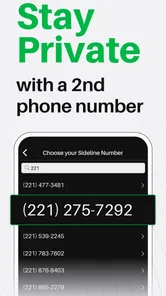
Getting started with Sideline is as easy as pie. Once you download the app, you can choose your new phone number. The app offers a plethora of options, allowing you to pick an area code or even a vanity number that suits your business or personal style. This flexibility is something I find really appealing.
The practical choice is to decide what the second number is for before sharing it. A number used for customer inquiries should appear consistently on your business materials; one used for short-term projects can stay limited to that audience. I would also tell close contacts which line to use, rather than expecting them to guess from a call or message. That small bit of setup makes the separation useful instead of merely adding another inbox to check.
Making the number work in daily use
Before I put a new number on a flyer, profile, or appointment reminder, I’d first save it in a contact on my own phone and test the path from the other person’s side. Can I tell which line is ringing? Can I find the right conversation afterward? Does the greeting make it clear that the caller reached the intended contact? Those small checks matter because a second number is only helpful when I can identify and respond to its traffic without hesitation.
More From Our News Desk

Weather by Xiaomi Review: Clear at a Glance, Less Clear Up Close

X Under Pressure: Can It Recover When Posting Goes Wrong?

Clash of Clans Is Won Between the Battles

Android Auto Makes the Case for Quieter Car Software

MobiOffice: Transforming Mobile Productivity with Seamless Integration

EA SPORTS FC™ Mobile Soccer: Redefining Mobile Sports Gaming
A realistic workflow might start with a client texting to ask whether an appointment is still on. I can reply from the work line, make a call if the details need discussion, and leave a voicemail greeting that matches the service if I miss them. Later, I can review the message and follow up without handing out my personal number. The advantage is not that every task becomes automatic; it is that the contact channel stays consistent from the first question to the final answer.
I’d also keep the number’s intended audience narrow at first. If I am testing a side business, I can share it with customers and collaborators without immediately replacing my personal number on every account. This makes it easier to judge whether a dedicated line actually reduces interruptions. If the number becomes part of a routine, I can then update the places where people should reach me. That gradual rollout is less messy than changing contact details everywhere and discovering that I still rely on the old line.
Features Galore
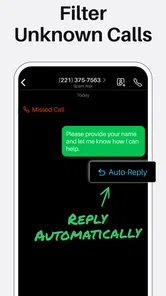
Sideline packs a punch with its features. You get unlimited calling and texting, voicemail transcription, and even the ability to send picture messages. One feature that I absolutely love is the auto-reply option. Imagine being in a meeting and someone texts you; the app can automatically send a custom message like "Hey, I’m in a meeting, will get back to you soon!" How cool is that?
That auto-reply is most useful when it sets expectations, not when it tries to replace a conversation. I’d write something brief that says when I’m likely to respond, then follow up personally when I’m free. For a solo seller, this can keep a missed text from feeling ignored. For anything urgent, though, an automated response cannot clarify details or make a decision, so it should not be the only contact route people have.
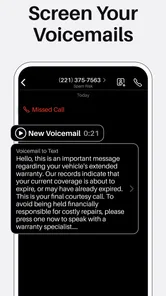
Voicemail transcription can also help with quick triage: I can scan a message while between tasks and decide whether to call back now or later. I would still listen to the recording before acting on names, addresses, or other details that matter; transcription is a convenience, not a substitute for checking the original message. Keeping the second line’s voicemail greeting specific to its purpose is another useful touch, so callers know they reached the right place.
For businesses, Sideline offers team number features, which means multiple people can handle calls and texts from one number. It's perfect for a small team looking to maintain professionalism without missing any inquiries.
A shared number changes the handoff, but it also asks a team to agree on who owns the next reply. I’d use a simple routine: whoever answers makes clear what has already been promised, and flags anything still waiting for a response. Without that habit, two people can answer the same customer differently, or each may assume the other will call back. The shared line is helpful for coverage; it does not replace a shared process.
Managing handoffs and interruptions
The team option is most valuable when coverage is the real problem: for example, when one person is serving a customer and another can pick up a new inquiry. It is less useful if nobody has agreed on what counts as a complete response. I would keep handoffs simple and explicit—who is calling back, what was promised, and whether the customer is waiting for a decision. That discipline reduces the chance that a shared line creates duplicate replies or a quiet gap in service.
For an individual user, the handoff is between work mode and personal time. I would choose a predictable time to review the second line rather than repeatedly checking it whenever the phone lights up. That turns the extra number into a managed channel instead of another source of constant distraction. If customers expect immediate replies, an auto-response can acknowledge a message, but I would avoid implying that it is a live emergency service unless I can actually provide that level of availability.
Performance and Reliability
Now, you might be wondering about the call quality and reliability. I’ve used Sideline extensively, and I have to say, the call quality is top-notch. It uses your carrier network, which means you get clear calls without the annoying hiccups you might experience with some other VoIP services. Plus, the app runs smoothly, and I didn’t encounter any crashes or bugs.
In a realistic workday, I might post the second number on a service listing, take a customer call while away from my desk, then send a text with a practical follow-up. The benefit is that all those conversations stay associated with the work line rather than spreading across personal calls and messages. Before relying on that routine, I’d make a test call and send a test text, then check that I can recognize the incoming line and find its voicemail. A few minutes of practice is easier than sorting out a missed inquiry later.
How it compares with other ways to add a line
Compared with a standard carrier line, Sideline puts the second contact channel in an app on the phone I already carry. That can be a better fit when I value a distinct number without wanting to manage another physical SIM or device. A carrier line may suit someone who wants both numbers handled as part of their mobile plan, while a second handset is preferable when work needs to stay physically separate from personal life. These options solve overlapping but not identical problems, so I would choose based on the boundary I actually need.
It also differs from relying on a messaging account tied to my usual number. That approach may be simpler if everyone I contact already knows me personally, but it does not give me the same clear public-facing number for calls and texts. Sideline is more appropriate when customers need a dedicated contact point and I want calls, texts, and voicemail associated with that line. If all I need is occasional messaging with one person, adding another line may be unnecessary overhead.
This setup suits a side business, a freelancer who wants a public contact number, or someone arranging appointments who prefers not to share a personal number. It is less compelling if I barely make calls, need only a temporary way to contact one person, or want a complete second device with its own apps and account. A separate SIM or handset can make more sense when independent hardware is important; a standard carrier line may be preferable if I want both numbers managed directly through my mobile plan. Sideline’s advantage is keeping the extra line in one phone, not replacing every reason someone might choose those alternatives.
Where the convenience has limits
The main trade-off is attention. A second line can protect the number I give out, but it cannot decide which calls deserve an immediate answer, keep my business hours for me, or make personal and work conversations disappear from the same device. I still have to set expectations, check the right inbox, and avoid replying from the wrong number. If I tend to answer every notification without looking, I would build a habit of confirming the line before sending anything sensitive or business-critical.
Another point I would consider is how long I expect to keep the number. For a recurring service or ongoing freelance work, having a consistent contact point can be useful. For a brief project, I would think carefully before distributing a number widely, since changing it later means updating customers and materials. The app is easiest to justify when I can name the ongoing role the line will play, rather than treating it as a spare number with no plan for managing it.
Some options involve in-app purchases, so I would check the specific purchase details before building a workflow around a feature I assume is included. The free download is a low-friction way to explore the basic idea, but the purchase range is broad enough that I would compare the options against my actual needs rather than tapping through out of curiosity. For a solo user who only wants a second contact point, it is worth separating essential features from conveniences before spending.
Is It Worth It?
So, is Sideline worth your time and money? In my opinion, absolutely! The convenience of having a second line on your phone without the need for another device is a huge plus. Whether you’re managing a side hustle or just need a separate line for privacy, this app delivers on its promise.
I’d weigh that convenience against the ongoing habit of checking a second line and the possibility that some options involve in-app purchases. It is not a magic privacy shield: giving out a separate number helps keep your usual one off routine business exchanges, but people still need to use the right line when contacting you. The app is rated for Everyone, has a 3.9 average from around 63,000 ratings, and has been installed over 5 million times. Those figures suggest a well-established option, though they do not guarantee that it will fit every carrier, workflow, or preference.
The current version is 13.6, and it requires Android 9 or later. If you are considering it on another platform, check the relevant app store for compatibility before planning your setup. I’d also decide in advance whether a second number is something I’ll use every week; if I only need it once, the effort of maintaining another contact channel may outweigh the convenience.
In conclusion, if you’re in the market for a second phone line, give Sideline a shot. It’s easy to set up, packed with useful features, and reliable. Now, go ahead and download it from your app store and let me know how it works for you!
Sideline: 2nd Phone Line App Frequently Asked Questions
Can I use Sideline for work while keeping my personal number private?
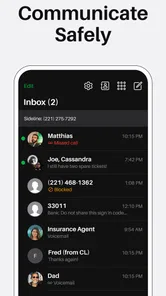
Yes. Sideline is designed to give you a second phone number on the mobile device you already use, which can help keep work and personal conversations separate. You can use the app to manage calls, texts, and voicemails on that second line while continuing to use your regular number. This can be useful if you want a dedicated contact number for professional communication.
Does Sideline require a separate phone or SIM card?
Sideline is intended to add a second phone number to the phone you already own, so its basic purpose is to let you manage another line without carrying a second device. Calls, texts, and voicemails for that line are handled through the app. You can keep using your primary number as usual, making Sideline a practical option for separating communications on one phone.
Can Sideline be used on my phone alongside my regular number?
Yes. Sideline is designed to add a second phone number to the mobile device you already use, so you can keep personal and other communications separate without carrying another phone. You can handle calls, texts, and voicemails through the app, while continuing to use your primary number as usual. It is a communication app from Pinger, Inc.
Which devices can run Sideline?
Sideline is available for Android devices that meet its minimum operating-system requirement. Before downloading, check your phone’s system version in its settings and compare it with the app’s requirement. The app is rated for Everyone, but compatibility still depends on your device and operating system. Sideline is a mobile app, so its second line is managed from the phone where you install it.
What is Sideline: 2nd Phone Line App and how does it work?
Sideline is a mobile application designed to provide users with a second phone number on their existing device. This app is perfect for those who need to separate professional and personal communications without carrying two phones. It operates using your mobile network, ensuring reliable voice quality and eliminating the need for Wi-Fi. Users can manage calls, texts, and voicemails just like they would with their primary number, making it a seamless addition to any smartphone.
Pros
- Provides a second phone line for privacy.
- Affordable pricing for premium features.
- Easy setup and user-friendly interface.
- Reliable call and text quality.
- Customizable voicemail and auto-reply.
Cons
- Requires internet connection for calls.
- Limited international call support.
- Ads in free version can be intrusive.
- Occasional app lag or crashes.
- Not all features available in free tier.













