Text Free: Calling & Texting
- 30.58K
- 4.5
- Installs
- 10.00M
- Price
- Free

Screenshots




Analysis by Reviewed
My first week with Text Free: Calling & Texting would begin with a simple question: do I need a separate way to call and text without handing out my everyday number? The appeal is easy to understand. It is a social app from Pinger, Inc, and its free starting point makes experimenting feel low-risk. I would treat it as an additional communication option, though, rather than assume it replaces a regular mobile line in every situation.
When a second number earns its place
A separate number can be useful for conversations I want to keep apart from personal contacts. For example, if I were arranging to pick up a used desk from someone I met through an online listing, I could give them the app’s number instead of my main one. Once the handoff is done, I can stop using that contact channel. That separation is practical, but it is not the same as complete anonymity: people still need a way to reach the number, and I would avoid sharing sensitive information through any casual messaging app.
It also suits someone who mainly communicates where Wi-Fi is available, such as a student spending much of the day on campus or a traveler checking in from a connected hotel. I would keep expectations realistic outside those settings. A call over Wi-Fi depends on the connection, so a weak network can turn a convenient option into a frustrating one. If I needed reliable contact while moving through places with inconsistent connectivity, I would favor a conventional mobile service.
How it fits beside familiar alternatives
Compared with the usual messaging apps tied to a personal number or an existing account, Text Free has a different appeal: it gives people a separate line for calling and texting. That makes it easier to keep a casual contact channel distinct from the one friends and family already use. In contrast, if everyone I need to reach already uses the same messaging service, staying there may be simpler; there is little value in asking them to adopt another route just for me.
It is also not a like-for-like substitute for a paid carrier plan. A carrier line is the safer choice when I need dependable service away from Wi-Fi or want one number to serve as my everyday point of contact. Text Free makes more sense as a secondary tool, or as a way to communicate when internet access is available. The right choice depends less on which app has more features and more on where I need to be reachable.
Seamless Communication, No Strings Attached
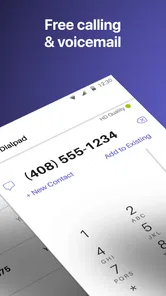
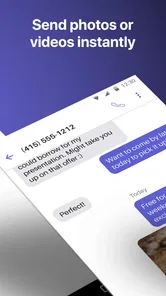
Text Free: Calling & Texting gives you a free phone number to call and text anyone without spending a dime. Sounds too good to be true, right? But, as someone who's given it a whirl, I can confirm that it truly delivers on its promise. The app allows you to make unlimited calls and send texts over Wi-Fi, which is a blessing if you're looking to cut down on expenses.
Features That Stand Out
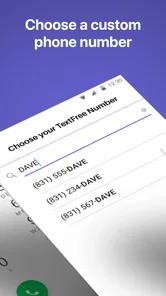
First off, the app's user-friendly interface is a breath of fresh air. You don’t need to be a tech wizard to navigate through it. Setting up a new number takes just a few taps, and you're all set to connect with your friends and family. The app offers a variety of area codes to choose from, so you can pick one that suits your needs.
More From Our News Desk

Weather by Xiaomi Review: Clear at a Glance, Less Clear Up Close

X Under Pressure: Can It Recover When Posting Goes Wrong?

Clash of Clans Is Won Between the Battles

Android Auto Makes the Case for Quieter Car Software

MobiOffice: Transforming Mobile Productivity with Seamless Integration

EA SPORTS FC™ Mobile Soccer: Redefining Mobile Sports Gaming
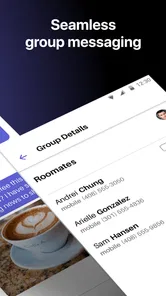
Another thing I love about this app is the voicemail feature. It's like having a mini answering machine in your pocket. You can record personalized greetings and manage your voicemails effortlessly. Plus, the app supports group messaging, which is perfect for planning outings or just keeping up with multiple friends at once.
Privacy is Key
In an age where privacy is paramount, Text Free: Calling & Texting provides an added layer of security with its secondary number feature. Whether you're selling something online or just want to keep your personal number private, this app has got you covered.
Moreover, the app doesn’t require an existing phone number to sign up, which is a boon for those without a traditional mobile plan. You can communicate freely without divulging your main number, offering peace of mind in this digital age.
Connectivity and Performance
Now, let's talk performance. The call quality is quite impressive, considering it's all over the internet. I found that as long as you have a stable Wi-Fi connection, the calls are crisp and clear. Text messages are delivered promptly, and I didn’t experience any noticeable delays.
However, if you're in an area with spotty Wi-Fi, you might face some challenges with call quality. But hey, that's the trade-off for free services, right?
Making the setup work for real life
The number is most useful when I decide its purpose before sharing it. For a sale or one-off arrangement, I would tell the other person to use this line for that conversation and keep the exchange focused on timing, pickup details, and a safe meeting place. That makes it easier to let the thread go quiet afterward instead of gradually turning a temporary contact into another social channel I feel obliged to maintain.
For recurring group plans, I would use the group messaging option only after agreeing on where updates belong. If the group already coordinates in another app, moving everyone just to use a second number is likely more hassle than help. But when a few people need one place for a particular plan, a dedicated thread can keep addresses and changes from getting buried among unrelated chats. I would still confirm important details directly if a missed message could cause someone to wait or travel unnecessarily.
What to check before relying on it
A practical question is whether the people you need to reach will be comfortable calling or texting a separate number. The app can provide a distinct contact point, but it cannot make other people recognize it automatically. I would save the number under a clear label in my own contacts and tell regular callers what it is for. That simple step reduces the chance of overlooking a call because it appears unfamiliar.
I would also test the routine before making the line important. Send a low-stakes message, place a call while connected to Wi-Fi, and check that notifications are noticeable without becoming distracting. This is not a substitute for judging reception in every place I visit, but it reveals whether the app fits the way I actually use my phone. If I need to be reachable for an urgent matter, I would give people my regular number as well rather than assume an internet-based line will always be available.
Keeping the number useful over time
The first-week novelty is not the real test; the question is whether I would keep opening the app after the initial setup. For me, the answer depends on assigning it a clear job. I would use it for marketplace conversations, group plans that do not need to live in my main inbox, or calls when I am already connected to Wi-Fi. If I tried to use it for every conversation, I would likely create more inbox juggling than convenience.
A small habit helps: tell the people who should use this number what it is for, and keep the app’s voicemail greeting clear enough that a caller knows they have reached the right person. For a group outing, I might start a group message for the plan, then keep replies there rather than splitting details across several threads. That is more useful than simply having another number sitting unused on the phone.
Over the months, I would review whether the original reason for installing it still exists. A separate line can be valuable during a period of selling items, organizing a club activity, or keeping a personal number out of casual circulation. When that period ends, the app may no longer deserve a spot at the front of my phone. I would not keep it from habit alone; the test is whether I have used its distinct number recently enough to justify remembering to check it.
The costs and upkeep to consider
The app is free to download, but it also offers in-app purchases ranging from $1.99 to $99.99 per item. I would check what a purchase covers before paying and decide whether I actually need it; the free option is the sensible place to start. Its average rating is 4.5 from around 124,000 ratings, and it has over 10 million installs, which suggests many people have tried it, but popularity alone cannot tell me whether it fits my routine.
There is also ordinary maintenance involved in keeping a second communication channel useful. I would check the app when expecting a reply, keep its notifications suited to how often I want to be interrupted, and make sure I remember which number I gave to which contact. If I stop checking it, the privacy benefit can become a drawback: someone may message the alternate number and assume I have seen it. A secondary line works best when I treat it as a real inbox, not a disposable address.
That upkeep is modest, but it is easy to underestimate. I would put the app somewhere visible rather than bury it among tools I rarely open, especially during a week when I am expecting a reply about a sale or appointment. If I choose to silence notifications, I would set a deliberate time to check messages. Otherwise, the line can appear dependable to other people while quietly becoming a channel I forget to monitor.
Where the convenience can wear thin
The main trade-off is attention. Two numbers can separate social circles, but they can also split conversations and make it less obvious where a message arrived. Group texting is handy when everyone is following the same plan; it is less tidy if some people reply to the alternate number while others contact me through my usual app. Before starting a group thread, I would choose one channel and tell everyone to keep the logistics there.
I would also skip this as my only way to stay reachable if I depend on calls in places without dependable Wi-Fi, or if I want every contact to know just one number. Likewise, someone who already has a smooth routine in a messaging app may find a second inbox adds friction rather than value. The useful question is not simply whether free calls and texts sound appealing, but whether a separate line solves a recurring problem often enough to justify checking it.
There is a social trade-off too: a second number can create a useful boundary, but it may also make a new contact wonder why I am using a different line. A brief explanation usually makes the arrangement clearer than leaving them to guess. I would not use the alternate number to imply a level of privacy or permanence it cannot guarantee; for sensitive conversations, I would choose a channel suited to that need rather than treating a second number as a security feature.
Wrapping It Up
All in all, Text Free: Calling & Texting is a fantastic app for anyone looking to save on phone bills or maintain their privacy. It's packed with features that cater to everyday communication needs while keeping it simple and efficient. Whether you're a frequent traveler, a student, or just someone who loves freebies, this app is definitely worth checking out.
Remember, it’s free to try, so why not give it a shot? You might just find it becomes a staple on your device!
Who should keep it installed
Text Free is best for someone with a specific, repeated reason to keep a second number: separating casual contacts, coordinating plans, or making internet-based calls when Wi-Fi is already part of the day. It is less compelling for someone who rarely uses Wi-Fi calling, wants a single dependable number everywhere, or dislikes monitoring multiple inboxes. The app is rated for Everyone, and version 13.6 requires Android 9 or later, details worth checking against your device before installing.
For my own long-term verdict, I would give it a place on the phone only if I had a boundary or routine it genuinely improved. The free starting point makes a trial straightforward, but the lasting value comes from using the second line deliberately and remembering to check it. If that small bit of upkeep feels worthwhile, it can be a handy companion; if it becomes one more inbox to maintain, I would remove it and stick with the communication setup I already use.
Text Free: Calling & Texting Frequently Asked Questions
Can Text Free be used without a traditional mobile plan?
Text Free provides a Wi-Fi voice line for calling and texting, so it can be useful when you want a separate way to communicate without relying on a traditional carrier line. Calls and messages use Wi-Fi or cellular data, so you will still need an internet connection. Consider how reliably you can access one before depending on the app for everyday communication.
What does Text Free offer for calls and messages?
Text Free is built around calls and texts, with a Wi-Fi voice line and group texting among its communication features. Its summary describes unlimited calls and texts, and it is intended to provide a way to keep conversations going over an internet connection. Your experience may depend on whether you have stable Wi-Fi or cellular data when you want to call or message.
Is Text Free free to download, and are there in-app purchases?
Text Free is free to download, with in-app purchases available for users who want paid options. The listed purchase range runs from $1.99 to $99.99 per item, so it is worth checking the purchase details in the app before confirming anything. If you plan to use only its free features, review which calling and messaging options are available to you.
What devices and operating systems can run Text Free?
Text Free is a social communication app for making calls and sending texts, and it is available for devices running iOS 9 or later. Before downloading, check that your device meets this minimum requirement and has a suitable internet connection, since the app’s calling and messaging features use Wi-Fi or cellular data.
What is Text Free and how does it work?
Text Free is a communication app that allows users to send free texts and make calls over Wi-Fi or cellular data. Users receive a real U.S. phone number that can be used for messaging and calling just like a regular phone line. This service is particularly useful for avoiding traditional carrier charges.
Pros
- Unlimited texting and calling.
- No hidden charges or fees.
- User-friendly interface.
- Customizable phone numbers.
- Available on both Android and iOS.
Cons
- Requires internet connection.
- Contains in-app ads.
- Limited features for free version.
- Limited international calls.
- Privacy concerns with data usage.













