Huckleberry: Baby & Child
- 3.40K
- 4.8
- Installs
- 1.00M
- Price
- Free

Screenshots







Analysis by Reviewed
Hey there, parents and caregivers! Today, I’m diving into an app that’s been making waves in the parenting community, and let me tell you, it’s a game-changer. If you haven’t heard about it yet, let me introduce you to Huckleberry: Baby & Child. It’s like having a parenting guru right in your pocket, helping you navigate the often-turbulent waters of child-rearing with a bit more confidence and a lot less stress.
A Must-Have for Every Parent
So, what exactly does Huckleberry: Baby & Child do? In a nutshell, it’s designed to make parenting that little bit easier by offering personalized sleep advice and tracking for your little ones. From newborns to toddlers, this app has got your back. I’ve been using it for a few weeks now, and honestly, it’s like having a sleep consultant on speed dial.
Features That Make Life Simpler
Let’s get into the nitty-gritty. One of the standout features of Huckleberry is its sleep tracking capability. You can log your child’s sleep patterns with ease, and the app will analyze and suggest the best nap times. The SweetSpot feature is a lifesaver, helping you pinpoint the perfect time to put your child down for a nap, minimizing those dreaded overtired meltdowns. Trust me, it’s a game-changer.
Apart from sleep tracking, Huckleberry also lets you keep tabs on feedings, diaper changes, and even your child’s growth and milestones. Everything is neatly organized, and the interface is super user-friendly. I love how I don’t have to juggle between different apps to keep track of these important details. It’s all in one place, making it incredibly convenient.
Why You’ll Love It
If you’re anything like me, you probably enjoy a good data analysis. Huckleberry provides detailed insights into your child’s sleep patterns and offers tailored advice based on that data. Whether you’re struggling with a night owl or an early riser, this app helps you understand your child’s unique sleep needs and how you can adjust their schedule for better rest.
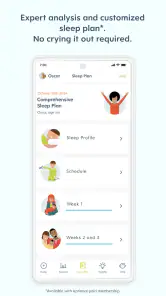
Another thing worth mentioning is the personalized sleep plan. For a small fee, you can get a customized sleep plan crafted by pediatric sleep experts. This feature is a godsend for parents who find themselves at their wits’ end with sleep training. It’s like having a one-on-one session with a sleep coach without leaving your home.
And let’s not forget the community aspect. The app includes a community feature where you can connect with other parents, share experiences, and get advice. Parenting can sometimes feel isolating, but with Huckleberry, you’ve got a village of support right at your fingertips.
In conclusion, Huckleberry: Baby & Child is more than just an app; it’s a comprehensive tool for parents who want to optimize their child’s sleep and daily routines. With its intuitive design and wealth of features, it’s no wonder so many parents are raving about it. If you’re looking for a way to bring a little more peace and predictability to your parenting journey, give Huckleberry a go. You won’t regret it!
Pros
- User-friendly interface.
- Comprehensive sleep tracking.
- Personalized advice for child.
- Engaging content for kids.
- Real-time notifications for parents.
Cons
- Limited free features.
- In-app ads can be intrusive.
- Requires internet for full access.
- Notifications can be overwhelming.
- Subscription can be pricey.

- Category
- Parenting
- Version
- 0.9.280