Homework AI - Math & Essay App
- 665.00
- 4.5
- Installs
- 1.00M
- Price
- Free

Screenshots
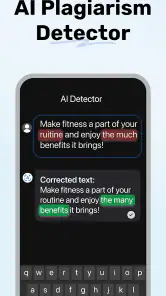
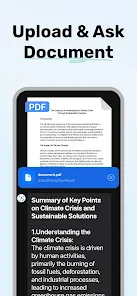
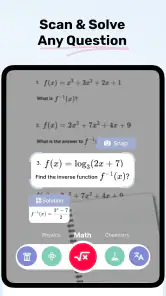
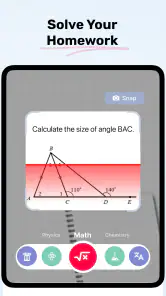
Analysis by Reviewed
Ever found yourself stuck on a math problem or staring at a blank page trying to start that essay? I know the feeling all too well. Let me introduce you to a little gem I stumbled upon recently, the Homework AI - Math & Essay App. This app has quickly become my go-to sidekick for tackling homework blues.
A closer look at its math help
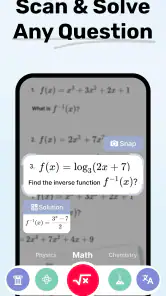
The feature I find most useful is the app’s approach to math questions: it can scan a problem and provide a worked solution. That matters because an answer alone rarely helps me with the next question. Seeing the steps gives me something to compare against my own working, so I can spot where I went off track instead of copying a result without understanding it.
I treat the explanation as a study aid, not as proof that every answer is right. A scanned equation can be misread if the writing is unclear or the layout is unusual, so I check that the problem shown in the result matches what I meant to ask. For a multi-line question, I find it sensible to compare each step with the original and then try a similar problem without help. That quick check is a better test of learning than simply saving the final answer.
Why a worked solution changes the study routine
The useful difference here is not just getting an answer quickly; it is having a route to inspect. When I am stuck, I can compare the app’s steps with my own and narrow the problem down to a particular transition. That is more actionable than rereading a whole chapter when I only need to understand why one line changed.
I would use that advantage selectively. First I would write down my own attempt, even if it is incomplete, then scan the question and compare the reasoning. If the solution starts from a method I have not learned, I would not assume that the method is the one my class expects. Instead, I would use it to identify the gap and return to my notes or ask a teacher how it relates to the approach being taught.
Getting to Know the App
The Homework AI - Math & Essay App is like having a tutor in your pocket. It’s designed to help with everything from solving complex math equations to brainstorming and drafting essays. Honestly, it's like magic. You just type in your problem or topic, and voila! The app churns out a solution or a structured essay outline. It's super intuitive and doesn’t require any tech-savvy skills to get started.
Math Problem Solver
Math has always been a bit of a nemesis for me, but with this app, I've found a new ally. Whether it’s algebra, calculus, or even geometry, the app handles it with ease. You simply enter the equation, and it not only gives you the answer but also a step-by-step breakdown of how to get there. This feature is a lifesaver for those tricky problems that just don’t seem to make sense.
More From Our News Desk

Clash of Clans Is Won Between the Battles

Android Auto Makes the Case for Quieter Car Software

MobiOffice: Transforming Mobile Productivity with Seamless Integration

EA SPORTS FC™ Mobile Soccer: Redefining Mobile Sports Gaming

How Microsoft OneDrive Became a Mobile Productivity Giant

How Google Translate Breaks Language Barriers Effortlessly
Using it during an ordinary study session
Picture a familiar evening: I have a worksheet beside me, I have attempted a question, and I am stuck on one transformation. Rather than asking the app to do the entire sheet, I scan that single question and use the steps to find the point where my method diverges. Then I cover the explanation and attempt the next problem on my own. This keeps the app in the role of a check-in tutor, rather than turning homework into a series of answers to copy.
For a cleaner result, I would frame the question so the symbols and signs are easy to distinguish, especially when a minus sign, exponent, or fraction bar could be mistaken. If the answer looks surprising, re-entering the equation in a clearer form is more useful than trusting the first output. This small habit also helps separate a genuine misunderstanding from a scanning mistake, which is easy to overlook when working quickly.
Making a scan more useful
One practical habit is to crop your attention, not just the picture: make sure the question itself is the focus and that nearby writing or marks are not likely to be confused with part of it. A neatly framed problem is easier to check against the result. If a worksheet has several questions close together, I would handle them one at a time rather than assume a scan has captured only the one I intended.
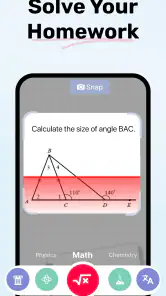
I also find it helpful to keep the original question visible while reading the steps. That makes it easier to notice whether a symbol has been interpreted differently and to compare each operation with the work I already did. For homework with diagrams or unusual notation, I would be especially cautious; the scan is a starting point for checking, not a reason to stop thinking about how the question is structured.
Essay Writing Helper
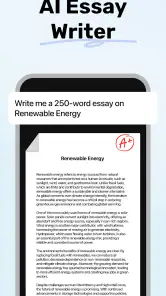
Writing essays can be daunting, especially when you’re not sure how to start or what to include. The essay feature is incredibly helpful. It assists in creating an outline and suggests key points to include. It’s like having a brainstorming partner who never runs out of ideas. And if you’re like me, who sometimes struggles with writer’s block, this app gently nudges you in the right direction.
I see the essay support as most useful at the planning stage: it can help turn a broad topic into a starting structure, but the outline still needs my judgement. I would check each suggested point against the assignment prompt, remove anything that does not answer it, and add examples from the class material. That makes the result a launch pad for my own argument, not a substitute for reading, research, or writing in my own voice.
Choosing between a quick answer and a full lesson
For a student who already knows the basic vocabulary of a topic but cannot get one problem moving, this kind of direct help can be more convenient than opening a long tutorial and searching for the relevant minute. The trade-off is depth: a worked example can show what happened in that problem, but it may not build the broader understanding that a lesson provides. I would reach for the app to unblock a specific task, then use a textbook, class notes, or a teacher when the same confusion keeps returning.
It is less helpful when the assignment depends on explaining a personal interpretation or making a claim supported by class reading. An outline can give structure, but it cannot decide which evidence matters to the teacher’s prompt. I would treat the suggestions as options to evaluate, not as a ready-made argument, and make sure the final work reflects what I can explain myself.
Where it fits among study tools
Compared with working through a textbook or searching for a video lesson, Homework AI is more direct when I already have a particular question in front of me. A textbook is usually better for building a subject from the basics, and a teacher can respond to the exact reason I am confused. The app’s advantage is convenience: it can give me a worked example at the moment I hit a snag. I would use those options together rather than expect one tool to replace the others.
It is also worth keeping the assignment rules in mind. A generated solution can support practice, but submitting work I do not understand can leave me unprepared for a test and may not meet a teacher’s expectations. I get more value by asking for help on the step I cannot explain, then closing the app and reproducing the reasoning myself.
How I would use it before a test
In the days before a test, I would use the scanner for questions I have already attempted, not as a shortcut through an entire revision sheet. I would note the kind of step I keep missing, check that idea in my notes, and then solve a fresh question without looking at the app. That creates a simple loop: attempt, compare, identify the gap, and practise independently.
This approach also makes it easier to decide when the app is not enough. If several different questions all become confusing at the same point, the problem may be a missing concept rather than one awkward calculation. At that stage, a lesson or a conversation with a teacher is likely to help more than collecting additional solved examples.
User-Friendly Interface
One of the things I love about this app is its user-friendly interface. Everything is laid out clearly, making it easy to navigate through its features. The developers clearly put a lot of thought into making sure that even the least tech-savvy among us can use it without a hitch. Plus, the design is sleek and modern, which is always a bonus.
Another point worth mentioning is how quickly the app processes the information. No more sitting around waiting for ages to get your answers. It’s fast, efficient, and very responsive. A real time-saver when you’re on a deadline.
Price, platform fit, and expectations
The app is free to download, with optional in-app purchases ranging from $4.99 to $49.99 per item. I would start with the free access and decide whether the help fits my routine before considering any purchase. The available purchase range is broad enough that I would check the in-app details carefully and avoid paying on the assumption that every feature or use is included in one option.
It is an education app made by HubX, rated for Everyone, and its current version is 1.2.8. On Android, it requires version 6.0 or later. It has an average rating of 4.5 from around 52,000 ratings, and more than one million installs. Those details give a sense of its reach, but the better test is still whether the explanations match the way I need to study.
The app was released on June 3, 2024, and has around 665 written reviews. I would read those as a useful snapshot of other people’s experiences, rather than a guarantee that every scanned question will work perfectly. For me, the key decision is whether I want occasional, focused help or a more structured learning resource.
Who benefits most, and what to consider
I think this is a good fit for students who want a quick explanation of a specific math problem, or who need help getting an essay plan started. It is less suitable for someone who needs a full course, sustained teaching, or careful feedback on a long piece of writing. If I were unsure about a foundational concept, I would pair the app with class notes or a proper lesson; if I only needed to check one troublesome step, its focused assistance would be more convenient.
It can also suit a learner who studies independently and wants a prompt to keep moving, provided they are willing to verify the scan and do the reasoning again. I would skip it as a main study method if I tend to accept generated answers without checking them, or if I need detailed feedback on how to improve a complete essay. In those cases, a teacher, tutor, or subject-specific course is a better match.
Final Thoughts
In a world where we’re constantly juggling multiple tasks, the Homework AI - Math & Essay App is a breath of fresh air. It’s like having a personal tutor available 24/7, ready to help with whatever academic challenge comes your way. Whether you’re a student trying to keep up with assignments or someone just looking to brush up on your skills, this app is definitely worth checking out.
So, if you’re tired of staring blankly at your homework, give this app a spin. It might just become your new best friend in the academic world. I would keep it in the role of a convenient helper for specific sticking points, while relying on my own practice and class resources for the deeper learning that a quick solution cannot replace.
Homework AI - Math & Essay App Frequently Asked Questions
What should students keep in mind when using Homework AI for schoolwork?
Homework AI can help explain math questions and support study tasks, but its answers are best treated as a learning aid rather than a substitute for understanding the material. Read through each step, check the result against your class methods, and follow your teacher’s rules on AI assistance. For essays, use suggestions to develop your own ideas and writing.
Who develops Homework AI - Math & Essay App, and how widely is it used?
Homework AI - Math & Essay App is developed by HubX and is an education app. It has an average rating of 4.5 from around 52,000 ratings, with over 1 million installs. Those figures suggest that many learners have tried it, though the app’s usefulness will depend on the kinds of questions and study support you need.
Is Homework AI - Math & Essay App free to download, and what might require payment?
Homework AI - Math & Essay App is free to download, so you can try the app without an upfront purchase. It also offers in-app purchases, with prices ranging from $4.99 to $49.99 per item. Check the purchase details shown in the app before confirming anything, and consider whether its available tools fit your study needs.
What features does Homework AI - Math & Essay App offer?
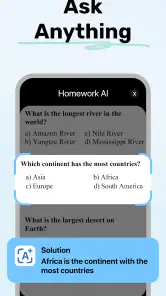
Homework AI - Math & Essay App is a versatile tool designed to assist students with both math problems and essay writing. It provides step-by-step solutions to various math problems, supports a wide range of mathematical topics, and includes a sophisticated essay writer that helps with structure, grammar, and content development for essays across different subjects.
Is Homework AI - Math & Essay App suitable for all age groups?
Yes, Homework AI - Math & Essay App caters to a wide range of age groups, from middle school students to college-level learners. The app is rated for Everyone, making it accessible to a broad audience. Its educational tools may be useful to learners at different stages, although students should still check answers and follow their teachers’ instructions when using AI for schoolwork.
Pros
- User-friendly interface for easy navigation.
- Provides step-by-step math explanations.
- Includes a variety of subjects beyond math.
- Offers essay writing assistance.
- Supports multiple languages for global users.
Cons
- Requires internet for full functionality.
- Limited free features; subscription needed.
- Occasional ads in the free version.
- May not cover advanced math topics.
- Essay help can be generic
- lacks depth.
- Category
- Education
- Version
- 1.2.8













