Hear My Baby Heartbeat Monitor
- 63.00
- 4.4
- Installs
- 1.00M
- Price
- Free

Screenshots
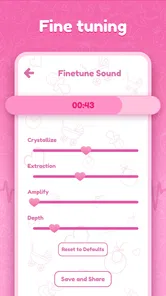

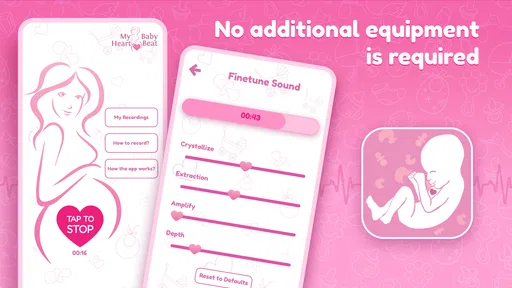
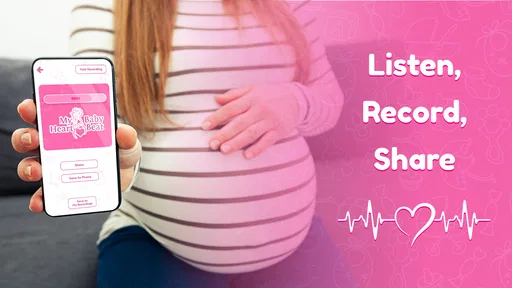
Analysis by Reviewed
I’d treat a phone-based heartbeat app as a personal listening experience, not a way to check whether a pregnancy is healthy. That distinction matters with Hear My Baby Heartbeat Monitor: the appeal is capturing a sound to share or remember, while the phone’s microphone and the conditions around you can affect what you hear. I’d go in curious, but without expecting a dependable medical reading or a guaranteed result every time.
When a listening attempt gets frustrating
The most likely sticking point is not knowing whether a faint or unclear sound means you placed the phone poorly, the room is noisy, or the sound simply isn’t coming through. I wouldn’t keep shifting the phone rapidly or press harder in an effort to force a result. Pause, settle in, and try again calmly; if you still can’t hear anything, don’t treat that as evidence about your baby’s wellbeing.
This is also an app that asks for patience rather than instant gratification. A first attempt may feel memorable, but a clear recording is not something I’d promise myself on demand. Going in with that expectation makes the experience gentler and avoids turning a bonding moment into a stressful test.
What you want from the app shapes the experience
Before installing, I’d decide whether I’m looking for a keepsake or reassurance. Those are very different jobs. A phone recording can be an intimate way to remember a moment, but it isn’t a dependable check-in on a pregnancy. If I were feeling worried about symptoms or a change in how I felt, I would contact a healthcare professional rather than use the app to interpret sounds.
It is also worth thinking about who will use the recording. Someone hoping to share a small moment with a partner or family member may find the attempt worthwhile even if the sound is faint. Someone who needs a clear result every time, or who tends to become more anxious when something is uncertain, may find the process a poor fit. The best reason to try it is curiosity, not pressure to prove that everything is fine.
First Impressions and Setup
Setting up the Hear My Baby Heartbeat Monitor was surprisingly straightforward. You just need to download it from your app store, and voila! You're ready to dive into the world of prenatal bonding. I was a bit skeptical at first, wondering if an app could really deliver what it promised. But let me tell you, it does.
Check the basics before recording
Before trying to capture anything, I’d close other audio-heavy activity, find a quiet room, and make sure the phone’s microphone area is unobstructed. A case, hand placement, or background conversation can get in the way of a microphone-based recording, so I’d check those simple factors before assuming the app has failed. Keep the phone steady and follow the app’s on-screen guidance rather than improvising with accessories or extra equipment.
More From Our News Desk

Weather by Xiaomi Review: Clear at a Glance, Less Clear Up Close

X Under Pressure: Can It Recover When Posting Goes Wrong?

Clash of Clans Is Won Between the Battles

Android Auto Makes the Case for Quieter Car Software

MobiOffice: Transforming Mobile Productivity with Seamless Integration

EA SPORTS FC™ Mobile Soccer: Redefining Mobile Sports Gaming
If the app behaves oddly, I’d first stop and reopen it, then check that the phone’s operating system is compatible: the listed minimum is version 8.0. If the microphone does not seem to respond, review the phone’s own microphone access settings and try again in a quiet place. Those are sensible general checks, not a promise that every unclear attempt can be fixed.
Small setup choices that can save a second attempt
I’d prepare the space before opening the recording screen: choose somewhere away from a television, music, or conversation, then settle into a position I can hold without straining. This matters because moving to silence the room after starting can introduce handling noise and make it harder to tell whether a sound came from the environment or the recording. A calm setup also makes it easier to stop rather than keep trying out of frustration.
Phone cases are an easy detail to overlook. If the microphone opening is partly covered, the app may not capture audio as expected, so I’d inspect the opening and adjust my grip before changing anything else. I wouldn’t add an external microphone or other equipment unless the app itself clearly guides me to do so; extra hardware can complicate a simple test and make troubleshooting less clear.
User-Friendly Interface
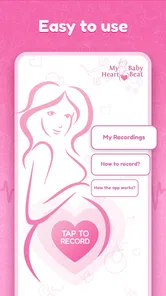
The app boasts a clean and intuitive interface. Even if technology isn't your thing, navigating through this app feels like a breeze. The instructions are clear, and the design is sleek, with everything you need right at your fingertips. It didn't take long for me to get the hang of it and start using it like a pro.
How It Works
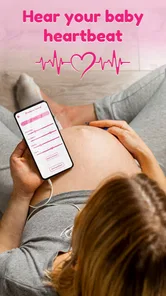
The app uses your phone's microphone to capture the sound of your baby's heartbeat. Simply place the microphone over your belly and hit record. It's as simple as that. I was amazed the first time I heard that tiny heartbeat. It was a magical moment, and I couldn't believe it was coming from an app on my phone.
For the best results, it's recommended to use the app in a quiet room and with the microphone placed directly against your skin. Trust me, following these tips makes a world of difference in the clarity of the sound.
Give an unclear attempt a sensible reset
If an attempt produces noise or nothing distinct, I’d avoid making a string of quick recordings in the same position. Stop, check the room and the microphone opening, then take a short pause before trying again. Changing one thing at a time—such as moving away from background audio or adjusting how the phone is held—makes it easier to notice whether the conditions helped. Changing several things at once can leave you unsure what made a difference.
If the app closes, freezes, or does not respond as expected, I’d leave the recording, reopen the app, and check the phone’s microphone access settings before another calm attempt. Restarting the phone is a reasonable general troubleshooting step if ordinary reopening does not help, but it cannot make an inaudible sound detectable. I would not keep pressing or repositioning the phone forcefully; comfort and safety matter more than chasing a recording.
Make the recording part of a calm routine
A practical approach is to pick one quiet moment when you are already relaxed, rather than checking repeatedly throughout the day. For example, after settling in at home, you could silence nearby audio, make one unhurried attempt, and save a recording only if you get a sound you genuinely want to keep. That routine gives you a memory without encouraging constant checking.
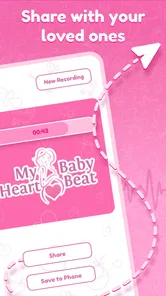
For sharing, I’d listen to the recording first and choose whether it feels meaningful to send to family. A saved sound is a keepsake, not a clinical result, and it may be less clear when played through another device. If your main goal is ongoing reassurance or pregnancy monitoring, a clinician’s advice is the better option; a consumer app cannot replace that care.
A realistic use case: one quiet moment, not a daily test
Imagine getting home after an appointment and wanting to share a small, personal moment with someone who could not be there. I’d choose a quiet time, make sure the phone’s microphone is clear, and try once without turning the result into a pass-or-fail test. If there were a recording worth keeping, I’d listen to it and share it as a memory. If there were not, I’d put the phone away and enjoy the moment in another way.
That approach also makes the app easier to compare with the usual alternatives. General pregnancy apps tend to help with information, planning, or reminders, while a clinical appointment is the place for health questions and assessment. This app occupies a narrower, more sentimental lane: it offers a possible sound recording, not a replacement for either of those options. I’d use it alongside ordinary pregnancy care, never instead of it.
Bonding with Baby
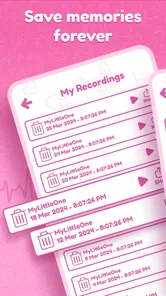
One of the standout features for me was how the app fosters a deeper connection with your baby. Listening to the heartbeat is an emotional experience that brings you closer to your little one. Plus, you can record the heartbeat to share with family and friends or to keep as a precious memory. It's a beautiful way to involve loved ones in your pregnancy journey.
That makes it most appealing to expectant parents who want a private, sentimental way to mark a moment and are comfortable with some trial and error. It may not suit someone who expects a medical-grade monitor, dislikes troubleshooting phone audio, or feels more anxious when a sound is hard to find. Compared with routine pregnancy apps that focus on general information or appointment reminders, this one has a narrower purpose: listening and keeping a recording, not managing pregnancy care.
Who will appreciate it—and who may prefer another option
I can see this working best for someone who enjoys small personal rituals and is content for a recording to be a bonus rather than an outcome they can demand. It may also suit a partner or relative who wants to share in a pregnancy from a distance, provided everyone understands that a recording is simply a keepsake. The app’s focused purpose is part of its appeal: there is no need to sift through unrelated planning tools just to try listening.
I’d steer away from it if uncertainty is likely to trigger repeated checking, or if you are searching for a device that can establish whether a baby is healthy. A healthcare professional is the appropriate choice for concerns, and a standard pregnancy information app may be more useful if what you really want is guidance and planning. The trade-off is straightforward: this app can make a particular moment feel tangible, but its value depends on accepting that phone audio is not a clinical measurement.
Who it suits, and what to expect
Hear My Baby is a free parenting app from App Bards, rated for Everyone, with an average rating of 4.3 from around 13,000 ratings and over a million installs. It was released on March 21, 2024, and version 1.1.3 is the current version. Those figures suggest plenty of people have tried it, but they don’t guarantee the same audio result on every phone or in every setting.
If you’re deciding whether to install it, ask yourself what you want from it: a possible recording to treasure, or reliable reassurance about your baby’s health. I’d recommend it for the first purpose, with a quiet setting and realistic expectations. For the second, I’d skip relying on an app and speak with a qualified healthcare professional.
What a recording can—and cannot—settle
A common practical question is whether an unclear recording should prompt another attempt. I’d first check the simple conditions once: quiet surroundings, unobstructed microphone, steady phone, and microphone access enabled. If those are in order and the result is still unclear, I’d stop rather than interpret the sound or keep repeating the process. The app can’t turn an uncertain sound into medical reassurance.
Another question is whether a saved clip will sound identical on another phone. I would not count on that: playback equipment and background noise can change how an audio recording comes across. If the point is sharing a memory, send it with that modest expectation and let the moment matter more than perfect sound quality. If the point is deciding whether to seek care, skip the recording and contact a qualified professional.
Final Thoughts
All in all, the Hear My Baby Heartbeat Monitor app is an incredible tool for expectant parents. It’s more than just a novelty; it’s a meaningful way to connect with your baby and cherish those precious moments. If you're expecting, I highly recommend giving this app a try. It's a small investment for a lifetime of memories and peace of mind.
My recommendation comes with one important boundary: I’d try it for the possibility of a personal keepsake, not for peace of mind about health. It is free to try, but no app-based listening attempt is a substitute for prenatal care or professional advice. Used calmly and occasionally, it may add a memorable moment to pregnancy; used as a repeated test, it can create more uncertainty than comfort. That difference is what should guide the decision.
Hear My Baby Heartbeat Monitor Frequently Asked Questions
Do I need any special equipment to use Hear My Baby Heartbeat Monitor?
The app is designed to use your smartphone’s microphone, so you do not need a separate heartbeat-monitoring device to try it. A functional microphone is essential, and headphones may help you hear playback more clearly. For the best chance of capturing a sound, follow the app’s guidance and try in a quiet environment; results can vary, and the app is not a medical monitor.
Is Hear My Baby Heartbeat Monitor suitable for first-time parents?
Yes. Hear My Baby Heartbeat Monitor is a parenting app intended for expectant parents, including those experiencing pregnancy for the first time. Its focus is listening to and recording sounds as a personal keepsake or bonding activity. It should not be used to judge how a pregnancy is progressing, so questions about your baby’s health are best discussed with a healthcare professional.
Does Hear My Baby Heartbeat Monitor work on both Android and iPhone?
The app is described as compatible with Android and iOS devices, and it needs a working smartphone microphone to attempt to capture sounds. On Android, it requires version 8.0 or later. Before downloading, check that your device meets the requirements shown for your platform, and remember that compatibility alone does not guarantee the app will capture a clear heartbeat sound.
Is Hear My Baby Heartbeat Monitor free to download?
Yes, Hear My Baby Heartbeat Monitor is free to download. It is a parenting app for expectant parents who want to try capturing and listening to their baby’s heartbeat sounds with a smartphone. Keep in mind that the app is intended for personal enjoyment, not medical monitoring, so downloading it should not replace prenatal care or advice from a healthcare professional.
What is Hear My Baby Heartbeat Monitor?
Hear My Baby Heartbeat Monitor is a mobile application designed for expectant parents who wish to listen to their baby's heartbeat using their smartphone. The app uses your device's microphone and is engineered to amplify the sound of your baby's heartbeat, allowing you to listen to and record it for personal enjoyment and sharing with loved ones.
Pros
- Easy to use interface
- ideal for new parents.
- High-quality sound recording capability.
- Offers real-time heartbeat monitoring.
- Compatible with most smartphones.
- Allows sharing of recordings with family.
Cons
- Requires a quiet environment for best results.
- Not a substitute for professional medical advice.
- Limited to audio monitoring
- no visual aid.
- Some users report occasional app glitches.
- May not work well with older phone models.











